

Booster Packs#
Booster Packs are GitHub Release zip files that contain curated Advanced Controls Files (ACFs) for specific workload families.
The goal is to give you a practical starting point. Instead of running a full CompileIQ search, first you can try curated candidates that are known to help specific workloads. If one of them passes validation and improves your target workload, you may choose not to run a search for that case.
Note: Booster Packs are not guaranteed speedups. Treat every ACF as workload-specific and environment-specific.
Choose the Right Path#
If this is true |
Use this path |
|---|---|
Your workload is close to a Booster Pack’s intended workload, compiler, GPU target, and validation context. |
Try the Booster Pack first. |
Your workload differs materially from the pack context, the pack candidates do not help, or you need production confidence for one exact target. |
Run a full CompileIQ search. |
You do not have a stable baseline, correctness check, compiler path, or benchmark setup yet. |
Wait. Do not apply a pack or run a search until those are in place. |
Before You Use a Pack#
Before trying a Booster Pack, run a baseline without an ACF and record the environment you used for that baseline. Evaluate the variability of your benchmark; make sure to follow good profiling practices to avoid measurements with high variability.
Adapt your code to handle failures: Applying an ACF can cause compilation errors, compile hangs, runtime crashes, wrong answers, performance regressions, or noisy measurements. That is normal for this workflow. Keep the candidates that pass your validation and reject the rest.
For the broader ACF risk model, read the compiler tuning overview before using a Booster Pack.
Available Booster Packs#
Booster Pack |
Intended use |
|---|---|
Helion Booster Pack |
ACFs known to help these Helion kernels: FP8 Quantization, Causal Depthwise Convolution, Gated DeltaNet Forward. |
Debug Pack |
Diagnostic ACFs that disable or alter selected optimizations to assist debugging. |
The pack name tells you where the ACFs were found or validated. It is not a hard boundary. Related workloads may benefit, but you must test them.
For example, the Helion Booster Pack has shown beneficial impact on FlashInfer’s BatchDecodeWithPagedKVCacheWrapper benchmark.
Downloading a Booster Pack#
Booster Packs are published as zip assets on the CompileIQ GitHub Releases page under a Booster Pack catalog release, tagged with a Booster Pack-specific prefix, for example booster-packs-*.
Use the filtered releases link as the download entry point:
Each Booster Pack catalog release contains the complete set of Booster Pack zip assets that are currently supported for that catalog version, so users can go to one release to find every supported pack.
Each catalog release includes:
booster-pack-catalog.json, which describes the release contents.SHA256SUMS.txt, which records checksums for the uploaded catalog and pack zip assets.booster-pack-debug.zip, the diagnostic Debug Pack.booster-pack-helion.zip, the Helion Booster Pack.Each Booster Pack zip consists of ACFs and a pack-specific
booster-pack-manifest.jsonthat describes the ACFs for that pack. When a pack covers more than one compiler stage, each ACF entry includescompiler_stagesso you can choose the correct NVCC/NVVM, PTXAS, or combined application path.
The release notes, catalog file, and pack manifest are the source of truth for each pack; check them for the intended workload, compiler version and path or compiler stage, GPU target, validation context, and known caveats.
Using a Booster Pack#
The basic workflow is:
Run your workload without an ACF and save the baseline result.
Download the Booster Pack from the filtered GitHub Releases page.
Unzip the pack and inspect each ACF’s
compiler_stagesinbooster-pack-manifest.json.Apply one ACF at a time through every compiler stage listed for that ACF.
Validate correctness against a known-good reference.
Compare performance against the no-ACF baseline.
Keep only candidates that compile, pass correctness, and improve the target workload.
For direct PTXAS usage, select an ACF whose compiler_stages includes ptxas and
pass it with --apply-controls:
ptxas -v -arch=sm_90a --apply-controls candidate.acf kernel.ptx
For NVCC usage, select an ACF whose compiler_stages includes nvcc and pass the
same option to NVCC:
nvcc -arch=sm_100 --apply-controls candidate.acf kernel.cu -o kernel
For Triton, pass the ACF through PTXAS options as shown in the Triton example. Make sure you force recompilation where framework caching applies, such as with TRITON_ALWAYS_COMPILE.
For Helion, pass the ACF through the official ACF API as shown in the Softmax Example. Make sure you force recompilation where framework caching applies.
Trying Related Workloads#
ACFs rarely generalize automatically, but related workloads can sometimes benefit from the same compiler decisions.
If your workload is similar to the workload described in a Booster Pack release, it may be worth testing that pack before running a full search. The safe way to do this is still candidate-by-candidate validation:
Apply one ACF at a time.
Test multiple input shapes where applicable.
Compare against a known-good implementation.
Use compile and runtime timeouts.
Run multiple performance trials if the benchmark is noisy.
Record the ACF name, command, compiler path/version, CTK, driver, GPU model, workload shape, and result.
As an example we have applied the Helion Booster Pack to Batch Decode in FlashInfer and we can see that some shapes get considerable benefits from some of the ACFs in the pack:
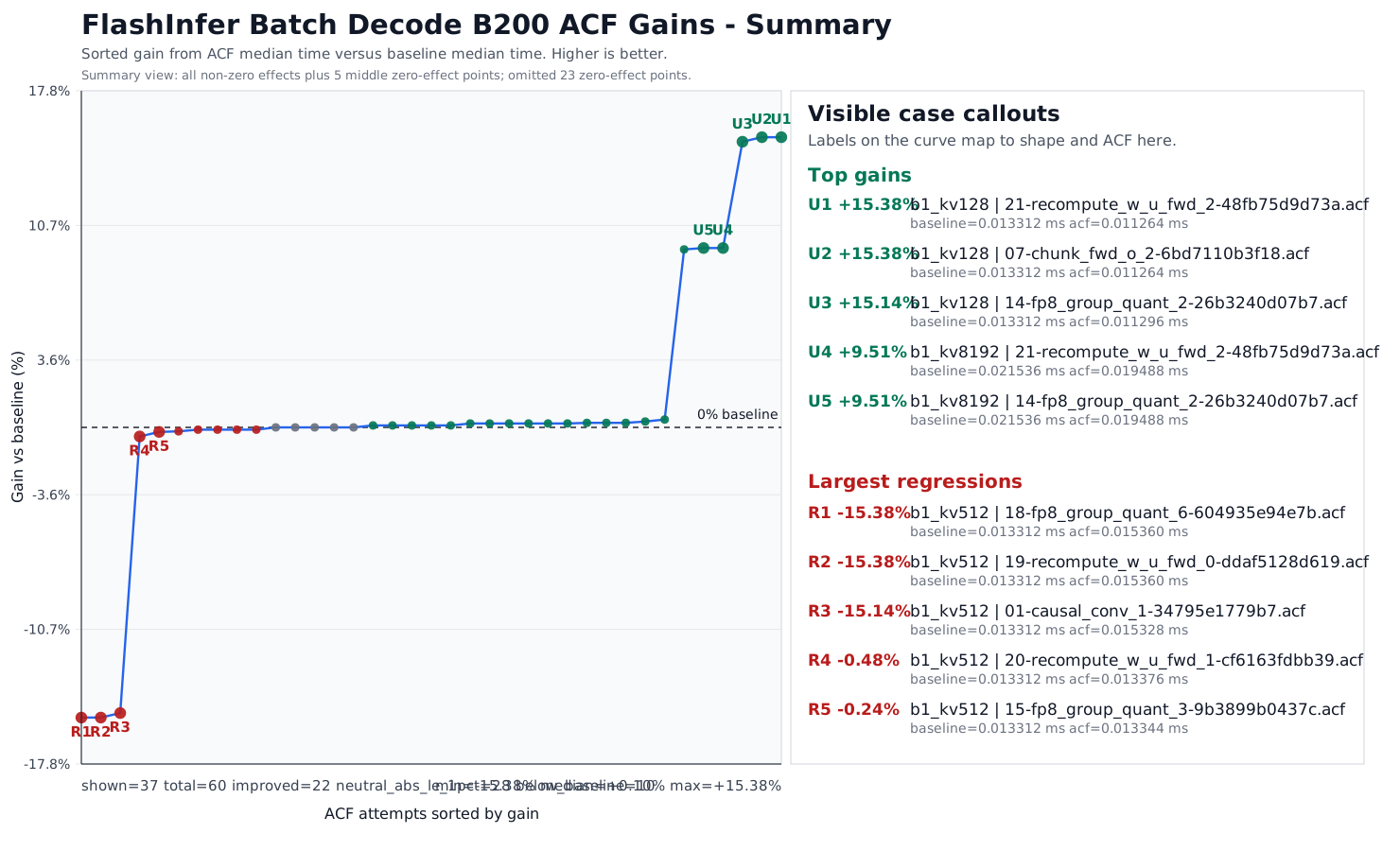
For a FlashInfer-specific walkthrough, see Applying a Booster Pack to FlashInfer.
ACFs, whether selected from a Booster Pack or produced by a CompileIQ search, should be benchmarked on your target workload before adoption. Use the default compiler settings if they match or outperform the ACF you are considering.
When to Run a Search Instead#
Run your own CompileIQ search if:
None of the Booster Pack candidates help your workload.
Your GPU, CTK, compiler, framework, or workload shape differs materially from the release notes.
You need stronger confidence for a specific production workload.
You want to co-tune compiler controls with application-level parameters.
Booster Packs are a shortcut when a curated candidate works. They do not replace workload-specific search and validation.