



Synthetic XR Teleoperation#
Build and automate teleoperation from your desktop, without an XR headset. Supply virtual controller inputs through IWER and use the same WebXR, CloudXR and native robot-control path as a human operator. Start with Franka stacking, then bring your own task logic.
Franka simulation example#
The example locates a cube, approaches it, closes the gripper, lifts it and places it on another cube. It repeats the transfer to build a three-cube stack and the default command stops after one successful native episode export. No recorded human movement or manual controller positioning is required.
The host-side stack_logic.py reads cube and gripper poses from Lab and
chooses the next gripper target. A bridge converts that target into synthetic
XR controller input. Lab’s native IK calculates the joint commands. The
Franka you see in the browser is the streamed result of the simulation.
Earlier preview: three episodes at 2× speed. The browser and Synthetic XR input are on the left; Isaac Lab is on the right. After each native export, Lab randomizes the cube layout and the same action logic starts the next episode. The original full-speed recording and native artifacts are retained with the run evidence.
One shared robot-control path#
A human observes the streamed scene and moves a physical controller. Automation reads numerical scene feedback and generates virtual controller poses. Both feed the same downstream path in this Franka example:
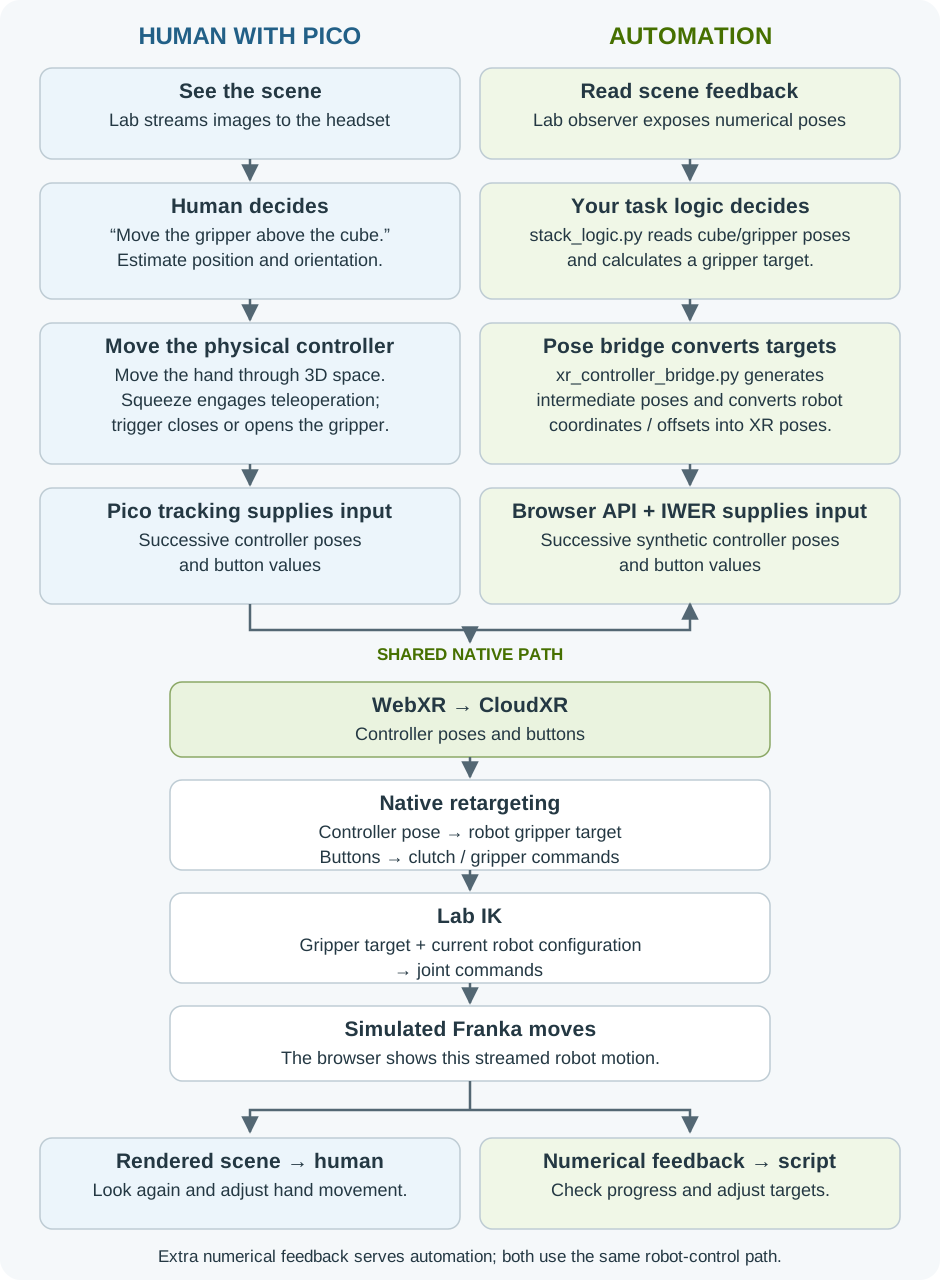
Different input producers; shared transport, retargeting, IK and simulation. Open the diagram to view it at full size.#
The numerical feedback is an extra, read-only observation path for the script. In the human workflow, the operator sees the cubes and robot in streamed images; this example’s structured cube-pose feed is not part of that browser view.
The script generates intermediate 3D positions and orientations, rather than joint angles or directional button presses. The bridge accounts for robot, world and XR coordinates and the controller/gripper offsets. Native retargeting maps the resulting controller poses back to robot targets; IK acts inside Lab. Trigger values close or open the gripper, just as a physical trigger would.
Try the example#
Use the fresh-install recipe linked below, this branch’s built WebXR client and the example’s optional Franka dependencies. A headset and ADB are not needed; CloudXR’s GPU, network and certificate requirements still apply.
Follow the Franka setup and run commands:
Start the CloudXR service and Lab recording task with the read-only observer.
Connect the desktop WebXR client with
syntheticXR=1enabled.Run
stack_logic. It drives the synthetic controller through the browser API, including task start, movement and gripping.
The Synthetic XR panel lets you see the input being applied. You do not need to select Left/Right or operate its movement buttons for this example.
The current candidate validates the session interface with one successful
seed-42 stacking episode on a fresh Lab environment with this branch’s
Isaac Capture 1.7 SDK and CloudXR 6.3. The browser uses normal sandboxing
and a trusted localhost certificate. A separate customer-application acceptance check also verifies a custom
success callback and native dataset export. The earlier preview recording above
shows three randomized stacking episodes; it is not a reliability measurement
of the new interface. See the
validation scope for
component identities and evidence limits.
Bring your own task logic#
Keep the virtual controller and native pipeline; change the decisions that drive them. For example, a pick-and-place script could choose a destination region instead of another cube as the placement target.
Reuse task logic across input sources. Keep approach, grasp, transfer and
release decisions separate from input generation. The example’s
shared task logic
uses input-specific adapters for XR controller poses, keyboard events or gamepad
values. XR uses the WebXR/CloudXR path; the keyboard/gamepad adapters target
Lab’s native input path. See the example README for integration contracts.
Your task logic
  observe object and gripper poses
  choose approach -> grasp -> lift -> destination -> release
  generate gripper targets and open/close commands
      |
      v
Robot-specific pose bridge -> browser API / IWER
      |
      v
Shared WebXR -> CloudXR -> retargeting -> IK -> robot simulation
Start with the shipped stacking implementation.
It uses FrankaTaskSession to observe the scene, move the tool and operate the
gripper. Replace its task decisions while keeping the session interface:
from isaaccapture_examples.synthetic_xr.franka.session import FrankaTaskSession

with FrankaTaskSession(
    observation_dir="run/observations", output="run/my-task"
) as session:
    observation = session.observe()
    # Your logic chooses a world-space tool target and unit xyzw quaternion.
    session.move_tool(target_position, target_quaternion, seconds=2)
    session.set_gripper(closed=True)
    # Continue your approach, transfer and release sequence.
    session.wait_for_export()
The snippet illustrates the interface; the linked stacking implementation is
the complete runnable example. Positions use metres in the simulator’s Z-up
world frame. move_tool targets the gripper tool frame; the Franka adapter
handles its offset and conversion into XR controller poses. The browser still
sends controller input through the shared native pipeline.
Define success as well as motion. An application success callback receives
a detached observation after each simulation step and returns True only
when the task’s actual completion criteria hold. Start the observer with
--success my_task:is_success to select your callback. Lab applies its
consecutive-success requirement and performs the native episode export.
wait_for_export confirms export and orderly observer completion; it never
forces a successful result. Without a callback, the original stacking success
criterion remains in effect.
The setup and interface contract
contains the exact launch sequence, observation fields, callback contract and
shutdown instructions. The session retains command receipts, native-action
acknowledgements and named observations so you can inspect an unexpected result.
Another robot needs its own supported pose adapter and task configuration.
This interface supplies controller input; task planning, collision avoidance
and application-specific correctness remain the application’s responsibility.