# Device Conformance Testing
You have integrated a device that publishes hand or full-body poses into Isaac Capture. The
Conformance Test Suite (CTS) produces the evidence that the integration works: you record one
scripted take, a checker reads only that recording and returns a verdict, and you send the take
through the submission form for your pull request. This page explains the process, the two suites
and what a verdict means.
## How it works
**1 · Integrate**
Your device feeds Isaac Capture’s hand or body tracker, through your plugin or the
headset’s own tracking.
Add a New Device
[Add a New Device](../device/add_device.md)
**2 · Set up**
Build with Python 3.12, create the tool environments, connect the headset.
Set Up the Tools
[Set Up the Tools](setup.md)
**3 · Rehearse**
Practice the script until the performer knows every step.
[Hand](hand.md#cts-hand-rehearse) · [Full body](full_body.md#cts-full-body-rehearse)
**4 · Record**
Record one scripted take in the capture panel in your browser.
[Hand](hand.md#cts-hand-record) · [Full body](full_body.md#cts-full-body-record)
**5 · Check**
The checker reads the take and returns one verdict.
[Hand](hand.md#cts-hand-check) · [Full body](full_body.md#cts-full-body-check)
**6 · Submit**
Package the take with its report and send it through the submission form.
Submit Your Results
[Submit Your Results](submit.md)
## Pick your suite
Run the suite for the data your device produces. A device that produces both runs both.
**Hand Preview**
- **For:** gloves, or a headset’s own optical hand tracking
- **Records:** `core.HandPoseRecord`, 26 OpenXR joints per hand, 21 of them judged
- **Script:** 11 gestures, seated at a table, about 2 minutes
- **Pacing:** automatic; a spoken cue, a count-in, a beep, then a timed hold
Hand Suite
[Hand Suite](hand.md)
**Full body**
- **For:** headset body tracking, or a mocap suit through a vendor backend
- **Records:** `core.FullBodyPoseRecord`, 24 joints
- **Script:** 10 poses and motions, standing
- **Pacing:** self-paced; you press when ready, then hold the pose or do the motion
Full-Body Suite
[Full-Body Suite](full_body.md)
## What the checker looks at
| Area | What it asks | Examples |
|-------------------------------|------------------------------------------------------------|---------------------------------------------------------------------------------------------------------------------------------|
| Signal and timing | Is the stream well formed and steady? | Finite values, unit quaternions, monotonic timestamps, frame rate and gaps, joint speed |
| Skeleton geometry | Is it a plausible human skeleton, in metres? | Units, bone lengths that stay constant, human proportions, joints in their named slots
and on their named sides, handedness |
| Placement and frames | Are the joints where the body is, in the frame they claim? | Not parked at the origin, wrist not frozen, quaternion component order, positions and
orientations that agree, +Y up |
| Poses over the scripted steps | Did each step happen, in order, as labelled? | Hands flat on a level table, pinch finger identity, arm raised overhead, squat depth,
march rhythm |
The checker needs only the `mcap` and `flatbuffers` Python packages. It is deterministic, so
we re-run it on your take and get the same verdict. Some checks are only measured and reported;
the suite pages say which.
## Verdicts
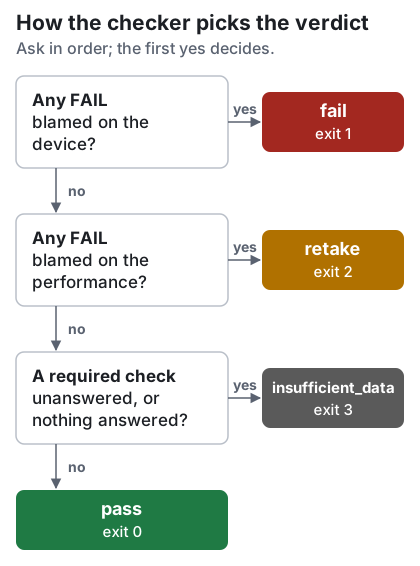
| Verdict | Exit status | Meaning | What to do |
|---------------------|---------------|------------------------------------------------------------------------------------------------------------------|--------------------------------------------------------------------------------------|
| `pass` | 0 | Nothing in the recording argues against the integration. | Submit it. |
| `fail` | 1 | A failure blamed on the device or its plugin. | Fix the integration and record again, or submit with an explanation. |
| `retake` | 2 | The take is unusable because of how it was performed. The device is not implicated. | Rehearse the failed step and record again. |
| `insufficient_data` | 3 | The recording cannot answer the question: too short, no channel, or a required check could
not run. | Check that the device streamed on its channel for the whole take, then record again. |
| (none) | 4 | The check could not run: a usage error, an unknown check, or a recording or labels file
that cannot be read. | Fix the command or the file named in the error, then run the check again. |
A take checked without its labels file still gets a verdict, even `pass`, but every step check
reads `n/a`: keep the labels file beside the recording. You can submit any verdict with its
report.
### Marks in the report
- `pass`: answered, and the answer is acceptable.
- `FAIL`: answered, and the answer is not. Whom the check blames decides `fail` or `retake`.
- `meas`: measured and reported, not judged. Read the value; it is not an approval.
- `n/a`: not answered, because data was missing or a check it depends on failed. Never a pass.
- `note`: an advisory check failed. Reported; it does not move the verdict.
## What you need
- A Linux workstation with the repository built for Python 3.12.
- An XR headset connected through CloudXR, even when your device produces the joints.
- Your device’s plugin built and installed, if it has one.
- `aplay` (`alsa-utils`) for the spoken cues. Without it, or without speakers, the capture
panel’s on-screen cues still guide every step.
- Room for the script (a table and chair for hand, standing space for full body), and ideally a
second person at the screen.
- A Google account to sign in to the submission form.
Start with [Set Up the Tools](setup.md).