# reBot B601-RS on Jetson AGX Orin
The [reBot B601-RS](https://github.com/Welt-liu/reBot-B601-Agent-Guide) is a 6-DOF arm built from
[RobStride](https://www.robstride.com) quasi-direct-drive actuators, which together with the
gripper put seven motors on a single CAN bus. This page brings one up from an **NVIDIA Jetson AGX
Orin** using the Orin’s **built-in CAN controller** (`mttcan`) and a cheap external transceiver —
no USB-CAN or PCAN adapter.
Start from the vendor’s [reBot Arm B601-RS Quick Start](https://wiki.seeedstudio.com/rebot_b601_rs_getting_started) for assembly, the power supply, and
the safety notes. That guide drives the arm through a PCAN-USB adapter and a Miniforge/conda
environment; this page swaps both out for the Orin’s own CAN controller and a uv environment.
Everything downstream of the bus — scanning for motors, assigning IDs, the gateway, Motorbridge
Studio — is identical either way; the only thing that changes is **how** `can0` comes into
existence.
#### IMPORTANT
This procedure has only been tested against the **B601-RS** (RobStride) model, **not the
B601-DM** (Damiao). The two builds use different actuators, so at minimum every
`motorbridge-cli` call below would need `--vendor damiao` instead of `--vendor robstride`,
and motorbridge reaches Damiao hardware over its own `dm-serial` / `dm-device` transports
rather than SocketCAN. For that model, start from the
[B601-DM quick start](https://wiki.seeedstudio.com/rebot_b601_dm_getting_started).
The working example, including the assets referenced below, lives in [examples/rebot](https://github.com/NVIDIA/IsaacCapture/tree/main/examples/rebot):
| Path | What it is |
|------------------------------------------------------------------------------------------------------------------------|-------------------------------------------------------------------------------------------------------------------|
| [SKILL.md](https://github.com/NVIDIA/IsaacCapture/blob/main/examples/rebot/SKILL.md) | The full procedure and troubleshooting tree, written as an agent skill. |
| [start-gateway.sh](https://github.com/NVIDIA/IsaacCapture/blob/main/examples/rebot/start-gateway.sh) | Launches the motorbridge WebSocket gateway for Studio. |
| [assets/set_can_pinmux.py](https://github.com/NVIDIA/IsaacCapture/blob/main/examples/rebot/assets/set_can_pinmux.py) | Routes the header pins to the CAN controller, via `/dev/mem`. Required on every boot;
idempotent; needs sudo. |
| [assets/can0-rebot.service](https://github.com/NVIDIA/IsaacCapture/blob/main/examples/rebot/assets/can0-rebot.service) | systemd oneshot that redoes the pinmux and brings `can0` up at 1 Mbit on boot. |
## What you need
| Item | Notes |
|----------------------------|-------------------------------------------------------------------------------------------------------------------------------------------------|
| reBot B601-RS arm | Seven RobStride motors (six joints plus the gripper) on one CAN bus, plus its own
**24–48 V** motor supply. The arm does not ship with one. |
| Jetson AGX Orin devkit | JetPack 6 / L4T R36.x. Verified on R36.5.2, `5.15.199-tegra`, aarch64. |
| SN65HVD230 CAN transceiver | The Orin has a CAN *controller* but no *transceiver* — see below. |
| Jumper wires | Orin 40-pin header (J30) to the transceiver’s 4-pin header. |
## The CAN transceiver
The Orin’s on-chip CAN controller speaks logic-level TX/RX; it cannot drive a differential CAN bus
on its own. A **3.3 V** transceiver bridges the two. The Waveshare SN65HVD230 board is the common
choice — it is 3.3 V native, which matches the Orin’s I/O directly.
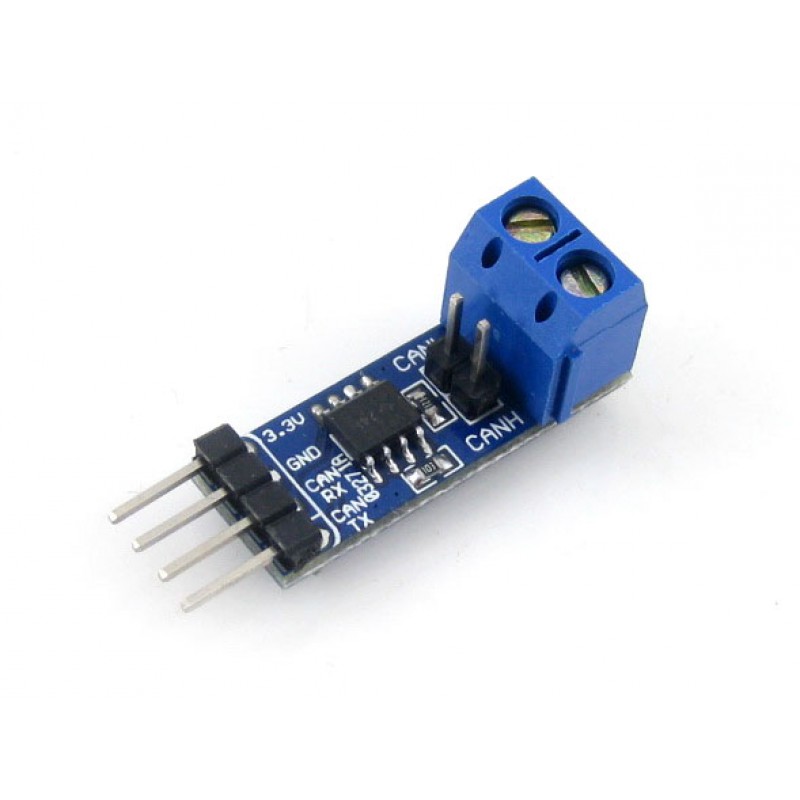
The Waveshare SN65HVD230 CAN board. The 4-pin header carries `3.3V`, `GND`, `RX` and
`TX`; the screw terminal carries `CANH` and `CANL`.
- Product page: [SN65HVD230 CAN Board](https://www.waveshare.com/sn65hvd230-can-board.htm)
- Buy: [search Amazon for “Waveshare SN65HVD230”](https://www.amazon.com/s?k=Waveshare+SN65HVD230)
#### WARNING
Power the board from **3.3 V**, not 5 V. The SN65HVD230 is a 3.3 V part and the Orin’s header
pins are not 5 V tolerant.
## Wiring
Connect the Orin’s 40-pin header (**J30**) to the transceiver. The Waveshare header labels are
written from the host’s point of view, so this is **straight-through — do not cross TX and RX**:
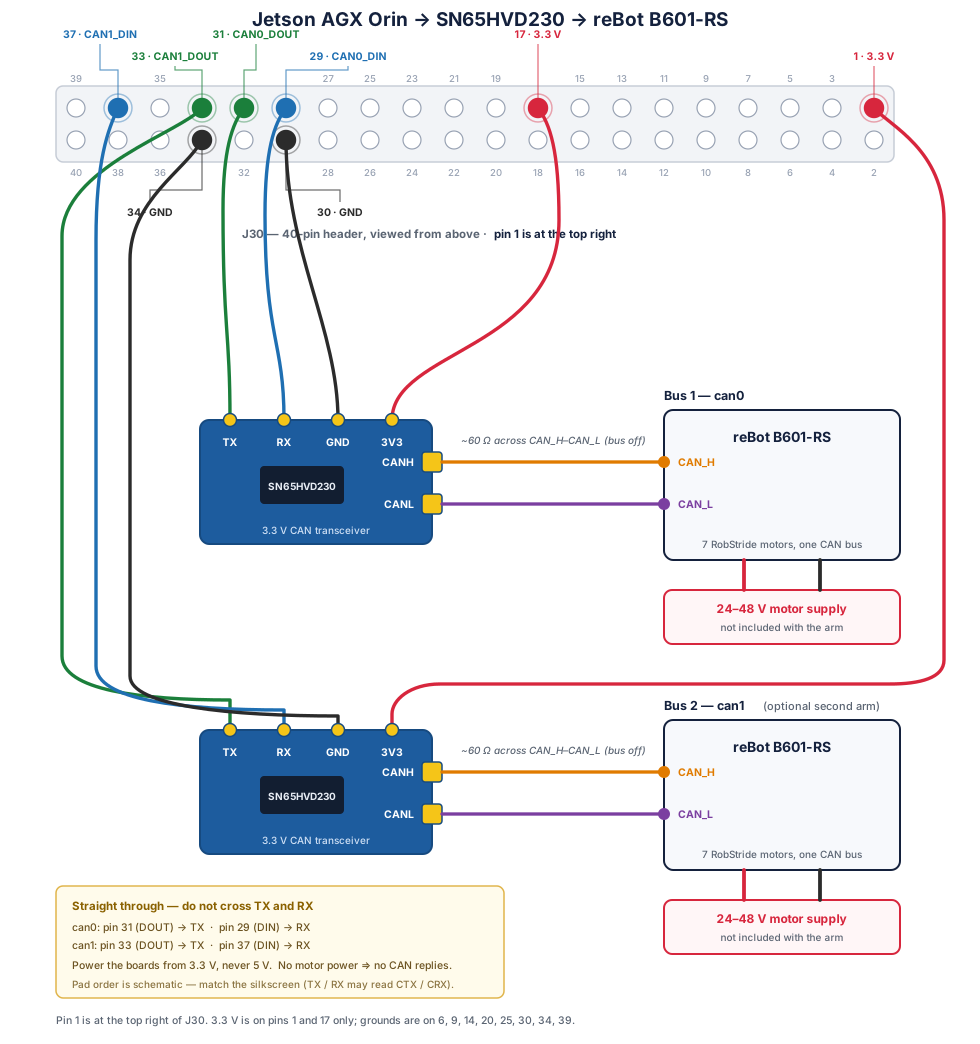
The complete signal path. The Orin drives logic-level TX/RX; the transceiver turns it into the
differential pair the arm’s motors share.
**Pin 1 is at the top right of J30**, so the numbering runs right to left — count from the far end
of the header, not the near one.
The Orin exposes two independent CAN controllers on the same header. The `can1` pins are listed
here for reference — driving a second arm from them takes work the example does not do yet, covered
in [Future work: a second arm on can1](#rebot-two-arms):
| Signal | `can0` pin | `can1` pin | Direction | SN65HVD230 |
|-------------|--------------|--------------|--------------|--------------|
| `CANx_DOUT` | 31 | 33 | Orin → board | `TX` |
| `CANx_DIN` | 29 | 37 | board → Orin | `RX` |
| **3.3 V** | 17 | 1 | — | `3V3` |
| GND | 30 | 34 | — | `GND` |
3.3 V is available on pins 1 and 17 only, so two transceivers take one each. Ground is not scarce —
pins 6, 9, 14, 20, 25, 30, 34 and 39 all work.
Then wire the transceiver to the arm: `CANH` → `CAN_H` and `CANL` → `CAN_L`. For background
on wiring a transceiver to a Jetson and the SocketCAN setup that follows, see Ramin Nabati’s
writeup, [Enabling CAN on NVIDIA Jetson Xavier Developer Kit](https://medium.com/@ramin.nabati/enabling-can-on-nvidia-jetson-xavier-developer-kit-aaaa3c4d99c9).
It targets the Xavier devkit, so confirm the pin numbers against your own carrier board’s pinout —
the table above is for the AGX Orin devkit.
#### NOTE
Everything on this page targets `can0`. A second arm on `can1` is not supported by the
example as shipped — see [Future work: a second arm on can1](#rebot-two-arms).
Two checks with a multimeter save hours of debugging:
- **Termination** — ~60 Ω across `CANH`–`CANL` with the bus unpowered. ~120 Ω means only one
terminator is present; an open circuit means a broken link.
- **Motor power** — 24–48 V at the arm’s power connector. RobStride motors run their CAN off the
motor rail, so an unpowered arm produces **no CAN replies at all**, which looks exactly like a
wiring fault.
## Bring up the bus
Install the example’s dependencies and check the CLI is reachable:
```bash
cd examples/rebot
uv sync
uv run motorbridge-cli --help
```
The Orin’s 40-pin header pins are not routed to the CAN controller out of the box — the pinmux
registers have to be programmed before `can0` can carry any traffic. Do that first:
```bash
sudo ./assets/set_can_pinmux.py
```
It prints each register’s value before and after the write, so a wrong read-back is immediately
visible. It uses only the system Python, so it needs no `uv run`, and it is idempotent — safe to
re-run any time you want to confirm the pinmux.
#### WARNING
The pinmux lives in live registers and is **cleared on every reboot**. Re-run the script after
each boot, or install the systemd unit below, which does it for you.
Then create `can0` at the RobStride bitrate of 1 Mbit and bring it up:
```bash
sudo modprobe can can_raw mttcan
sudo ip link set can0 type can bitrate 1000000 restart-ms 100
sudo ip link set up can0
ip -details link show can0
```
You want `state UP`, `can state ERROR-ACTIVE`, and `bitrate 1000000`. With the arm powered,
scan for the seven motors:
```bash
uv run motorbridge-cli scan --vendor robstride --channel can0 --start-id 1 --end-id 7
```
A healthy bus reports `scan done: 7 motor(s) found`.
#### TIP
Leave `--end-id` at 7 unless you are hunting a motor whose ID you do not know. Every ID that
does not answer costs the full probe timeout (80 ms, plus a 120 ms parameter-read fallback), and
the range is swept once per RobStride host-id candidate — five by default. Sweeping 1–127 spends
roughly two minutes mostly waiting on silence, which reads exactly like a hung CLI.
Neither the pinmux nor the `ip link` configuration survives a reboot. Install the script somewhere
stable and enable the unit, which redoes both on every boot:
```bash
# Not optional: the unit runs this script by absolute path.
sudo install -D -m 755 assets/set_can_pinmux.py /opt/rebot/set_can_pinmux.py
sudo cp assets/can0-rebot.service /etc/systemd/system/
sudo systemctl daemon-reload && sudo systemctl enable --now can0-rebot.service
systemctl --no-pager status can0-rebot.service
```
A healthy oneshot reports `active (exited)`. Skipping the first line — easy to do when updating an
already-installed unit — gets you a unit that fails on every boot and a bus that never comes up:
```text
set_can_pinmux.py (code=exited, status=2)
python3: can't open file '/opt/rebot/set_can_pinmux.py': [Errno 2] No such file or directory
```
Install the script and `sudo systemctl restart can0-rebot.service`.
## Calibrate and drive
Start the motorbridge WebSocket gateway and connect
[Motorbridge Studio](https://motorbridge.github.io/motorbridge-studio/) to it:
```bash
./start-gateway.sh
```
Confirm 7/7 motors online, pose the arm at its home position, and set the current position as zero
for all seven joints.
#### WARNING
The gateway takes **exclusive** ownership of the CAN bus — stop it before running any
`motorbridge-cli` command, or the CLI will find nothing.
`start-gateway.sh` binds `127.0.0.1:9002`, which reaches Studio only from a browser on the
Orin itself. Driving the arm from another machine means binding wider, and the gateway refuses
that unless `MOTORBRIDGE_WS_TOKEN` is set — from then on that token is the only thing between
your network and a moving arm, so make it a real one:
```bash
MOTORBRIDGE_WS_TOKEN= BIND=0.0.0.0:9002 ./start-gateway.sh
```
A browser cannot set WebSocket request headers, so Studio has to carry the token in the URL:
`ws://:9002/?motorbridge_ws_token=`.
## Let an agent do it
[examples/rebot/SKILL.md](https://github.com/NVIDIA/IsaacCapture/blob/main/examples/rebot/SKILL.md) is written as an agent skill: it carries the full procedure
plus a troubleshooting tree covering the failure modes that actually bite (loopback passes but no
motors answer, `MUX UNCLAIMED` pinmux red herrings, wedged TX FIFOs). Paste this into Claude Code,
or any agent that can fetch a URL, from the Orin itself — the prompt is self-contained, so the agent
does not need a checkout of this repository to start:
```text
Bring up the reBot B601-RS arm on this Jetson AGX Orin using the Orin's built-in
CAN (mttcan) and an SN65HVD230 transceiver — no USB-CAN adapter.
Follow the procedure at
https://github.com/NVIDIA/IsaacCapture/blob/main/examples/rebot/SKILL.md
Read it first, then work through it in order: environment, CAN0 pinmux, can0
bring-up at 1 Mbit, bus verification, reboot persistence, motor IDs 1-7, and
zero calibration.
The arm is wired to CAN0 on J30 pins 31 (TX) and 29 (RX). I have a multimeter.
Any step needing sudo, hand me the exact command to run myself.
If the scan finds no motors, work the troubleshooting tree in that file before
changing anything — start by confirming motor power.
```
## Troubleshooting
The full tree is in [examples/rebot/SKILL.md](https://github.com/NVIDIA/IsaacCapture/blob/main/examples/rebot/SKILL.md). The rule that resolves most cases:
#### IMPORTANT
On a single-node CAN bus, “nothing replies” almost always means **no other powered node is
ACKing**. Check motor power before touching software or pinmux.
A controller loopback test proves the driver is alive but says nothing about your pins,
transceiver, or wiring — it never leaves the chip:
```bash
sudo apt install can-utils # JetPack ships without it; the tools themselves need no root
sudo ip link set can0 down
sudo ip link set can0 type can bitrate 1000000 loopback on && sudo ip link set can0 up
( timeout 2 candump -n 1 can0 & ); sleep 0.4; cansend can0 123#DEADBEEF
sudo ip link set can0 down
sudo ip link set can0 type can bitrate 1000000 loopback off restart-ms 100 && sudo ip link set can0 up
```
If that echoes but a real scan stays silent, the problem is downstream of the controller: motor
power, transceiver supply, wiring, or the pinmux. Re-run `sudo ./assets/set_can_pinmux.py` — it
reports the value it read *before* writing, so a register that comes back wrong is a pinmux that
was never set, or one a reboot cleared.
## Future work: a second arm on `can1`
The Orin has two independent CAN controllers, so in principle a second arm needs nothing more than
a second SN65HVD230 on the `can1` pins listed in [Wiring](#wiring). **This path is not implemented — the
example targets \`\`can0\`\` only, and making it work is on you.** What follows is the shape of the
work, not a procedure to follow.
The blocker is the pinmux. `set_can_pinmux.py` programs the **CAN0** pins only (`0x0c303010`
and `0x0c303018`); the CAN1 pins live in their own registers in the same AON block, which the
script never touches. Until `REGS` covers them, `can1` goes `UP` and stays deaf — the netdev
exists because `mttcan` registers both, whether or not the pins are routed.
That last detail is also why the shipped unit is `can0`-only. A unit that brought `can1` up
unconditionally would leave every single-arm machine with a live interface wired to nothing: noise
in `ip -br link`, a candidate for bus-off, and a bus that looks ready when its pins are not even
routed.
Three things to sort out, in order:
1. **Pinmux.** Find the CAN1 register offsets and add them to `REGS` in
[assets/set_can_pinmux.py](https://github.com/NVIDIA/IsaacCapture/blob/main/examples/rebot/assets/set_can_pinmux.py). Without this
nothing below matters.
2. **Bring-up and persistence.** `ip link` takes `can1` exactly as it takes `can0`. For
reboot persistence, derive a second unit from
[assets/can0-rebot.service](https://github.com/NVIDIA/IsaacCapture/blob/main/examples/rebot/assets/can0-rebot.service) with the
interface name replaced and its `ExecStartPre` pointing at a CAN1-capable pinmux step. If you
run both routinely, a systemd template unit (`can-rebot@.service`, enabled as
`can-rebot@can0` and `can-rebot@can1`) collapses the two files back into one.
3. **Two gateways.** A gateway owns exactly one bus, so each arm needs its own on its own port —
`./start-gateway.sh --channel can0` on the default port alongside
`BIND=127.0.0.1:9003 ./start-gateway.sh --channel can1`. Motor IDs may repeat across the two
arms; the buses never see each other, so each keeps its own 1–7.