---
title: Run a single task with OpenShell Agent Runner
description: Launch ephemeral agents for bounded tasks in CI and automated workflows.
agent_markdown: true
---
# Run a single task with OpenShell Agent Runner
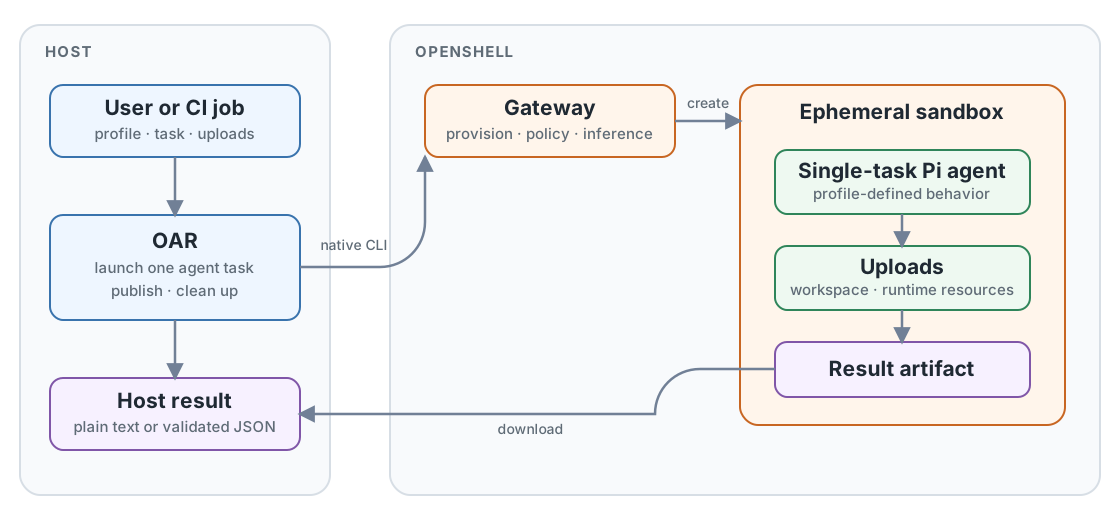
OpenShell Agent Runner (OAR) is a CLI for launching an ephemeral agent to
accomplish one task. Each `oar run` creates an isolated OpenShell sandbox, starts
Pi with the selected profile task, publishes one result, and removes the
sandbox. The agent exists only for that run.
## Why OAR fits CI
This bounded lifecycle is designed for CI and other automated workflows: a job
can provide explicit inputs, run one review or transformation, consume the
result, and finish without maintaining a long-lived agent service. The profile
defines the task behavior through its prompt, tools, skills, extensions,
uploads, model settings, and sandbox policy.
Profiles can be versioned with the repository, while stable exit codes and an
explicit output path make the result available to later job steps. The CI worker
must have access to an existing OpenShell gateway and inference route; OAR does
not provision providers or credentials.
One CLI invocation launches one ephemeral agent, produces one result, and cleans up.
## Profile inputs
A profile directory is the complete task configuration:
```text
profile/
├── profile.yaml Task, sandbox policy, tools, skills, and extensions
├── models.json Pi provider and model definition
├── settings.json Pi model selection and thinking level
├── policy.yaml OpenShell sandbox policy
├── prompts/ Task instructions
├── schemas/ Optional result schemas
├── skills/ Optional Pi skills
└── extensions/ Optional Pi extensions
```
The CLI supplies run-specific values:
- `--task` selects a task from `profile.yaml`.
- `--upload SOURCE:DESTINATION` uploads a file or directory using OpenShell's
native mapping format. It may be repeated.
- `--input FILE` is an optional document-task convenience. OAR uploads the file
to `/workspace/input/document.md` and sets `REPOSITORY_ROOT=/workspace/input`.
- `--env KEY=VALUE` adds a sandbox environment value.
- `--gateway` and `--workspace` select existing OpenShell state.
- `--output` selects the host result path.
- `--timeout-seconds` limits the agent run.
## Run lifecycle
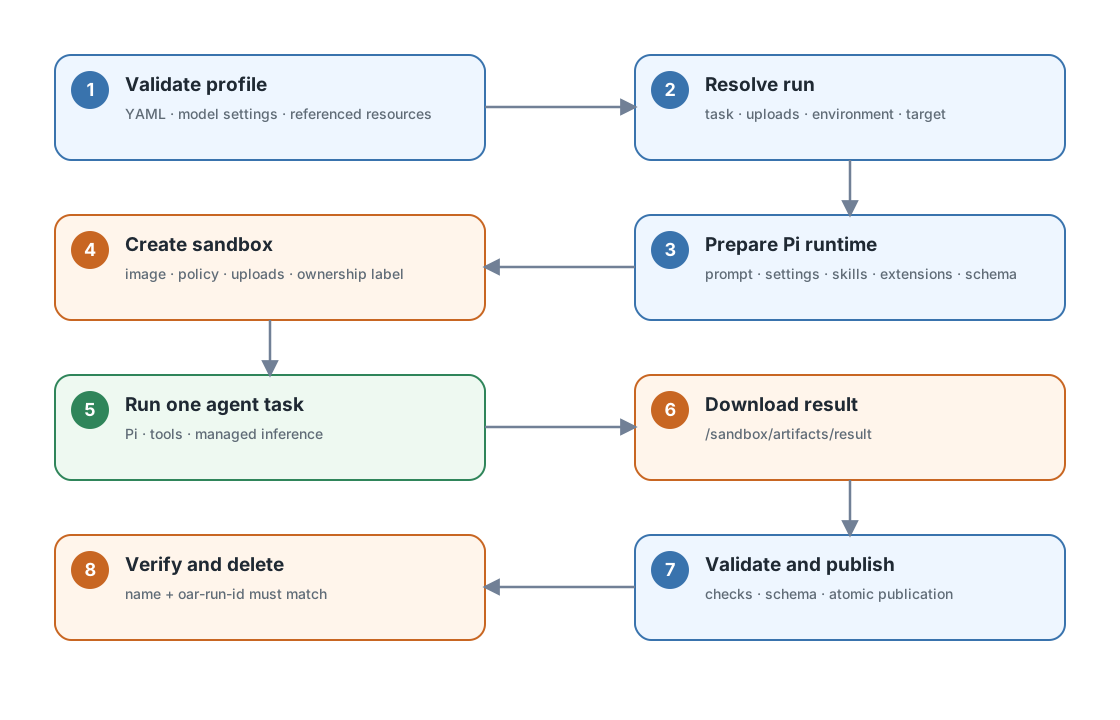
One run launches one ephemeral agent in one sandbox and produces one published result.
The sequence is:
1. Load `profile.yaml`, `models.json`, and `settings.json`; validate every
referenced local resource.
2. Resolve the selected task, uploads, environment, gateway, workspace, and
output path.
3. Prepare a temporary Pi runtime bundle containing the prompt, model files,
configured skills and extensions, and optional output schema.
4. Run `openshell sandbox create` with the packaged image context, sandbox
policy, uploads, ownership label, and Pi command.
5. Inside the sandbox, `/opt/oar/pi/exec.sh` installs the Pi settings, changes
to `REPOSITORY_ROOT`, and passes the prompt to `pi --print` through standard
input:
```bash
pi --print ... < /sandbox/oar-runtime/prompt.md
```
6. Pi reads uploaded files, uses its declared tools, and accesses inference
through OpenShell's managed inference path.
7. OAR downloads `/sandbox/artifacts/result`, validates it, and atomically
replaces the requested host output.
8. OAR verifies the sandbox name and `oar-run-id` ownership label before
deleting it. `--keep-sandbox` skips this cleanup.
## Uploads
OAR uses OpenShell's term **upload** for files transferred into the sandbox.
General uploads accept files or directories:
```bash
--upload ./document.md:/workspace/document.md
--upload ./repository:/workspace/repository
```
Uploads come from three places:
| Source | Contents |
| --- | --- |
| Profile | `sandbox.upload` mappings shared by every run |
| CLI | Repeatable `--upload` mappings and the optional `--input` document |
| OAR | Prompt, Pi model settings, skills, extensions, and optional schema |
Caller uploads normally live under `/workspace`. OAR runtime uploads live under
`/sandbox/oar-runtime`. Uploaded workspace changes are disposable and are not
synchronized back to the host.
## Result handling
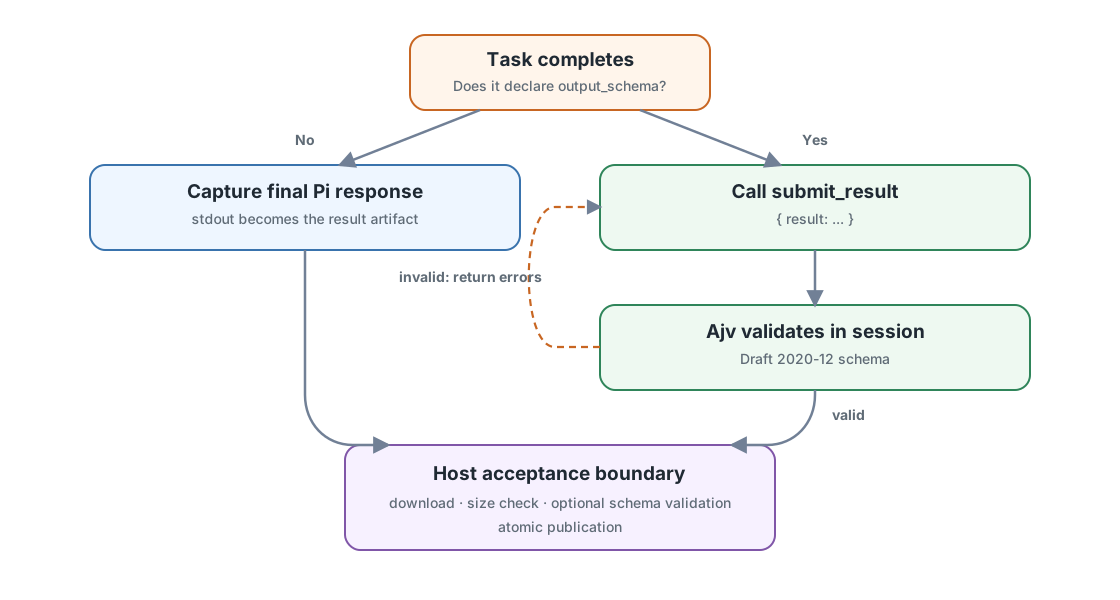
A task chooses plain output by default or structured output by declaring an output schema.
Without `output_schema`, Pi's final headless response becomes the result. OAR
requires it to be present, non-empty, and no larger than one MiB.
With `output_schema`, OAR enables the generic `submit_result` Pi tool. The tool
uses TypeBox for its Pi tool parameters and Ajv for Draft 2020-12 validation.
Invalid submissions return diagnostics to Pi, which can correct and resubmit
inside the same agent session. OAR validates the downloaded JSON against the
same schema again before publishing it.
The schema belongs to the profile. OAR has no built-in review or other
task-specific result type.
## Native command sequence
A normal run issues four native commands:
```text
openshell sandbox create ...
openshell sandbox download ...
openshell sandbox get ...
openshell sandbox delete ...
```
Use `--dry-run` to print the complete generated commands and host actions
without creating a sandbox.
## Failure boundaries
| Exit code | Meaning |
| --- | --- |
| `0` | The result was validated and published. |
| `1` | OpenShell execution, timeout, ownership inspection, or cleanup failed. |
| `2` | CLI input or profile configuration was invalid. |
| `3` | The result was missing, oversized, invalid, or failed its schema. |