

Run on Slurm#
Run CloudAI on a login or submit node. Slurm schedules the workloads on compute nodes.
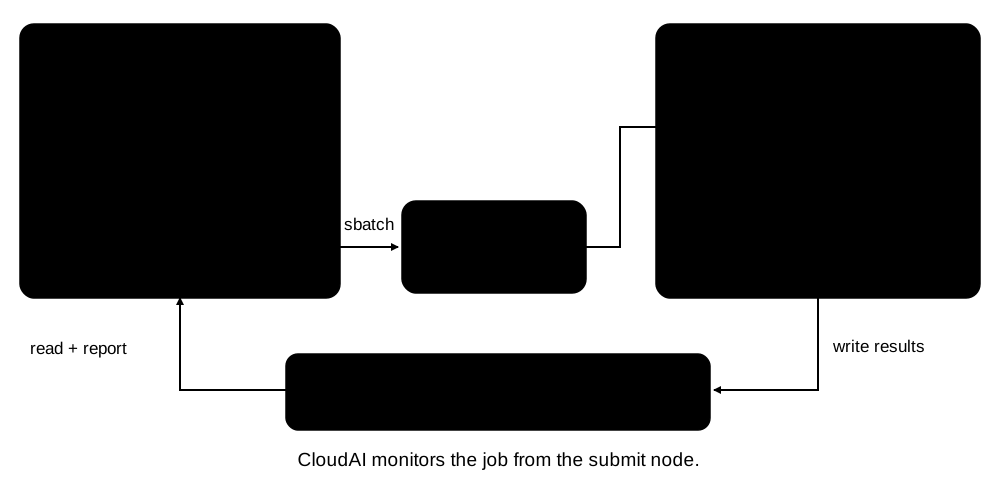
Login / submit node: runs CloudAI, generates
cloudai_sbatch_script.sh, submits it withsbatch, and monitors job status.Compute nodes: execute the generated script and launch workload processes with
srun.Results: workload logs and measurements are written to
output_path; CloudAI produces reports on the submit host.
Start with Set up your execution environment to configure your cluster. Keep CloudAI running while it monitors the experiment, and make input, install, and output paths accessible where they are used.
Choose an allocation mode#
Mode |
Execution |
Use when |
|---|---|---|
Per-case (default) |
Each case has its own sbatch allocation. Dependencies can coordinate cases. |
Cases need independent scheduling or can run concurrently. |
|
Cases run sequentially on the same nodes in one allocation. Case dependencies are unsupported. |
Measurements need to reuse the same allocated nodes. |
uv run cloudai run --system-config slurm.toml \
    --test-scenario conf/experimental/quickstart/nccl.toml --single-sbatch
Assuming two cases in a scenario like this:
[[Tests]]
id = "nccl.all_reduce"
test_name = "nccl-all_reduce"
num_nodes = 2
time_limit = "00:20:00"

[[Tests]]
id = "nccl.all_gather"
test_name = "nccl-all_gather"
num_nodes = 2
time_limit = "00:20:00"
Regular output directory structure (some files are omitted for clarity):
$ tree results/scenario
results/scenario
├── nccl.all_gather
│   └── 0
│       ├── cloudai_sbatch_script.sh
│       ├── env_vars.sh
│       ├── metadata/
│       ├── stderr.txt
│       ├── stdout.txt
│       └── test-run.toml
└── nccl.all_reduce
    └── 0
        ├── cloudai_sbatch_script.sh
        ├── env_vars.sh
        ├── metadata/
        ├── stderr.txt
        ├── stdout.txt
        └── test-run.toml
Single sbatch mode output directory structure:
$ tree results/scenario
results/scenario
├── cloudai_sbatch_script.sh
├── common.err
├── common.out
├── metadata/
├── nccl.all_gather
│   └── 0
│       ├── env_vars.sh
│       ├── stderr.txt
│       ├── stdout.txt
│       └── test-run.toml
├── nccl.all_reduce
│   └── 0
│       ├── env_vars.sh
│       ├── stderr.txt
│       ├── stdout.txt
│       └── test-run.toml
└── slurm-job.toml
Most of the files are the same: output files, env vars script, test run metadata. The difference for single sbatch mode is that slurm-job.toml is created for the entire job as well as cloudai_sbatch_script.sh. Extra common.err/common.out files are created for general sbatch outputs.
Extra srun and sbatch Arguments#
CloudAI forms sbatch script and srun commands following internal rules. Users can affect the generation by setting special arguments in the system TOML file.
For example (in a system TOML file):
extra_sbatch_args = [
  "--section=4",
  "--other-arg val"
]
It will result in sbatch file content like this:
... # CloudAI set sbatch arguments
#SBATCH --section=4
#SBATCH --other-arg val
...
Another example (in a system TOML file):
extra_srun_args = "--arg=val --other-arg=other-val"
Will result in srun command inside sbatch script like this:
srun ... --arg=val --other-arg=other-val ...
Set image import limits#
Image imports have separate allocation arguments from workload execution. Add these top-level settings to your system TOML when caching images locally:
cache_docker_images_locally = true
extra_sbatch_args = ["--segment 2"]
extra_srun_args = "--cpu-bind=cores"
docker_image_import_extra_sbatch_args = ["--time=00:20:00"]
Each import uses one node and one task, with the system’s account and default partition.
The example allows 20 minutes per image import, excluding queue wait time.
extra_sbatch_argsandextra_srun_argsapply only to workloads. Put import-specific options indocker_image_import_extra_sbatch_args.With no import time argument, Slurm’s default time limit applies.
Container Mounts#
Container-based Slurm workloads use mounts to expose data and results. To simplify file system related tasks, CloudAI mounts the following directories into the container:
Test output directory (
<output_path>/<scenario_name_with_timestamp>/<test_name>/<iteration>, likeresults/scenario_2024-06-18_17-40-13/Tests.1/0) is mounted as/cloudai_run_results.Test specific mounts can be specified in TOML files:
extra_container_mounts = [
  "/path/to/mount1:/path/in/container1",
  "/path/to/mount2:/path/in/container2"
]

[cmd_args]
...
These mounts are not verified for validity and do not override default mounts.
Test specific mounts can be mounted in-code.
Dev Details#
SlurmCommandGenStrategy defines abstract method _container_mounts(tr: TestRun) that must be implemented by every subclass. This method is used in SlurmCommandGenStrategy.container_mounts(tr: TestRun) (defined as @final) where mounts like /cloudai_run_results (default mount), TestDefinition.extra_container_mounts (from Test TOML) and test specific mounts (defined in-code) are added.
Nsys Tracing#
Users can enable Nsys tracing for any workload when running via Slurm. Note that nsys should be available on the compute nodes; CloudAI does not manage it.
The configuration fields are:
enable: bool = True
nsys_binary: str = "nsys"
task: str = "profile"
output: Optional[str] = None
sample: Optional[str] = None
trace: Optional[str] = None
force_overwrite: Optional[bool] = None
capture_range: Optional[str] = None
capture_range_end: Optional[str] = None
cuda_graph_trace: Optional[str] = None
gpu_metrics_devices: Optional[str] = None
extra_args: list[str] = []
Fields with None value are not passed to nsys command.