

Inference pipeline overview#
This page outlines the major computation flow in the FlashDreams inference pipeline. It outlines the core concepts and APIs for building custom model integrations, or modifying existing ones.
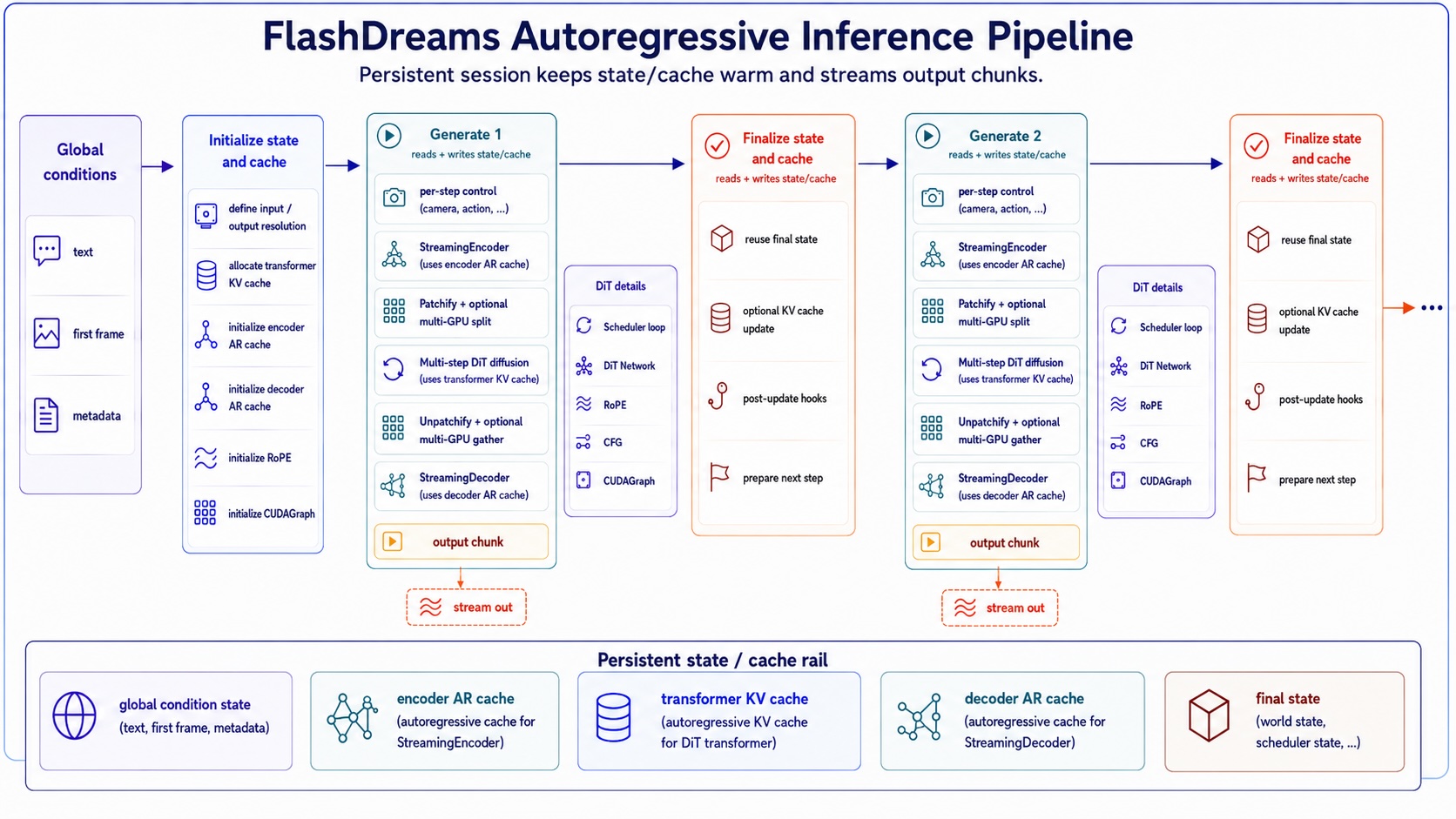
The key entry point for the inference pipeline is the
StreamInferencePipeline class, which defines the
autoregressive generation loop shown in the figure. The persistent state is held in
StreamInferencePipelineCache as a cache object,
which is shared within the pipeline and updated in each autoregressive step.
from flashdreams.infra.pipeline import (
    StreamInferencePipeline,
    StreamInferencePipelineCache,
)

pipeline: StreamInferencePipeline = ...

# One-shot encoding on global conditions, then initialize cache/state
cache: StreamInferencePipelineCache = pipeline.initialize_cache(
    text=["a beautiful beach scene"],
    image=first_frame,
    ...,
)

# Autoregressive generation loop
for autoregressive_index, control in enumerate(controls):
    current_output = pipeline.generate(autoregressive_index, cache, input=control)
    yield current_output
    pipeline.finalize(autoregressive_index, cache)
The code snippet above shows the basic execution loop. The initial call initialize_cache()
consumes global conditions, such as text prompts and the first frame. Then, for each autoregressive step,
generate() is called to produce the current output chunk,
followed by finalize(). This split exists because
finalize() typically handles additional KV
cache updates that are not in the hot path, which can be offloaded to a background thread in many
cases to hide latency.
Inside generate(), the pipeline encodes the
per-step control input, runs the diffusion model’s denoising loop, and decodes the latent chunk into
the final output. The following snippet illustrates this internal flow:
# class StreamInferencePipeline
def generate(
    autoregressive_index: int, cache, input=None,
) -> torch.Tensor:
    # 1. Convert per-step control into model conditioning
    if input is not None:
        input = pipeline.encoder(
            input=input,
            autoregressive_index=autoregressive_index,
            cache=cache.encoder_cache,
        )

    # 2. Run scheduler loop + DiT flow prediction
    clean_latent, final_state = diffusion_model.generate(
        autoregressive_index=autoregressive_index,
        cache=cache.transformer_cache,
        input=input,
    )
    cache.final_state = final_state

    # 3. Convert latent chunk to output chunk
    if pipeline.decoder is None:
        return clean_latent

    return pipeline.decoder(
        input=clean_latent,
        autoregressive_index=autoregressive_index,
        cache=cache.decoder_cache,
    )
In FlashDreams, these components are composed using a configuration system. This allows building
customized pipelines by supplying different configurations for the encoder, diffusion model, and decoder.
A typical StreamInferencePipelineConfig is instantiated as follows:
from flashdreams.infra.diffusion.model import DiffusionModelConfig
from flashdreams.infra.diffusion.scheduler.fm import FlowMatchSchedulerConfig
from flashdreams.infra.pipeline import StreamInferencePipelineConfig

# Define your own configs for the encoder, transformer, and decoder
CustomizedStreamingEncoderConfig = ...
CustomizedTransformerConfig = ...
CustomizedStreamingDecoderConfig = ...

# create a pipeline config
pipeline_config = StreamInferencePipelineConfig(
    name="customized-method-name",
    encoder=MyStreamingEncoderConfig(),
    diffusion_model=DiffusionModelConfig(
        transformer=MyTransformerConfig(),
        scheduler=FlowMatchSchedulerConfig(),
    ),
    decoder=MyStreamingDecoderConfig(),
)

# then a pipeline can be simply instantiated as follows:
pipeline = pipeline_config.setup().to("cuda").eval()
More details on the config system can be found in Config system.
Examples#
Samples on how existing models use this structure:
NVIDIA OmniDreams config: An I2V video model with a VAE-based causal encoder for HDMap control.
LingBot-World config: A camera-controlled I2V model that uses the per-step camera encoder.
Self-Forcing config: A pure T2V model that sets
encoder=None, so each rollout starts from noise.Wan2.1 config: Treats a bidirectional video model as a single-rollout autoregressive model.
For the detailed API documentation, please reference Infra. To integrate a new model, please refer to Add a new method.