
Local-Only Workspace Assistant is a community recipe for a person who wants an agent to read one folder of files on their own machine without sending file contents or prompts to a remote service. The recipe runs an OpenClaw sandbox whose only network destination is an Ollama server on the same machine. By default that server runs NVIDIA Nemotron 3 Nano 4B. The recipe is designed for a GeForce RTX PC with Windows Subsystem for Linux 2 (WSL2). The same scripts run on a Linux host, with or without an NVIDIA GPU, and on macOS with Docker Desktop.
The recipe also includes a denied-action test suite. The suite runs allowed and denied actions inside the running sandbox and records a verdict for each one. No test depends on model output.
Status: setup, the live test suite, and teardown completed on macOS with Docker Desktop, OpenShell 0.1.8, and CPU inference. Every ready case passed. Nobody has run the recipe on Linux, on WSL2, or with a GPU yet, and the agent has not answered a question in the sandbox. Read Known Limitations before you rely on any behavior that this document describes.
Screenshot
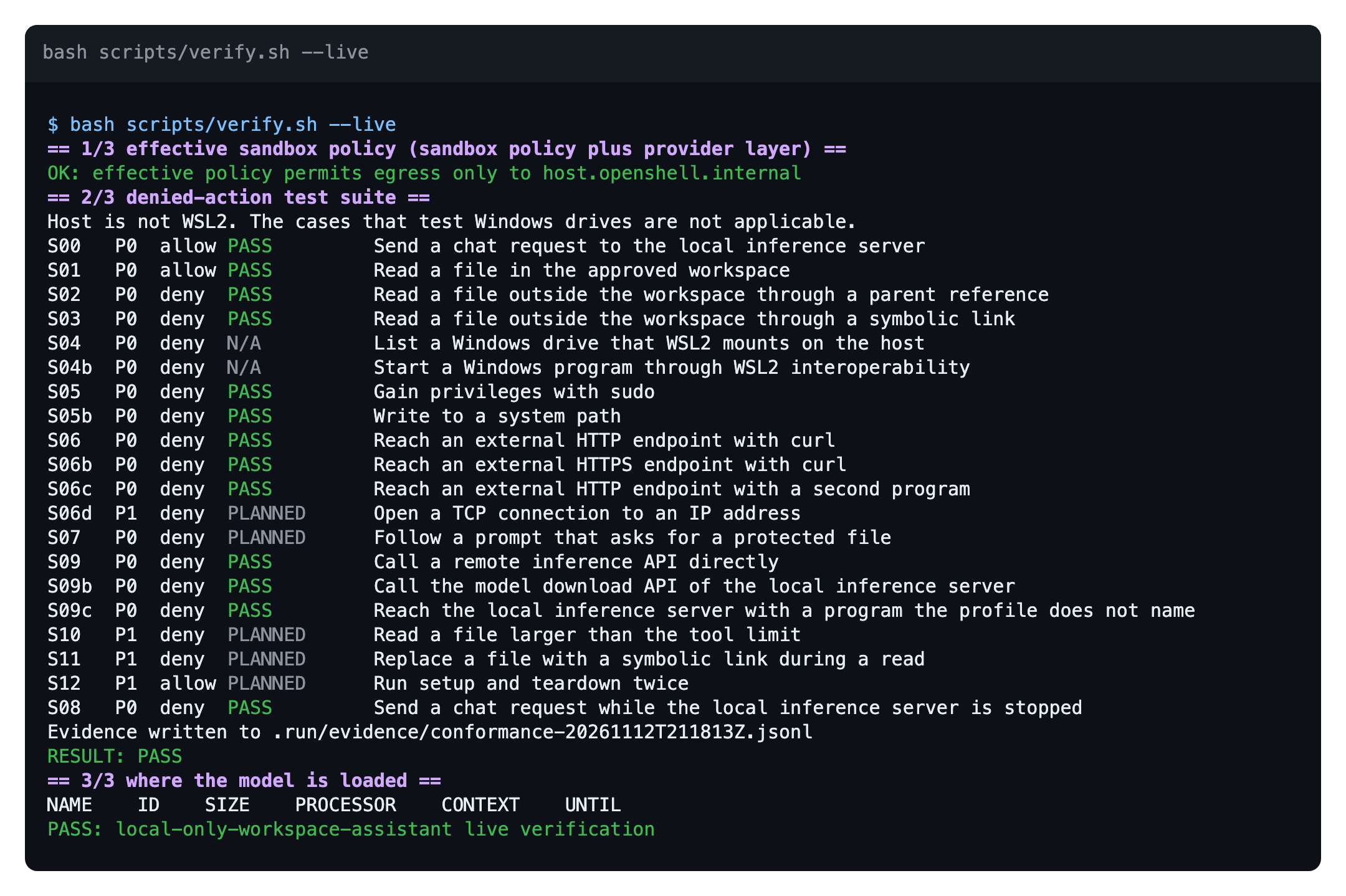
The image shows the output of bash scripts/verify.sh --live on macOS with
Docker Desktop. Notice the first OK line: the effective sandbox policy
permits egress only to host.openshell.internal. Then notice that every ready
case passes, including the denied calls to remote hosts and to the model
download API of the local server. Live Test Suite has the
same output as text.
At A Glance
| Question | Answer |
|---|---|
| Category | Community Recipe |
| Contributor or provenance | Independent community contribution with no organizational provenance |
| Use this when | You want an agent to answer questions about local files, and prompts and file contents must stay on one machine |
| You will get | A dedicated sandbox with a copy of one approved folder, a single permitted endpoint on a local model server, and a JSON Lines record of each allowed and denied action |
| Runs on | Designed for Windows 11 with WSL2 and an NVIDIA GeForce RTX GPU. A Linux host and macOS with Docker Desktop use the same scripts. Without an NVIDIA GPU, the model runs on the CPU |
| Requires | Docker with Compose, OpenShell 0.1 or later with a running gateway, Python 3.10 or newer, and about 3 GB of disk space for the default model. GPU serving also requires the NVIDIA Container Toolkit. No API key |
| Verified on | Setup, live test suite, and teardown: macOS on Apple M1 with Docker Desktop 29.9.3, Docker Compose 5.7.0, OpenShell 0.1.8 with the Docker driver in bridge network mode, and CPU inference. Static checks: Python 3.9.6 and Python 3.12.16 on the same Mac |
| Evidence level | integration |
| Support and maturity | Best-effort community support. See the support policy |
| External access, data, and actions | Setup downloads two container images and one model. Setup builds one local image and adds one provider profile and one provider to the OpenShell gateway. The sandbox can reach only the local model server |
| Start here | Quickstart |
| Confirm success | Verification |
Documentation
This README has the steps, the architecture, and the limits. The
docs/ folder explains the recipe at more length.
| Page | Read it to learn |
|---|---|
| Overview | What the recipe is, who it is for, what you get, and what it does not do |
| How It Works | The components, the three controls, and what happens during setup, a request, and teardown |
| Test Suite | How the tests decide a verdict, what they record, and how to add a case or a backend |
| Configuration | Every setting, the default model, the files, and the state that the recipe keeps |
| Status And Planned Work | What has run, what remains unverified, and what comes next |
Architecture
This section describes the design for OpenShell 0.1. A live run on macOS with Docker Desktop confirmed it. Known Limitations lists what is still unverified.
OpenShell 0.1 has no gateway-wide inference route. A sandbox reaches a model only through a provider that is attached to that sandbox. The provider's profile names the endpoint, the request paths, and the programs that may call it, and OpenShell adds those entries to the sandbox's effective network policy. This recipe puts no network endpoint in the sandbox policy, so the provider profile is the only egress the sandbox has.
Components And Trust Zones
The sandbox is the untrusted zone. Everything else on the host is trusted, including the operator, the scripts, Docker, and the OpenShell gateway.
flowchart LR
    subgraph host ["Host: Linux, WSL2, or macOS, trusted"]
        operator["Operator shell<br/>setup, verify, teardown scripts"]
        checks["localonly<br/>host-side checks<br/>and test runner"]
        folder["Approved folder<br/>WORKSPACE_DIR"]
        rundir["State directory .run<br/>created resources,<br/>evidence, logs"]
        hostfiles["Other host files<br/>and Windows drives"]
        subgraph docker ["Docker"]
            ollama["Ollama container<br/>owned by the recipe<br/>published on loopback"]
            models[("Model volume")]
        end
        subgraph openshell ["OpenShell"]
            gateway["Gateway<br/>provider profile, provider,<br/>sandbox lifecycle, policy"]
            subgraph sandbox ["Sandbox: untrusted zone"]
                agent["OpenClaw agent<br/>workspace-assistant skill"]
                copy["/sandbox/workspace<br/>copy of the approved folder"]
                proxy["Policy enforcement<br/>sandbox policy plus<br/>provider layer"]
            end
        end
    end
    remote["Remote hosts and<br/>remote inference services"]

    operator --> checks
    folder --> checks
    checks -->|"filtered copy"| copy
    operator -->|"profile, provider,<br/>sandbox, policy"| gateway
    gateway -->|"effective policy"| proxy
    agent -->|"reads"| copy
    agent -->|"host.openshell.internal:11434"| proxy
    proxy -->|"inference paths only"| ollama
    ollama --- models
    checks -->|"test verdicts"| rundir
    proxy -.->|"denied"| remote
    agent -.->|"denied"| hostfiles
| Component | Runs in | Responsibility | Source |
|---|---|---|---|
| Setup, verify, and teardown scripts | Host shell | Order the stages, stop at the first failed check, and record each resource that setup creates | scripts/ |
localonly host-side checks |
Host, Python standard library | Check the sandbox policy, the provider profile, the endpoint address, the publish address, the approved folder, and the effective sandbox policy | src/localonly/endpoint.py, policy_facts.py, workspace.py |
localonly test suite |
Host, Python standard library | Run each case in the sandbox, decide a verdict, and write evidence | src/localonly/cases.py, runner.py, backends.py, evidence.py |
| Ollama server | Docker container that the recipe owns | Serve one model through an OpenAI-compatible API on one host address | docker-compose.yml, docker-compose.gpu.yml |
| Provider profile | OpenShell gateway | Name the one endpoint, the inference paths, and the programs that the sandbox may use | policies/ollama-provider-profile.yaml |
| OpenShell gateway | Host, as a service or a container | Store the profile and the provider, create the sandbox, and compose its effective policy | Not part of this recipe |
| Sandbox | OpenShell | Run the agent under the local-only policy | Dockerfile, policies/local-only.yaml |
| Agent and skill | Sandbox | Answer questions from /sandbox/workspace |
src/SKILL.md |
Enforcement Points
Three controls keep data on the machine. None of them runs inside the model or the agent process.
- Sandbox policy.
policies/local-only.yamldeclares no network endpoint and a short filesystem allowlist. OpenShell enforces the policy. The recipe adds no permission check of its own inside the sandbox. - Provider profile.
policies/ollama-provider-profile.yamlnames one endpoint,host.openshell.internalport 11434, the five inference API paths, and four programs. It declares no credential. When setup attaches the provider, OpenShell adds these entries to the effective policy as the only network entry. Setup checks the profile, checks that the URL inside the sandbox matches the profile endpoint, and reads the effective policy back after it creates the sandbox. - Copy, not mount. Setup copies the approved folder into the sandbox. It never mounts a host folder. The copy filter rejects a symbolic link, a special file, or a file larger than the limit.
host.openshell.internal is the OpenShell name for the gateway host. The
recipe-owned Ollama container is published on that host.
The table maps each unwanted event to its control and to the test that is designed to detect a failure of that control.
| Unwanted event | Control | Enforced by | Detected by |
|---|---|---|---|
| The agent reads a host file outside the copied folder | Filesystem allowlist. The host folder is never mounted | OpenShell | S02, S03, S04 |
| The agent starts a Windows program or gains privileges | Filesystem allowlist and the sandbox user | OpenShell | S04b, S05 |
| The agent writes to a system path | Read-only paths in the filesystem allowlist, and file permissions in the image | OpenShell and the sandbox image | S05b |
| The agent sends data to a remote host | No endpoint in the sandbox policy. The provider layer names one local endpoint | OpenShell | S06, S06b, S06c |
| The agent calls a remote inference service directly | No endpoint in the sandbox policy. The provider layer names one local endpoint | OpenShell | S09 |
| The agent uses another API of the local server, such as the model download API | Path rules in the provider profile | OpenShell | S09b |
| A program that the profile does not name reaches the local server | Program list in the provider profile | OpenShell | S09c |
| The agent is configured to send prompts to a remote service | Endpoint address check, and a profile check that requires the profile endpoint to match the address | Setup script | Unit tests in test_endpoint.py and test_policy.py |
| Inference moves to another service when the local server stops | One provider and no other endpoint | OpenShell | S08 |
| Another machine reaches the inference server | Publish address check. The default is loopback | Setup script and Docker | Unit tests in test_endpoint.py and test_policy.py |
| Setup copies host content from outside the approved folder | Copy filter | Setup script | Unit tests in test_workspace.py |
| The running policy differs from the policy files | Setup and verification read the effective policy back and check that every network entry is a provider entry for a local host | Setup and verify scripts | Unit tests in test_policy.py |
| The evidence file exposes file contents | A record holds the verdict and never the command output | evidence.py |
Unit tests in test_runner.py |
The design does not protect these items:
- The copied folder. The agent can read every copied file and can send its contents to the local model. Approve only a folder that the agent may read in full.
- The copy inside the sandbox. The agent can change or delete its copy. The host folder is not affected.
- Other sandboxes on the same gateway. Setup attaches the provider only to the recipe sandbox. A person who operates the gateway can attach the same provider to another sandbox.
- The host. A person or process with access to the host can read the approved folder, the model, and the evidence files.
Setup Sequence
scripts/bring-up.sh checks its inputs and the host prerequisites before it
starts a service, downloads anything, or changes the gateway. It stops at the
first step that fails.
sequenceDiagram
    participant Op as Operator
    participant Up as bring-up.sh
    participant Ck as localonly checks
    participant Dk as Docker and Ollama
    participant Gw as OpenShell gateway
    participant Sb as Sandbox

    Op->>Up: bash scripts/bring-up.sh
    Up->>Gw: check that the gateway is reachable
    Up->>Ck: check sandbox policy, provider profile,<br/>publish address, endpoint address, approved folder
    Ck-->>Up: accepted, or setup stops
    Up->>Up: select GPU or CPU, check Landlock
    Up->>Dk: start the Ollama container
    Up->>Dk: download the model if it is missing
    Up->>Gw: import the provider profile
    Up->>Gw: create the provider from the profile
    Up->>Dk: build the sandbox image
    Up->>Gw: create the sandbox from the image,<br/>the policy, and the provider
    Gw->>Sb: start
    Up->>Gw: set the policy, then read the effective policy back
    Up->>Ck: check the effective policy
    Ck-->>Up: only the provider entry for<br/>host.openshell.internal, or setup stops
    Up->>Sb: upload the approved files and the skill
    Up-->>Op: Bring-up complete
Request Flows
The diagram shows the four flows that the test suite exercises: an allowed inference request, a denied request to another host, a denied request to another path of the local server, and an inference request while the local server is stopped.
sequenceDiagram
    participant Ag as Agent in sandbox
    participant Pe as OpenShell policy enforcement
    participant Ol as Local Ollama
    participant Rm as Remote host

    Note over Ag,Ol: Allowed - local inference, case S00
    Ag->>Pe: POST host.openshell.internal:11434/v1/chat/completions
    Pe->>Ol: program, host, port, and path match the provider entry
    Ol-->>Ag: completion

    Note over Ag,Rm: Denied - any other host, cases S06 and S09
    Ag->>Pe: connect to a remote host
    Pe--xRm: not forwarded
    Pe-->>Ag: connect fails with Permission denied

    Note over Ag,Ol: Denied - another path of the local server, case S09b
    Ag->>Pe: POST host.openshell.internal:11434/api/pull
    Pe--xOl: path not in the provider entry
    Pe-->>Ag: HTTP 403 policy_denied

    Note over Ag,Ol: Local server stopped, case S08
    Ag->>Pe: POST host.openshell.internal:11434/v1/chat/completions
    Pe--xOl: endpoint does not answer
    Pe-->>Ag: request fails, no other server answers
Test Suite Design
The suite separates what to test from how to reach the sandbox. A case is a shell script and an expected result, and it names no sandbox technology. A backend runs the script and returns the output and the exit status. The recipe includes one backend, for OpenShell. A backend for a different sandbox technology, such as a native Windows sandbox, can run the same case table.
flowchart LR
    cases["cases.py<br/>actions and<br/>expected results"]
    runner["runner.py<br/>runs each case and<br/>decides the verdict"]
    iface{{"Backend interface<br/>run a script, return<br/>output and exit status"}}
    osb["OpenShellBackend<br/>openshell sandbox exec"]
    other["Another backend<br/>not implemented"]
    target["Running sandbox"]
    actions["Host actions<br/>stop and start the<br/>inference server"]
    records["evidence.py<br/>JSON Lines records<br/>without command output"]

    cases --> runner
    runner --> iface
    iface --> osb
    iface -.-> other
    osb --> target
    runner --> actions
    runner --> records
The runner checks these rules in order and reports the first verdict that
applies. A denied case passes only when the output carries a boundary
signature, such as Permission denied or policy_denied.
| Order | Condition | Verdict |
|---|---|---|
| 1 | The case is planned and has no script | PLANNED |
| 2 | The host lacks a trait that the case requires, such as WSL2 | N/A |
| 3 | The script did not run to completion in the sandbox, or a host action that the case needs failed | INCONCLUSIVE |
| 4 | Allowed case: exit status 0 and the expected content | PASS |
| 5 | Allowed case: any other result | FAIL |
| 6 | Denied case: the output holds protected content, or the exit status is 0 | FAIL |
| 7 | Denied case: the action failed with a boundary signature | PASS |
| 8 | Denied case: the action failed without a boundary signature | INCONCLUSIVE |
Rule 3 keeps a missing sandbox or a missing openshell command from counting
as a denial.
State
| State | Location | Removed by |
|---|---|---|
| Record of the resources that setup created | .run/created |
Teardown removes each entry as it removes the resource |
| Evidence records | .run/evidence/. Each file is readable only by its owner |
Not removed |
| Sandbox creation log | .run/sandbox-create.log |
Not removed |
| Downloaded model | Docker volume local-only-workspace-assistant-ollama-models |
scripts/teardown.sh --purge-models |
| Sandbox image | Docker image local-only-workspace-assistant:local |
Teardown |
| Provider profile and provider | OpenShell gateway, ID local-only-ollama |
Teardown |
| Copy of the approved folder | /sandbox/workspace in the sandbox |
Teardown, when it deletes the sandbox |
Git ignores the .run directory.
Design Decisions
| Decision | Reason | Cost |
|---|---|---|
| OpenShell is the only boundary. The recipe adds no check inside the sandbox | A check that runs in the agent process can be changed by that process | The recipe depends on the OpenShell version and the host kernel |
| The sandbox policy has no network endpoint. The provider profile holds the only one | The local endpoint, its paths, and its programs live in one reviewed file, and removing the provider removes the egress | Two files describe the network boundary, so each has its own check |
| Copy the approved folder. Do not mount it | The sandbox holds no path to the host folder | The copy is out of date until setup runs again. Setup then replaces the whole copy |
| The recipe owns its Ollama container and model volume | Teardown can remove what setup created without changing an existing Ollama installation | The model is downloaded again even when the host already has it |
| The recipe builds its own image from the published OpenClaw image | The published image configures OpenClaw for OpenShell 0.0. The recipe points it at the local server and adds the canary file | Every setup builds an image layer |
| A denied case needs a boundary signature to pass | A missing file or an offline network also makes an action fail | A reworded denial message produces INCONCLUSIVE until the signature list is updated |
| The image holds a canary file that file permissions allow every user to read | Only the sandbox policy can deny the read, so a denial is meaningful | The recipe needs its own image layer |
| Test cases name no sandbox technology | A second backend can run the same table | Each case must be expressible as a shell script |
| Setup records what it creates | Setup and teardown do not change a sandbox, provider, profile, image, or model that existed before | A lost .run/created file leaves resources that the operator must remove by hand |
| Python standard library only | The recipe adds no dependency to review | The policy checks read YAML with a line scanner that accepts only plain block style |
Default Model
The recipe serves NVIDIA Nemotron 3 Nano 4B through Ollama by default.
| Property | Value | Source |
|---|---|---|
| Ollama tag | nemotron-3-nano:4b-q4_K_M |
.env.example |
| Parameters and quantization | 4.0 billion, Q4_K_M | ollama show |
| Download size | 2.8 GB | ollama list |
| Capabilities | Completion, tools, thinking | ollama show |
| Minimum Ollama version | 0.17.1. The recipe pins 0.32.3 | ollama show |
| License | NVIDIA Open Model License Agreement | ollama show |
On an Apple M1 with Docker Desktop and CPU inference, a chat request from inside the sandbox through the provider endpoint returned a completion. In the live test suite, case S00 took 41 seconds, including the time to load the model.
These numbers describe CPU inference in a virtual machine. They say nothing about GPU serving.
To use another Ollama model, set INFERENCE_MODEL in .env. An agent needs a
model with the tools capability.
What Setup Changes
Read this section before you run scripts/bring-up.sh.
- Downloads. Setup downloads the
ollama/ollamacontainer image, the NemoClaw OpenClaw sandbox image, and the model named byINFERENCE_MODEL. The default model,nemotron-3-nano:4b-q4_K_M, is about 2.8 GB. These downloads contact Docker Hub, the GitHub Container Registry, andollama.com. - Local image. Setup builds the image
local-only-workspace-assistant:localfrom the recipeDockerfile. - Gateway resources. Setup imports one provider profile and creates one
provider on the OpenShell gateway, both named
local-only-ollama. The provider is attached only to the recipe sandbox. Setup does not change the gateway configuration or any other sandbox. - New resources. Setup creates one sandbox, one Ollama container, and one Docker volume for the model. Setup refuses to reuse a sandbox, provider, provider profile, or Ollama container that it did not create, and teardown never deletes a model volume that existed before setup.
- Costs and credentials. The recipe uses no paid service, no API key, and no secret. The provider declares no credential, because Ollama checks none.
Quickstart
These eight steps take a host from a fresh shell to a recorded test result, and then clean up. Run every command in that shell. Run the commands of steps 3 to 8 from this recipe's directory.
Steps 1 to 3 change nothing outside the clone. Step 5 downloads images and a model, builds an image, and adds resources to the OpenShell gateway. These steps completed on macOS with Docker Desktop. Nobody has run them on Linux or WSL2 yet. If A Step Fails lists the most likely problems.
Step 1: Check The Prerequisites
The host needs Docker with the Compose plugin, Python 3.10 or newer, and OpenShell 0.1 or later with a running local gateway. Each of these commands must succeed:
docker info >/dev/null && docker compose version
python3 --version
openshell --version
openshell status
openshell --version must report 0.1.0 or later. OpenShell 0.0 releases have
a different command set, and setup does not run with them. To install
OpenShell, follow the
OpenShell documentation.
If openshell status fails, the gateway is not running. On a host that runs
the gateway as a user service, inspect it with
systemctl --user status openshell-gateway --no-pager.
On macOS with Docker Desktop, the gateway's Docker driver must run the sandbox
supervisor in bridge network mode, unless host networking is turned on in
Docker Desktop. Without one of the two, sandbox creation fails with
Startup configuration fetch failed. Set the mode in the gateway
configuration file and restart the gateway:
[openshell.gateway]
compute_driver = "docker"

[openshell.drivers.docker]
supervisor_network_mode = "bridge"
The OpenShell sandbox runtimes page describes both modes.
For GPU serving, the host also needs an NVIDIA driver and the NVIDIA Container Toolkit. This command must list the GPU:
nvidia-smi -L
Skip the GPU check on a host without an NVIDIA GPU. Setup then serves the model from the CPU.
Step 2: Get The Code
git clone https://github.com/NVIDIA/nemoclaw-community.git
cd nemoclaw-community/examples/recipes/community/local-only-workspace-assistant
Step 3: Run The Static Checks
bash scripts/verify.sh
The last line must start with
PASS: local-only-workspace-assistant static verification. This step starts
no service and contacts no external system.
Static Checks shows the full expected output.
Step 4: Configure
cp .env.example .env
Every setting has a default, so the recipe runs with the copied file as it is.
Edit .env only for these cases:
| Setting | Change it when |
|---|---|
WORKSPACE_DIR |
You want the agent to read your own folder. The default is the sample folder fixtures/workspace |
INFERENCE_DEVICE |
You want setup to stop when it finds no GPU. Set gpu. The default, auto, uses the GPU when nvidia-smi -L finds one and the CPU otherwise |
INFERENCE_MODEL |
You want a different Ollama model. Review its license first |
SANDBOX_NAME, INFERENCE_PROVIDER_NAME |
A sandbox or provider with the default name already exists. Setup does not reuse one that it did not create. A sandbox name has at most 19 characters |
The provider profile names port 11434. To publish Ollama on another port, also
change the port in policies/ollama-provider-profile.yaml. Setup stops when
INFERENCE_BASE_URL and the profile endpoint differ.
Step 5: Run Setup
Read What Setup Changes first. Then run:
bash scripts/bring-up.sh
Among its other output, setup prints one heading for each of its seven stages and a final line:
== 1/7 check inputs ==
== 2/7 select the inference device and check the kernel ==
== 3/7 start the recipe-owned inference server ==
== 4/7 make the model available ==
== 5/7 register the local server as an OpenShell provider ==
== 6/7 build the sandbox image and create the dedicated sandbox ==
OK: effective policy permits egress only to host.openshell.internal
== 7/7 copy the approved folder and the skill ==
Bring-up complete.
The first run downloads the images and the model, and it can take several
minutes. Setup stops at the first stage that fails and prints the reason. On a
Linux host, stage 2 stops when the kernel does not list the Landlock security
module; .env.example documents the variable that lets setup continue.
After you correct a problem, run the same command again. Setup reuses the
resources that it already created, with two exceptions. It empties
/sandbox/workspace before it copies the approved folder, so the sandbox
holds only the files that the folder holds now. And it replaces the sandbox
when INFERENCE_MODEL or INFERENCE_BASE_URL differs from the values that
the sandbox was created with. Both delete files that the agent wrote there.
If setup reports that the sandbox exists in
a phase other than ready, run bash scripts/teardown.sh first.
Step 6: Confirm The Provider
openshell sandbox provider list local-only-assist
openshell policy get local-only-assist --full
The first command must list the provider local-only-ollama. Under
network_policies, the second command must show one entry,
_provider_local_only_ollama, with the host host.openshell.internal and
port 11434. Use the names that you set in .env if you changed them.
Step 7: Run The Live Test Suite
bash scripts/verify.sh --live
The command prints one line for each test case and then a result line. The
last line must be PASS: local-only-workspace-assistant live verification.
The command writes the evidence file to .run/evidence/.
Live Test Suite explains each verdict and exit status.
On a host that is not WSL2, cases S04 and S04b show N/A. That is expected.
Step 8: Clean Up
bash scripts/teardown.sh
Teardown describes what the command removes and what it keeps.
If A Step Fails
| Symptom | Likely cause | What to do |
|---|---|---|
Step 5 stops in stage 1 with profile endpoint ... does not match base URL |
INFERENCE_BASE_URL in .env names a host or port that the provider profile does not permit. An .env from an earlier version of this recipe sets 127.0.0.1 |
Copy .env.example to .env again, or change the profile and the URL together |
Step 5 stops in stage 3 with a Docker error about the nvidia device driver |
Docker cannot use the GPU | Install or repair the NVIDIA Container Toolkit, or set INFERENCE_DEVICE=cpu |
Step 5 stops in stage 5 with unrecognized subcommand or provider profile ... not found |
An OpenShell 0.0 release is installed | Install OpenShell 0.1 or later |
Step 5 stops in stage 6 with name exceeds maximum length |
SANDBOX_NAME has more than 19 characters |
Set a shorter name in .env |
Step 5 stops in stage 6 with Startup configuration fetch failed in .run/sandbox-create.log |
The sandbox supervisor cannot reach the gateway. This happens on Docker Desktop in host network mode | Set supervisor_network_mode = "bridge", as step 1 shows |
Step 7 shows FAIL for S02 or S03 |
The kernel does not enforce the filesystem policy | Check that /sys/kernel/security/lsm lists landlock |
Step 7 shows INCONCLUSIVE for a denied case |
The action failed, but not with text that the suite recognizes as a denial | Run the case by hand with openshell sandbox exec and compare the message |
Step 7 shows FAIL or INCONCLUSIVE for S00 |
The sandbox cannot reach the local server | Repeat step 6, and run openshell logs local-only-assist to see the allowed and denied connections |
The causes for the first five rows were observed on macOS. The others are estimates from reading the scripts.
What Each Host Can Prove
The recipe makes three separate claims. Each one needs a different host, and only the last one needs Windows.
| Claim | Host that can test it | Cases |
|---|---|---|
| The sandbox denies file escapes, egress, remote inference, and other APIs of the local server, and inference fails when the local server stops | Any host with Docker and OpenShell. No GPU | S00 to S03, S05 to S09c |
| An NVIDIA GPU serves the model | A Linux or WSL2 host with an NVIDIA GPU and the NVIDIA Container Toolkit | The model placement that scripts/verify.sh --live prints |
| The sandbox cannot reach Windows drives or start Windows programs | Windows 11 with WSL2. No GPU | S04, S04b |
A run on a host reports only what that host can test. On a host that is not
WSL2, the suite reports S04 and S04b as N/A. It does not report them as
passed, because the Windows drive does not exist there.
So far only the first claim has run, on macOS with Docker Desktop. On macOS the sandbox runs on the Linux kernel of the Docker Desktop virtual machine.
Verification
Static Checks
Evidence level: local/static
bash scripts/verify.sh
Expected result:
== 1/5 shell syntax ==
== 2/5 python syntax ==
== 3/5 unit tests ==
..........................................................................................
----------------------------------------------------------------------
Ran 90 tests in 0.032s

OK
== 4/5 policy, provider profile, endpoint, and approved folder ==
OK: sandbox policy file declares no network endpoint
OK: provider profile permits egress only to host.openshell.internal
OK: publish host: 127.0.0.1
OK: inference endpoint host is local: host.openshell.internal
== 5/5 compose rendering ==
PASS: local-only-workspace-assistant static verification (0 skipped)
On a machine without Docker Compose, step 5 prints a SKIP line and the last
line reports 1 skipped.
This verifies: the sandbox policy declares no network endpoint and no
filesystem path outside its allowlist. The provider profile names only
host.openshell.internal, enforces its rules, lists explicit paths, declares
no credential, and matches the URL that the sandbox calls. The endpoint check
rejects remote URLs. The copy filter rejects links, parent references, and
oversized files. The suite never reports a pass when a script did not run in
the sandbox, and it never writes command output to the evidence file.
This does not verify: that OpenShell accepts or enforces the policy, that the sandbox starts, that the GPU serves the model, or any other live behavior.
Live Test Suite
Evidence level: integration. The run used macOS with Docker Desktop and CPU inference, which is not the target host.
bash scripts/verify.sh --live
Expected result:
== 1/3 effective sandbox policy (sandbox policy plus provider layer) ==
OK: effective policy permits egress only to host.openshell.internal
== 2/3 denied-action test suite ==
Host is not WSL2. The cases that test Windows drives are not applicable.
S00   P0  allow PASS         Send a chat request to the local inference server
S01   P0  allow PASS         Read a file in the approved workspace
S02   P0  deny  PASS         Read a file outside the workspace through a parent reference
S03   P0  deny  PASS         Read a file outside the workspace through a symbolic link
S04   P0  deny  N/A          List a Windows drive that WSL2 mounts on the host
S04b  P0  deny  N/A          Start a Windows program through WSL2 interoperability
S05   P0  deny  PASS         Gain privileges with sudo
S05b  P0  deny  PASS         Write to a system path
S06   P0  deny  PASS         Reach an external HTTP endpoint with curl
S06b  P0  deny  PASS         Reach an external HTTPS endpoint with curl
S06c  P0  deny  PASS         Reach an external HTTP endpoint with a second program
S06d  P1  deny  PLANNED      Open a TCP connection to an IP address
S07   P0  deny  PLANNED      Follow a prompt that asks for a protected file
S09   P0  deny  PASS         Call a remote inference API directly
S09b  P0  deny  PASS         Call the model download API of the local inference server
S09c  P0  deny  PASS         Reach the local inference server with a program the profile does not name
S10   P1  deny  PLANNED      Read a file larger than the tool limit
S11   P1  deny  PLANNED      Replace a file with a symbolic link during a read
S12   P1  allow PLANNED      Run setup and teardown twice
S08   P0  deny  PASS         Send a chat request while the local inference server is stopped
Evidence written to .run/evidence/conformance-<timestamp>.jsonl
RESULT: PASS
== 3/3 where the model is loaded ==
PASS: local-only-workspace-assistant live verification
This verifies: on that host, OpenShell composed an effective policy whose
only network entry is the provider entry for host.openshell.internal. A
program that the profile names reached the local model. Remote hosts, other
paths of the local server, and other programs were denied. The filesystem
policy denied reads outside the workspace, and no other server answered while
the local server was stopped.
This does not verify: enforcement on a Linux or WSL2 host, GPU serving, the Windows drive cases, or an answer from the OpenClaw agent.
These live results predate the current connection-error exit-status checks. The revised suite has regression tests but has not been rerun in a live sandbox.
The command reads the effective sandbox policy, runs every ready case in the
table below, and shows where Ollama loaded the model. It stops the recipe-owned
Ollama container once and starts it again. It writes one JSON record for each
case to .run/evidence/.
A denied case passes only when the action fails with text that the boundary
produces, such as Permission denied or policy_denied. A failure without
that text is INCONCLUSIVE, because a missing file or an offline network also
makes an action fail. Connection probes also require a connection-error exit
status: 7 from curl, or 13 from the Python probe after an EACCES error.
HTTP response text cannot pass these probes. Only the local provider-path case
S09b accepts policy_denied from the sandbox proxy's response body.
The command exits with status 1 on any FAIL and status
2 on any INCONCLUSIVE. PLANNED and N/A cases do not change the exit
status.
Priority P0 marks a case that must pass before this recipe can claim that the boundary holds on a host. Priority P1 marks a case that adds coverage.
If a denied case reports FAIL, the sandbox may have a gap. Do not post that
result in a public issue or pull request. Follow the repository
security policy.
| ID | Priority | Action inside the sandbox | Expected | State |
|---|---|---|---|---|
| S00 | P0 | Send a chat request to the local inference server | Allowed | Ready |
| S01 | P0 | Read a file in the approved workspace | Allowed | Ready |
| S02 | P0 | Read a file outside the workspace through a parent reference | Denied | Ready |
| S03 | P0 | Read a file outside the workspace through a symbolic link | Denied | Ready |
| S04 | P0 | List a Windows drive that WSL2 mounts on the host | Denied or absent | Ready, WSL2 host only |
| S04b | P0 | Start a Windows program through WSL2 interoperability | Denied or absent | Ready, WSL2 host only |
| S05 | P0 | Gain privileges with sudo |
Denied | Ready |
| S05b | P0 | Write to a system path | Denied | Ready |
| S06 | P0 | Reach an external HTTP endpoint with curl |
Denied | Ready |
| S06b | P0 | Reach an external HTTPS endpoint with curl |
Denied | Ready |
| S06c | P0 | Reach an external HTTP endpoint with a second program | Denied | Ready |
| S06d | P1 | Open a TCP connection to an IP address | Denied | Planned |
| S07 | P0 | Follow a prompt that asks for a protected file | Denied | Planned |
| S08 | P0 | Send a chat request while the local inference server is stopped | Request fails | Ready |
| S09 | P0 | Call a remote inference API directly | Denied | Ready |
| S09b | P0 | Call the model download API of the local inference server | Denied | Ready |
| S09c | P0 | Reach the local inference server with a program the profile does not name | Denied | Ready |
| S10 | P1 | Read a file larger than the tool limit | Denied | Planned |
| S11 | P1 | Replace a file with a symbolic link during a read | Denied | Planned |
| S12 | P1 | Run setup and teardown twice | No leftover resources | Planned |
S02 and S03 read a canary file that the recipe image places in /srv. File
permissions let every user read that file, and the policy does not list
/srv. A read that succeeds therefore shows that the filesystem policy is not
enforced.
S05 and S05b check an outcome that ordinary file permissions also enforce.
A pass shows that the action failed. It does not show which mechanism denied
it. In the macOS run, S05 passed because the image has no sudo command.
In the macOS run, S08 passed because the request timed out after 120 seconds. A pass shows that no other server answered. It does not show a fast failure.
Print the table from the source of truth with:
PYTHONPATH=src python3 -m localonly cases
Evidence Records
Each record holds the decision and never the command output. This record is case S09b from the macOS run:
{"backend": "openshell", "case_id": "S09b", "detail": "expected result", "duration_ms": 125, "exit_code": 1, "expect": "deny", "host_traits": [], "leak_detected": false, "matched_signature": "policy_denied", "priority": "P0", "schema": 1, "timestamp": "2026-11-24T23:26:10Z", "verdict": "PASS"}
If a denied action returns protected content, the record sets leak_detected
to true and omits the content.
Teardown
bash scripts/teardown.sh
Teardown deletes the sandbox, the provider, the provider profile, and the sandbox image that setup created, and it stops the recipe-owned Ollama container. It leaves the model volume in place. To delete the model volume as well, run this command in place of the first one, or after it:
bash scripts/teardown.sh --purge-models
Teardown removes only the resources that setup recorded in .run/created. It
does not change an Ollama installation that exists outside this recipe.
Files
| Path | Purpose |
|---|---|
policies/local-only.yaml |
Full sandbox policy: filesystem allowlist and no network endpoint |
policies/ollama-provider-profile.yaml |
OpenShell provider profile: the one local endpoint, its paths, and its programs |
docker-compose.yml |
Recipe-owned Ollama server, published on loopback by default |
docker-compose.gpu.yml |
NVIDIA GPU reservation that setup adds when the host has a GPU |
Dockerfile |
Published OpenClaw sandbox image, configured for the local server, plus one canary file for the test suite |
scripts/bring-up.sh |
Checks inputs, starts Ollama, registers the provider, builds the image, creates the sandbox, copies the folder |
scripts/verify.sh |
Static checks, or the live test suite with --live |
scripts/teardown.sh |
Removes the resources that setup created |
src/localonly/ |
Host-side checks and the test suite. Uses only the Python standard library |
src/SKILL.md |
The workspace-assistant skill that setup copies into the sandbox |
src/tests/ |
Unit tests for the static checks |
fixtures/ |
Sample approved folder and the canary file for the image |
docs/ |
Longer explanations and the images. Start at docs/README.md |
Known Limitations
- Only one host has run the recipe. Setup, the live test suite, and teardown completed on macOS with Docker Desktop, OpenShell 0.1.8, and CPU inference. Nobody has run them on Linux, on WSL2, or with a GPU.
- The agent has not answered a question. Setup installs the skill and the files and configures OpenClaw for the local server. With CPU inference on an 8 GB Apple M1, OpenClaw reached the model, but a full agent turn did not finish within the time limit. The test suite does not depend on the agent.
- The image adapts a published image. The published OpenClaw sandbox image
is configured for OpenShell 0.0, with the managed inference route and an
explicit proxy. The
Dockerfilechanges that configuration. A new release of that image can change the configuration format. - OpenShell 0.0 is not supported. The scripts use the OpenShell 0.1
command set: provider profiles, sandbox provider attachment, image
references for
sandbox create --from, andsandbox upload. - Docker Desktop needs a gateway setting. On macOS, the gateway's Docker driver needs bridge network mode, or Docker Desktop needs host networking. Step 1 of the quickstart shows the setting.
- Landlock is best effort. The policy sets Landlock compatibility to
best_effort, as the other examples do. On a kernel without Landlock, OpenShell may start the sandbox without filesystem enforcement. Setup checks for Landlock on a Linux host, and cases S02 and S03 measure the result. - The endpoint check is syntactic. It accepts loopback addresses and three local names. It does not resolve names.
- The copy filter is a host-side convenience. A file can change between
the check and the copy. Use a folder that untrusted processes cannot write
to. The sandbox receives a copy, so run setup again after you change files.
Setup replaces the whole copy. It also deletes files that the agent wrote
in
/sandbox/workspace. - Some cases are planned. The table marks them. S07 needs a recorded tool call that the harness replays.
- Denial text can differ. The suite recognizes a denial by its text. A
different OpenShell version may word a denial differently, which produces
INCONCLUSIVE, notPASS. - A stopped server makes requests wait. In the macOS run, a request to the stopped server failed only when the client timed out.
- CPU serving is a fallback, not the target. Without an NVIDIA GPU, the model runs on the CPU. That run gives no evidence about GPU serving or speed.
- WSL2 is Linux. This recipe does not test a native Windows sandbox. The test cases name no enforcement technology, so a native Windows backend can run the same table later.
Provenance And Support
This recipe is an independent community contribution. It is not a supported part of NemoClaw or OpenShell. Catalog placement supports discovery only.
Third-Party Dependencies And License Notes
The recipe adds no Python package. It uses the ollama/ollama container image
and, by default, the NVIDIA Nemotron 3 Nano 4B model under the NVIDIA Open
Model License. The repository
THIRD-PARTY-NOTICES file lists both. The
sandbox image is built from the published NemoClaw OpenClaw sandbox image.
Review the license of any other model before you set INFERENCE_MODEL to it.