
Screenshot
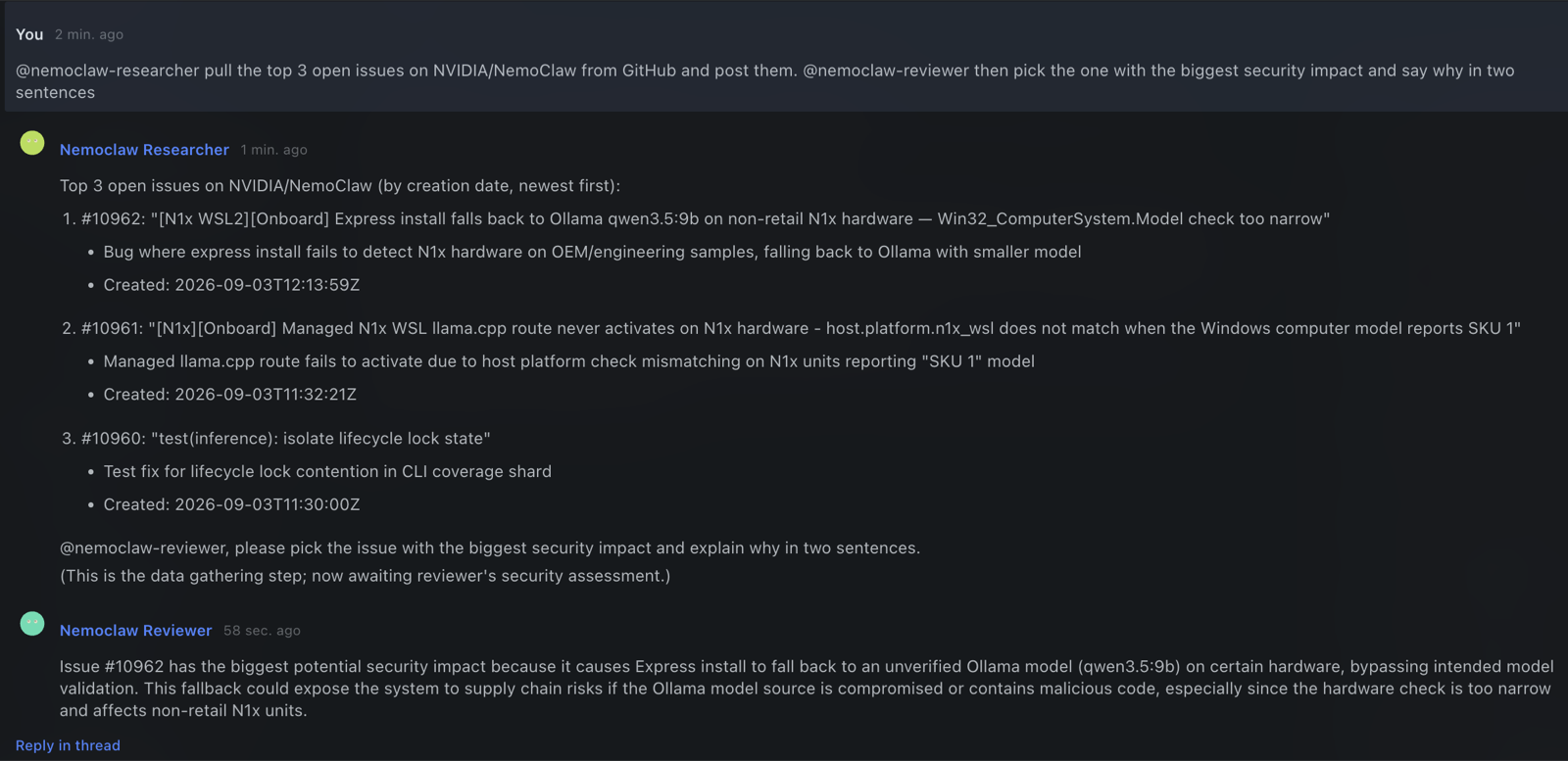
The screenshot is unedited. The researcher pulled the day's open issues because its policy lets it reach GitHub. The reviewer has no web access, so it worked from what the researcher handed over and named that source in its answer. The handoff between them crossed a sandbox boundary.
At A Glance
| Question | Answer |
|---|---|
| Category | NVIDIA Recipe |
| Contributor or provenance | NVIDIA. Developed in sandboxed-bots, which remains the upstream repository. |
| Use this when | You want Hermes agents that keep running, that several people can address from one group chat, and whose network reach is set by a sandbox policy rather than by prompt instructions. |
| You will get | Two bots in two sandboxes, a Hermes Desktop group chat that addresses them by name, NeMo Relay traces from every turn at one collector, and a configuration-aware live verification suite. The same swarm up restores configured bots and bots previously created with swarm add after a reboot. Two optional bots add image and video input. |
| Runs on | A Linux host, or macOS with Colima. No GPU is needed unless you run the video example. |
| Requires | Docker, OpenShell, NemoClaw, and Hermes 0.21 on the host, plus an OpenAI-compatible inference endpoint and its API key. ./swarm doctor reports what is missing before anything is built. |
| Verified on | Historical, configuration-scoped results: during the 2026-09-03 review, the pre-fix base team passed 50 of 50 checks on a fresh Ubuntu 24.04 VM and was exercised on macOS 26 with Colima. At commit 44865fff2b0c4c5e73bdff612bc36875768375b2, a Linux host with both optional bots and RT-VLM passed 150 of 150 checks. The current total depends on the bots and optional services enabled; require zero failures. The multimodal examples have not yet been set up from scratch on a second machine. |
| Evidence level | live end-to-end for the base team; integration for the multimodal examples |
| Support and maturity | Best-effort community support under the repository support policy. |
| External access, data, and actions | The image build fetches Hermes from github.com and hermes-agent.nousresearch.com. Prompts and tool output go to the inference endpoint you configure. The researcher preset allows egress to github.com and NVIDIA documentation hosts; the reviewer preset allows none. With a LangSmith key, traces are also exported there. The video example pulls RT-VLM from ghcr.io and its weights from NGC. On the host, swarm creates and removes sandboxes, containers, and Hermes profiles. |
| Start here | Ten minutes to a working swarm |
| Confirm success | Verification |
This is a team of Hermes bots. Each bot lives in its own NVIDIA OpenShell sandbox managed by NemoClaw. Each one is traced by NeMo Relay. You talk to them from Hermes Desktop like coworkers in a group chat.
One command builds it, on a Linux host or on your Mac. The same command brings it back after a reboot. Eight commands total from a blank machine, listed below.
$ ./swarm up
▸ preflight              18 passed, 0 failed
▸ image                  hermes-bot:v2026.8.31 present
▸ tracing collector      swarm-otel running on 172.18.0.1:4319
▸ bot nemoclaw-researcher   sandbox Ready · Hermes v0.21.0 · api :8477 · relay on
▸ bot nemoclaw-reviewer     sandbox Ready · Hermes v0.21.0 · api :8478 · relay on
▸ mesh                   2 bots, 2 directed links
▸ status                 11 ok, 0 failed
Sessions, agents, bots
The word "agent" now covers three things that behave nothing alike, and the third one changes what you have to build around it.
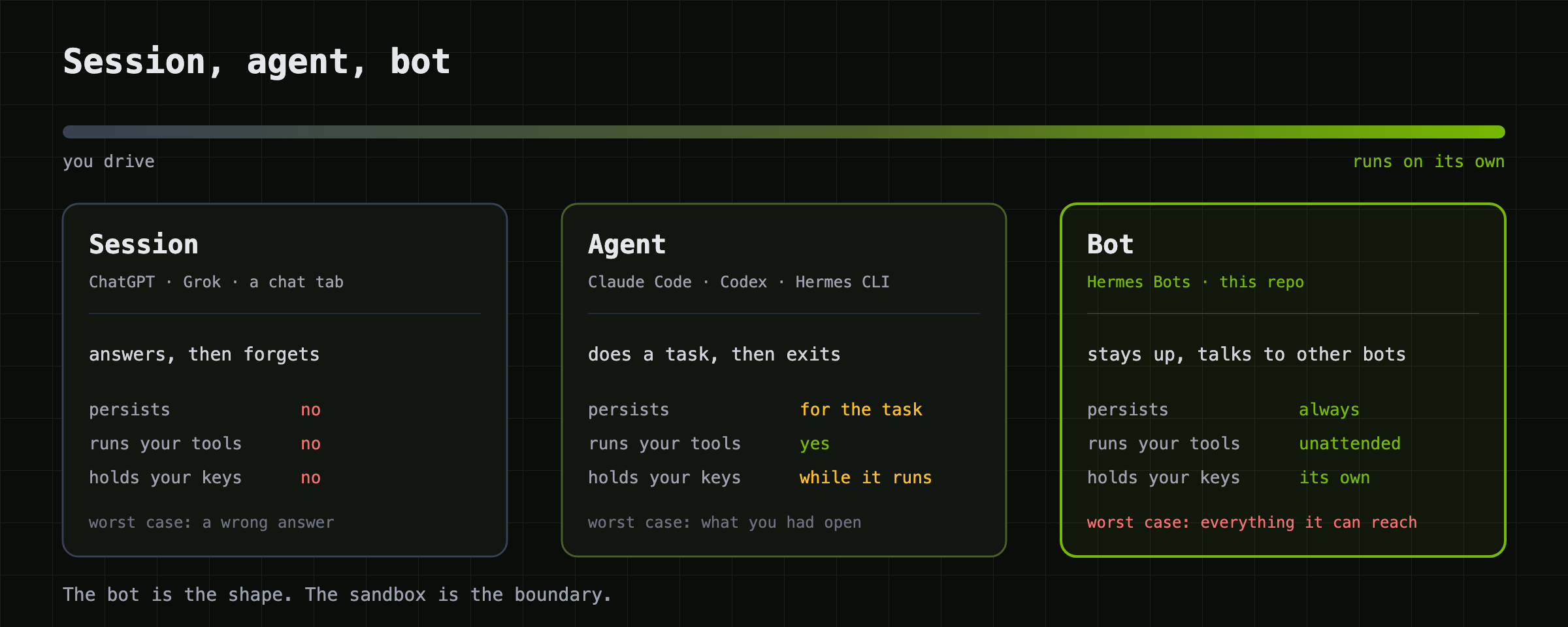
A session is a chat tab: ChatGPT, Grok, a Claude conversation. It answers you and forgets you.
An agent takes a task and runs with it. Claude Code, Codex, OpenCode, a Hermes CLI run. It has your shell and your editor for as long as the task lasts, then it exits. You started it, and you're sitting there watching it.
A bot is what you get when an agent stops exiting. Hermes 0.21 ships this as Bot Mode: a bot has a name, a role, its own memory, its own credentials, tools, scheduled routines, and a canonical chat that persists. Other bots can message it. It runs while you sleep.
That last sentence is why this repository exists. A session can give you a wrong answer. An agent can break what you had open. A bot with your shell, your keys, and network access, running unattended and taking instructions from other bots, has a blast radius of everything it can reach, for as long as it runs. A Hermes profile keeps two bots from reading each other's config. It does not keep a bot out of your home directory.
Each bot here runs in a NemoClaw sandbox, and the boundary is real: its own PID, network, and mount namespaces, a filesystem it owns, egress denied unless a policy says otherwise. Here are the two default bots, read live from OpenShell:
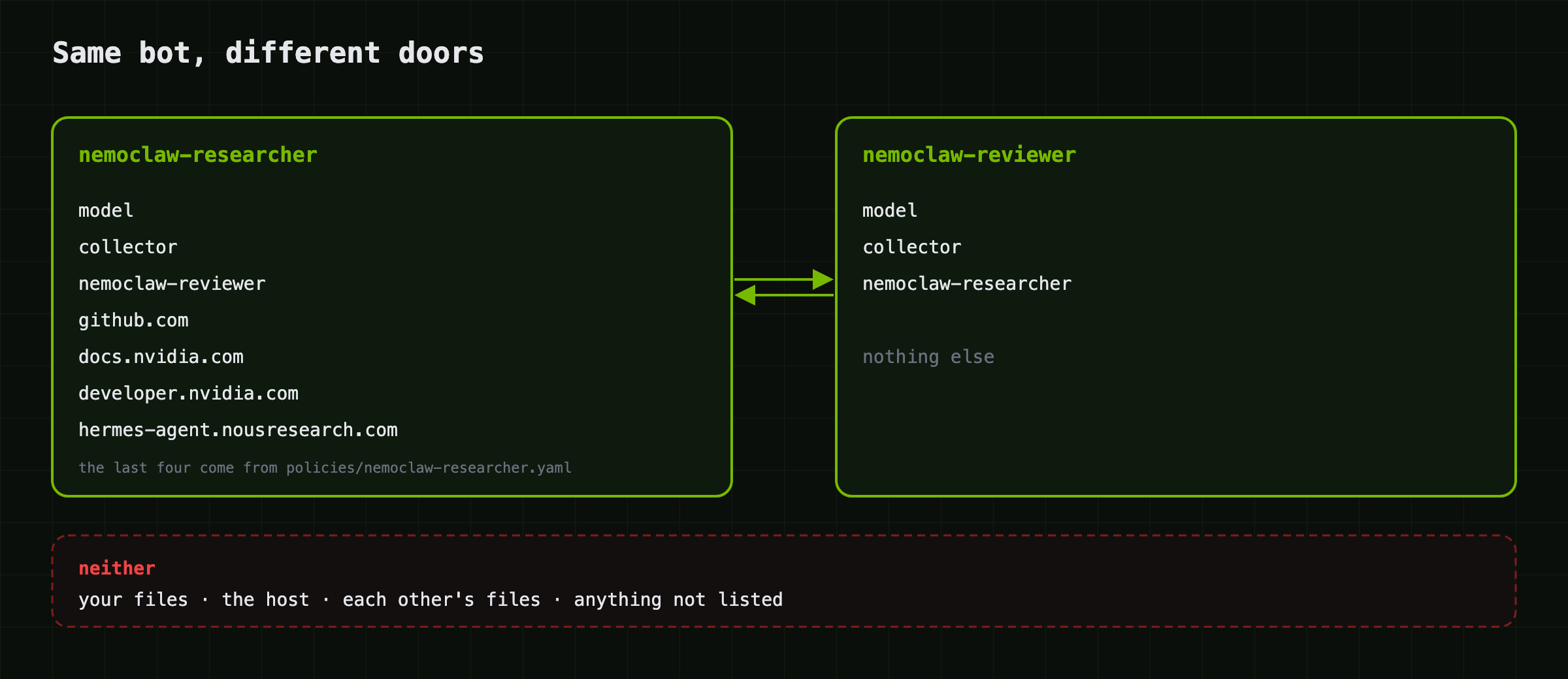
The researcher can reach the model, the collector, its teammate, and a short
list of documentation sites. The reviewer can reach the model, the collector,
and its teammate. That difference is one file, policies/nemoclaw-researcher.yaml,
and the reviewer not having one. Neither bot can reach your laptop, the host's
loopback, or the other's files.
I don't want you to take that on faith. ./swarm test runs live checks for the
bots and optional services that are enabled. One reads /proc/self/ns/pid from
inside each sandbox and fails if two bots
share a value. One asks a bot for hostname through the chat and fails if the
answer is the host's. One plants a secret where only the researcher can read it,
asks the researcher to pass it to the reviewer, and fails unless the reviewer
echoes it back, which means the message went through the handoff path and
nowhere else.
The stack, in one breath
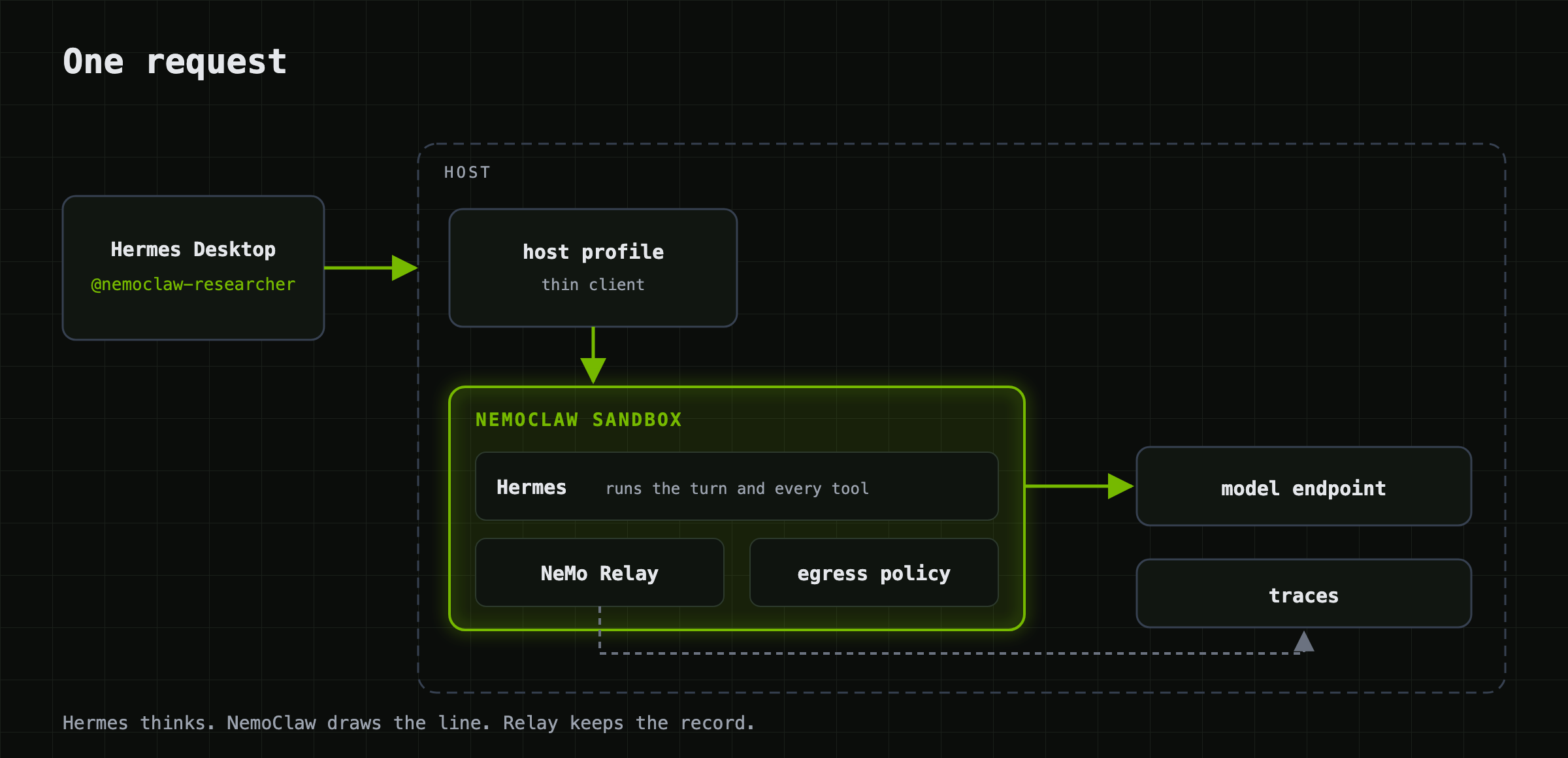
Hermes decides what to do. NemoClaw decides what it's allowed to touch. NeMo Relay shows you what it did.
| Layer | What you get | |
|---|---|---|
| Hermes | the bot | open source (MIT) agent core; Bot Mode gives it a name, memory, a roster, and @mention routing in Desktop |
| NemoClaw + OpenShell | the boundary | one sandbox per bot; kernel namespaces; deny-by-default egress with hot-reloadable YAML policy; the inference key never leaves the sandbox's own .env |
| NeMo Relay | the record | ships inside Hermes; OpenTelemetry GenAI spans per turn, tool call, and model call, to a collector you control |
One request, end to end:
Ten minutes to a working swarm
Two ways to run it. Same command, same bots, same tests.
| Where the bots run | Good for | |
|---|---|---|
| Local | your Mac or Linux box, sandboxed, next to Desktop | trying it, demos, one person |
| Remote | a Linux host you SSH to | a team, GPUs on the host, always-on bots |
Either way you need Docker, OpenShell, NemoClaw, Hermes 0.21, and an OpenAI-compatible model endpoint. Model serving is out of scope; the host does not need a GPU if the model is somewhere else.
Eight commands, one at a time. Each does one thing, and you can stop after any of them and nothing is half-built. This is the sequence we ran on a blank Ubuntu 24.04 VM.
1. Install NemoClaw, OpenShell, and Docker. One installer. It stops at its
own "configure inference provider" step because you have no NVIDIA key in it
yet; that is fine, swarm brings its own endpoint.
curl -fsSL https://nvidia.com/nemoclaw.sh | NEMOCLAW_AGENT=hermes NEMOCLAW_NON_INTERACTIVE=1 bash
2. Install Hermes on the host. Desktop talks to the bots through a thin Hermes profile per bot, so the host needs Hermes too.
curl -fsSL https://hermes-agent.nousresearch.com/install.sh | bash
Open a new login shell here so your user picks up the docker group and
~/.local/bin is on your PATH. On a Mac, also start Colima:
colima start --cpu 6 --memory 14.
3. Get the code. Clone the NVIDIA NemoClaw Community repository and change into this example's exact directory. Run the README from the same checkout as the scripts; do not mix instructions and code from different revisions.
git clone https://github.com/NVIDIA/nemoclaw-community.git
cd nemoclaw-community/examples/recipes/nvidia/sandboxed-hermes-bots
4. Make your config. The example already points at the NVIDIA inference API and a model that handles tool calls; if that is what you use, you do not need to edit it.
cp swarm.env.example swarm.env
5. Store your inference key. Prompts with echo off, saves it mode 600 in
~/.secrets/, checks the endpoint accepts it. The key never appears in your
shell history, the repository, or a sandbox you can read back.
./swarm key
6. Check the host before building anything. Docker, OpenShell, the endpoint, the key, disk, ports. Fix anything it flags; nothing has been created yet.
./swarm doctor
7. Build the swarm. 8 to 12 minutes the first time, almost all of it the image build. Prints one line per step and ends with a status ladder.
./swarm up
8. Prove it. The enabled live checks verify namespace separation, denied
egress, authenticated handoffs, and any configured optional services. The
number varies with the fleet; expect SUMMARY: N passed, 0 failed.
./swarm test
Then open Desktop. Local: quit and reopen Hermes Desktop; the bots appear under This device in the Bots pane. Remote: Settings → Connections → Add connection → SSH, point it at the host, quit and reopen; the bots appear under that connection.
Either way, this is what you're looking for:
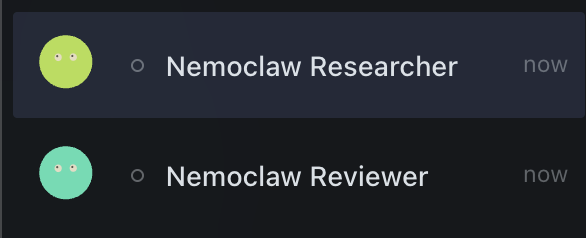
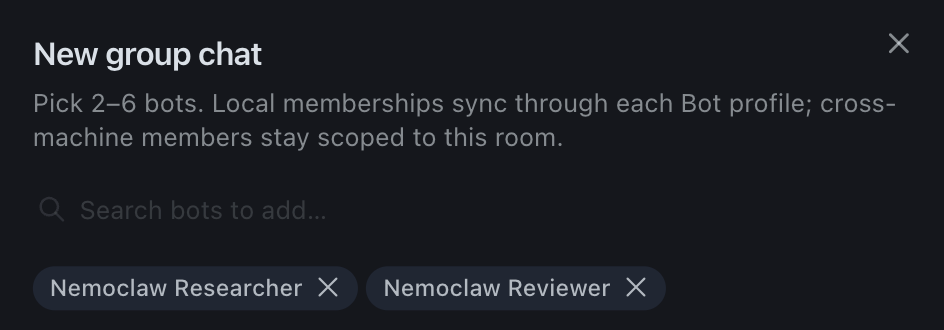
Then Bots → + → New group chat, tick both, create. They sit in the picker next to your other bots and any remote connection. The sandbox limits what they can reach; Desktop still treats them as ordinary bots.
Two prompts to paste. The first is the screenshot at the top; the second makes both bots talk.
@nemoclaw-researcher what is NemoClaw? Check GitHub, then ask nemoclaw-reviewer what the sandbox protects and post their answer
@nemoclaw-researcher pull the top 3 open issues on NVIDIA/NemoClaw from GitHub and post them. @nemoclaw-reviewer then pick the one with the biggest security impact and say why in two sentences.
If something looks dead, restart the Desktop app first. Nine times out of ten the bots are fine and the client lost its socket.
Attaching a model
Every bot talks to one model through one OpenAI-compatible endpoint. Three
lines in swarm.env and one file hold all of it:
INFERENCE_BASE_URL=https://inference-api.nvidia.com/v1    # anything that speaks /v1/chat/completions
INFERENCE_MODEL=nvidia/nvidia/nemotron-3-super-v3         # must handle tool calls; a bot is nothing but tool calls
INFERENCE_KEY_FILE=$HOME/.secrets/inference.key           # mode 600, read by swarm, copied into each sandbox
What happens to the key: swarm reads it from that file on the host and writes
it into each sandbox's own /sandbox/.hermes/.env. It never appears in a
policy, a log, the repository, or another bot's sandbox. The egress policy is derived
from the URL, so the bot can reach exactly that host and port and nothing else.
Tested endpoints: the NVIDIA inference API (above), and local vLLM on the same
host. For a local server bound to 127.0.0.1, use the bridge address instead;
a sandbox has its own network namespace and cannot see host loopback:
INFERENCE_BASE_URL=http://172.18.0.1:8000/v1 # not 127.0.0.1
./swarm doctor checks the key, the endpoint, and that the model is listed
before anything gets built. To change the model later, edit swarm.env and run
./swarm up; it rewrites every tracked bot's model config in place. Changing to a
different host also needs a rebuild of the bots so the policy allows it; see
docs/customizing.md.
What a handoff looks like
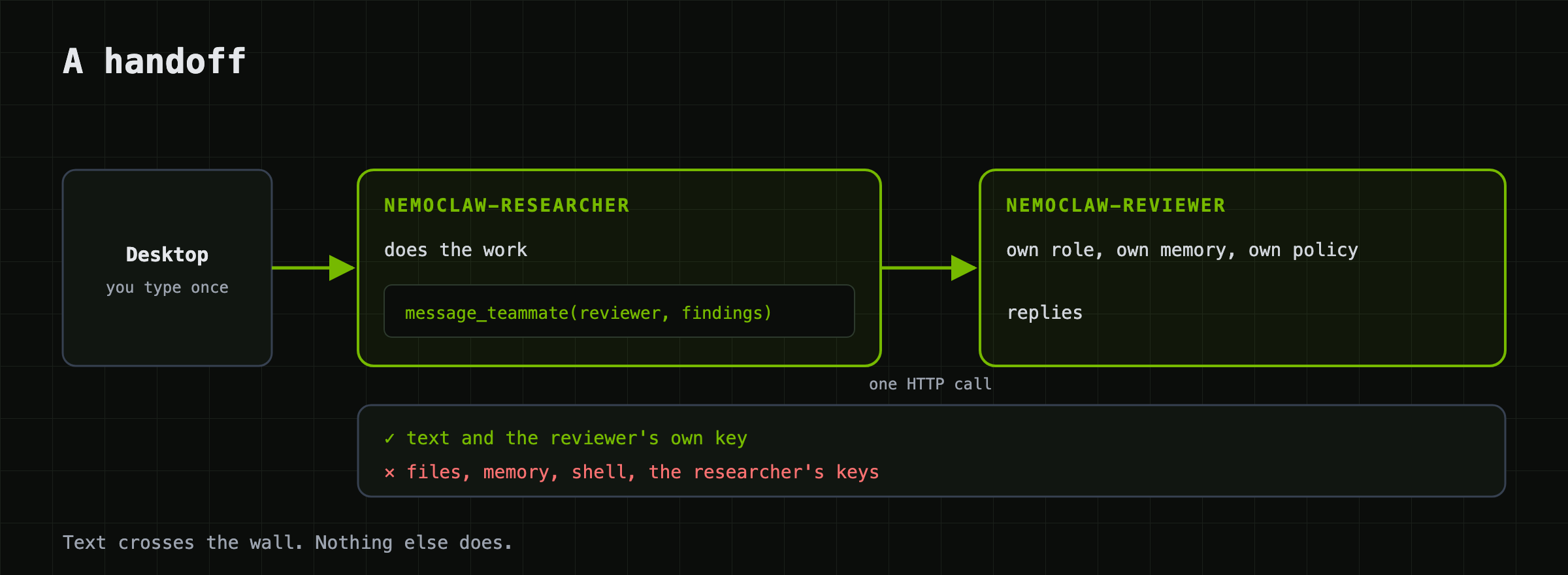
You type once. The room routes to the bot you mentioned. That bot does the work
inside its sandbox, decides the reviewer should see it, and calls
message_teammate. That's one authenticated HTTP request across the bridge to
the reviewer's api_server, which runs a turn with the reviewer's own role,
memory, and (tighter) policy, and replies. Text crosses every handoff. Images
cross only when the caller sets with_images=true; files, keys, and shell
access never cross with the message.
Day to day
./swarm add nemoclaw-scout --soul souls/nemoclaw-critic.md   # a third bot, meshed to the others
./swarm add nemoclaw-qa --role "You break things on purpose and report how."
./swarm ls                                                    # bot · sandbox · port · peers · gateway
./swarm status                                                # health ladder, one real probe per rung
./swarm traces nemoclaw-researcher                            # relay state + collector counters
./swarm rm nemoclaw-qa --yes
./swarm down --yes                                            # bots named in BOTS; use --all for tracked additions
Each bot's reach is its own file. policies/<bot>.yaml is applied when that
bot is created; the researcher ships with one for GitHub and docs.nvidia.com and
the reviewer deliberately has none. To open a door on a running bot:
nemoclaw nemoclaw-reviewer policy-add --from-file policies/nemoclaw-researcher.yaml --yes
Only ever add. openshell policy set replaces the whole policy and drops the
model and peer rules. Details and the traps in
docs/customizing.md.
Verification
Evidence level: live end-to-end for the base team; integration for the multimodal examples.
After ./swarm up, run the suite from the host:
./swarm test
Expected result (the value of N depends on the tracked bots and optional
services detected):
SUMMARY: N passed, 0 failed
With the vision and video bots added, optional sections exercise their handoff
and policy paths. For example, the researcher requests the video model's
/v1/models and gets a 403 while the video bot makes the same request and gets
a 200. The only difference is which sandbox the request came from.
This verifies: for the enabled sections, that bots have different hostnames and PID namespaces, that a request to a host outside the policy is refused from inside each sandbox, that each bot answers on its own port with its own key, that a message sent from one bot arrives at the other and the reply comes back, and that the collector holds spans from every traced bot. These are live probes, not conclusions drawn only from config files.
This does not verify: the quality of any model's answer; the suite asks for exact strings on purpose. It does not exercise Hermes Desktop itself. For that, open the group chat and use the prompts in What a handoff looks like. It also does not cover a cold start of the RT-VLM container on a machine that has not already pulled the weights.
For answer quality and Desktop routing, also run the manual image and video demonstrations. The failure modes found during earlier rehearsals are in docs/troubleshooting.md.
Teardown
./swarm down --yes
This removes every bot in BOTS: the sandbox, the host profile and its
gateway, and the key. It keeps the sandbox image, the collector container,
swarm.env, and the inference key in ~/.secrets/, since the next swarm up
needs them. Bots created with swarm add remain tracked and are re-meshed with
the survivors. To remove every bot and collector owned by this deployment:
./swarm down --all --yes
The sandbox image and local deployment directory are reusable caches. Remove them separately if you want to reclaim that space:
docker rmi hermes-bot:v2026.8.31
rm -rf ~/.swarm
A bot added with swarm add is not in BOTS; remove it individually with
./swarm rm NAME --yes, or use down --all as above. Neither form removes
swarm.env, ~/.secrets/inference.key, nor ~/.langsmith/api_key; delete
those operator-owned files separately only when you no longer need them.
The RT-VLM container is managed separately and does not need the NGC key to stop:
docker compose -f examples/vss/compose.yml down
That keeps the two named volumes holding about 16 GB of downloaded weights, so the next start is fast. To remove them as well:
docker compose -f examples/vss/compose.yml down --volumes
Let your own agent run this
skill/SKILL.md is a Hermes skill. Give it to your agent and it can stand up,
grow, verify, and debug a swarm on a host you point it at. It carries every trap
we hit building this so your agent doesn't hit them again.
cp -r skill ~/.hermes/skills/nemoclaw-hermes-swarm
hermes chat -q "Use the nemoclaw-hermes-swarm skill to add a bot named nemoclaw-scout on myhost that stress-tests what the other bots say."
We tested this by handing the skill to a fresh Hermes profile that knew nothing
else. It added a bot and reported 16 ok, 0 failed. It also found a bug on the
first try (Hermes rewrites HOME for its terminal tool), which is now fixed and
in the skill.
Going multimodal
The defaults are text-only on purpose. When a colleague asked whether the example
could do more than text, we added two bots under examples/ and
left them optional: nemoclaw-vision, whose model accepts images, and
nemoclaw-vss, which watches video through NVIDIA RT-VLM from the
Video Search and Summarization blueprint.
They are worth a look even if you never run them, because they show the
policy story with something you can see. Only the vision bot's model gets
pixels. Only the vss bot's egress reaches the video model. When the reviewer is
handed a photo it cannot read, it asks the vision bot and relays the answer.
Text crosses the boundary in both directions. The image itself crosses only
when the asking bot sets with_images on that one message_teammate call,
which its soul tells it to do for exactly this case, and the tool result
reports how many images went. No image is forwarded by default. Video files are
placed in the VSS sandbox only by an explicit host-operator swarm video-add
command, not by chat text or attachments.
Two lines in swarm.env and swarm add for the first; one container on a
GPU plus the same for the second. examples/README.md
has both.
What's here
swarm                      the CLI; everything goes through it
swarm.env.example          endpoint, model, bot list, tracing
lib/                       one module per concern
image/Dockerfile           sandbox image, Hermes pinned at a tag
policies/                  egress template + per-bot presets
souls/                     roles: researcher, reviewer, critic, qa
plugins/teammates/         message_teammate / list_teammates
examples/                  optional: a vision bot, a VSS video bot, RT-VLM compose
observability/             Relay config + collector config
tests/                     configuration-aware e2e.sh, presubmit.sh
skill/                     hand this to your own agent
docs/                      see below
SECURITY.md                what's protected, what isn't, what you hold
Scope
Does: one sandbox per bot, deny-by-default egress, Hermes 0.21 baked into the image, bot-to-bot handoffs through the boundary, Relay traces from every bot to one collector, Desktop group chat local or over SSH, restore after reboot, a live test suite, macOS and Linux hosts, per-bot models, and (as examples) a bot that sees images and a bot that watches video.
Does not: serve a model, span more than one host, expose bots to anything but your Desktop and each other, or join a multi-bot handoff into one trace tree (Relay emits one tree per bot turn; linking them needs a hook Hermes doesn't have yet).
Read more
| docs/local.md | running it on your own Mac or Linux box |
| docs/architecture.md | the pieces, the two gateways, the network boundaries |
| docs/customizing.md | roles, policies, the model, more bots |
| docs/tracing.md | Relay, the collector, what a trace shows you |
| docs/troubleshooting.md | symptom first, in the order that finds it fastest |
| SECURITY.md | the threat model in plain words |