
Screenshot
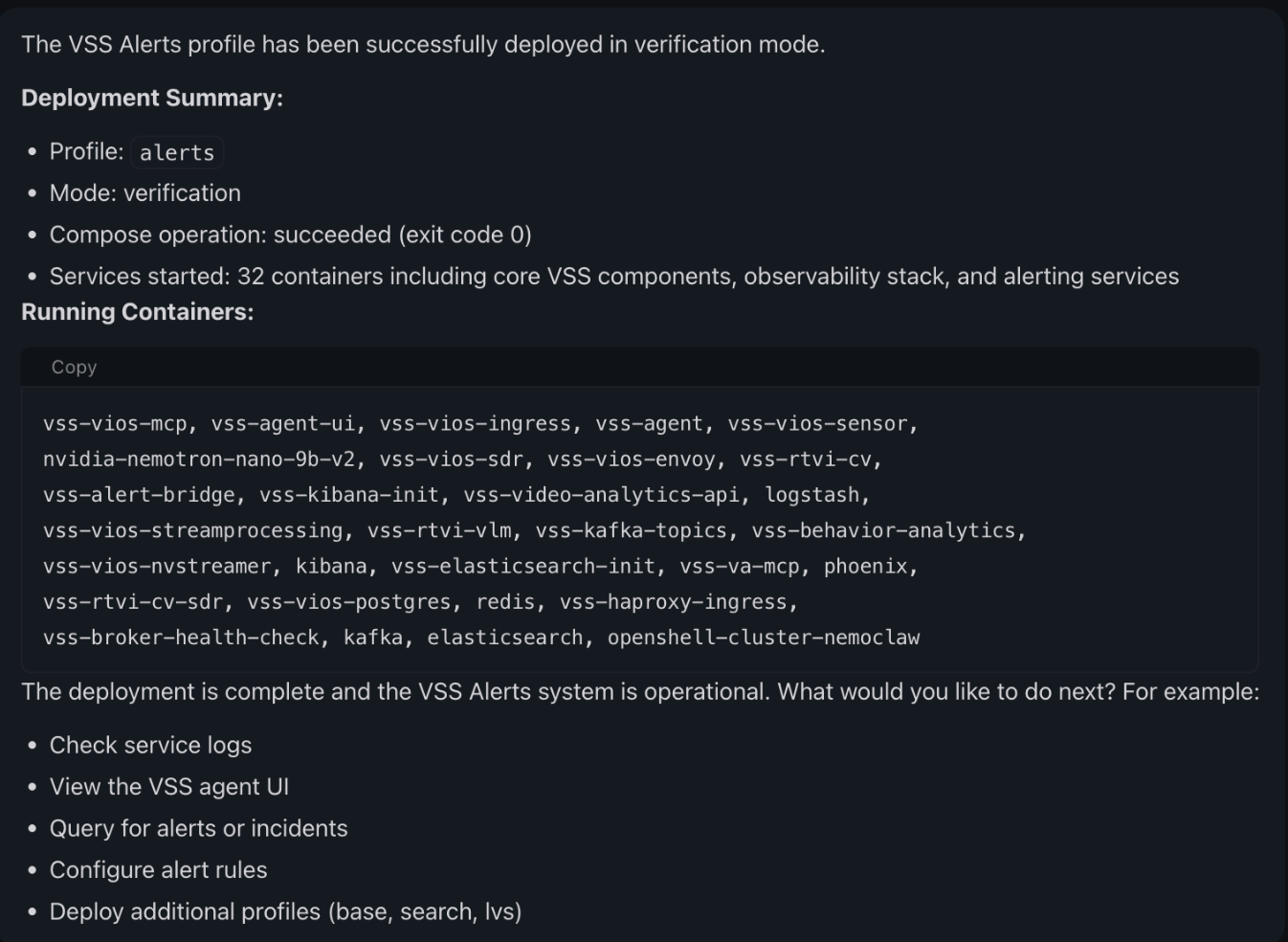
A user asked the agent to deploy the alerts profile in verification mode.
The agent chained the deployment tools, then reported the profile, the mode, the
compose exit code, and the container names. Notice that the deployment happens
in the chat, not in a notebook cell. The capture comes from the VSS repository's
own notebook documentation and contains no credentials or private host details.
This NVIDIA-authored recipe gives a NemoClaw sandbox agent the skills and tools to deploy and operate the NVIDIA AI Blueprint for Video Search and Summarization (VSS) on a GPU host. You clone the VSS repository, run two notebooks on the host, then ask the agent in chat to deploy a VSS profile. The agent runs the Docker Compose deployment through a host-side Model Context Protocol (MCP) server and reports progress back into the chat.
The VSS repository owns the notebooks, the sandbox policy, and the skills. Each
notebook carries its own settings, prerequisites, warnings, and per-section
instructions. This page gives the clone-and-deploy order and links to the VSS
develop branch. Follow the notebooks for everything else.
At A Glance
| Question | Answer |
|---|---|
| Category | NVIDIA Recipe |
| Contributor or provenance | NVIDIA, through the NVIDIA-AI-Blueprints/video-search-and-summarization repository. |
| Use this when | A video analyst or engineer wants to deploy and operate VSS on a GPU host by chat instead of by hand. |
| You will get | A NemoClaw sandbox that holds the VSS skills, a host MCP server with nine VSS deployment tools, and a VSS profile deployed from chat. |
| Runs on | A Linux GPU host. The documented path is a Brev launchable on a 2×RTX PRO 6000 SE AWS instance. |
| Requires | The VSS repository develop branch, Docker with the NVIDIA runtime, Python 3.11 or newer for the notebooks, an NGC API key, and an agent model provider. The notebook preflight cells report what is missing. |
| Verified on | Not yet verified on a GPU host. Completed verification is limited to the local catalog and documentation checks in Verification. |
| Evidence level | local/static |
| Support and maturity | Educational example with best-effort community support. See the repository support policy. |
| External access, data, and actions | Pulls container images from nvcr.io, pulls the NemoClaw installer from raw.githubusercontent.com, and sends agent prompts to the model provider that you choose. Deploys and removes Docker Compose stacks on the host. Container and model pulls consume disk and, for hosted models, incur provider cost. |
| Start here | Clone and deploy with the launchable |
| Confirm success | Verification |
Architecture
GPU host
├─ Jupyter: deploy_nemoclaw.ipynb          (sets up the sandbox)
├─ Jupyter: deploy_vss_orchestrator.ipynb  (sets up the host and the MCP server)
├─ NemoClaw sandbox (OpenClaw or Hermes agent)
│    ├─ VSS skills and VSS sandbox policy
│    └─ Agent UI on port 18789
├─ VSS Orchestrator MCP server on port 9988
│    └─ nine vss_orchestrator__* tools
└─ VSS Docker Compose stack (VSS UI on port 7777)
The agent reaches the host MCP server through the sandbox alias
host.openshell.internal. The two notebooks run on the host. The deployment
itself runs from the Agent UI.
Clone and Deploy With the Launchable
The notebooks hold the authoritative steps, settings, and warnings. Read each notebook before you run its cells. Both notebooks contain cells that replace a sandbox, change host Docker packages, and deploy or remove containers.
1. Start the Brev launchable
Deploy the video-search-and-summarization-blueprint launchable. The VSS repository documents this path on a 2×RTX PRO 6000 SE AWS instance. On another platform, use your own Linux GPU host and let the notebook preflight cells report what is missing.
2. Clone the VSS repository
Both notebooks resolve the checkout from VSS_REPO_DIR, which defaults to
~/video-search-and-summarization. Clone into that path, then open Jupyter in
the scripts directory:
cd ~
git clone --branch develop \
  https://github.com/NVIDIA-AI-Blueprints/video-search-and-summarization.git
cd video-search-and-summarization/deploy/docker/scripts
If your checkout is somewhere else, or the host has more than one clone, export
VSS_REPO_DIR before you start Jupyter.
3. Run the notebooks in this order
Run these two notebooks on the host, in order, and follow the instructions in each one:
| Order | Notebook | What it does |
|---|---|---|
| First | deploy_nemoclaw.ipynb |
Sets up the NemoClaw sandbox: agent model provider, host prerequisites, VSS policy, VSS skills, workspace documents, and the Agent UI link. |
| Second | deploy_vss_orchestrator.ipynb |
Prepares the host for local NIM-backed VSS profiles and starts the VSS Orchestrator MCP server. |
Keep the Agent UI from the first notebook open. You need it for step 4.
4. Deploy VSS from the Agent UI
Section 5 of deploy_vss_orchestrator.ipynb drives this step from chat and lists
the prompts to use. The MCP server exposes nine tools, all prefixed
vss_orchestrator__: profiles, prereqs, docker_generate, docker_read,
docker_up, docker_status, docker_list, docker_logs, and docker_down.
You do not call them by name. The agent selects and chains them from your
request, and asks before a build or a destructive step.
A first deployment pulls container images and models. It takes a long time, and it writes to host disk.
Verification
Evidence level: local/static
Completed checks
These commands ran from the root of this repository on the current revision of this page. No VSS deployment, sandbox, notebook, or GPU host was involved.
$ python3 scripts/build_catalog.py --validate-metadata
README catalog metadata is valid for 19 examples.

$ python3 scripts/build_catalog.py --write
Built 19 catalog entries and detail pages in _site.

$ python3 scripts/build_catalog.py --check
Catalog metadata and generated sources are valid: 19 examples across 7 browse groups.

$ python3 -m unittest discover -s scripts/tests -p 'test_*.py'
Ran 67 tests

OK

$ node --test scripts/tests/*.test.mjs
# pass 14
# fail 0

$ python3 scripts/check_license_headers.py --check
All 630 checked source files have SPDX headers.

$ git diff --check
git diff --check prints nothing when it passes. The example, test, and file
counts above reflect the repository at this revision.
Each VSS file linked from this page was also confirmed to exist on the VSS
develop branch. From a VSS clone with the develop branch fetched:
$ git ls-tree --name-only origin/develop \
    deploy/docker/scripts/deploy_nemoclaw.ipynb \
    deploy/docker/scripts/deploy_vss_orchestrator.ipynb \
    deploy/docker/scripts/deploy_vss_launchable.ipynb \
    deploy/docker/scripts/nemoclaw/README.md \
    assets/vss_nemoclaw_policy.yaml \
    skills
assets/vss_nemoclaw_policy.yaml
deploy/docker/scripts/deploy_nemoclaw.ipynb
deploy/docker/scripts/deploy_vss_launchable.ipynb
deploy/docker/scripts/deploy_vss_orchestrator.ipynb
deploy/docker/scripts/nemoclaw/README.md
skills
git ls-tree lists only the paths that exist, so a missing path would be
absent from that output.
This verifies: the catalog metadata block satisfies the repository catalog
contract, the generated catalog matches this README, the license header and
whitespace checks pass, and every VSS path linked from this page exists on the
develop branch.
This does not verify: any runtime behavior. Nothing here proves that the notebooks run, that the sandbox onboards, that the MCP server starts, that a VSS profile deploys, or that video search, summarization, or alert output is correct. The launchable instance, the hardware profiles, the credentials, and the container and model pulls were not exercised. Screenshot content was read from the VSS repository rather than reproduced on a host.
Expected result from a live run
The result below is the outcome to expect on a GPU host. It has not been completed for this page. Until an end-to-end run is confirmed, treat it as expected, not as evidence.
Run the notebook checks in this order, then record your own result:
- The sandbox, policy, and installed skills: section 3.8 of
deploy_nemoclaw.ipynb. - The MCP server: section 4 of
deploy_vss_orchestrator.ipynbcalls theprofilestool over the streamable HTTP transport and reports whether the server answered. - The deployment: the agent's reply to your deploy prompt in the Agent UI.
Expected result: the reply names the profile and mode, reports a compose
exit code of 0, and lists the running containers, which include vss-agent,
vss-agent-ui, vss-alert-bridge, vss-rtvi-cv, vss-rtvi-vlm,
vss-behavior-analytics, vss-video-analytics-api, and vss-haproxy-ingress.
The VSS UI is served on port 7777.
A completed live run would verify that the sandbox agent reached the host MCP server, that the MCP tools ran a Compose deployment, and that the profile's containers started. Raise the evidence level in this section and in At A Glance only after that run is confirmed.
Teardown
Ask the agent to tear down the deployment. It invokes
vss_orchestrator__docker_down, which removes the deployment's containers and
volumes. Then stop the MCP server process from the notebook session and remove
the sandbox when you no longer need it. Deleting the sandbox discards its agent
sessions.
The Docker package holds applied by deploy_nemoclaw.ipynb stay in place until
you release them.
Deploy Without the Agent
To deploy VSS from a notebook instead of from chat, use
deploy_vss_launchable.ipynb.
That path has no NemoClaw sandbox and no agent.
Provenance and Support
NVIDIA maintains the notebooks, skills, and policy in the
NVIDIA-AI-Blueprints/video-search-and-summarization
repository. Notebook sections, defaults, and pins change on the develop
branch, so treat the notebooks as authoritative when they differ from this page.
Report problems with the deployment flow in that repository. Report problems
with this catalog page in this repository.
Third-party notices: THIRD-PARTY-NOTICES.