Tutorial Curriculum
Tutorials teach; they are not a lookup reference. Each module introduces one mental model, asks you to change or inspect something concrete, and ends with a self-check. Start after completing Getting Started; the first modules reuse the GPT-2 bundle from the Quick Start instead of asking you to rebuild it.
Use User Guides when you already know the concept and need a command for speech, diffusion, text, or another task. Use Reference for exact option and API details.
Course contract
Each module has four parts, adapted from strong public technical courses and hands-on learning sites:
- Learning objectives state what you should be able to explain or do.
- Lab applies one concept to a real bundle, task, or source boundary.
- Evidence checkpoint gives an observable success condition.
- Self-check asks you to predict or explain the behavior before opening the answer key.
Do not measure progress by page completion. Move on when you can satisfy the module milestone and answer its self-check without copying the prose.
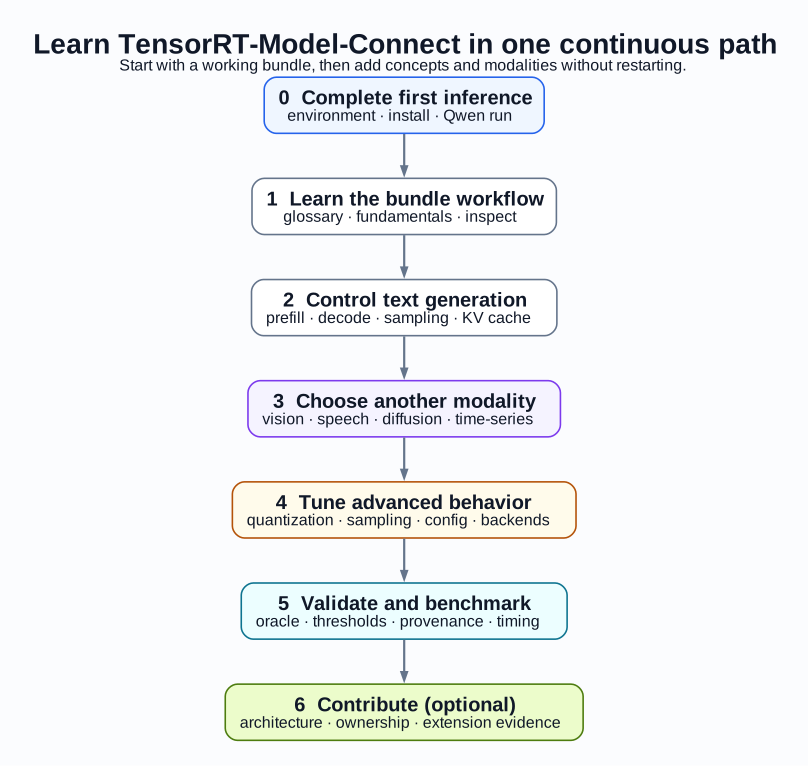
You do not have to complete every modality. Follow the common foundations through text generation, then choose the task labs that match your workload.
Module 0: Complete the first inference
Read and run these pages in order:
Milestone: trtmc run returns generated text from ./gpt2.bundle, and
inspect reports the gpt2 family with the expected bundle sections.
If that milestone does not pass, stay in Getting Started. Architecture, quantization, and other model recipes will add variables without fixing the environment boundary.
Module 1: Learn the bundle workflow
Read:
- Glossary when a term is unfamiliar.
- Inference Fundamentals for the checkpoint-to-result mental model.
- Inspect Bundles for artifact-first debugging.
Use the bundle you already built. Inspect its metadata and section list, then identify which evidence came from model conversion, which was stored in the bundle, and which was produced only when the C++ runtime loaded it.
Milestone: you can explain why a Hugging Face checkpoint, a TensorRT engine,
and a .bundle bundle are different artifacts.
Module 2: Control text generation
Continue with Text Generation. Reuse
./gpt2.bundle to compare deterministic decoding with sampling
controls such as temperature, top-k, top-p, min-p, and a fixed seed.
Use the CLI Reference when you need the exact option surface. The tutorial teaches the behavior; the API menu is the lookup source.
Milestone: you can choose deterministic or sampled decoding intentionally and can reproduce a seeded request.
Module 3: Choose another modality
Choose one or more branches:
| Goal | Tutorial | What changes from text generation |
|---|---|---|
| Image-conditioned text or speech/audio | Multimodal and Speech | Preprocessing, bundle sections, task method, and output type. |
| Canary ASR decoding details | Canary Decoding | Timestamp-aware token handling and speech-specific decoding. |
| Image/video diffusion or time-series | Diffusion, Vision, and Time-Series | Denoising or forecasting replaces token-by-token generation. |
The diffusion tutorial includes progressively larger FLUX, PixArt, Wan, and Thor-qualified Wan2.2 recipes. Do not use the Thor recipe as a first-run environment test.
Use Model Recipes only as an optional task index. Each recipe can add model-specific dependencies and hardware demands; it is not another Getting Started path.
Milestone: for the modality you chose, you can name the input preprocessing, engine components, public task method, and returned result type.
Module 4: Tune advanced behavior
Read:
- Quantization and Runtime Knobs
- Run Inference on Multiple GPUs
- Sampling
- Quantization
- Multi-Device Execution
- Configuration and Backends
Change one variable at a time and inspect the resulting bundle. A smaller or faster build is not automatically an accuracy-equivalent build. Multi-device topologies also require an exact model manifest and one runtime rank per GPU; the generic build flag alone does not establish support.
Milestone: you can identify whether a setting belongs to build-time model conversion, bundle metadata, runtime configuration, or request-time decoding, and can distinguish build-time topology metadata from launcher/runtime process count.
Module 5: Validate and benchmark
Follow Validation and Benchmarking, then use Testing and Benchmarking as references.
Record the exact model revision, bundle configuration, hardware/software cohort, command, oracle, and thresholds. A successful documentation build or a single plausible output is not model-parity evidence.
Milestone: another developer can reproduce what you measured and can tell which claims your evidence does and does not support.
Module 6: Optional architecture and contributor branch
Stop here if you only need to use the product. To understand or change the implementation, continue with:
- Developer Guide
- Architecture Overview
- Units and Ownership
- Build Pipeline
- Runtime Lifecycle
- Validation Design
- Extension Overview
Then choose the extension guide owned by your change:
- Add a Model Family
- Add Complete-Network Platform Offload
- Extend a Family Runtime
- Add an Explicit Configuration Field
- Validate a Model Contribution
- Bring Your Own Kernel
- Contributing
Bring Your Own Kernel is an advanced extension workflow, not part of the beginner or common user path. Use it only when replacing or adding a kernel implementation is the goal.
Milestone: before editing, you can name the family-owned Python entry, runtime DSO owner, public API boundary, tests, E2E manifest, and documentation that form the vertical slice of your change.