DAQIRI Connects Sensor Data to the NVIDIA Compute Ecosystem
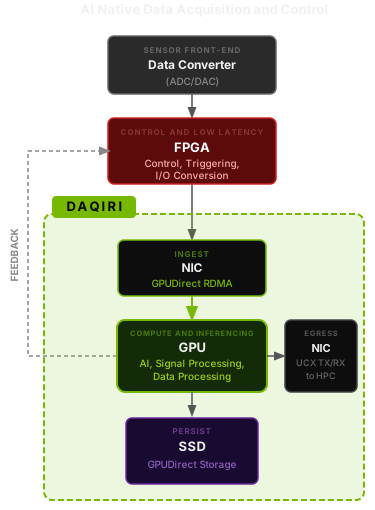
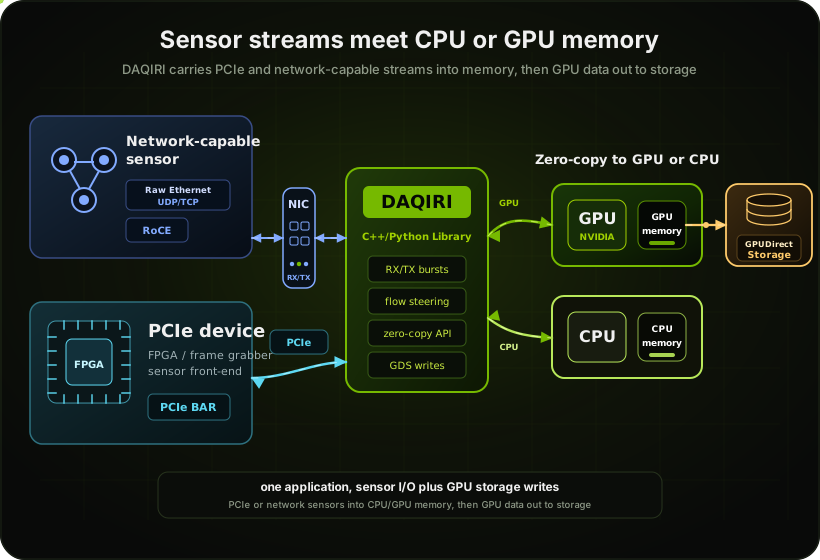
DAQIRI (Data Acquisition for Integrated Real-time Instruments) moves high-bandwidth data between external sensors and GPU, CPU, or storage devices. Streams can arrive from PCIe devices such as FPGAs or from network-capable sensors over Raw Ethernet (UDP/TCP) or RoCE/RDMA, giving applications one zero-copy path for ingest and egress. DAQIRI not only accelerates data movement and storage at the instrument but can also be used to connect sensor data to HPC and Cloud systems.
Closing the Gap Between Sensor and GPU
Scientific and industrial instruments generate data that is richest at the source, before it is filtered, decimated, or summarized. DAQIRI puts NVIDIA GPU hardware directly in that data path, connecting sensors and their data converters to the NVIDIA compute ecosystem. That lets developers work with instrument data in its rawest form, at wire speed, and build experiments where AI can read the data as it arrives, assist with analysis, and adjust the experiment in real time. Stream data into and out of GPUs efficiently using common tensor-compute libraries.
Scalable, High Throughput
Hundreds of gigabits per second with proper hardware and CPU/NUMA tuning. Direct access to NIC ring buffers keeps latency at PCIe transit time only.
GPUDirect Zero-Copy
Two GPU receive modes: Header-data split (headers to CPU, payload to GPU, recommended) and Batched GPU (entire packets to GPU for maximum bandwidth).
Hardware Flow Steering
Route packets based on header matching to steer different streams to different GPUs or CPUs, entirely in NIC silicon, before any software runs.
RDMA over Converged Ethernet
Run RDMA READ, WRITE, and SEND over standard Ethernet via RoCE, with no specialized InfiniBand fabric required. The same libibverbs API also supports InfiniBand for environments where it is available.
YAML-Driven Configuration
Define memory regions, NIC interfaces, TX/RX queues, and flow rules in a single YAML file, or build the same config in C++ code. Switch stream types, memory kinds, and buffer sizes without recompiling.
Containerized Deployment
A ready-to-run container bundles all userspace dependencies including a dmabuf-patched DPDK, with no host-side dependency setup and no peermem kernel module. Go from docker pull to running benchmarks in minutes.
Build & Run in Minutes
Runs on Linux (kernel 5.15+) with the CUDA Toolkit 12.2+. The kernel-bypass and GPUDirect paths additionally require an NVIDIA ConnectX-6 Dx (or newer) NIC.
Install Prerequisites
Install the CUDA Toolkit (12.2 or newer).
For the Raw Ethernet / GPUDirect / RoCE path, you also need an NVIDIA ConnectX-6 Dx (or newer) NIC. The default Ubuntu kernel drivers are sufficient. We also recommend installing doca-ofed for the diagnostic utilities (ibstat, ibv_devinfo, mlxconfig, mlnx_perf, and so on).
Build from Source
Select optional engines with DAQIRI_ENGINE. Valid values: dpdk, ibverbs. Linux sockets are always built in.
# Configure, build, install
cmake -S . -B build \
  -DBUILD_SHARED_LIBS=ON \
  -DDAQIRI_BUILD_PYTHON=OFF \
  -DDAQIRI_ENGINE="dpdk ibverbs"
cmake --build build -j
cmake --install build --prefix /opt/daqiri
Or Build the Container
The Dockerfile builds DPDK from source with dmabuf patches, so no peermem is needed inside the container. Set BASE_IMAGE=torch to build on top of NGC PyTorch for Torch / TensorRT inference workflows.
BASE_TARGET=dpdk \
  DAQIRI_ENGINE="dpdk ibverbs" \
  scripts/build-container.sh
Tune the System
Run the diagnostic script to surface common networking bottlenecks (CPU governor, hugepages, MRRS, NUMA, GPU clocks, MTU, BAR1, PCIe topology):
sudo python3 python/tune_system.py --check all
Run a Benchmark
Edit the YAML to match your hardware (PCIe BDF, CPU cores, IPs), then:
./build/examples/daqiri_bench_raw_gpudirect \
  examples/daqiri_bench_raw_tx_rx.yaml \
  --seconds 10
Initialize & Receive PacketsC++
#include <daqiri/daqiri.h>

// Init from YAML config
daqiri::daqiri_init("config.yaml");

// Non-blocking burst receive
daqiri::BurstParams *burst;
auto s = daqiri::get_rx_burst(
    &burst, port_id, queue_id);

if (s == daqiri::Status::SUCCESS) {
  int n = daqiri::get_num_packets(burst);
  for (int i = 0; i < n; i++) {
    void* p = daqiri::get_packet_ptr(
        burst, i);
    // process p ...
  }
  daqiri::free_all_packets_and_burst_rx(
      burst);
}
Header-Data Split (GPU payload)C++
// Seg 0 = headers (CPU)
// Seg 1 = payload (GPU)
for (int i = 0; i < n; i++) {
  void* hdr =
    daqiri::get_segment_packet_ptr(
        burst, 0, i);
  void* pay =
    daqiri::get_segment_packet_ptr(
        burst, 1, i); // GPU ptr
  uint32_t hlen =
    daqiri::get_segment_packet_length(
        burst, 0, i);
  uint32_t plen =
    daqiri::get_segment_packet_length(
        burst, 1, i);
  // pay is already on GPU, no copy
}
Examples
Get started with DAQIRI by exploring commonly used features when building real time sensor processing applications.
| Example | Type | Description |
|---|---|---|
| Raw TX/RX GPUDirect ↗ | C++ | The recommended starting point. Sends and receives packets with payloads landing directly in GPU memory, with no CPU in the data path. Use this to validate your hardware setup and measure baseline throughput. |
| Header-Data Split TX/RX ↗ | C++ | Splits each incoming packet into two segments: headers land in CPU memory for inspection, while the payload goes directly to the GPU. Useful when your application needs to read per-packet metadata without touching the payload on the CPU. |
| Runtime Named Endpoints ↗ | C++ | Registers raw Ethernet/IPv4/UDP destinations at runtime and sends payload-only GPU buffers. DAQIRI reuses each cached header inline in the mlx5 send WQE while the application selects the TX queue per burst. |
| Sequence Reorder ↗ | C++/CUDA | Reassembles out-of-order UDP packets into a correctly ordered GPU buffer. A CUDA kernel reads the sequence number embedded in each packet header and places the packet at the right position, so downstream compute always sees a clean, ordered stream. |
| Sequence Reorder + Quantize ↗ | C++/CUDA | Extends sequence reorder with an in-kernel type conversion step (e.g., int4 → fp32), so the GPU buffer is both reordered and in the format your compute pipeline expects, all before your application code runs. |
| PCAP Writer ↗ | C++ | Captures live network traffic to a standard .pcap file you can open in Wireshark or tcpdump. Packets are received via GPUDirect and staged through pinned host memory to disk. Capture continues until you press Ctrl+C. |
| RDMA Benchmark ↗ | C++ | Measures RoCE/RDMA throughput in client/server mode. Useful for comparing DAQIRI against standard tools like ib_send_bw, or when one endpoint is a third-party RDMA device such as an FPGA or instrument. |
| Socket Benchmark ↗ | C++ | Measures TCP and UDP throughput over standard Linux sockets, with no ConnectX NIC or special privileges required. A good comparison baseline before moving to kernel-bypass, or for connecting to a peer that only speaks standard sockets. |
| GPUDirect Storage Write ↗ | C++/CUDA | Captures a burst of packets and writes them from GPU memory directly to NVMe storage via cuFile, in either raw binary or PCAP format. Supports both synchronous and asynchronous writes, demonstrating the full GPU-to-storage path without any CPU copy. |
Tutorials
Step-by-step guides from first build to production-grade deployment.
doca-ofed for diagnostics, and CUDA Toolkit 12.2+ on Linux 5.4+.DAQIRI_ENGINE / DAQIRI_BUILD_PYTHON / CMAKE_CUDA_ARCHITECTURES, install, smoke-test, troubleshoot.build-container.sh. The container ships a dmabuf-patched DPDK, so peermem is not required.python/tune_system.py to diagnose common configuration issues.huge, device, host_pinned), RX/TX queue setup, flow steering rules, flex items, and RDMA client/server config schemas.get_segment_packet_ptr(), and reorder scattered GPU buffers with the built-in CUDA kernel.accurate_send in the TX config and use set_packet_tx_time() for PTP-synchronized, hardware-scheduled packet transmission on ConnectX-7+.reorder_configs, an SPSC ring decoupling RX from inference, and zero-copy TensorRT FP16 inference on the reorder output.Connect Your Sensors to the NVIDIA Ecosystem
Clone the repo, build with CMake, and start streaming sensor data directly into your GPU-accelerated pipeline today.
# Clone and build
git clone https://github.com/NVIDIA/daqiri
cmake -S daqiri -B build \
  -DBUILD_SHARED_LIBS=ON \
  -DDAQIRI_ENGINE="dpdk ibverbs"
cmake --build build -j