Architecture
This page discusses the high level architecture of a site running NCX Infra Controller (NICo).
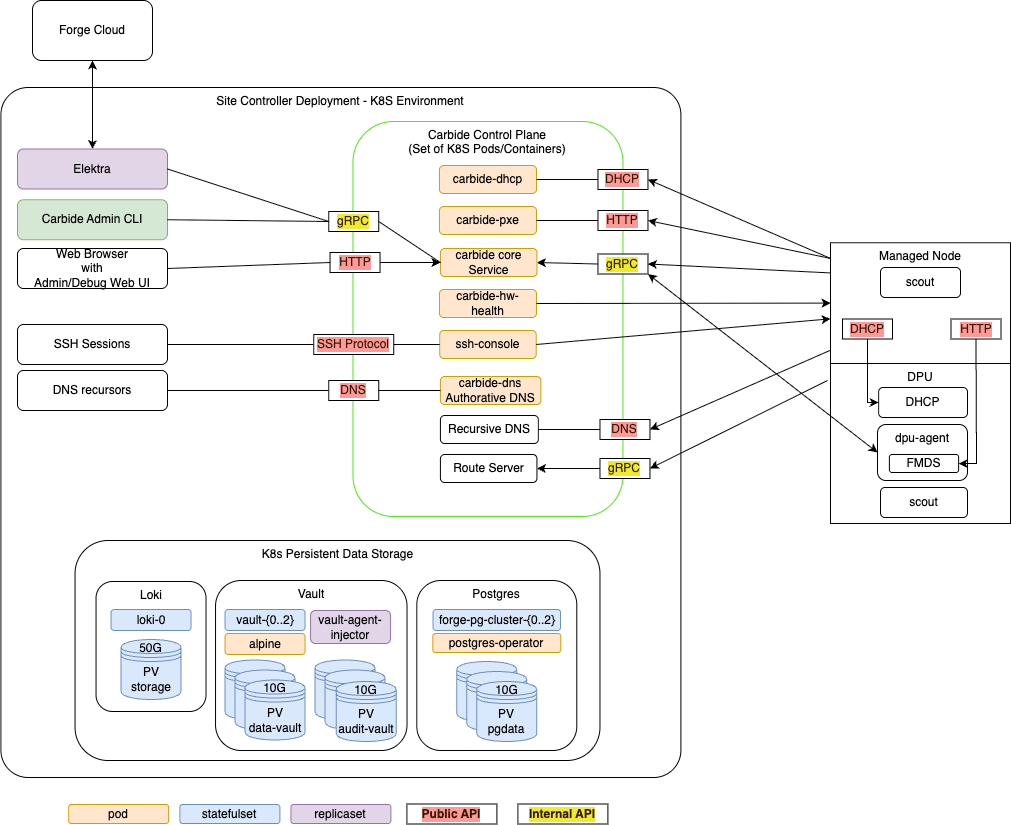
NICo orchestrates the lifecycle of "Managed Hosts" and other resources via set of cooperating control plane services. These control plane services have to be deployed to a Kubernetes cluster with a size of at least 3 nodes (for high availability).

The Kubernetes cluster needs to have variety of services deployed:
- The Carbide control plane services. These services are specific to Carbide, and must be deployed together in order to allow Carbide to manage the lifecyle of hosts.
- Dependency services. Carbide requires "off-the-shelf" dependencies like Postgres, Vault and telemetry services deployed and accessible.
- Optional services. A variety of services in tools within the deployment that interfact with the Carbide deployment, but are not required continuously for the control plane to operate.
The following chapters look at each of these in more detail.
Managed Hosts
A "Managed Host" is a host whose lifecycle is managed by Carbide.
The managed host consists of various internal components that are all part of the same chassis or tray:
- The actual x86 or ARM host, with an arbitrary amount of GPUs
- One or more DPUs (of type Bluefield 2 or Bluefield 3) plugged into the host
- The BMC that is used to manage the host
- The BMC that is used to manage the DPU
Carbide deploys a set of binaries on these hosts during various points of their lifecycle:
Scout
scout is an agent that Carbide runs on the host and DPU of managed hosts for a variety of tasks:
- "Inventory" collection: Scout collects and transmits hardware properties of the host to carbide-core which can not be determined through out-of-band tooling.
- Execution of cleanup tasks whenever the bare metal instance using the host is released by a user
- Execution of machine validation tests
- Periodic Health checks
DPU Agent
dpu-agent is an agent that Carbide runs exclusively on DPUS managed by Carbide as a daemon.
DPU agent performs the following tasks:
- Configuring the DPU as required at any state during the hosts lifecycle. This process is described more in depth in DPU configuration.
- Executing periodic health-checks on the DPU
- Running the Forge metadata service (FMDS), which provides the users on the bare metal instance a HTTP based API to retrieve information about their running instance. Users can e.g. use FMDS to determine their Machine ID or certain Boot/OS information.
- Enabling auto-updates of the dpu-agent itself
- Deploying hotfixes for the DPU OS. These hotfixes reduce the need to perform a full DPU OS reinstallation, and thereby avoid bare metal instances becoming unavailable for their users due to OS updates.
DHCP Server
Carbide runs a custom DHCP server on the DPU, which handles all DHCP requests of the actual host. This means DHCP requests on the hosts primary networking interfaces will never leave the DPU and show up on the underlay network - which provides enhanced security and reliability. The DHCP server is configured by dpu-agent.
Carbide Control plane services
The carbide control plane consists of a number of services which work together to orchestrate the lifecycle of a managed host:
- carbide-core: The Carbide core service is the entrypoint into the control plane. It provides a gRPC API that all other components as well as users (site providers/tenants/site administrators) interact with, as well as implements the lifecycle management of all Carbide managed resources (VPCs, prefixes, Infiniband and NVLink partitions and bare metal instances). The Carbide Core section describes it further in detail.
- carbide-dhcp (DHCP): The DHCP server responds to DHCP requests for all devices on underlay networks. This includes Host BMCs, DPU BMCs and DPU OOB addresses. carbide-dhcp can be thought of as a stateless proxy: It does not acutally perform any IP address management - it just converts DHCP requests into gRPC format and forwards the gRPC based DHCP requests to carbide core.
- carbide-pxe (iPXE): The PXE server provides boot artifacts like iPXE scripts, iPXE user-data and OS images to managed hosts at boot time over HTTP. It determines which OS data to provide for a specific host by requesting the respective data from carbide core - therefore the PXE server is also stateless. Currently, managed hosts are configured to always boot from PXE. If a local bootable device is found, the host will boot it. Hosts can also be configured to always boot from a particular image for stateless configurations.
- carbide-hw-health (Hardware health): This service scrapes all host and DPU BMCs known by Carbide for system health information. It extracts measurements like fan speeds, temperaturs and leak indicators. These measurements are emitted as prometheus metrics on a
/metricsendpoint on port 9009. In addition to that, the service calls the carbide-core APIRecordHardwareHealthReportto set health alerts based on issues identified within the metrics. These alerts are merged within carbide-core into the aggregated-host-health - which is emitted in overall health metrics and used to decide whether hosts are usable as bare metal instances for tenants. - ssh-console: The SSH console provides bare metal-tenants and site-administrators virtual serial console access to hosts managed by Carbide. The ssh-console service also sends the output of each hosts serial console to the logging system (Loki), from where it can be queried using Grafana and logcli. In order to provide this functionality, the ssh-console service continuously connects to all host BMCs. The ssh-console service only forwards logs to users ("bare metal tenants") if they connect to the service and get authenticated.
- carbide-dns (DNS): Domain name service (DNS) functionality
is handled by two services. The
carbide-dnsservice handles DNS queries from the site controller and managed nodes and is authoritative for delegated zones.
Carbide Core
Carbide core is the binary which provides the most essential services within the Carbide control plane. It provides a gRPC API that all other components as well as users (site providers/tenants/site administrators) interact with, as well as implements the lifecycle management of all Carbide managed resources (VPCs, prefixes, Infiniband and NVLink partitions and bare metal instances).
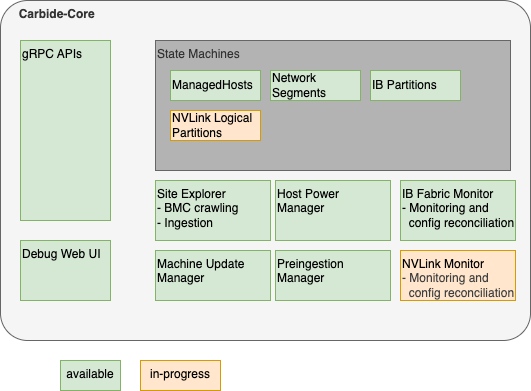
Carbide core can be considered as a "collection of independent components that are deployed within the same binary". These components are shown the following diagram, and are described further below:
Carbide core is the only component within carbide which interacts with the postgres database. This simplifies the rollout of database migrations throughout the product lifecycle.
Carbide Core Components
gRPC API handlers
The API handlers accept gRPC requests from Carbide users and internal system components. They provide users the ability to inspect the current state of the system, and modify the desired state of various components (e.g. create or reconfigure bare metal instances).
API handlers are all implemented within the trait/interface rpc::forge::forge_server::Forge. Various implementations delegate to the handlers subdirectory. For resources managed by Carbide, API handlers do not directly change the actual state of the resources (e.g. the provisioning state of a host). Instead of it, they only change the required state (e.g. "provisioning required", "termination required", etc). The state changes will be performed by state machines (details below). The carbide-core gRPC API supports
gRPC reflection to provide a machine readable API
description so clients can auto-generate code and RPC functions in the client.
Debug Web UI
Carbide core provides a debug UI under the /admin endpoint. The debug UI allows to inspect the state of all resources managed by Carbide via a variety of HTML pages. It e.g. allows to list details about all managed hosts and DPUs, or about the internal state of other components that are described within the Carbide Core section.
The Debug UI also provides access to various admin level tools. E.g. it
- allows to change the power state of hosts, reset the BMC, and change boot orders
- inspect the redfish tree of any BMC managed by Carbide
- allows admins to perform changes to a BMC (via HTTP POST) in a peer-reviewed and auditable fashion
- inspect UFM responses
State Machines
Carbide implements State Machines for all resources managed by Carbide. The state machines are implemented as idempotent state handling functions calls, which are scheduled by the system. State handling for various resource types is implemented indepently, e.g. the lifecycle of hosts is managed by different tasks and different code than the lifecycle of InfiniBand partitions.
Carbide implements state machines for
- Managed Hosts (Hosts + DPUs)
- Network Segments
- InfiniBand Partitions
- NVLink Logical Partitions
Details about the Carbide state handling implementation can be found here.
Site Explorer
Site Explorer is a process within Carbide Core that continuously monitors the state of all BMCs that are detected within the underlay network. The process acts as a "crawler". It continuously tries to perform redfish requests against all IPs on the underlay network that were provided by Carbide Core and records information that Carbide is required to manage the hosts in a follow-up. The information collected by Carbide is
- Serial Numbers
- Certain inventory data, e.g. the amount, type and serial numbers of DPUs
- Power State
- Configuration data, e.g. boot order, lockdown mode
- Firmware versions
Carbide users can inspect the data that site explorer discovers using the FindExploredEndpoints APIs as well as using the Carbide Debug Web UI.
Site Explorer requires an "Expected Machines" manifest to be deployed. Expected Machines describes the set of Machines that is expected to be managed by the Carbide instance - it encodes BMC MAC addresses, hardware default passwords and other details of these Machines. The manifest can be updated using a set of APIs, e.g. ReplaceAllExpectedMachines.
Beyond the basic BMC data collection, Carbide also performs the following tasks:
- It matches hosts with associated DPUs based on the redfish reports of both components - e.g. both the host an DPU need to reference the same DPU serial number.
- It kickstarts the ingestion process of the host once the host is in an "ingestable" state (all components are found and have up to date firmware versions).
Site Explorer emits metris with the prefix forge_endpoint_ and forge_site_explorer_.
Preingestion Manager
Preingestion Manager is a component which updates the firmware of hosts that are below the minimum required firmware version that is required to be ingestable. Usually firmware updates to hosts are deplyoed within the main machine lifecycle, as managed by the ManagedHost state machine.
In some rare cases - e.g. with very old host or DPU BMCs - the host ingestion process can't be started yet - e.g. because the BMC does not provide the necessary information to map the host to DPUs. In this case the firmware needs to be updated before ingestion, and preingestion manager performs this task.
Machine Update Manager
Machine Update Manager is a scheduler for Host and DPU firmware updates. It selects Machines with outdated software versions for automated updates. Machine update manager looks at various criteria to determine whether a Machine should get updated:
- The current Machine state - e.g. whether its occupied by a tenant. Right now only Machines within the
Readystate are selected for automated software updates - Whether the machine is healthy (no health alerts recorded on the machine)
- How many machines are already updating, and the overall amount of healthy hosts in the machine. Machine Update Manager will never update all Machines at once, and won't schedule additional updates in case the temporary loss of Machines would move the site under the Machine health SLA.
Machine Update Manager does not perform the actual updates - it only performs scheduling/selection. The updates are instead applied within the ManagedHost state machine. This approach is chosen in order to assure that only a single component (managedhost state machine) is managing a hosts lifecycle at any point in time.
Machine Update Manager is an optional component and can be disabled.
Host Power Manager
Host Power Manager is a component which orchestrates power actions against BMCs.
IB (InfiniBand) Fabric Monitor
InfiniBand fabric monitor is a periodic process within Carbide that performs all interactions with the InfiniBand fabric using UFM APIs.
In each run, IBFabricMonitor performs the following task:
- It checks the health of the fabric manager (UFM) by performing API calls
- It checks whether all security configurations for multitenancy are applied on UFM and emits alerts in case of inappropriate settings
- It fetches the actually applied InfiniBand partitioning information for each InfiniBand port on each host managed by Carbide and stores it in Carbide. The data can be inspected in the
Machine::ib_statusfield in the gRPC API. - If calls UFM APIs to bind ports (guids) to partitions (pkeys) according to the configuration of each host. This happens continuosly based on comparing the expected InfiniBand configuration of a host (whether it is used by a tenant or not, and how the tenant configured the InfiniBand interfaces) with the actually applied configuration (determined in the last step).
InfiniBand Fabric Monitor is an optional component. It only needs to be enabled in the case Carbide managed InfiniBand is required.
IB Fabric Monitor emits metrics with prefix forge_ib_monitor_.
NVLink Monitor
In development. The NVLink monitor will have similar responsibilities as IBFabricMonitor, but is used for monitoring and configuring NVLink. It will therefore interact with NMX APIs.
Dependency services
In addition to the Carbide API server components there are other supporting services run within the K8s site controller nodes.
K8s Persistent Storage Objects
Some site controller node services require persistent, durable storage to maintain state for their attendant pods. There are three different K8s statefulsets that run on the controller nodes:
- Loki - The loki/loki-0 pod instatites a single 50GB persistent volume and is used to store logs for the site controller components.
- Hashicorp Vault - Used by Kubernetes for certificate signing requests (CSRs). Vault
uses three each (one per K8s control node) of the
data-vaultandaudit-vault10GB PVs to protect and distribute the data in the absence of a shared storage solution. - Postgres - Used to store state for any Carbide or site controller components that
require it including the main "forgedb". There are three 10GB
pgdataPVs deployed to protect and distribute the data in the absence of a shared storage solution. Theforgedbdatabase is stored here.
Optional services
The point of having a site controller is to administer a site that has been populated with tenant managed hosts. Each managed host is a pairing of a Bluefield (BF) 2/3 DPUs and a host server (only two DPUs have been tested). During initial deployment scout runs and informs carbide-api of any discovered DPUs. Carbide completes the installation of services on the DPU and boots into regular operation mode. Thereafter the forge-dpu-agent starts as a daemon.
Each DPU runs the forge-dpu-agent which connects via gRPC to the API service in Carbide to get configuration instructions.
The forge-dpu-agent also runs the Forge metadata service (FMDS), which provides the users on the bare metal instance a HTTP based API to retrieve information about their running instance. Users can e.g. use FMDS to determine their Machine ID or certain Boot/OS information.