
Adding custom feature to precision debug tools#
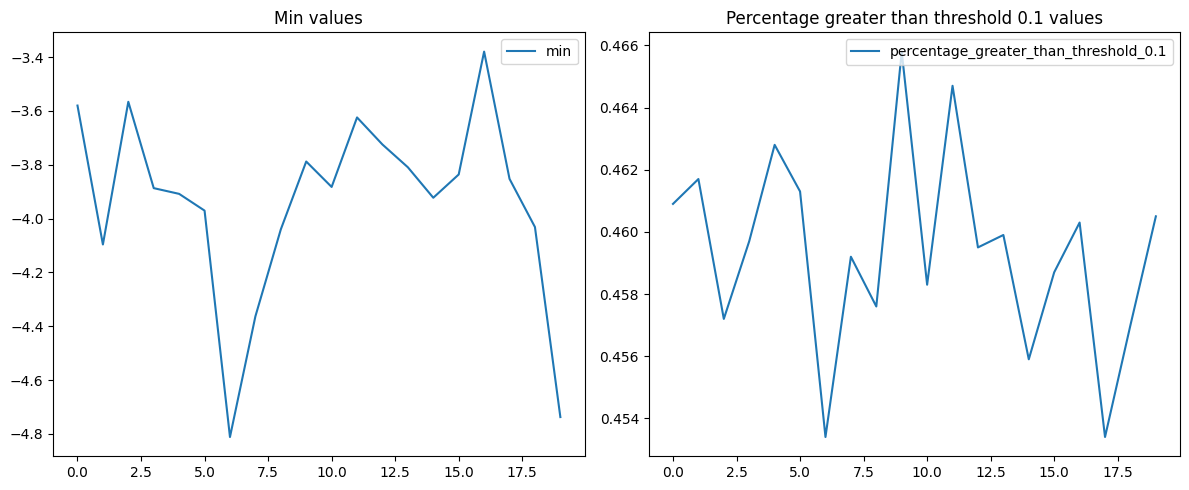
TE comes with several built-in features, such as LogFp8TensorStats, which can log statistics for each tensor involved in matrix multiplication (GEMM) operations. In this tutorial, we’ll demonstrate how to extend TE by adding a custom feature. This custom feature will log the percentage of elements in a tensor whose absolute values exceed a configurable threshold t, as specified in the config file.
Custom features can be used for example for:
Logging custom statistics.
Dumping intermediate tensors.
Experiments with modifying intermediate tensors.
How to add custom feature:
Add Python with feature class definition which inherits from
transformer_engine.debug.features.api.TEConfigAPIMapper.Wrap the class with
@Registry.register_feature(namespace="transformer_engine").Implement some of API calls to nvidia-dl-framework-inspect described here.
Let’s define a new file at .../custom_feature_dir/percentage_greater_than_threshold.py containing the following code:
[1]:
from IPython.display import Code
Code(filename='./custom_feature_dir/percentage_greater_than_threshold.py', language='python')
[1]:
stats:
  enabled: True
  layers:
    layer_name_regex_pattern: .*
  transformer_engine:
    PercentageGreaterThanThreshold:
      enabled: True
      tensors: [activation]
      threshold: 0.1
      freq: 5
    LogTensorStats:
      enabled: True
      tensors: [activation]
      stats: [min]
      freq: 5
To use this feature one needs to add .../custom_feature_dir to debug_api.initialize(feature_dirs=....
[3]:
import os, time
import torch
import transformer_engine.pytorch as te
import nvdlfw_inspect.api as debug_api

te_dir = os.environ["TE_PATH"] # setup TE dir as environment variable to run this script
log_dir = os.environ.get("LOG_PATH", "./log")

debug_api.initialize(
    config_file=te_dir + "/docs/debug/custom_feature_dir/custom_feature_example_config.yaml",
    feature_dirs=[
        te_dir + "/transformer_engine/debug/features",
        te_dir + "/docs/debug/custom_feature_dir" # One needs to add path to the custom feature dir here
    ],
    log_dir=log_dir,
    default_logging_enabled=True)

debug_api.set_tensor_reduction_group(None) # For distributed training one needs to set the reduction group

module = te.Linear(128, 128, name="linear_1")
inp = torch.randn(128, 128).cuda()

# Simple training loop with measuring the time
times = []
for _ in range(100):
    time_start = time.time()
    inp.normal_()
    out = module(inp)
    out.sum().backward()
    torch.cuda.synchronize()
    time_end = time.time()
    times.append(time_end - time_start)

    debug_api.step()
NVDLFW INSPECT - 2025-10-17 14:16:42,204 - WARNING - Reduction group initialized for tensor reduction before logging statistics. If per-rank statistics are required, pass `skip_reduction=True` when invoking the API. To pass another reduction group, use `reduction_group` kwarg when invoking the API.
Now, let’s plot the gathered stats.
[4]:
from custom_feature_dir.utils import plot_stats

plot_stats(log_dir)