

Performance Considerations#
Handling transposes#
In the last chapter we demonstrated that for FP8 on Hopper architecture, some tensors need to be physically transposed in memory to perform needed GEMMs. Dealing with transposes in Transformer low precision training is a bit tricky. Let’s start by introducing the concept of tensor usages.
Tensor usages
Each quantized tensor may have two usages:
rowwise usage – which is used for matrix multiplication, when the consecutive elements in row are accessed,
columnwise usage – which is used for matrix multiplication, when the consecutive elements in column are accessed,
To understand what access of consecutive elements means, let’s consider two matrices A and B
and analyze how their elements are accessed during multiplication.
For NN (non-transposed, non-transposed) multiplication C = A * B, the formula is C_ij = sum_k(A_ik * B_kj).
To compute element C_ij, we iterate over the i-th row of A (elements A_i0, A_i1, ...)
and the j-th column of B (elements B_0j, B_1j, ...). Thus, A is accessed rowwise
and B is accessed columnwise.
For NT (non-transposed, transposed) multiplication C = A * B^T, the formula changes to C_ij = sum_k(A_ik * B_jk).
Now we iterate over the i-th row of A and the j-th row of B (elements B_j0, B_j1, ...).
Both tensors are accessed rowwise.
The figure below illustrates these access patterns:
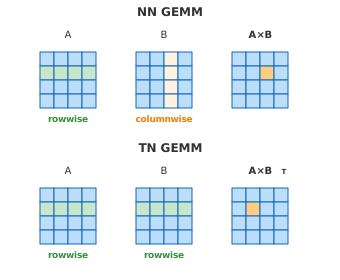
Figure 1: Access patterns in matrix multiplication for matrices in A * B and A * B^T operations.#
Based on the visualization above, we can derive general rules for when each matrix is accessed in rowwise or columnwise fashion. The key insight is that:
The first tensor in a matrix multiplication is accessed along its rows (rowwise) when non-transposed, or along its columns (columnwise) when transposed.
The second tensor follows the opposite pattern: columnwise when non-transposed, rowwise when transposed.
First tensor |
Second tensor |
|
Non-transposed |
rowwise |
columnwise |
Transposed |
columnwise |
rowwise |
Input, weight and output gradient usages
Now let’s apply these rules to a Linear layer. During training, a Linear layer performs three GEMM operations: one in the forward pass and two in the backward pass.
GEMM |
Formula |
First tensor usage |
Second tensor usage |
|---|---|---|---|
Forward |
|
input: rowwise |
weight: rowwise |
Weight gradient |
|
output_grad: columnwise |
input: columnwise |
Input gradient |
|
output_grad: rowwise |
weight: columnwise |
An important observation is that the forward pass uses only rowwise tensors - both input and weight are accessed rowwise.
The backward pass introduces columnwise access. For weight gradient, both output gradient and input are accessed columnwise. For input gradient, output gradient is rowwise while weight is columnwise.
As a result, each tensor (input, weight, output gradient) needs both rowwise and columnwise usages during training. This has implications for memory layout and transpose operations.
Architecture differences
The physical memory layout requirements for rowwise and columnwise usages differ between architectures and recipes. For FP8 tensors:
Hopper: cannot efficiently access elements in columnwise fashion, so columnwise tensors need to be physically transposed in memory. Note that higher precision formats (BF16/FP16) do not have this limitation.
Blackwell: supports columnwise access natively, so no transpose is needed.
We will see that for most of the recipes and devices, rowwise usage and columnwise usage need different tensors. Thus by rowwise tensor and columnwise tensor we mean tensors that are used in rowwise and columnwise usages respectively.
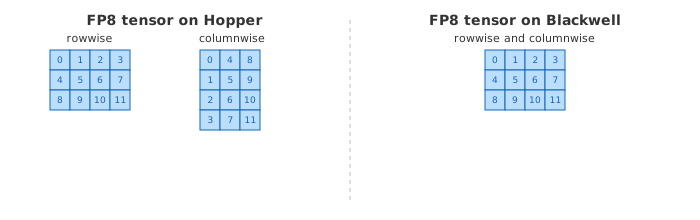
Figure 2: On Blackwell, rowwise and columnwise usages share the same memory layout. On Hopper, columnwise usage requires a physical transpose.#
Quantization fusions
This section is relevant only for recipes for which columnwise tensors are different from rowwise tensors.
Note that performing rowwise and columnwise quantization at the same time enables some fusions, which usually lead to better performance. We showcase 3 example scenarios of producing quantized tensors in rowwise and columnwise usages, TE will use best possible fusion for given recipe and TE module configuration:
Computation of quantized tensor in both rowwise and columnwise usages in a single kernel in forward pass.
This is the fastest one, but since the columnwise usage is saved for backward pass, it may lead to increased memory usage, if the high precision tensor also needs to be saved for backward - for example if it is the attention output which is saved anyway.
Computation of quantized tensor in rowwise usage in forward pass and fused quantization to produce columnwise usage in backward pass.
This is usually slower than the previous one, since high precision tensor needs to be read twice. It is used for example when high precision tensor is gathered both in forward and in backward and quantized tensor gather is not implemented for such recipe.
Computation of quantized tensor in rowwise usage in forward pass and transpose to columnwise usage in backward pass.
It is more memory efficient than Option 1, but not all recipes can utilize it (otherwise the quantization accuracy would drop due to double quantization errors).
Transformer Engine chooses the best possible fusion internally taking the recipe and the operation into account.
Figure 3: Three scenarios of producing quantized tensors in rowwise and columnwise usages.
Usages in the quantizer API
The usages are visible directly in the quantizer API:
At quantization time, the quantizer’s rowwise_usage and
columnwise_usage flags select which representations quantize()
produces; when both are set, the representations are computed together
in one fused kernel (scenario 1 above).
After quantization, update_usage() on the quantized tensor removes a
representation or, when supported by the format, generates a missing one.
Passing rowwise_usage=False after the forward pass frees the rowwise
data while keeping the columnwise data for backward. Some formats also
support columnwise_usage=True to create the columnwise representation
from the data already present (e.g. by a transpose on Hopper — scenario 3
above); unsupported requests raise an error. Arguments left as None
preserve the current state.
quantizer = te.MXFP8Quantizer(
    fp8_dtype=te.DType.kFloat8E4M3,
    rowwise=True,
    columnwise=True,
)

qtensor = quantizer(tensor)   # both representations, one fused kernel

qtensor.update_usage(rowwise_usage=False)  # drop rowwise, keep columnwise
The usages are selected when the tensor is quantized: the quantizer’s
q_layout (QuantizeLayout.ROWWISE, COLWISE, or
ROWWISE_COLWISE) sets the default, and quantize() accepts
is_rowwise/is_colwise overrides. Requesting both usages returns
a ScaledTensor2x holding the two representations. There is no
in-place update_usage(): JAX arrays are immutable, so a
representation is not added or dropped later — unneeded ones are simply
not requested and get dropped by XLA’s dead-code elimination.
quantizer = QuantizerFactory.create(
    scaling_mode=ScalingMode.MXFP8_1D_SCALING,
    q_dtype=jnp.float8_e4m3fn,
    q_layout=QuantizeLayout.ROWWISE_COLWISE,
)

qtensor = quantizer.quantize(x)  # ScaledTensor2x, both representations
rowwise_only = quantizer.quantize(x, is_rowwise=True, is_colwise=False)
Memory usage#
This section discusses memory usage in low precision training. Contrary to intuition, FP8 training does not always reduce memory compared to BF16/FP16.
Master weights
Transformer Engine by default stores weights in high precision and quantizes them to low precision before each GEMM. Moreover, one can specify which high precision should be used to store the weights in the model (FP32/BF16/FP16) – or choose not to store high precision weights in the model at all. There are multiple scenarios to consider, three of them are listed below:
model weights are in FP32, quantized to low precision before each GEMM,
model weights are in BF16/FP16, quantized to low precision before each GEMM, master weights in optimizer are in FP32.
model weights are stored directly in low precision, and master weights in optimizer are in FP32.
Note that each of these scenarios may have different memory footprint.
Activations saved for backward
Unlike weights, activations do not require a high precision copy for optimizer updates. As shown in Table 2, the input needs rowwise usage in forward and columnwise usage for weight gradient computation in backward — so it must be saved between passes.
The memory impact depends on which scenario from Figure 3 is used. Additionally, on architectures where rowwise and columnwise usage tensors share the same memory layout (e.g., FP8 on Blackwell, as shown in Figure 2), a single quantized tensor serves both usages, reducing memory overhead compared to architectures requiring separate tensors.
Output gradients, on the other hand, are computed during backward and do not need to be saved — both rowwise and columnwise usages are produced on the fly as needed.
The FP8 examples below are analyzed on Hopper (SM90) or Ada (SM89) architecture, where rowwise and columnwise tensors require separate memory layouts.
1. Baseline: high precision forward pass
Let’s start with a forward pass in higher precision to establish a baseline.
import torch
import transformer_engine.pytorch as te


def measure_memory():
    torch.cuda.empty_cache()
    torch.cuda.reset_peak_memory_stats()

    init_memory = torch.cuda.memory_allocated()
    layer = te.Linear(1024, 1024, params_dtype=torch.bfloat16)

    inp = torch.randn(1024, 1024, dtype=torch.bfloat16, device="cuda")
    out = layer(inp)
    del inp  # Input is saved by model for backward, not by user script

    mem_after_forward = torch.cuda.memory_allocated() - init_memory
    return mem_after_forward


# Warmup run
measure_memory()

# Actual measurement
mem_after_forward = measure_memory()
print(f"Memory usage after forward pass: {mem_after_forward/1024**2:.2f} MB")
Memory usage after forward pass: 6.00 MB
Layer size is 1024 * 1024 * 2 (2 bytes per parameter) = 2MB.
Memory after forward pass is 2 MB (weight) + 2 MB (input saved for backward) + 2 MB (output) = 6 MB.
2. FP8 training with model weights in BF16
Now let’s see the memory usage in FP8 training with high precision weights.
import torch
import transformer_engine.pytorch as te


def measure_memory():
    torch.cuda.empty_cache()
    torch.cuda.reset_peak_memory_stats()

    init_memory = torch.cuda.memory_allocated()
    layer = te.Linear(1024, 1024, params_dtype=torch.bfloat16)

    inp = torch.randn(1024, 1024, dtype=torch.bfloat16, device="cuda")
    with te.autocast(enabled=True):
        out = layer(inp)
    del inp  # Input is saved by model for backward, not by user script

    mem_after_forward = torch.cuda.memory_allocated() - init_memory
    return mem_after_forward


# Warmup run
measure_memory()

# Actual measurement
mem_after_forward = measure_memory()
print(f"Memory after forward pass: {mem_after_forward/1024**2:.2f} MB")
Memory after forward pass: 6.02 MB
Total memory usage is 2 MB (weight) + 1 MB (weight in FP8) + 1 MB (input in FP8 saved for backward) + 2 MB (output) = 6 MB.
3. FP8 inference with model weights stored directly in low precision
For inference scenarios, model weights can be stored directly in low precision. Since we are only performing forward passes without gradient updates, master weights in high precision are not needed.
import torch
import transformer_engine.pytorch as te


def measure_memory():
    torch.cuda.empty_cache()
    torch.cuda.reset_peak_memory_stats()

    init_memory = torch.cuda.memory_allocated()

    # FP8 inference with FP8 weights
    with te.quantized_model_init(enabled=True), torch.no_grad():
        layer_fp8 = te.Linear(1024, 1024, params_dtype=torch.bfloat16)

    with torch.no_grad():
        inp = torch.randn(1024, 1024, dtype=torch.bfloat16, device="cuda")
        with te.autocast(enabled=True):
            out = layer_fp8(inp)
        del inp  # Input is not saved by model for backward in inference

    mem_after_forward = torch.cuda.memory_allocated() - init_memory

    return mem_after_forward


# Warmup run
measure_memory()

# Actual measurement
mem_after_forward = measure_memory()
print(f"Memory after forward pass: {mem_after_forward/1024**2:.2f} MB")
Memory after forward pass: 3.02 MB
Total memory usage is 1 MB (weight in FP8) + 2 MB (output) = 3 MB.
This is lower than the BF16 baseline (6 MB) since no copies are saved for backward in inference mode.
4. Saving original input instead of quantized
By default, TE saves the columnwise quantized input for the backward pass (needed for weight gradient). However, when the high precision input is already being saved (e.g., for a residual connection), keeping an additional quantized copy wastes memory.
The save_original_input=True option tells the layer to reference the original high precision input
instead of caching a separate quantized copy. The input is re-quantized during backward when needed.
Below is an example with a residual block where input is kept for the addition:
# START_SAVE_ORIGINAL_INPUT
import torch
import transformer_engine.pytorch as te
from transformer_engine.common.recipe import Float8CurrentScaling

recipe = Float8CurrentScaling()


def residual_block(layer, inp):
    """Residual connection: input is saved for addition after linear."""
    out = layer(inp)
    return out + inp  # inp must be kept for this addition


def measure_memory(use_save_original):
    torch.cuda.empty_cache()
    torch.cuda.reset_peak_memory_stats()

    layer = te.Linear(
        1024, 1024, params_dtype=torch.bfloat16, save_original_input=use_save_original
    )
    inp = torch.randn(1024, 1024, dtype=torch.bfloat16, device="cuda", requires_grad=True)

    with te.autocast(enabled=True, recipe=recipe):
        out = residual_block(layer, inp)
    out.sum().backward()

    return torch.cuda.max_memory_allocated() / 1024**2


# Warmup runs
measure_memory(False)
measure_memory(True)

# Actual measurements
for use_save_original in [False, True]:
    peak = measure_memory(use_save_original)
    print(f"save_original_input={use_save_original}: {peak:.1f} MB")
save_original_input=False: 25.0 MB
save_original_input=True: 24.0 MB
1. Baseline: high precision forward pass
Let’s start with a forward pass in higher precision to establish a baseline.
import jax
import jax.numpy as jnp
from transformer_engine.jax.flax import DenseGeneral


key = jax.random.PRNGKey(0)
jax.clear_caches()


# Initialize layer with BF16 parameters
layer = DenseGeneral(features=1024, dtype=jnp.bfloat16)
x = jax.random.normal(key, (1024, 1024), dtype=jnp.bfloat16)
var_collect = layer.init(key, x)


@jax.jit
def loss_fn(var_collect, x):
    output = layer.apply(var_collect, x)
    return output.sum()


# Trace the backward pass - this allocates saved tensors
_, backward_fn = jax.vjp(loss_fn, var_collect, x)


del x

print("Tensors in memory:")
total_bytes = 0
for arr in jax.live_arrays():
    total_bytes += arr.nbytes
    if arr.nbytes > 200000:  # do not count small tensors
        print(f"  Shape: {arr.shape}, Dtype: {arr.dtype}, Size: {arr.nbytes / 1024:.1f} KB")
print(f"  Total from all live arrays: {total_bytes / (1024**2):.2f} MB")
Tensors in memory:
  Shape: (1024, 1024), Dtype: bfloat16, Size: 2048.0 KB
  Shape: (1024, 1024), Dtype: bfloat16, Size: 2048.0 KB
  Total from all live arrays: 4.00 MB
Layer size is 1024 * 1024 * 2 (2 bytes per parameter) = 2MB.
Memory after forward pass is 2 MB (weight) + 2 MB (input saved for backward) = 4 MB.
2. FP8 training with master weights in BF16
Now let’s see the memory usage in FP8 training with high precision weights.
import jax
import jax.numpy as jnp
import transformer_engine.jax as te
from transformer_engine.jax.flax import DenseGeneral
from transformer_engine.common.recipe import DelayedScaling


key = jax.random.PRNGKey(0)
recipe = DelayedScaling()
jax.clear_caches()


# Initialize layer with BF16 parameters (outside autocast)
layer = DenseGeneral(features=1024, dtype=jnp.bfloat16)
x = jax.random.normal(key, (1024, 1024), dtype=jnp.bfloat16)


# Forward and backward pass with FP8 compute
with te.autocast(enabled=True, recipe=recipe):
    var_collect = layer.init(key, x)

    @jax.jit
    def loss_fn(var_collect, x):
        output = layer.apply(var_collect, x)
        return output.sum()

    # Trace the backward pass - this allocates saved tensors
    _, backward_fn = jax.vjp(loss_fn, var_collect, x)

del x

print("Tensors in memory:")
total_bytes = 0
for arr in jax.live_arrays():
    total_bytes += arr.nbytes
    if arr.nbytes > 200000:  # do not count small tensors
        print(f"  Shape: {arr.shape}, Dtype: {arr.dtype}, Size: {arr.nbytes / 1024:.1f} KB")
print(f"  Total from all live arrays: {total_bytes / (1024**2):.2f} MB")
Tensors in memory:
  Shape: (1024, 1024), Dtype: float8_e4m3fn, Size: 1024.0 KB
  Shape: (1024, 1024), Dtype: float8_e4m3fn, Size: 1024.0 KB
  Shape: (1024, 1024), Dtype: bfloat16, Size: 2048.0 KB
  Total from all live arrays: 4.02 MB
Memory after forward pass is 2 MB (weight in BF16) + 1 MB (input in FP8) + 1 MB (weight in FP8) = 4 MB.
Fused layers#
Transformer Engine provides fused layers such as LayerNormLinear (LayerNormDenseGeneral in JAX) and LayerNormMLP
that enable kernel fusion optimizations. One key optimization is fusing layer normalization
with quantization.
In a typical Transformer architecture, LayerNorm precedes a Linear layer. Without fusion,
the LayerNorm outputs in high precision, and the Linear layer must then quantize this input before
performing the GEMM — adding overhead. With LayerNormLinear, these operations are fused
into a single kernel: the LayerNorm output is quantized directly, eliminating the separate
quantization step and reducing memory movement.
Figure 4: Comparison of separate LayerNorm and Linear layers versus fused LayerNormLinear layer, showing reduced quantization overhead.
Let’s see how we can use fused layers in different frameworks.
In PyTorch, Transformer Engine provides fused layers like LayerNormLinear and LayerNormMLP.
These layers combine normalization and linear operations with optimized quantization.
import torch
import transformer_engine.pytorch as te
from transformer_engine.common.recipe import DelayedScaling

# Example 1: Separate LayerNorm and Linear layers
layer_norm = te.LayerNorm(1024)
linear = te.Linear(1024, 1024)

inp = torch.randn(32, 128, 1024, dtype=torch.bfloat16, device="cuda")

# Two separate operations: LayerNorm produces FP32, then Linear quantizes it
normalized = layer_norm(inp)
output_separate = linear(normalized)

# Example 2: Fused LayerNormLinear layer
fused_layer = te.LayerNormLinear(1024, 1024, params_dtype=torch.bfloat16)

# Single operation: LayerNorm output is directly quantized
recipe = DelayedScaling()
with te.autocast(enabled=True, recipe=recipe):
    output_fused = fused_layer(inp)

# The fused layer is more efficient as it avoids redundant quantization
The fused LayerNormLinear layer is particularly efficient in FP8 training because
it avoids an intermediate quantization step. The LayerNorm output is directly quantized
for the GEMM operation, reducing memory movement and improving performance.
In JAX, Transformer Engine provides fused layers like LayerNormDenseGeneral and LayerNormMLP.
These layers combine normalization and dense operations with optimized quantization.
import jax
import jax.numpy as jnp
import transformer_engine.jax as te
from transformer_engine.jax.flax import LayerNorm, DenseGeneral, LayerNormDenseGeneral
from transformer_engine.common.recipe import DelayedScaling

key = jax.random.PRNGKey(0)
x = jax.random.normal(key, (32, 128, 1024), dtype=jnp.bfloat16)

# Example 1: Separate LayerNorm and DenseGeneral layers
layer_norm = LayerNorm()
dense = DenseGeneral(features=1024)

# Initialize parameters
ln_params = layer_norm.init(key, x)
dense_params = dense.init(key, x)

# Two separate operations
normalized = layer_norm.apply(ln_params, x)
output_separate = dense.apply(dense_params, normalized)

# Example 2: Fused LayerNormDenseGeneral layer
fused_layer = LayerNormDenseGeneral(features=1024)

# Initialize and apply with FP8 autocast
recipe = DelayedScaling()
with te.autocast(enabled=True, recipe=recipe):
    fused_params = fused_layer.init(key, x)
    output_fused, _ = fused_layer.apply(fused_params, x)  # Returns (output, ln_output)

# The fused layer is more efficient as it combines LayerNorm and quantization
The fused LayerNormDenseGeneral layer is particularly efficient in FP8 training because
it avoids an intermediate quantization step. The LayerNorm output is directly quantized
for the GEMM operation, reducing memory movement and improving performance.
Distributed training#
Transformer Engine handles collective operations internally, so users typically don’t need to manage the interaction between communication and low precision computation.
Recall that each Linear layer involves six tensors: weight, input, output, and their gradients. Of these, output and gradients are returned in high precision, and weights are generally not communicated (except in FSDP, which is outside the scope of this section). This leaves two tensors where low precision communication matters: input and output gradient.
For sequence parallelism, TE supports all-gather of quantized tensors. This provides several benefits:
Reduced memory usage — no need to store high precision tensors for backward pass.
Reduced communication — smaller tensors mean less data to transfer.
Parallelized quantization — quantization work is distributed across GPUs.
Support varies by recipe — for example, columnwise quantized all-gather is not available for all configurations.
The figure below illustrates one possible all-gather scenario for input and output gradient tensors. Actual behavior depends on the recipe and module configuration.
Figure 5: All-gather of quantized tensors for input and gradient tensors. This is one possible scenario — actual behavior varies depending on the recipe and module configuration.