Introduction
What is sflow
A declarative workflow descriptor for massive GPU clusters that separates what to deploy from where to deploy it.
Not sure where to start? Open the Feature Map to choose a goal, see which sflow features apply, and jump to the relevant docs. Building with an AI coding agent? See Agent Skills.
One semantic across every platform — backend agnostic by design. A deployment's logic never changes: start etcd and NATS, launch a frontend, spin up workers, run the benchmark. Only the infrastructure glue does — and today that glue is rewritten from scratch for every platform. sflow consolidates it into a single portable YAML: tasks, dependencies, resources, and launch methods. The same sflow.yaml runs on Docker, Slurm, and Kubernetes — swap the backend fragment, rewrite nothing. Backends delegate to each platform's native ecosystem (srun/MPI, docker run, pods and MPI jobs) rather than reimplementing it.
Cluster-level orchestration at scale. Topology-aware node and GPU placement, multi-node replicas and sweeps, readiness/failure probes, and batch submission — so one descriptor drives hundreds of GPUs instead of a pile of hand-written bash.
All four backends ship today: local, docker, slurm, and kubernetes (k8s / k8s_mpi). It is light enough to write and debug a recipe on your laptop and submit that same file to the cluster.
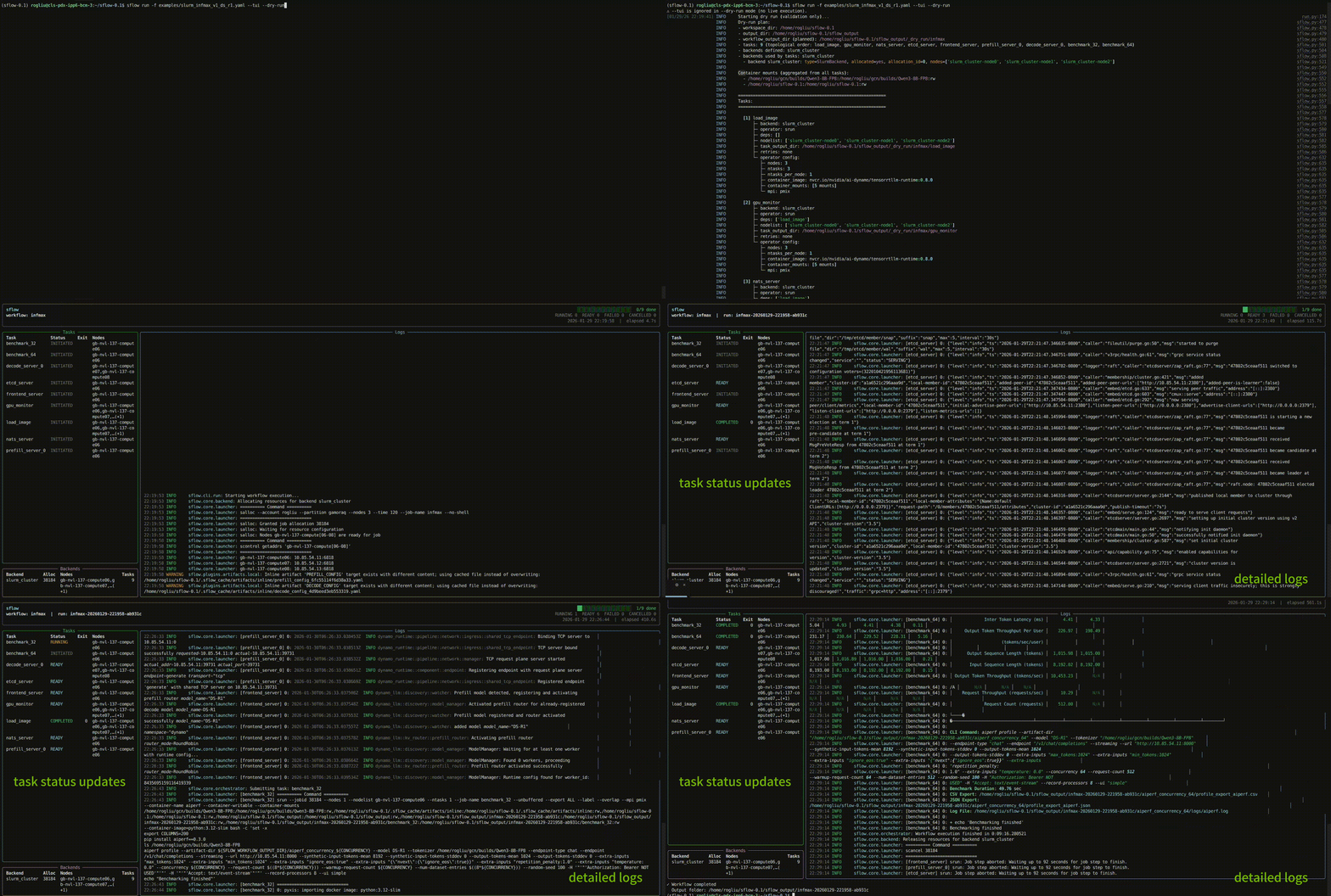
Define what to run in a sflow.yaml — tasks, dependencies, how to launch each task, and required resources. sflow executes the DAG in order, collects logs, and organizes outputs into a consistent directory structure. Example of a dynamo PD disaggregation LLM inference service workflow:
Docs versions
The docs site version selector intentionally shows only maintained documentation streams:
develop: verified pre-release documentation for tested features that are queued for the next release.main: stable documentation aligned with the latest released state.vX.Y.Zrelease tags: immutable documentation snapshots for a specific release.
Both develop and main are kept up to date. Use main or a release tag for production/stable behavior, and use develop when validating upcoming tested features before the next release.
Use Cases
Complex Slurm Workflows
sflow streamlines orchestration within Slurm clusters with built-in support for:
- Automatic hostname/IP detection after allocation
- Workload distribution across nodes and GPUs
- Runtime readiness and failure checks (probes)
- Replica scaling (parallel workers, sweeps)
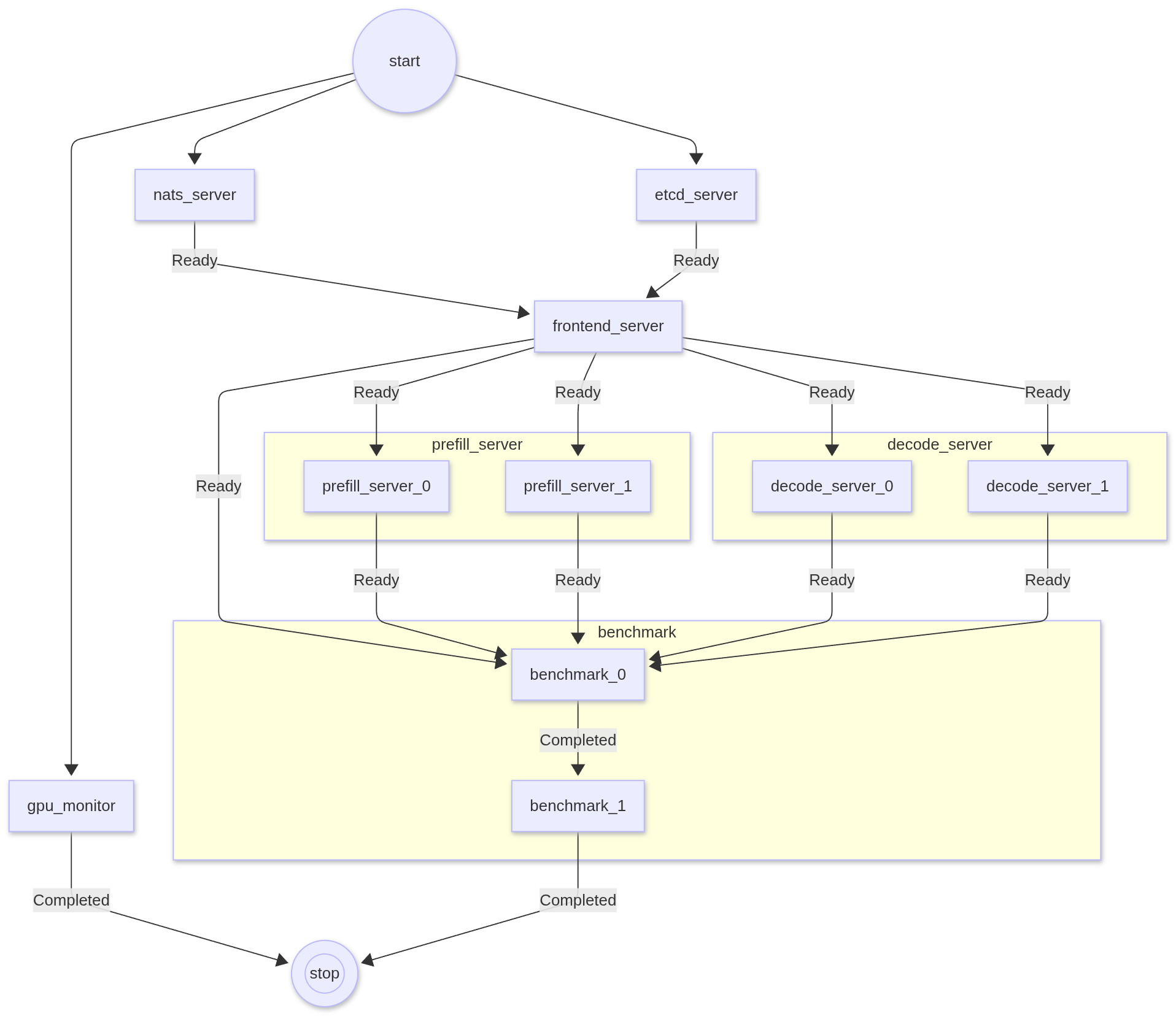
Define what you want to run — no more hand-crafted bash scripts to manage resource placement or ensure processes land on the right nodes and GPUs. Below is an example DAG for a Dynamo PD disaggregated LLM inference service:
Cross-Environment Orchestration
Codify startup order, replica scale, readiness probes, and log capture in YAML — then run the same file locally or on a cluster by switching the backend.
Benchmarking & Experiment Automation
Standardize how you launch runs, capture logs/artifacts, and structure outputs so results are reproducible across teams and machines.
Local Development & Testing
Use the local backend with the bash operator to validate your DAG and scripts on your laptop before moving to a Slurm cluster.
Core Concepts
| Concept | Description |
|---|---|
| Workflow | A set of tasks wired into a DAG via depends_on. |
| Task | An executable unit. The key field is script — a list of lines joined into a bash script. |
| Backend | Where compute comes from. Built-ins: local (simulates nodes on the local machine), slurm (allocates via salloc), docker (launches tasks via docker run), and kubernetes (schedules tasks as pods). |
| Operator | How a task is launched. Built-ins: bash, srun, docker_run, k8s, k8s_mpi, ssh, python. Named operators let you preset flags and reuse them across tasks. |
| Variable | A named value referenced as ${{ variables.NAME }} in YAML or ${NAME} in scripts. Override from the CLI with --set. |
| Expression | Jinja2-based ${{ ... }} syntax inside YAML to reference variables, backend info, task metadata, and more (e.g. ${{ backends.slurm.nodes[0].ip_address }}). Supports filters (${{ [a, b] | min }}), conditionals, and list indexing. |
| Artifact | A named external resource (model, config, dataset) referenced by URI and resolved to a local path at runtime. |
| Storage | A named post-execution upload target (e.g. S3). Per-task uploads: specs ship logs and result files to the target when a task completes. |
| Result | A task's small structured outputs (metrics, scores). A result: entry parses them from the task log or a JSON file into a canonical result.json plus a workflow-level results.json index. |
| Probe | A health-check gate. Readiness probes block dependents until a service is live; failure probes terminate the workflow when a fatal condition is detected. |
| Replica | A task can be replicated N times (parallel or sequential) with per-replica variable overrides for sweeps. |
For detailed architecture diagrams, execution flow, assembly pipeline, orchestrator internals, plugin reference, and output structure, see Architecture.
How to Use sflow (General Workflow)
Modular Workflow
For larger projects, split config into composable modules and pass them directly to sflow run or sflow batch -- no separate compose step required. This enables framework swapping, benchmark mixing, and CSV-driven parameter sweeps. See Modular Workflows for details.
Config Merging Rules
When multiple YAML files are provided, they are combined with a recursive deep merge keyed on name, so a single definition can be scattered across files:
| Section | Merge Strategy |
|---|---|
version | Must match across all files |
variables | Deep-merge by name (same-name entries merge; on a conflicting leaf value the last file wins, with a warning) |
artifacts | Deep-merge by name |
backends | Deep-merge by name |
operators | Deep-merge by name |
storage | Deep-merge by name |
workflow.tasks | Deep-merge by name, preserving first-seen order (a task can be split across files; duplicate task names no longer error) |
workflow.name | Last non-null wins (a differing name no longer errors — it warns) |
workflow.monitor / upload_all | Carried across files and deep-merged |
Tasks can also wire the DAG in reverse with required_by (the inverse of depends_on): A required_by: [B] makes B run after A. Targets that are absent from the merged workflow are skipped silently, so modular fragments self-wire without --missable-tasks. See Modular Workflows.
Expression System
The ${{ ... }} expression syntax (powered by Jinja2) provides access to the full runtime context:
| Namespace | Example | Description |
|---|---|---|
variables | ${{ variables.MODEL_NAME }} | Resolved variable value |
artifacts | ${{ artifacts.MODEL.path }} | Artifact local path |
backends | ${{ backends.slurm.nodes[0].ip_address }} | Backend node info |
task | ${{ task.assigned_nodes }} | Current task's node assignment |
| Filters | ${{ [a, b] | min }} | Jinja2 filters |
Expressions are resolved in phases — variables first, then backends, then artifacts, then task-level — so later phases can reference earlier results.
Known Limitations
The following features are not yet implemented in the current release:
sflow run --resume— raisesNotImplementedErrorsflow run --task— raisesBadParameterhf://anddocker://artifact materialization — raisesNotImplementedError
This user guide reflects actual code behavior. Not all planned features may be available yet.
Next Steps
| Topic | Page |
|---|---|
| Architecture, execution flow, plugins | Architecture |
| Run a minimal example | Quickstart |
| Variables, expressions, env injection | Variables |
| Named inputs (paths, images, etc.) | Artifacts |
| Compute backends (local, Slurm, Docker, Kubernetes) | Backends |
| Task launch methods (bash, srun, containers) | Operators |
| Node/GPU placement, CUDA_VISIBLE_DEVICES | Resources |
| Parallel/sequential replicas, sweeps | Replicas |
| Composable configs, sweeps, missable tasks | Modular Workflows |
| Readiness/failure gates for services | Probes |
| Examine a finished run — where to look for what | Understanding Run Output |
| Log and output directory structure | Outputs & Logs |
| Capture task metrics & structured results | Results |
| Hardware monitoring (GPU/CPU/memory/disk/network) | Monitor |
| Post-execution uploads to S3 | Uploads |
| Full sflow.yaml schema | Configuration |
| CLI options | CLI Reference |
| Frequently asked questions | FAQ |