

Visual Materials Workflow#
This guide takes one asset to demonstrable conformance on visual materials. You author an OpenPBR surface and a display colour, validate the result against a profile, render it in Kit, and work out what the render result is worth.
Visual materials in SimReady cover two separate things. A material describes a shaded surface through a shading network. Display colour is a primvar holding a single colour per prim and no network at all, which is what makes it readable by consumers that never evaluate a material. Each gets its own tool here, because they are different contracts.
There are two ways in, and both depend on the contract in step 1. Step 2 exports a conformant material from Blender. Step 3 upgrades an asset that already exists. All commands run from the repository root unless stated otherwise.
What you end up with#
Stage |
Tool |
Outcome |
|---|---|---|
Baseline |
|
A profile report, and a record of what it does not cover |
OpenPBR surfaces |
|
|
Display colour |
|
|
Re-validation |
|
The static contract, confirmed |
Evaluate |
|
Evidence that the geometry bound to each surface drew in the engine |
Static validation and the evaluation answer different questions. Validation inspects the authored scene description and confirms the file holds the right values. The evaluation loads the asset in Kit and confirms the engine resolved it. Neither establishes that the asset looks correct, and step 5 is about where that line falls.
Prerequisites#
Requirement |
How to get it |
Needed for |
|---|---|---|
Python |
3.12 |
All steps |
Git LFS |
|
Sample assets |
|
|
Steps 2 and 3 |
|
|
Steps 2 and 3 |
|
Refer to Running Tests |
Step 4 |
Kit or Isaac Sim |
2024.2.0 or later |
Step 4 |
One environment covers steps 2 and 3. requirements.txt lists simready-validate and
numpy, and usd-core arrives behind them. Two more are needed and neither is in that
file:
pip install -r requirements.txt
pip install "MaterialX>=1.39" pillow
MaterialX supplies the OpenPBR node definitions. A usd-core wheel ships no usdMtlx
plugin, so in a pip environment the Python package is the only source of them. Without it
VM.PBR.002 and VM.PBR.003 have nothing to compare an asset against and report nothing,
which looks the same as a clean asset. The validator emits one line per run, VM.PBR.002 and VM.PBR.003 did not run. VM.PBR.001 matches one shader identifier, needs no node
definition, and runs either way. Pillow is how VM.TEX.001 gets a texture’s dimensions,
and the display-colour script uses it to sample texture maps.
The core tier#
simready-validate checks an asset against the core tier: the capabilities, features,
profiles and rule checkers that make up the spec. It is a separate package from the
validator, so install it alongside:
pip install simready-foundation-tier-core
SimReady Foundation PyPI Packages covers the tiers, the index to install from, and how content is discovered.
The evaluation#
Give simready-evaluate a virtual environment of its own: it installs a Kit engine plugin
on top of its own USD build, and Running Tests covers the setup.
The worked example uses the toaster sample. Both conform scripts write into an asset in place, so take a copy and work on that. The samples are LFS-tracked binaries and a rewrite moves the file hash even when nothing about the content changes.
mkdir -p ../vm-workflow
cp -r sample_content/common_assets/props_general/gen_appliance_toaster_v01_01 ../vm-workflow/
The shipped samples already have an OpenPBR surface and a display colour, so the worked example below confirms a conformant asset. Point the same commands at your own asset to see them repair one, and read each transcript for the shape of its output; the counts and colours belong to this sample.
1. The material contract#
Three surfaces on one prim#
A SimReady Material prim can declare three surface outputs at once, one per render
context. A render context is the token a renderer uses to choose which shader inside a
material it evaluates.
Output |
Shader |
Render context |
Feature |
Requirement |
|---|---|---|---|---|
|
UsdPreviewSurface |
universal |
|
com.nvidia.usd.VM.PS.001 |
|
OmniPBR |
|
|
VM.MDL.001 |
|
OpenPBR |
|
|
VM.PBR.001 |
These are sibling contracts. An asset may declare any combination, and none of the three depends on another. OpenPBR is the recommended target for new assets because it is a portable format that needs no vendor-specific material; MDL stays permitted for existing content. Refer to FET006 OpenPBR Materials for the full contract.
Which surface the renderer picks#
Kit resolves one surface per material by walking an ordered list of render contexts and
taking the first one the material has. The list is the carb setting
/persistent/app/hydra/material/renderContexts, and Kit ships it as ["mdl", "mtlx", ""].
An asset with both an OmniPBR and an OpenPBR surface therefore renders the OmniPBR one. If you open a migrated asset in Kit and it looks unchanged, that is why: you are looking at MDL.
The evaluation tests in step 4 pin the context themselves and verify the pin took, so you do not need to change the setting to see the OpenPBR surface rendered. Refer to How a Surface Is Measured for how they do it.
Render context is a different mechanism from binding purpose. Render context selects which
shader inside a material is evaluated. Binding purpose, authored as
material:binding:full or material:binding:preview, selects which material is bound to a
prim in the first place. This guide concerns render context.
Display colour is a primvar#
primvars:displayColor has no render context and no surface output, because it has no
shading network. That is the point of it: it is the appearance layer available to a
consumer that never evaluates a material, such as a low-fidelity or non-ray-traced render
path. In Kit, the RTX default material takes it as its diffuse tint for geometry with no
material bound.
Code |
Requirement |
Status |
|---|---|---|
Every renderable Gprim resolves a |
Required |
|
Every component is within |
Required |
|
|
Optional |
Display opacity works differently. A material has to opt in to reading
displayOpacity; gltf/pbr.mdl is one that does. Kit’s RTX default material has no
opacity term, so geometry with no material bound picks up the colour and nothing else.
Neither conform script in this guide authors display opacity.
Colour space#
Colours and data channels both need colour space information, and the rules differ. Constants are linear everywhere. Textures declare their own, and each of the three surfaces declares it somewhere else, with a different default and a different vocabulary.
Constants and display colour are linear. primvars:displayColor, and any constant you
type onto a surface input, are Linear Rec.709 with a D65 white point. 0.18 is mid grey.
USD resolves the colour space from the attribute’s own colorSpace metadata, then from
UsdColorSpaceAPI on the prim, then from the nearest ancestor that authors one, and falls
back to lin_rec709_scene when none is authored, so an asset that authors nothing still
has a defined colour space.
So a value taken from an sRGB colour picker needs converting before you write it. 0.5
picked as mid grey in sRGB is much lighter once interpreted as linear. The display-colour
script in step 3 handles this by decoding every texel through the sRGB transfer function
before it averages, so you only need to think about it when you author a value by hand.
Textures are where the three surfaces diverge.
Surface |
Declared on |
No declaration means |
Requirement |
|---|---|---|---|
UsdPreviewSurface |
|
|
|
MDL |
|
|
|
OpenPBR |
|
no transform at all |
auto reads the image file’s own colour-space metadata; where the file states nothing, it
decodes any 8-bit three- or four-channel image as sRGB and treats everything else as raw.
Two consequences follow, and they pull in opposite directions.
On UsdPreviewSurface and MDL a colour texture can rely on the default, because auto
decodes 8-bit RGB the way a colour texture needs. A data texture cannot: image editors
write 8-bit RGB as a matter of course, so a roughness, metalness or occlusion map left
undeclared is decoded as though it held colour and every value comes out low. Declare
raw on data inputs. Single-channel and high-bit-depth files fall outside the sRGB branch,
so auto is already correct for a single-channel mask.
On OpenPBR there is no auto. An undeclared texture gets no transform whatever the file
is, so a colour texture must declare srgb_texture or it is consumed undecoded and
renders washed out. A data texture needs nothing, or none.
Author srgb_texture, not srgb_rec709_scene. The two name the same encoding, the sRGB
transfer function over Rec.709 primaries, but only the MaterialX spelling resolves on an
OpenPBR surface. OpenUSD adopted srgb_rec709_scene in 24.11; MaterialX defines its
transform nodes under srgb_texture, and the mapping between the two vocabularies arrived
in MaterialX 1.39.4, which no runtime SimReady targets ships. A texture tagged with the
OpenUSD name is consumed undecoded and renders washed out with nothing reported. The MDL
loader does resolve srgb_rec709_scene, so an asset with both surfaces can be correct on
one and wrong on the other.
Mid grey is 0.18 as a constant and code 118 in an 8-bit sRGB texture. Both are the 18%
grey card; they differ because the texture is sRGB-encoded and the constant is linear. Code
128 is not mid grey in a colour texture: it is the middle of the encoding range and
decodes to 0.216, about 20% lighter than a grey card.
The materials requirements overview states the conventions of all four appearance formats side by side, including display colour.
3. Upgrading an Omniverse asset with OmniPBR#
This path is for an asset that already exists and already has an OmniPBR (MDL) surface on
outputs:mdl:surface. The job is to add an OpenPBR surface and a display colour beside it
without disturbing what is there. It assumes an asset that already loads and passes the
core SimReady features.
Four passes follow: a baseline profile run, the OpenPBR conform, the display-colour conform, and a second profile run.
Establish a baseline#
Run the profile the asset targets:
simready-validate --project-config sample_content/project_config.toml --profile Robotics-Prop --version 4.0.0 ../vm-workflow/gen_appliance_toaster_v01_01/simready_usd/sm_gen_appliance_toaster_v01_01.usd
--project-config takes the capability, feature and profile directories from the
[validate] section of that file, which the repository keeps pointed at the core tier.
Spelling the three out with --rules-path, --features-path and --profiles-path does
the same thing, and is the form
SimReady Validation Workflow shows. This guide takes the short
one because it runs the command four times.
The run prints a page of capability-parsing warnings before it prints anything about your asset. The result is the last two lines, and the exit code is 0 for a pass and 1 for anything else:
Asset: ../vm-workflow/gen_appliance_toaster_v01_01/simready_usd/sm_gen_appliance_toaster_v01_01.usd
  [PASSED] Robotics-Prop v4.0.0
Name a profile version that does not exist and you get the Asset: line, no verdict, and
exit 1. The reason is in the warnings above it, as Profile ... is not registered — cannot validate. Refer to Profiles for the versions on offer.
Note
A green profile line establishes less about visual materials than it appears to.
Robotics-Prop 4.0.0 requires the UsdPreviewSurface preview (FET006_Materials) and
marks display colour, OpenPBR and MDL optional. Three profiles list
FET006_Materials.Openpbr and FET010_DisplayColor: Robotics-Prop, Robot-Body and
Robot-Gripper. All three mark both optional. An optional feature’s requirements still run:
an unmet one is listed under the verdict and reported under optional requirements in the
JSON report, but it cannot fail the profile. So no profile today fails an asset for
shipping no OpenPBR surface or no display colour.
Two requirements ask for less than their names suggest:
VM.PBR.001 asks for an OpenPBR surface on
outputs:mtlx:surface, and nothing else on that terminal satisfies it. An MDL surface isVM.MDL.003, a separate requirement, so a profile that accepts either lists both. It resolves each renderable Gprim’s binding at thefullpurpose and judges the material that comes back, so an unused material in/Looksand one bound only for preview both fall outside it.VM.PBR.003 asks for a connected surface terminal in some render context. A preview plus an MDL surface satisfies it with no MaterialX anywhere.
So a profile run covers everything except the OpenPBR and display-colour contracts. The next two subsections each open with the tool that covers one of those.
Conform the OpenPBR surfaces#
Use the skill at skills/simready-foundation-conform-fet-006-openpbr/. Its bundled script
authors an OpenPBR surface on materials that already have a UsdPreviewSurface preview and an
OmniPBR final surface, which is the shape every sample under
sample_content/common_assets/props_general/ has.
The path argument takes a USD file, or a directory to search for simready_usd assets.
Start with the state of the asset:
python skills/simready-foundation-conform-fet-006-openpbr/assets/scripts/migrate_to_openpbr.py ../vm-workflow/gen_appliance_toaster_v01_01 --verify
ok   ../vm-workflow/gen_appliance_toaster_v01_01/simready_usd/sm_gen_appliance_toaster_v01_01.usd

0 problem(s) across 1 asset(s)
--verify reports VM.PBR.001, VM.PBR.002 and texture resolution, and exits 0 only when it
finds nothing. On an asset with no OpenPBR surface it exits 1 and prints one line per
material, each naming the prim, the problem and the requirement:
/RootNode/Geometry/body_obj_01/body_mesh_01/VisualMaterials/m_opaque__plastic__toaster_v01_01: no outputs:mtlx:surface (VM.PBR.001)
Now see what a run would write, without writing anything:
python skills/simready-foundation-conform-fet-006-openpbr/assets/scripts/migrate_to_openpbr.py ../vm-workflow/gen_appliance_toaster_v01_01 --dry-run
../vm-workflow/gen_appliance_toaster_v01_01/simready_usd/sm_gen_appliance_toaster_v01_01.usd: 6 migrated, 2 skipped (dry run)
  /RootNode/Geometry/body_obj_01/body_mesh_01/VisualMaterials/m_opaque__plastic__toaster_v01_01: emission_color=(1, 1, 1), geometry_opacity=1.0, specular_ior=1.5
      texture: base_color <- t_gen_appliance_toaster_v01_01_a.png (rgb)
      texture: base_metalness <- t_gen_appliance_toaster_v01_01_orm.png (b)
      texture: specular_roughness <- t_gen_appliance_toaster_v01_01_orm.png (g)
      texture: geometry_normal <- t_gen_appliance_toaster_v01_01_n.png (rgb)
  /RootNode/Geometry/body_obj_01/body_mesh_01/VisualMaterials/m_opaque__metal__toaster_v01_01: emission_color=(1, 1, 1), geometry_opacity=1.0, specular_ior=1.5
      texture: base_color <- t_gen_appliance_toaster_v01_01_a.png (rgb)
      texture: base_metalness <- t_gen_appliance_toaster_v01_01_orm.png (b)
      texture: specular_roughness <- t_gen_appliance_toaster_v01_01_orm.png (g)
      texture: geometry_normal <- t_gen_appliance_toaster_v01_01_n.png (rgb)
  ...

6 material(s) migrated across 1 asset(s)
24 channel(s) carried across as textures.
Those counts are what the run would author, whatever is there already. The script owns the
prims it writes and rewrites them from scratch every pass, so a conformant asset reports
the same six materials as a broken one. Each mesh has its own VisualMaterials scope, so a
material shared by several meshes is authored once per mesh. The two skipped materials are
the asset’s physics materials, which describe friction, so the script leaves them alone.
Drop --dry-run to write. The output is the same, without (dry run):
python skills/simready-foundation-conform-fet-006-openpbr/assets/scripts/migrate_to_openpbr.py ../vm-workflow/gen_appliance_toaster_v01_01
The four flags are --verify, --dry-run, --textures and --no-textures. Textures are
reconnected by default, so --textures names the default and changes nothing.
--no-textures flattens texture-driven channels to constants instead; those materials
still satisfy VM.PBR.001 and VM.PBR.002, and they will not look like the original. The
before-and-after image in step 5 is exactly that difference.
The prims the script owns are one OpenPBR_Shader per material plus the reader nodes named
OpenPBR_Shader_* beside it. A material that already has an OpenPBR surface under a
different prim name was authored by hand or by a DCC; the script reports it as a conflict
and leaves it alone. Because these assets are LFS-tracked binaries that cannot be merged,
re-running the script is the way to resolve a collision with someone else’s edit.
A re-run rewrites the binary layer even when nothing changes, so the file hash moves. To confirm a re-run was inert, compare flattened USD instead of file hashes.
Note
--verify checks authored scene description. It covers VM.PBR.001, VM.PBR.002 and whether
each texture it names resolves to a file. VM.PBR.003, the structural check on the shading
network, belongs to simready-validate.
VM.PBR.002 and VM.PBR.003 need MaterialX installed, which the Prerequisites cover.
Conform display colour#
Use the skill at skills/simready-foundation-conform-fet-010-standard/. Its script
authors a constant primvars:displayColor on every renderable Gprim, derived from the
material bound to that Gprim. It takes the same four flags as the OpenPBR script, with
--textures and --no-textures controlling whether base colour maps are sampled.
The script resolves base colour through OpenPBR first, then UsdPreviewSurface, then MDL, and reports which tier it used. On these samples the first two tiers hold the same map, so running this before or after the OpenPBR conform gives the same values.
python skills/simready-foundation-conform-fet-010-standard/assets/scripts/author_display_color.py ../vm-workflow/gen_appliance_toaster_v01_01 --verify
FAIL ../vm-workflow/gen_appliance_toaster_v01_01/simready_usd/sm_gen_appliance_toaster_v01_01.usd
  /RootNode/Geometry/body_obj_01/body_mesh_01/body_mesh_01: GPrim '/RootNode/Geometry/body_obj_01/body_mesh_01/body_mesh_01' does not resolve a 'primvars:displayColor', authored on the prim or inherited from an ancestor (DISP.001)
  /RootNode/Geometry/lever_obj_01/lever_mesh_01: GPrim '/RootNode/Geometry/lever_obj_01/lever_mesh_01' does not resolve a 'primvars:displayColor', authored on the prim or inherited from an ancestor (DISP.001)
  ...

5 problem(s) across 1 asset(s) checked
--verify reports DISP.001 and DISP.002, one line per Gprim, and exits 1. None of the five
meshes has a display colour yet, which is what the authoring step below fixes; re-run it
afterwards and it reports ok and 0 problem(s).
Then author. --edit-target binding puts each opinion in the layer holding that Gprim’s
material:binding, which for these samples is payloads/instances.usda. The meshes are
instanceable, and a primvar cannot be authored on an instance proxy at the path it appears
on, so the default --edit-target stage reaches nothing here:
python skills/simready-foundation-conform-fet-010-standard/assets/scripts/author_display_color.py ../vm-workflow/gen_appliance_toaster_v01_01 --edit-target binding
../vm-workflow/gen_appliance_toaster_v01_01/simready_usd/sm_gen_appliance_toaster_v01_01.usd: 5 authored, 0 skipped
  /RootNode/Geometry/body_obj_01/body_mesh_01/body_mesh_01: (0.2469, 0.2459, 0.2434) -> instances.usda/Instances/body_mesh_01/body_mesh_01
      m_opaque__plastic__toaster_v01_01 -> (0.0840, 0.0840, 0.0840)  OpenPBR base_color <- t_gen_appliance_toaster_v01_01_a.png sampled over 13952 triangle(s)
      m_opaque__metal__toaster_v01_01 -> (0.3500, 0.3484, 0.3443)  OpenPBR base_color <- t_gen_appliance_toaster_v01_01_a.png sampled over 20640 triangle(s)
  /RootNode/Geometry/lever_obj_01/lever_mesh_01: (0.0123, 0.0123, 0.0123) -> instances.usda/Instances/lever_mesh_01/lever_mesh_01
      m_opaque__plastic__toaster_v01_01 -> (0.0123, 0.0123, 0.0123)  OpenPBR base_color <- t_gen_appliance_toaster_v01_01_a.png sampled over 940 triangle(s)
  /RootNode/Geometry/tray_obj_01/tray_mesh_01: (0.3788, 0.3731, 0.3592) -> instances.usda/Instances/tray_mesh_01/tray_mesh_01
      m_opaque__metal__toaster_v01_01 -> (0.3788, 0.3731, 0.3592)  OpenPBR base_color <- t_gen_appliance_toaster_v01_01_a.png sampled over 2012 triangle(s)
  ...
  instances.usda: 5 colour(s) authored

Per-material area-weighted colour:
  gen_appliance_toaster_v01_01/m_opaque__metal__toaster_v01_01: (0.3506, 0.3489, 0.3446) across 2 Gprim(s)
  gen_appliance_toaster_v01_01/m_opaque__plastic__toaster_v01_01: (0.0822, 0.0822, 0.0822) across 4 Gprim(s)

5 Gprim(s) given a display colour across 1 asset(s)
Read the per-material lines under each Gprim as well as the value. They name which material
each contribution came from and how it was derived, and the same record goes into the
primvar’s customData so it survives in the file:
color3f[] primvars:displayColor = [(0.37882704, 0.3730906, 0.35922563)] (
    colorSpace = "lin_rec709_scene"
    customData = {
        dictionary simready = {
            string displayColorSource = "m_opaque__metal__toaster_v01_01: OpenPBR base_color <- t_gen_appliance_toaster_v01_01_a.png sampled over 2012 triangle(s)"
        }
    }
    interpolation = "constant"
)
The console rounds to four decimals for reading; the primvar holds the full value.
Three properties of the derivation decide what its output is good for.
One colour per Gprim. The value is the area-weighted mean of the texels the bound
geometry lands on, taken in linear light. Where a Gprim has several materials through
materialBind GeomSubsets, they are blended. The toaster’s body mesh resolves
(0.2469, 0.2459, 0.2434), which matches neither its plastic (0.0840, 0.0840, 0.0840)
nor its metal (0.3500, 0.3484, 0.3443). A printed label or a painted stripe disappears
into the mean.
Sampling only where the geometry lands. Five of the electricians toolbox’s materials
share one atlas. Averaging the whole image would hand the same yellow to all five;
sampling per material gives the locks (0.011, 0.010, 0.007) and the lid
(0.633, 0.448, 0.042).
Nothing is invented. A Gprim with no bound material, no base colour, or an unresolvable
texture is listed as SKIPPED with its reason and left without a display colour, so
DISP.001 still fails on it visibly. Out-of-range components are clamped; NaN and Inf are
refused.
The script is safe to re-run, and its sampling uses a fixed stratified point set instead of
a random one, so a second pass over an unchanged asset produces the same values. Geometry
that already has a display colour without the simready:displayColorSource record was
authored by hand, and is reported as a conflict and left alone.
Re-validate#
Run the baseline command again, against the copy you have been working on:
simready-validate --project-config sample_content/project_config.toml --profile Robotics-Prop --version 4.0.0 ../vm-workflow/gen_appliance_toaster_v01_01/simready_usd/sm_gen_appliance_toaster_v01_01.usd
Asset: ../vm-workflow/gen_appliance_toaster_v01_01/simready_usd/sm_gen_appliance_toaster_v01_01.usd
  [PASSED] Robotics-Prop v4.0.0
The verdict is the same whatever the two conform scripts did, because the features they
conform are optional in every profile that lists them. What the scripts change is the list
under the verdict: an unmet optional feature is printed there as
optional feature, unmet requirements, and the conformed toaster has none. To see
per-feature detail, write a JSON report:
simready-validate --project-config sample_content/project_config.toml --profile Robotics-Prop --version 4.0.0 --output results.json ../vm-workflow/gen_appliance_toaster_v01_01/simready_usd/sm_gen_appliance_toaster_v01_01.usd
results.json is keyed by asset path, and each asset has a features_summary with one
entry per feature holding passed, blocking_failure, version, dependencies and,
where they apply, failing requirements and optional requirements. The four
visual-material features on the conformed toaster:
FET006_Materials.MDL.0-2-0 {"blocking_failure": false, "dependencies": "[]", "passed": true, "version": "0-2-0"}
FET006_Materials.0-2-0 {"blocking_failure": false, "dependencies": "[]", "passed": true, "version": "0-2-0"}
FET006_Materials.Openpbr.0-1-0 {"blocking_failure": false, "dependencies": "[]", "passed": true, "version": "0-1-0"}
FET010_DisplayColor.0-1-0 {"blocking_failure": false, "dependencies": "[]", "passed": true, "version": "0-1-0"}
This is where an unmet optional requirement shows up in detail. An asset whose materials
have no physically based final surface reports "passed": false for
FET006_Materials.Openpbr, with the requirement it missed listed alongside and
"blocking_failure": false because the feature is optional:
FET006_Materials.Openpbr.0-1-0 {"blocking_failure": false, "dependencies": "[]", "optional requirements": "['com.nvidia.simready.VM.PBR.001']", "passed": false, "version": "0-1-0"}
Removing the OpenPBR surface produces that line even where an MDL surface remains, since
VM.PBR.001 reads only outputs:mtlx:surface.
So optional requirements lists what did not pass and did not block. For a visual-materials
review that makes the JSON the interesting output, and it makes each conform script’s
--verify your pass or fail gate for its own feature. --verify is the only place today
where a missing OpenPBR surface or a missing display colour produces a non-zero exit code.
Refer to SimReady Validation Workflow for stamping results into
the asset with --stamp-asset-validation, which is what makes the evaluation plan these
tests without --features.
4. Evaluate#
Four tests cover visual materials. Each loads the asset in Kit and measures pixels.
Test |
What it renders |
Feature |
|---|---|---|
Bound-material pixel coverage with |
|
|
Bound-material pixel coverage with |
|
|
Bound-material pixel coverage with the universal context requested |
|
|
|
|
Each of the first three requests a single render context and uses three fresh
disposable stages with the same room, light rig and camera-framing procedure.
A strong magenta control on a fixture-owned enclosing ancestor establishes the
silhouette. Weak magenta and weak cyan controls let the asset’s own bindings win;
a pixel counts as uncovered only if it follows both weak colors inside that
silhouette. Coverage is 1 - uncovered / silhouette, not a hidden-geometry
difference or proof that the named shader evaluated. Each stage expands nested
instances in its session layer; source layers, materials and bindings remain
unchanged. Context pinning and required cleanup are checked, and the incoming
render-context list is restored. See FET006 Materials
for the measurement prerequisites and renderer limitations.
display_color_response works by substitution. It binds one material over the whole asset
from strong all-purpose/full/preview relationships on a test-owned enclosing ancestor,
marked bindMaterialAs = "strongerThanDescendants". Before collecting geometry,
procedure 0.4.5 expands nested instances only in the disposable stage’s session
layer and requires zero instances remaining. Source layers, material opinions
and primvars are preserved. That material is the OpenPBR surface DISP.001’s
guidance nominates, with a MaterialX primvar reader feeding displayColor into base_color.
After a hidden-background capture, the fixture primes Read and ReadControl
through its checked binding/settling/capture path. Those warmups are diagnostic
only, excluded from masks, ratios and the three-frame summary video. The fixed
measured sequence is:
Variant |
What it changes |
What the difference answers |
|---|---|---|
Read |
The reader, falling back to magenta |
The frame everything else is compared against |
ReadControl |
An identical reader through a second material |
Whether the measured material-swap comparison is qualified by its noise ceiling |
Removed |
No reader, flat magenta |
Whether the primvar drove the pixels, or a constant did |
Opacity |
The Read material with the |
DISP.003 |
The fixture requests ["mtlx"] before stage creation and verifies the effective
list before asset loading, then restores the incoming context list and clears its temporary
wrapper bindings on every exit. Rejected expansion, bindings, context or noisy
measured controls leave the response unassessed; they do not establish an asset
color defect. First-visible-material initialization differences are not proof
that longer settling will fix the run. The measured control must qualify without
selecting a favorable later frame pair. See the linked procedure page for the
expansion/warmup metrics, unchanged acceptance criteria and required cleanup.
The asset’s stamped profile drives planning, so an asset stamped against a profile without
a feature will not pick its tests up. --features bypasses that gate while the plan is
built:
simready-evaluate --assets ../vm-workflow/gen_appliance_toaster_v01_01/simready_usd/sm_gen_appliance_toaster_v01_01.usd --features FET006_Materials.Openpbr
simready-evaluate --assets ../vm-workflow/gen_appliance_toaster_v01_01/simready_usd/sm_gen_appliance_toaster_v01_01.usd --features FET010_DisplayColor
Pass one --features value per invocation. --only-features is a different flag: it
narrows a plan that already exists, where --features acts while the plan is built. Refer
to Running Tests for installation and engine configuration.
These coverage procedures do not skip merely because the requested surface is
absent. Normal planning uses prior validation evidence; a forced diagnostic can
still run without that evidence. Static validation owns surface presence and
resolution, and a runtime coverage PASS does not establish them. Qualified
coverage below min_material_coverage is a measured FAIL. A strong silhouette
below min_silhouette_pixels, rejected context/binding, unusable image mask or
failed required cleanup is an execution/measurement error, not an asset FAIL.
OpenPBR also checks captured scoped MaterialX document-build errors when its
startup validation logging is enabled; missing logging is not proof of clean
shader evaluation.
5. Read the report#
Use the resolved output directory printed by the CLI; an existing requested
directory can redirect this run into a new evaluate_testing_N directory.
Open its index.html, then the per-asset pages under assets/ and their native
result/media links. Canonical test evidence lives under
results/<asset-parent>/.simready/assets/<asset-namespace>/runtime/<test-artifact-name>/<engine>/.
The namespace includes the asset filename’s identity hash, so do not guess an
evidence path from a shared basename. Refer to
Reading Reports for the full layout and exit codes.
Inspect the appearance frame, the three separately captured strong-magenta, weak-magenta and weak-cyan controls, and the coverage metrics together. The appearance capture precedes the strong binding and may be repeated for settling; the control captures are diagnostic, not source appearance. Their intersected color masks supply the verdict; the test no longer hides supporting geometry or judges an appearance-frame difference.

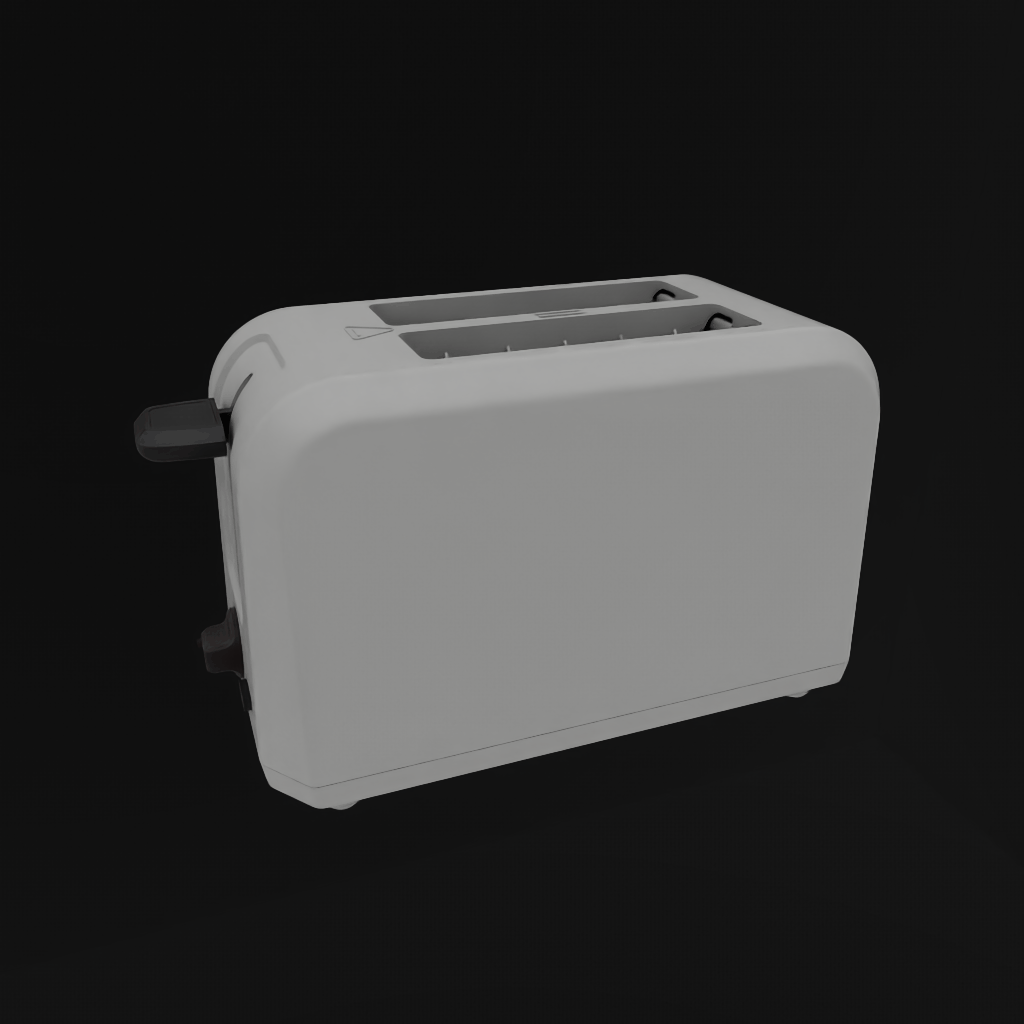
This historical toaster image and the earlier result (293,685 pixels against a
212-pixel noise floor with [mtlx, mdl, universal]) came from the replaced
selective-hide procedure. They are not evidence for the current single-context,
three-control measurement or proof that the OpenPBR network evaluated. Current
runs need their own appearance, control masks and coverage evidence.
What a pass establishes#
The sampled bound-material coverage proxy met its configured floor with the
requested context pinned. Controls bind above the asset so its root, descendant
and subset bindings can win unchanged in the weak passes. A universal fallback
or a bound shader that fails to evaluate may still count as covered. An unused
material in /Looks alone cannot replace those winning asset bindings.
display_color_response establishes a sampled display-color response through
the nominated material on the expanded measurement scene. Its qualified
Read/Removed comparison must reach the configured presence floor and exceed
applicable swap noise; the opacity rule depends on whether opacity is authored everywhere,
nowhere or on a subset. The file-side counts are diagnostic, not a per-Gprim
rendered coverage gate. A pass does not certify complete static conformance,
the original instanced rendering path, its performance or every consumer.
Static validation owns per-Gprim resolved coverage and value validity. A
disagreement calls for fixture and capture investigation before source repair;
it does not justify relocating valid inherited colors or de-instancing an asset.
What a pass does not establish#
That the requested surface network is the one Kit evaluated. The context list contains the requested entry alone, but universal fallback resolution is still possible. A winning bound material can also count as covered when its shader fails to evaluate. The separate scoped MaterialX log check can detect reported document-build failures; absence of captured errors is not a complete shader evaluation inventory. This family does not modify the source shader network to identify which network produced every pixel.
Nor does a pass establish that the surface looks correct or has its intended textures. The clearest way to see the size of that gap is the same prop rendered through the same room, light rig and camera, before and after migration:
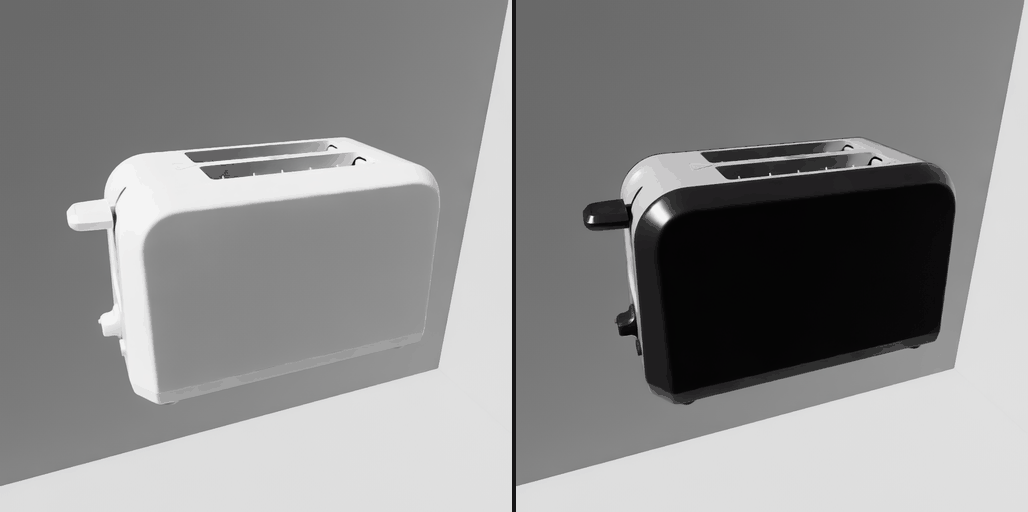
Left, the OpenPBR surface with constant inputs and no textures wired: flat white, because
base_color was unauthored and fell back to the node definition’s default. Right, the same
prop after migration kept its maps. Both passed the historical openpbr_renders procedure. Everything
separating those two frames is outside what the test judges, which is why the frames are
kept instead of reduced to a number.
The same boundary applies to display colour, and display_color_response is explicit about
it. The test asserts nothing about which display colour is brighter than which, and no match
between a pixel and an authored value. RTX tone-maps and the scene is dome-lit, so no
absolute match is available, and DISP.002 sets no plausibility band to check a relative one
against. Whether the shipped colours are the right colours is not something a render can
settle: the conform script’s derivation approximates albedo without claiming to match what a
path tracer produces for the same object.
A green runtime report establishes only the selected sampled coverage and response checks. Static surface presence, primvar coverage and value validity need their own recorded validation; a profile PASS does not establish optional feature conformance. Neither result identifies the evaluated network for every pixel or certifies appearance quality. Inspect the frames and exact selected requirements before making those separate claims.
Common mistakes#
Symptom |
Cause |
Fix |
|---|---|---|
Migrated asset looks unchanged in Kit |
MDL has priority in the shipped context order; similar-looking surfaces and failed evaluation are also possible |
Use the requested-context appearance capture and scoped logs; a confirmed pin alone does not identify the evaluated network |
Display colours all come back |
|
Install both and re-run; the log records when this happened |
Display colour looks washed out |
An sRGB value was written without converting to linear |
Decode through the sRGB transfer function first |
A profile pass on an asset with no OpenPBR surface |
|
Use |
A Blender export has no |
|
Set it to |
A Blender export has an unreferenced copy under |
|
Leave the mode on |
Where to go next#
FET006 OpenPBR Materials and FET010 Display Color for the two contracts in full.
Visual Materials capability for VM.PBR.001, and Display Color capability for DISP.001 to DISP.003.
FET006 Materials and FET010 Display Color for the evaluation families and what each test guards against.
SimReady Validation Workflow for validator setup, JSON reports and stamping.
Profiles for which profiles select these features and at which version.