Authentication and API keys
NeMo Retriever uses different credentials depending on what you are doing:
NVIDIA_API_KEY— Authorizes HTTP calls to NVIDIA-hosted NIMs (for exampleai.api.nvidia.comandintegrate.api.nvidia.com). Obtain this key from build.nvidia.com. Keys typically start withnvapi-.- NGC personal key — Used when you install the NeMo Retriever Helm chart so the cluster can authenticate to NGC Helm repos, pull images from
nvcr.io, and provideNGC_API_KEYto in-cluster NIM workloads.
You may need one or both, for example if you deploy with Helm from NGC and also call hosted inference APIs.
NVIDIA API key (NVIDIA_API_KEY)
Use this key when you run the NeMo Retriever Library from Python, call remote NIM URLs, or use any workflow that calls NVIDIA-hosted inference without supplying a separate per-service secret.
- Sign in at build.nvidia.com with your NVIDIA developer account.
- Open API keys (profile menu → Settings → API keys, or use that link after you are signed in).
- Create a key, copy it when it is shown (you may not be able to read the full secret again later), and set it in your environment:
export NVIDIA_API_KEY="nvapi-..."
On Windows PowerShell you can use $env:NVIDIA_API_KEY = "nvapi-...".
The SDK and CLI do not load a .env file automatically. For a full list of related variables and how to source a .env file into the shell, refer to Environment configuration variables.
Hosted object-detection NIMs (Page Elements, Table Structure, Graphic Elements) cap inline base64 image payloads at about 180,000 characters (roughly 180 KB). This key authorizes those hosted inference calls. For size limits and what to do when an image exceeds the cap, refer to Hosted Page Elements NIM image size limits.
Note
The NVIDIA_API_KEY from build.nvidia.com is not the same string as your NGC personal key used for Helm and nvcr.io access. Do not substitute one for the other unless your tooling explicitly documents that mapping.
Credential references in persisted graphs
Persisted pipeline graphs never contain literal API keys. Configure a graph with an explicit worker-side environment reference such as:
api_key="os.environ/NVIDIA_API_KEY"
Use the provider's own variable name, for example os.environ/OPENAI_API_KEY for an OpenAI model. The reference is stored in graph JSON and resolved only when the operator is constructed or invoked on the worker.
Literal keys remain available for non-persisted local execution, but attempting to serialize one raises an error. This prevents graph persistence from silently substituting an NVIDIA credential for another provider's key.
For how persisted graphs store credential references, refer to Persisted graphs are trusted configuration in the Python API guide.
NGC personal key (Helm and nvcr.io)
Many public assets on NGC can be used without authentication. For a Kubernetes deployment, the cluster must still pull NIM and microservice images from nvcr.io and may need NGC API access; the Helm chart expects credentials derived from an NGC personal key.
To create a key, go to https://org.ngc.nvidia.com/setup/api-keys.
When you create an NGC key, select the following for Services Included.
- NGC Catalog
- Public API Endpoints
Important
Early Access participants must also select Private Registry.
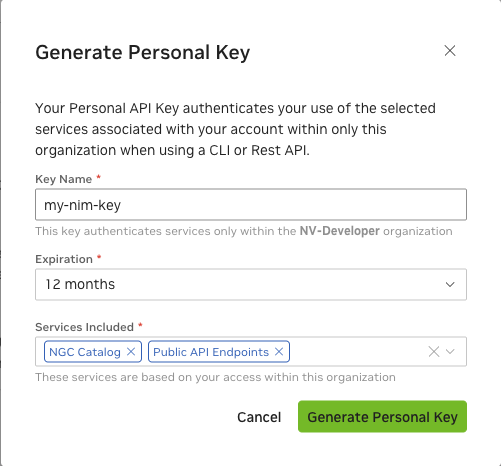
After you copy the key, set it in your environment. The Helm example below reads $NGC_API_KEY. If that variable is empty, Helm fails because ngcImagePullSecret.password is required when create=true.
export NGC_API_KEY="<ngc-personal-key>"
On Windows PowerShell you can use $env:NGC_API_KEY = "<ngc-personal-key>".
Using your NGC key with Helm
Set the chart values in the Secrets section of the Helm chart README so the chart renders ngc-secret and ngc-api:
ngcImagePullSecret.createandngcImagePullSecret.passwordcreate thengc-secretdockerconfigjson Secret for pulls fromnvcr.io.ngcApiSecret.createandngcApiSecret.passwordcreate thengc-apiSecret withNGC_API_KEYandNGC_CLI_API_KEY. The service container mapsNGC_API_KEYandNVIDIA_API_KEYfrom the SecretNGC_API_KEYkey when the Secret exists.- Overriding
ngcImagePullSecret.nameorngcApiSecret.namealso updates every rendered NIMCache and NIMService unless you set a non-empty per-NIMimage.pullSecretsorauthSecretoverride.
helm install retriever ./nemo_retriever/helm \
  --set ngcImagePullSecret.create=true \
  --set ngcImagePullSecret.password=$NGC_API_KEY \
  --set ngcApiSecret.create=true \
  --set ngcApiSecret.password=$NGC_API_KEY
Helm accepts unknown --set paths without error. Paths such as imagePullSecret, nimApiKey, and nims.ngcApiKey do not create either Secret.
For defaults and additional fields, refer to values.yaml.