Audio and video ingestion
Use this page for speech and audio extraction with Parakeet ASR and for video workflows that combine audio with OCR on frames or derived images.
For air-gapped or disconnected deployments, refer to Air-gapped and disconnected deployment.
Sections: Speech and audio (Parakeet) · Run Parakeet on the cluster (Helm) · Parakeet with hosted inference (build.nvidia.com) · Video and frame OCR
Speech and audio extraction
This documentation describes two ways to run NeMo Retriever Library with the parakeet-1-1b-ctc-en-us ASR NIM microservice (nvcr.io/nim/nvidia/parakeet-1-1b-ctc-en-us) to extract speech from audio files:
- Run the NIM locally on your cluster with the NeMo Retriever Helm chart
- Use NVIDIA Cloud Functions (NVCF) endpoints for cloud-based inference
Supported file types for speech extraction today:
mp3,wavmp4,mov,mkv,avi— common video containers; the audio track is transcribed (same extensions as in NeMo Retriever Library Overview)
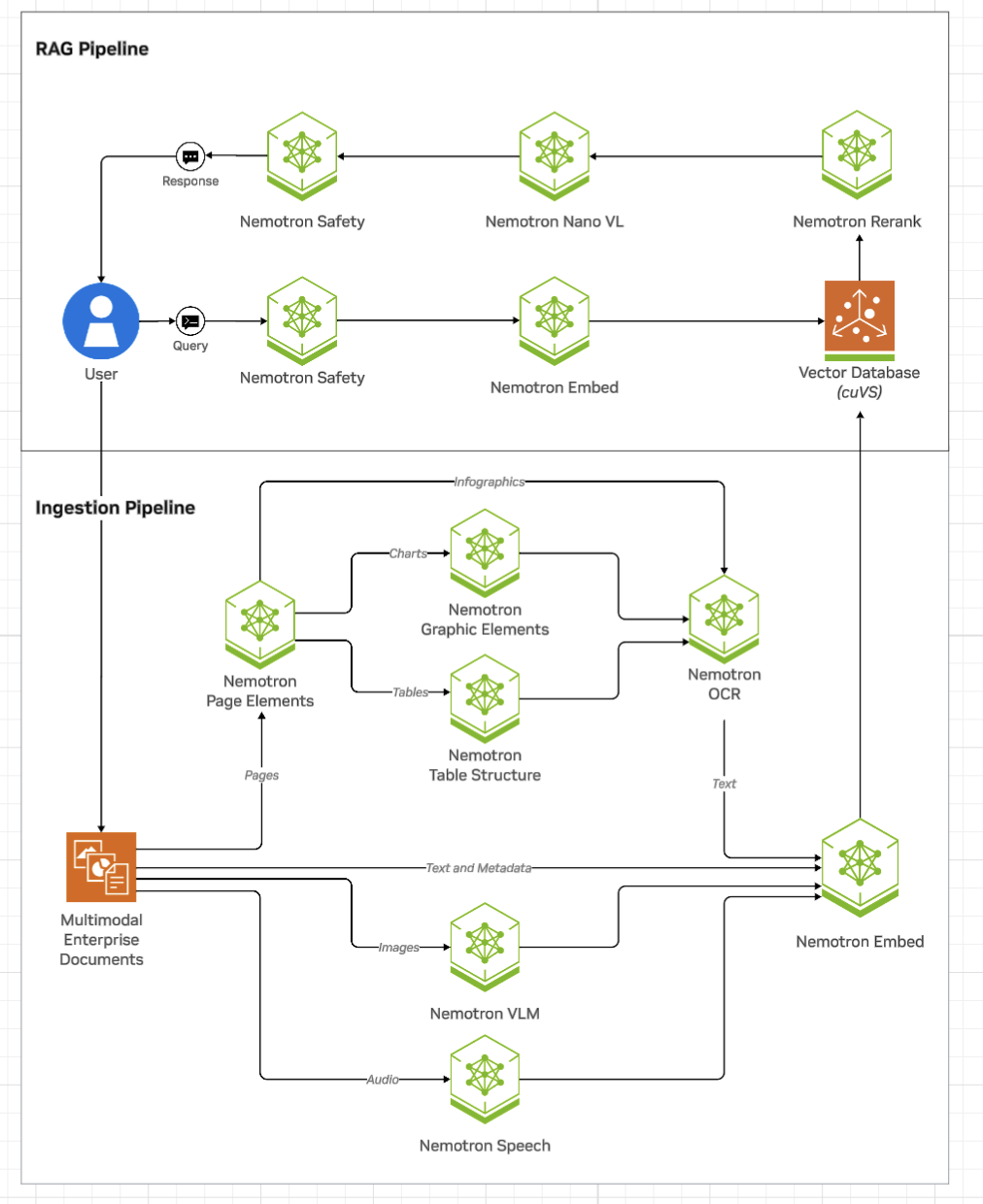
NeMo Retriever Library supports extracting speech from audio for Retrieval Augmented Generation (RAG). Similar to how the multimodal document pipeline uses detection and OCR microservices, NeMo Retriever Library uses the parakeet-1-1b-ctc-en-us ASR NIM to transcribe speech to text, then embeddings through the NeMo Retriever embedding path.
Before running audio extraction from Python with either self-hosted or hosted Parakeet, install the multimedia extra so the Parakeet ASR client can decode and resample audio:
pip install "nemo-retriever[multimedia]"
# For local GPU inference, include both extras:
pip install "nemo-retriever[local,multimedia]"
The Python package includes the ffmpeg-python wrapper, and the multimedia
extra adds Python libraries for audio decoding and resampling. These Python
dependencies do not install the ffmpeg or ffprobe command-line binaries.
For audio and video workflows, install system FFmpeg so both binaries are on
PATH:
sudo apt-get update && sudo apt-get install -y --no-install-recommends ffmpeg
Containers use the FFmpeg package from the base Ubuntu image, rather than a source-built FFmpeg release. If your workflow depends on exact FFmpeg version or codec behavior, verify the package inside the image against those requirements.
For Kubernetes deployments, the Helm chart default is service.installFfmpeg=true.
That value sets INSTALL_FFMPEG=true on every retriever service role, including
gateway, realtime, and batch in split topology. If ffmpeg and ffprobe are
not already in the image, the service entrypoint runs
sudo /usr/local/sbin/retriever-install-ffmpeg before the API starts.
This runtime path requires package-repository network egress, a writable root
filesystem, and a security policy that allows the image's scoped sudo use.
On air-gapped, proxy-restricted, read-only, or sudo-restricted clusters, set
service.installFfmpeg=false and embed the binaries in a custom service image at build time.
Refer to Air-gapped and disconnected deployment
and the Helm chart.
Important
Due to limitations in available VRAM controls in the current release, the parakeet-1-1b-ctc-en-us ASR NIM must run on a dedicated additional GPU. For the full list of requirements, refer to the Pre-Requisites & Support Matrix.
This pipeline enables retrieval at the speech segment level when you enable segmenting (refer to the examples below).
Run Parakeet on the cluster (Helm)
Use the following procedure to run the NIM on your own infrastructure. Self-hosted Parakeet runs on Kubernetes through the NeMo Retriever Helm chart. Parakeet is disabled by default and is not auto-wired into the retriever service. Refer to Optional Helm NIMs for the enablement table. GPU pinning is documented in Parakeet ASR.
-
Deploy or upgrade with the NeMo Retriever Helm chart. Set both of the following values, then follow Deployment options.
nimOperator:
  audio:
    enabled: true

serviceConfig:
  nimEndpoints:
    audioGrpcEndpoint: audio:50051
Equivalent Helm flags are
--set nimOperator.audio.enabled=trueand--set serviceConfig.nimEndpoints.audioGrpcEndpoint=audio:50051.Enabling only the audio NIM deploys Parakeet and leaves
audio_grpc_endpointset tonull. -
Confirm
service.installFfmpegfor your cluster. Keep the defaulttruewhen runtime package installation is allowed. On air-gapped or privilege-restricted clusters, setservice.installFfmpeg=falseand use a custom service image. Refer to Air-gapped and disconnected deployment and the Helm chart README forservice.imageoverrides. -
After the services are running, interact with the pipeline from Python (refer to the Python API guide for parameter details).
- In
batchmode, pass the in-cluster Parakeet gRPC endpoint throughASRParams.audio_endpoints. Useaudio:50051from your Helm release. Graph ingest does not read the Helm service endpoint.
from nemo_retriever import create_ingestor
from nemo_retriever.common.params.models import ASRParams

ingestor = (
    create_ingestor(run_mode="batch")
    .files("./data/*.wav")
    .extract_audio(
        asr_params=ASRParams(
            audio_endpoints=("audio:50051", None),  # (grpc_endpoint, http_endpoint)
            segment_audio=True,
        ),
    )
)
results = ingestor.ingest()
To generate one extracted element for each sentence-like ASR segment, pass
asr_params=ASRParams(segment_audio=True)to.extract_audio(...). This option applies when audio extraction runs with a self-hosted Parakeet NIM or using build.nvidia.com hosted inference, but has no effect when using the local Hugging Face Parakeet model.For more runnable examples, refer to Workflow: Ingest documents.
- In
Parakeet with hosted inference (build.nvidia.com)
Instead of running the pipeline locally, you can call Parakeet through build.nvidia.com hosted inference.
-
On the Parakeet model page on build.nvidia.com, create or copy an API key and note the function ID for hosted access. You need both before making API calls.
-
Run inference from Python with the hosted gRPC endpoint and credentials from that page (the example below uses the default hosted gRPC hostname; confirm values in the Get API Key flow for your deployment). Pass hosted endpoint, function ID, and API key through
ASRParams(audio_endpoints,function_id,auth_token).For parameter details, refer to the Python API guide.
from nemo_retriever import create_ingestor
from nemo_retriever.common.params.models import ASRParams

ingestor = (
    create_ingestor(run_mode="batch")
    .files("./data/*.mp3")
    .extract_audio(
        asr_params=ASRParams(
            audio_endpoints=("grpc.nvcf.nvidia.com:443", None),  # (grpc_endpoint, http_endpoint)
            function_id="<function ID>",
            auth_token="<API key>",
            segment_audio=True,
        ),
    )
)
results = ingestor.ingest()
Tip
For more runnable examples, refer to Workflow: Ingest documents.
Video and frame OCR
For video assets, NeMo Retriever Library can combine audio or speech processing (refer to Speech and audio extraction above) with visual text extraction when OCR applies to frames or derived images.
For OCR-oriented extract methods on scanned or image-heavy content, refer to OCR and scanned documents, text and layout extraction, and Nemotron Parse for advanced visual parsing.
Container formats and early-access video types are listed under supported file types and formats (refer to NeMo Retriever Library Overview for the full list).
For end-to-end RAG stacks that include multimodal ingestion, refer to the NVIDIA AI Blueprints catalog and related solution pages on NVIDIA Build.
Related topics
- Pre-Requisites & Support Matrix
- Optional Helm NIMs
- Troubleshoot NeMo Retriever extraction
- Use the Python API
- Chunking (includes audio and video segmenting defaults)