NeMo Retriever Library Overview
NVIDIA NeMo Retriever Library (NRL) extracts text, tables, charts, infographics, and transcripts from PDFs, HTML, Office documents, audio, video, and images. Run it as a Python library or Kubernetes deployment, and route inference through NVIDIA NIM microservices or local Nemotron models for downstream RAG and generative applications.
NeMo Retriever Library splits documents into pages, classifies sub-page content (text, tables, charts, and infographics), extracts it, and applies optical character recognition (OCR) where needed into a standard schema. It can compute embeddings for extracted content and store vectors in LanceDB when you pass vdb_op="lancedb" to upload (refer to Vector databases).
NVIDIA AI Enterprise (NVAIE) support
The NeMo Retriever Library is not supported under NVIDIA AI Enterprise (NVAIE)
NVIDIA AI Enterprise (NVAIE) support does not cover the NeMo Retriever Library. This applies to the NeMo Retriever Library Python package, its container image, and its Helm chart artifacts.
Some individual NIM microservices and models that the library calls—for example, the default NIMs in the Pre-Requisites & Support Matrix—may be covered by NVAIE on their own. That coverage applies only to those individual NIMs and models. It does not extend to the NeMo Retriever Library or its end-to-end extraction workflow. Using NVAIE-supported NIMs or models through the NeMo Retriever Library does not make the library, its container, or its chart NVAIE-supported.
What NeMo Retriever Library Is ✔️
The following diagram shows the retriever pipeline.
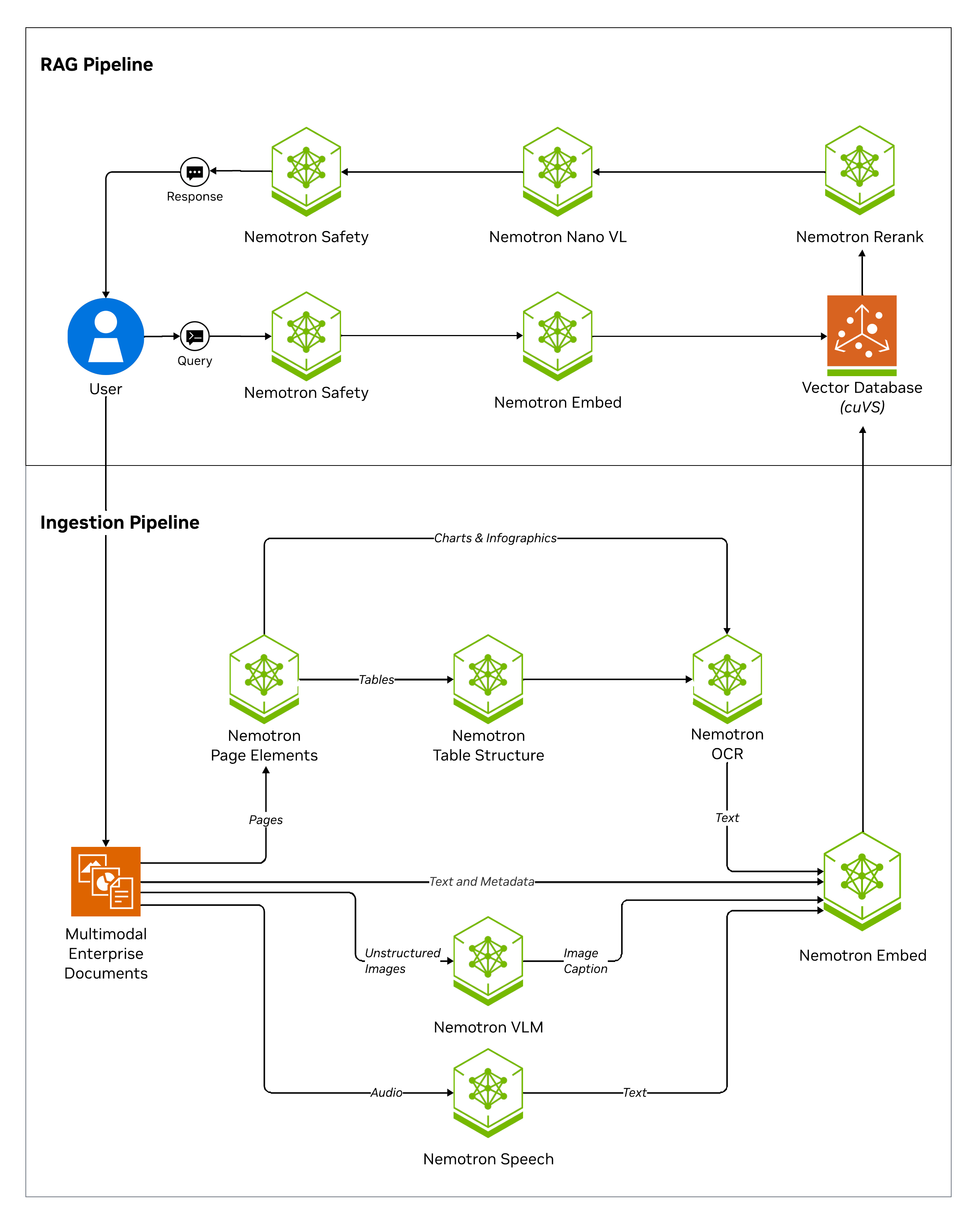
NeMo Retriever Library does the following:
- Accept directories of input files and configurable ingestion tasks
- Store extracted content in a vector database (VDB) with discrete metadata elements
- Support multiple extraction methods per document type—for example, PDFs can use pdfium or Nemotron Parse as an alternate method (
method="nemotron_parse") - Apply pre- and post-processing: text splitting and chunking, transforms and filtering, embedding generation, and image offloading to storage
Note
To use method="nemotron_parse" with PDFs, install the Nemotron Parse client dependencies with the nemotron-parse extra, for example uv pip install "nemo-retriever[nemotron-parse]". You can use the equivalent pip install command if you do not use UV.
NeMo Retriever Library supports the following file types:
avibmpdocxhtml(converted to markdown format)jpegjson(treated as text)md(treated as text)mkvmovmp3mp4pdfpngpptxsh(treated as text)svg(NeMo Retriever Library only, requirescairosvg)tifftxtwav
Related Topics
- Pre-Requisites & Support Matrix
- Agentic retrieval (concept) and Workflow: Agentic retrieval
- Deployment options — library, Helm, hosted vs self-hosted NIMs in one place
- Deploy on Kubernetes with Helm
- Notebooks
- NVIDIA AI Blueprints catalog — solution cards, enterprise RAG blueprints, and end-to-end patterns (including Enterprise RAG — multimodal PDF data extraction)
- For integration pathways, refer to Starter kits.