
Deployment Guide for GLM-5.3-Flash on TensorRT LLM - Blackwell Hardware#
Introduction#
This guide describes how to deploy GLM-5.3-Flash with the TensorRT LLM PyTorch backend and the official FP8 checkpoint on NVIDIA Blackwell GPUs.
GLM-5.3-Flash is a 320B-parameter mixture-of-experts model with 18B active parameters. It combines KDA linear attention with sparse Multi-Latent Attention and is served through Glm5NextForConditionalGeneration. The model supports text, image, and video inputs, as well as Multi-Token Prediction (MTP) for speculative decoding.
Validated Features#
The following features have been tested on B200 with four GPUs per worker. Disaggregated serving uses separate context and generation workers:
CUDA Graph
Overlap scheduler
Chunked prefill
Multi-Token Prediction (MTP)
Attention data parallelism, including MTP (see
enable_attention_dp)FP8 KV cache
Disaggregated serving
Disaggregated serving with MTP
KV cache block reuse (with periodic Mamba state snapshots, see
kv_cache_config)Image and video inputs (see Multimodal Inputs)
Automatic tool calling and JSON structured output (see Tool Calling and Structured Output)
Limitations#
KV cache block reuse requires a periodic Mamba snapshot policy; see
kv_cache_config.
See the Model-Feature Support Matrix for the current support status.
Prerequisites#
GPU: 4x NVIDIA B200 (SM100) for aggregated serving; 8x B200 for disaggregated serving.
OS: Linux
Drivers: CUDA Driver 575 or later
Docker with NVIDIA Container Toolkit installed
Minimum TensorRT LLM version: 1.3.0rc29
Text-only serving works with the Transformers version installed with TensorRT LLM. Image and video inputs require the native
Glm5NextProcessorfromtransformers==5.17.0; install it in the GLM deployment environment:pip install "transformers==5.17.0"
Install
fla-coreandeinopsin the container:pip install fla-core einops.
Models#
FP8 model: zai-org/GLM-5.3-Flash
Download the checkpoint to the model directory mounted into the container:
git lfs install
git clone https://huggingface.co/zai-org/GLM-5.3-Flash /models/GLM-5.3-Flash
MoE Backend Support Matrix#
There are multiple MoE backends inside TensorRT LLM. Here is the support matrix for GLM-5.3-Flash:
Device |
Checkpoint |
Supported moe_backend |
|---|---|---|
B200/GB200 |
FP8 |
TRTLLM, DEEPGEMM |
On B200, the default moe_config.backend (AUTO) selects TRTLLM for this checkpoint. DEEPGEMM is also supported.
Deployment Steps#
Run Docker Container#
Run the Docker container using the TensorRT LLM NVIDIA NGC image.
docker run --rm -it \
    --ipc=host \
    --gpus all \
    -p 8000:8000 \
    -v /path/to/your/models:/models \
    --name tensorrt_llm \
    nvcr.io/nvidia/tensorrt-llm/release:1.3.0rc29 \
    /bin/bash
Note:
You can mount additional directories using the
-v <host_path>:<container_path>flag, such as mounting the downloaded weight paths.The command maps port
8000from the container to your host so you can access the LLM API endpoint from your host.See https://catalog.ngc.nvidia.com/orgs/nvidia/teams/tensorrt-llm/containers/release/tags for all available containers. Containers published in the main branch weekly have an
rcNsuffix, while the monthly release with QA tests has norcNsuffix. Use thercrelease to get the latest model and feature support.
If you want to use the latest main branch, you can build from source: https://nvidia.github.io/TensorRT-LLM/latest/installation/build-from-source.html
All commands below should be run inside the Docker container.
Recommended Performance Settings#
Use these configurations as starting points for 4x B200 with FP8 weights and a BF16 KV cache. Tune the batch size and token budget for your workload.
B200 FP8 Config#
cat > /tmp/config.yml <<EOF
cuda_graph_config:
  enable_padding: true
  max_batch_size: 64
enable_attention_dp: false
enable_chunked_prefill: true
kv_cache_config:
  enable_block_reuse: false
  free_gpu_memory_fraction: 0.5
EOF
B200 FP8 Config with MTP#
MTP predicts multiple tokens per decoding step. Set max_draft_len to choose the number of draft tokens (1 to 5); the following configuration uses 3.
cat > /tmp/config.yml <<EOF
cuda_graph_config:
  enable_padding: true
  max_batch_size: 64
enable_attention_dp: false
enable_chunked_prefill: true
kv_cache_config:
  enable_block_reuse: false
  free_gpu_memory_fraction: 0.5
speculative_config:
  decoding_type: MTP
  max_draft_len: 3
EOF
B200 FP8 Config with Attention Data Parallelism#
Attention data parallelism distributes requests across ranks while keeping the routed experts expert-parallel. Set enable_attention_dp: true and reduce --max_num_tokens to 4096 in the launch command below. To enable MTP as well, add the speculative_config section from the MTP example above.
With attention data parallelism, the batch size limits apply per rank and each slot reserves KDA state, so size them to the per-rank concurrency (for example, 64 for 256 concurrent requests on four ranks).
cat > /tmp/config.yml <<EOF
cuda_graph_config:
  enable_padding: true
  max_batch_size: 64
enable_attention_dp: true
enable_chunked_prefill: true
kv_cache_config:
  enable_block_reuse: false
  free_gpu_memory_fraction: 0.5
EOF
To use FP8 KV cache with any of these aggregated-serving configurations, add dtype: fp8 under kv_cache_config. This halves latent KV storage; indexer and KDA state precision are unchanged. On SM100/SM103 GPUs with 16, 32 or 64 attention heads per rank (TP4, TP2, TP1 or attention data parallelism), sparse MLA runs directly on the FP8 cache with FP8 queries, for prefill and decode alike. Other configurations, such as TP8 or other GPU architectures, dequantize the selected KV rows in bounded query chunks and run FlashMLA; there, repeated staging can increase time to first token and reduce prefill throughput for large prefills, so prefer BF16 KV when prioritizing latency or prefill throughput. dtype: auto inherits the checkpoint’s KV-cache quantization metadata, so BF16 also requires that metadata not to enable FP8 KV quantization. The performance results below use BF16 KV cache.
Launch the TensorRT LLM Server#
Below is an example command to launch the TensorRT LLM server with GLM-5.3-Flash from within the container.
trtllm-serve \
  /models/GLM-5.3-Flash \
  --served_model_name zai-org/GLM-5.3-Flash \
  --host 0.0.0.0 \
  --port 8000 \
  --max_batch_size 64 \
  --max_num_tokens 16384 \
  --max_seq_len 16384 \
  --tp_size 4 \
  --ep_size 4 \
  --pp_size 1 \
  --config /tmp/config.yml
Disaggregated Serving#
Disaggregated serving runs prefill and decode on separate workers and supports MTP. GLM-5.3-Flash requires the Python NIXL transceiver. Add the following configuration to both context and generation workers:
cache_transceiver_config:
  backend: NIXL
  transceiver_runtime: PYTHON
Reuse the FP8 or FP8-with-MTP configuration, with matching speculative_config settings on both workers when using MTP. Set disable_overlap_scheduler: true and cuda_graph_config: null on the context worker.
On an 8-GPU node, use GPUs 0–3 for the context worker and GPUs 4–7 for the generation worker, each with --tp_size 4 --ep_size 4.
The orchestrator is launched with a disaggregated config that lists the context and generation worker URLs:
trtllm-serve disaggregated -c disagg_config.yaml
hostname: localhost
port: 8000
context_servers:
  num_instances: 1
  urls:
    - "localhost:8001"
generation_servers:
  num_instances: 1
  urls:
    - "localhost:8002"
Clients send requests to the orchestrator at localhost:8000. For worker launch commands and multi-node deployment, see the Disaggregated Serving guide.
LLM API Options (YAML Configuration)#
These options provide control over TensorRT LLM’s behavior and are set within the YAML file passed to the trtllm-serve command via the --config argument.
kv_cache_config#
Description: Configuration for the KV cache and recurrent-state pools.
Options:
enable_block_reuse: Enables prefix reuse. Requiresmamba_state_config.periodic_snapshot_interval(for example256); without this policy, reuse is disabled.free_gpu_memory_fraction: Fraction of free GPU memory reserved for caches after loading the model. Recommendation:0.5; reduce it if you encounter OOM errors.dtype: Attention KV-cache data type. Default:auto, which follows the checkpoint’s KV-cache quantization metadata. Set tofp8to reduce latent KV storage; this also works with MTP and attention data parallelism.
cuda_graph_config#
Description: Configuration for CUDA graphs to optimize performance.
Options:
enable_padding: Iftrue, input batches are padded to the nearest CUDA graph batch size. This can significantly improve performance. Default:falsemax_batch_size: Sets the maximum batch size for which a CUDA graph will be created. Recommendation: Set this to match the--max_batch_sizecommand-line option.
moe_config#
Description: Configuration for Mixture-of-Experts (MoE).
Options:
backend: The backend to use for MoE operations. UseAUTO(resolves toTRTLLM) orDEEPGEMMon B200.
speculative_config#
Description: Configuration for speculative decoding with MTP.
Options:
decoding_type: Set toMTPto enable Multi-Token Prediction.max_draft_len: Number of draft tokens proposed per step (1to5). The example uses3.
enable_chunked_prefill#
Description: Enables chunked prefill to overlap prefill and generation, improving throughput for mixed batches. Default:
false. Recommendation:truefor prompts of several thousand tokens.
enable_attention_dp#
Description: Enables attention data parallelism with expert-parallel MoE. Default:
false. When enabled, use--max_num_tokens 4096for the configuration above. MTP can be enabled with the samespeculative_configas tensor parallelism.
See the TorchLlmArgs class for the full list of options which can be used in the YAML configuration file.
Testing API Endpoint#
Health Check#
Start a new terminal on the host to test the TensorRT LLM server you just launched. You can query the health/readiness of the server using:
curl -s -o /dev/null -w "Status: %{http_code}\n" "http://localhost:8000/health"
When Status: 200 is returned, the server is ready for queries. Note that the very first query may take longer due to initialization and compilation.
Basic Test#
After the TensorRT LLM server is set up and shows Application startup complete, you can send requests to the server.
curl http://localhost:8000/v1/completions \
  -H "Content-Type: application/json" \
  -d '{
      "model": "zai-org/GLM-5.3-Flash",
      "prompt": "The capital of France is",
      "max_tokens": 16,
      "temperature": 0
  }'
Example response:
{
  "id": "cmpl-...",
  "object": "text_completion",
  "model": "zai-org/GLM-5.3-Flash",
  "choices": [
    {
      "index": 0,
      "text": " Paris. In French, Paris is spelled the same way but pronounced \"pa-",
      "finish_reason": "length"
    }
  ],
  "usage": {
    "prompt_tokens": 5,
    "total_tokens": 21,
    "completion_tokens": 16
  }
}
For /v1/chat/completions, pass reasoning controls through chat_template_kwargs, for example {"reasoning_effort": "low", "clear_thinking": true}. reasoning_effort accepts low, high, or max (default); clear_thinking controls whether earlier reasoning is retained. Thinking is always enabled, and enable_thinking is not supported.
Multimodal Inputs#
Send images and videos to /v1/chat/completions using the OpenAI-compatible image_url and video_url content types. Video decoding requires opencv-python-headless in the container.
Tool Calling and Structured Output#
For tool calling, add --tool_parser glm47 --reasoning_parser deepseek-r1 to the server command and use tool_choice: "auto" (streaming/non-streaming and MTP all supported). Limitations: tool_choice: "required" and named-function choice are not supported, and parallel_tool_calls should be omitted (the model can still return multiple tool calls under auto).
Long Context#
The checkpoint supports a total sequence length of 1,048,576 tokens. Set --max_seq_len 1048576 and keep chunked prefill enabled; input + output must fit within this limit. On 4×B200 (TP4/EP4, BF16 KV), a validated config is --max_batch_size 16, --max_num_tokens 8192, CUDA graph batch limit 16, and kv_cache_config.free_gpu_memory_fraction: 0.6. This was smoke-tested up to the exact limit (≈1.04M-token multi-needle retrieval and a full 1,048,576-token run) — validating execution and basic retrieval, not comprehensive long-context quality.
Troubleshooting Tips#
CUDA OOM errors: Reduce
--max_batch_size,--max_num_tokens, orkv_cache_config.free_gpu_memory_fraction. Keepcuda_graph_config.max_batch_sizeconsistent with the server batch limit.Configuration or processor errors: Check that the Transformers version in Prerequisites is installed in the serving environment.
Block reuse disabled: Configure the periodic snapshot policy described in
kv_cache_config.
Benchmarking Performance#
To benchmark the performance of your TensorRT LLM server, you can use the built-in benchmark_serving.py script. First, create a wrapper bench.sh script:
cat << 'EOF' > bench.sh
concurrency_list="1 2 4 8 16 32 64 128 256"
multi_round=5
isl=1024
osl=1024
result_dir=/tmp/glm53_flash_output

for concurrency in ${concurrency_list}; do
    num_prompts=$((concurrency * multi_round))
    python -m tensorrt_llm.serve.scripts.benchmark_serving \
        --model zai-org/GLM-5.3-Flash \
        --backend openai \
        --dataset-name "random" \
        --random-input-len ${isl} \
        --random-output-len ${osl} \
        --random-prefix-len 0 \
        --random-ids \
        --num-prompts ${num_prompts} \
        --max-concurrency ${concurrency} \
        --ignore-eos \
        --tokenize-on-client \
        --seed 0 \
        --percentile-metrics "ttft,tpot,itl,e2el"
done
EOF
chmod +x bench.sh
To save results to files, add these options to each benchmark command:
--save-result \
--result-dir "${result_dir}" \
--result-filename "concurrency_${concurrency}.json"
For more benchmarking options see benchmark_serving.py.
Run bench.sh to begin a serving benchmark. This will take a long time if you run all the concurrencies.
./bench.sh
Sample TensorRT LLM serving benchmark output. Your results may vary due to ongoing software optimizations.
============ Serving Benchmark Result ============
Successful requests:                      40
Benchmark duration (s):                   [result]
Total input tokens:                       40960
Total generated tokens:                   40960
Request throughput (req/s):               [result]
Output token throughput (tok/s):          [result]
Total Token throughput (tok/s):           [result]
User throughput (tok/s):                  [result]
---------------Time to First Token----------------
Mean TTFT (ms):                           [result]
Median TTFT (ms):                         [result]
P99 TTFT (ms):                            [result]
-----Time per Output Token (excl. 1st token)------
Mean TPOT (ms):                           [result]
Median TPOT (ms):                         [result]
P99 TPOT (ms):                            [result]
---------------Inter-token Latency----------------
Mean ITL (ms):                            [result]
Median ITL (ms):                          [result]
P99 ITL (ms):                             [result]
----------------End-to-end Latency----------------
Mean E2EL (ms):                           [result]
Median E2EL (ms):                         [result]
P99 E2EL (ms):                            [result]
==================================================
Key Metrics#
Time to First Token (TTFT)#
The typical time elapsed from when a request is sent until the first output token is generated.
Time Per Output Token (TPOT) and Inter-Token Latency (ITL)#
TPOT is the typical time required to generate each token after the first one.
ITL is the typical time delay between the completion of one token and the completion of the next.
Both TPOT and ITL ignore TTFT. With MTP, tokens can arrive in groups, so streaming ITL depends on how tokens are delivered; use TPOT for per-token decode comparisons.
For a single request, ITLs are the time intervals between tokens, while TPOT is the average of those intervals:
Across requests, average TPOT weights each request equally, while average ITL averages the recorded inter-token intervals:
End-to-End (E2E) Latency#
The typical total time from when a request is submitted until the final token of the response is received.
Total Token Throughput#
The combined rate at which the system processes both input (prompt) tokens and output (generated) tokens.
Tokens Per Second (TPS) or Output Token Throughput#
How many output tokens the system generates each second.
Performance#
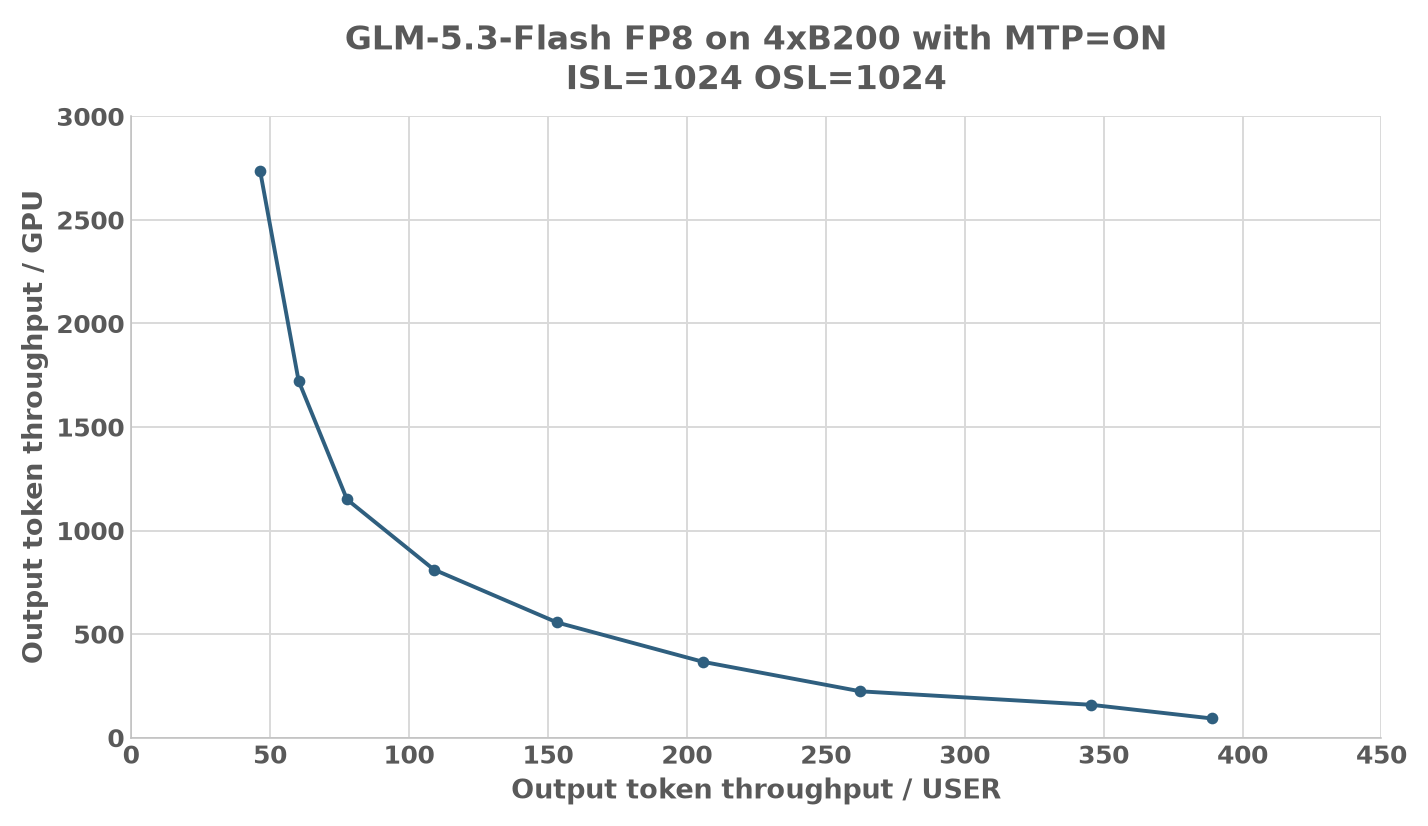
The chart below shows the Pareto frontier of output-token throughput per GPU versus per-user output speed on 4x B200 with GLM-5.3-Flash FP8, a BF16 KV cache, and MTP enabled, at ISL 1024 / OSL 1024. The frontier is the efficient boundary of the measured TP4 / EP4 and attention DP4 / EP4 configurations with MTP: no other measured point is better on both axes. Other settings or workloads can give different results. Benchmarks were run using the benchmark_serving client above against TensorRT LLM 1.3.0rc29.