Extending Prognostic Models
Implementing a custom prognostic model
This example will demonstrate how to extend Earth2Studio by implementing a custom prognostic model and running it in a general workflow.
In this example you will learn:
- API requirements of prognostic models
- Implementing a custom prognostic model
- Running this model in existing workflows
Custom Prognostic
As discussed in the Prognostic Models section of the user guide,
Earth2Studio defines a prognostic model through a simple interface
[earth2studio.models.px.base.PrognosticModel][]. This can be used to help
guide the required APIs needed to successfully create our own custom prognostic.
In this example, let's create a simple prognostic that simply predicts adds normal noise to the surface wind fields every time-step. While not practical, this should demonstrate the APIs one needs to implement for any prognostic.
Starting with the constructor, prognostic models should typically be torch modules.
Models need to have a to(device) method that can move the model between
different devices. If your model is PyTorch, then this will be easy.
import os

os.makedirs("outputs", exist_ok=True)
from dotenv import load_dotenv

load_dotenv()  # TODO: make common example prep function

from collections.abc import Generator, Iterator

import numpy as np
import torch
import xarray as xr

from earth2studio.models.px.utils import PrognosticMixin
from earth2studio.utils.coords import coord_array, coord_array_like, handshake_dataarray
from earth2studio.utils.cupy import from_torch


class CustomPrognostic(torch.nn.Module, PrognosticMixin):
    """Custom prognostic model"""

    def __init__(self, noise_amplitude: float = 0.1):
        super().__init__()
        self.amp = noise_amplitude

    def input_coords(self) -> xr.DataArray:
        """Input coordinate system of the prognostic model

        Returns
        -------
        xr.DataArray
            Allocation-free coordinate signature
        """
        return coord_array(
            ("batch", "lead_time", "variable", "lat", "lon"),
            {
                "lead_time": np.array([np.timedelta64(0, "h")]),
                "variable": np.array(["u10m", "v10m"]),
            },
            dynamic=("batch",),
            grid="latlon-0.25deg",
        )

    def output_coords(self, input_coords: xr.DataArray) -> xr.DataArray:
        """Output coordinate system of the prognostic model

        Parameters
        ----------
        input_coords : xr.DataArray
            Input coordinate system to transform into output_coords

        Returns
        -------
        xr.DataArray
            Allocation-free coordinate signature
        """
        # Check input coordinates are valid
        lead = input_coords.coords["lead_time"].values
        if (
            lead.shape != (1,)
            or not np.issubdtype(lead.dtype, np.timedelta64)
            or np.isnat(lead).any()
        ):
            raise ValueError("Expected one finite timedelta lead time")
        handshake_dataarray(
            input_coords.assign_coords(lead_time=lead - lead[-1]), self.input_coords()
        )
        return coord_array_like(
            input_coords, {"lead_time": lead + np.timedelta64(1, "h")}
        )

    def __call__(
        self,
        x: xr.DataArray,
    ) -> xr.DataArray:
        """Runs prognostic model 1 step.

        Parameters
        ----------
        x : xr.DataArray
            Input field carrying its coordinates and grid metadata
        """
        out_coords = self.output_coords(x)
        tensor, _ = x.e2s.to_torch()
        noise = torch.rand_like(tensor)
        return from_torch(tensor + self.amp * noise, out_coords)

    def _default_generator(
        self, x: xr.DataArray
    ) -> Generator[xr.DataArray, None, None]:
        """Create prognostic generator"""
        self.output_coords(x)
        # First time-step should always be the initial state
        yield x

        while True:
            x = self.front_hook(x)
            out_coords = self.output_coords(x)
            tensor, _ = x.e2s.to_torch()
            x = self.rear_hook(
                from_torch(tensor + self.amp * torch.randn_like(tensor), out_coords)
            )
            yield x

    def create_iterator(self, x: xr.DataArray) -> Iterator[xr.DataArray]:
        """Creates a iterator which can be used to perform time-integration of the
        prognostic model. Will return the initial condition first (0th step).

        Parameters
        ----------
        x : xr.DataArray
            Input field carrying its coordinates and grid metadata
        """

        yield from self._default_generator(x)
Input/Output Coordinates
Defining the input/output coordinate systems is essential for any model in Earth2Studio since this is how both the package and users can learn what type of data the model expects. Ensuring this is correct will set an prognostic model up for success. Have a look at Data and Metadata for details on coordinate system.
This requires the definition of two functions, input_coords and
output_coords :
-
input_coords: A function that returns the expected input coordinate signature of the model, without allocating field values. -
output_coords: A function that returns the expected output coordinate system of the model given an input coordinate system. This function should also validate the input dimensions, labels, and metadata.
Here, we define the input output coords to be the surface winds and give the model a
time-step size of 1 hour. Thus output_coords updates the lead time by one
hour.
Leading dimensions are preserved by coord_array_like; only the fixed
trailing dimensions declared by the model are validated.
__call__ API
The call function is one of the two main APIs used to interact with the prognostic model. The first thing we do is check the coordinate system of the input data is indeed what the model expects. Next, we execute the forward pass of our model (apply noise) and then update the output coordinate system.
This elementwise model naturally handles arbitrary leading dimensions.
Models with fixed-rank numerical kernels can use batch_func to pack them.
create_iterator API
The call function is useful for a single time-step. However, prognostics generate time-series which is done using an iterator. This is achieved by creating a generator under the hood of the prognostic.
A generator in Python is essentially a function that returns an iterator using the
yield keyword. In the case of prognostics, it yields a single time-step
prediction of the model. Note that this allows the model to control its own internal
state inside the iterator independent of the workflow.
Since this model is auto regressive, it can theoretically index in time forever. Thus, we make the generator an infinite loop. Keep in mind that generators execute on demand, so this infinite loop won't cause the program to get stuck.
Warning
It is the responsibility of the model check if the input tensor and coordinate
system are indeed valid. The earth2studio.utils.coords.handshake_coords
and earth2studio.utils.coords.handshake_dim can help make this easier.
Set Up
With the custom prognostic defined, it's now easily usable in a standard workflow. In
this example, we will use the build in workflow earth2studio.run.deterministic.
Let's instantiate the components needed.
- Prognostic Model: Use our custom prognostic defined above.
- Datasource: Pull data from the GFS data api
earth2studio.data.GFS. - IO Backend: Save the outputs into a Zarr store
earth2studio.io.ZarrBackend.
from dotenv import load_dotenv

load_dotenv()  # TODO: make common example prep function

from earth2studio.data import GFS
from earth2studio.io import ZarrBackend

# Create the prognostic
model = CustomPrognostic(noise_amplitude=10.0)

# Create the data source
data = GFS()

# Create the IO handler, store in memory
io = ZarrBackend()
Execute the Workflow
Because the prognostic meets the needs of the interface, the workflow will execute just like any other model.
import earth2studio.run as run

nsteps = 24
io = run.deterministic(["2024-01-01"], nsteps, model, data, io)

print(io.root.tree())
Console output35 lines
2026-11-19 21:26:20.001 | INFO     | earth2studio.run:deterministic:132 - Running simple workflow!
2026-11-19 21:26:20.004 | INFO     | earth2studio.run:deterministic:140 - Inference device: cuda

Fetching GFS data:   0%|          | 0/2 [00:00<?, ?it/s]
Fetching GFS data:  50%|█████     | 1/2 [00:01<00:01,  1.02s/it]
Fetching GFS data: 100%|██████████| 2/2 [00:01<00:00,  2.04it/s]
Fetching GFS data: 100%|██████████| 2/2 [00:01<00:00,  1.75it/s]

Fetching GFS statistics: 0it [00:00, ?it/s]
Fetching GFS statistics: 0it [00:00, ?it/s]
2026-11-19 21:26:21.296 | SUCCESS  | earth2studio.run:deterministic:181 - Fetched data from GFS
2026-11-19 21:26:21.297 | INFO     | earth2studio.run:deterministic:189 - Inference starting!


Running inference:   0%|          | 0/25 [00:00<?, ?it/s]

Running inference:   4%|▍         | 1/25 [00:00<00:04,  5.75it/s]

Running inference:  20%|██        | 5/25 [00:00<00:01, 19.38it/s]

Running inference:  44%|████▍     | 11/25 [00:00<00:00, 32.60it/s]

Running inference:  72%|███████▏  | 18/25 [00:00<00:00, 42.76it/s]

Running inference:  92%|█████████▏| 23/25 [00:00<00:00, 43.81it/s]
Running inference: 100%|██████████| 25/25 [00:00<00:00, 36.33it/s]
2026-11-19 21:26:21.986 | SUCCESS  | earth2studio.run:deterministic:218 -
Inference complete
/
├── lat (721,) float64
├── lead_time (25,) timedelta64[ns]
├── lon (1440,) float64
├── time (1,) datetime64[ns]
├── u10m (1, 25, 721, 1440) float32
└── v10m (1, 25, 721, 1440) float32
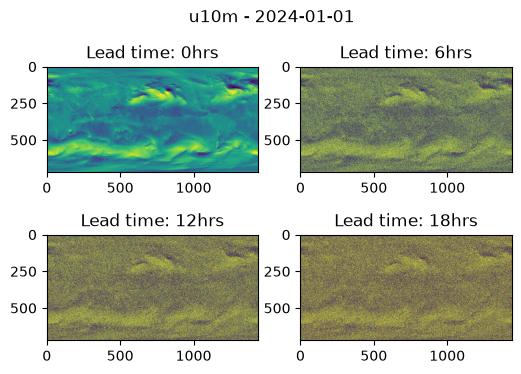
Post Processing
To confirm that our prognostic model is working as expected, we should see the fields become progressively more noisy as time progresses.
import matplotlib.pyplot as plt

forecast = "2024-01-01"
variable = "u10m"

plt.close("all")

# Create a figure and axes with the specified projection
fig, ax = plt.subplots(2, 2, figsize=(6, 4))

# Plot u10m every 6 hours
ax[0, 0].imshow(io[variable][0, 0], vmin=-20, vmax=20)
ax[0, 1].imshow(io[variable][0, 6], vmin=-20, vmax=20)
ax[1, 0].imshow(io[variable][0, 12], vmin=-20, vmax=20)
ax[1, 1].imshow(io[variable][0, 18], vmin=-20, vmax=20)


# Set title
plt.suptitle(f"{variable} - {forecast}")
times = (
    io["lead_time"][:].astype("timedelta64[ns]").astype("timedelta64[h]").astype(int)
)
ax[0, 0].set_title(f"Lead time: {times[0]}hrs")
ax[0, 1].set_title(f"Lead time: {times[6]}hrs")
ax[1, 0].set_title(f"Lead time: {times[12]}hrs")
ax[1, 1].set_title(f"Lead time: {times[18]}hrs")

plt.savefig("outputs/01_custom_prognostic_prediction.jpg", bbox_inches="tight")