



Haptikos Exoskeletons#
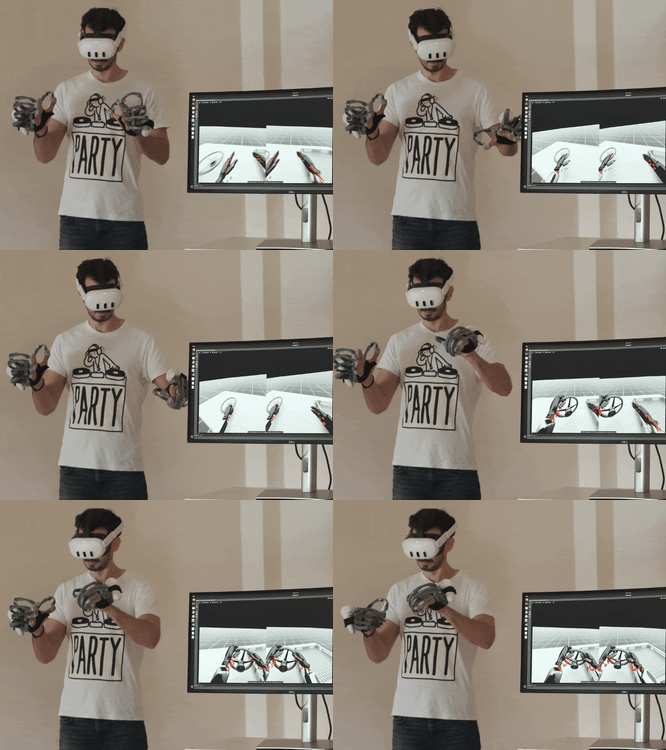
Use the Haptikos Exoskeletons with the Isaac Teleop framework. Currently only Linux is supported. Tested on Meta Quest headsets. Other headsets with controllers may work as well.
Components#
Core library (
haptikos_core) — wraps the Haptikos Core App(libHaptikosCore.so) and provides access to per-joint tracking data and haptics.Plugin executable (
haptikos_plugin) — the primary plugin binary that enables integration with the Teleop system via CloudXR and OpenXR.
Prerequisites#
Linux — x86_64 (tested on Ubuntu 22.04 / 24.04).
Haptikos API for Linux.
Quick Start#
Step 1: Get the Haptikos API#
The Haptikos API must be downloaded separately due to licensing. Check our website.
Obtain a Haptikos account.
Clone the repository.
Copy the
HaptikosCpp_API_Sharedfolder from our HaptikosAPI repository into thesrc/plugins/haptikosfolder. The folder structure should be the following:
src/plugins/haptikos/
├── CMakeLists.txt
├── HaptikosCpp_API_Shared
│   ├── include
│   └── lib
├── haptikos_hands_plugin.cpp
├── haptikos_hands_plugin.hpp
├── main.cpp
├── plugin.yaml
└── README.md
Step 2: Build the plugin#
cd ../../..  # Navigate to TeleopCore root
cmake -S . -B build
cd build
make haptikos_hands_plugin
Step 3: Build the entire project#
cmake -B build -DENABLE_CLANG_FORMAT_CHECK=OFF #From Project root
cmake --build build --parallel 4
cmake --install build
We use the -DENABLE_CLANG_FORMAT_CHECK=OFF because the headers in the HaptikosAPI library are not clang-formatted. You can clang format the headers to not include the flag by running:
clang-format -i src/plugins/haptikos/HaptikosCpp_API_Shared/include/*
Step 4: Run the plugin#
The Haptikos plugin connects to the Teleop session through the CloudXR / OpenXR runtime, so the runtime must be running and its environment sourced in the shell that launches the plugin.
Start the CloudXR runtime. It runs as a background service that outlives this shell, until you stop it with python -m isaacteleop.cloudxr.service stop:
source isaac_teleop_env/bin/activate
python -m isaacteleop.cloudxr.service start --accept-eula
In the shell that runs the plugin, source the environment file that the runtime writes on startup. This points the OpenXR loader at CloudXR:
cd IsaacTeleop/
source ~/.cloudxr/run/cloudxr.env
In the same terminal, run the plugin with the following:
./install/plugins/haptikos/haptikos_hands_plugin
Important Information#
To use the plugin properly it is necessary to attach the controllers on our exoskeletons using the included mount.
The orientation calibration defines the direction the Haptikos gloves define as forward. This needs to be aligned with the Head Mounted Display’s forward direction.
To inject the hand tracking data and haptic feedback, the controllers, the Haptikos App and the exoskeletons need to be active.
The executable will be located in the
build/src/plugins/haptikos. If you installed the project by runningcmake --install buildthe executable will also be found in theinstall/plugins/haptikosfolder.
License#
Source files are covered by their stated licenses (Apache-2.0). The Haptikos API is proprietary to Haptikos and is subject to its own license; it is not redistributed by this project.