



Egocentric Hand Reconstruction#
Automated pipeline for 4D hand and camera pose reconstruction from egocentric videos. Integrates ViPE and Dyn-HaMR in containerized environments.
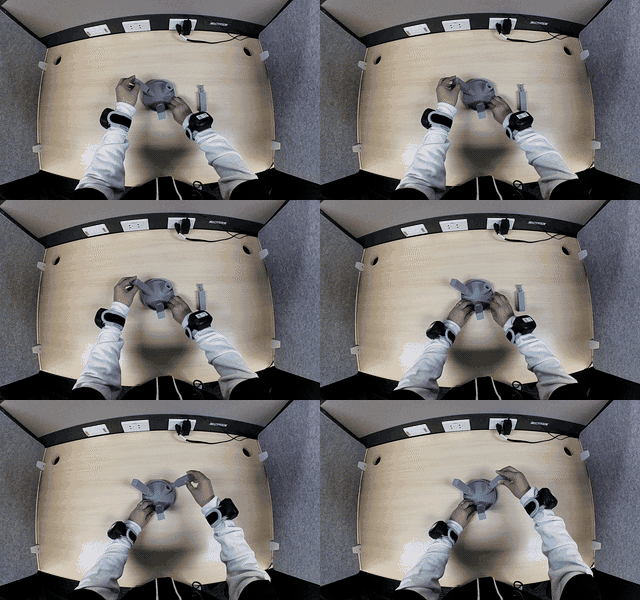
|
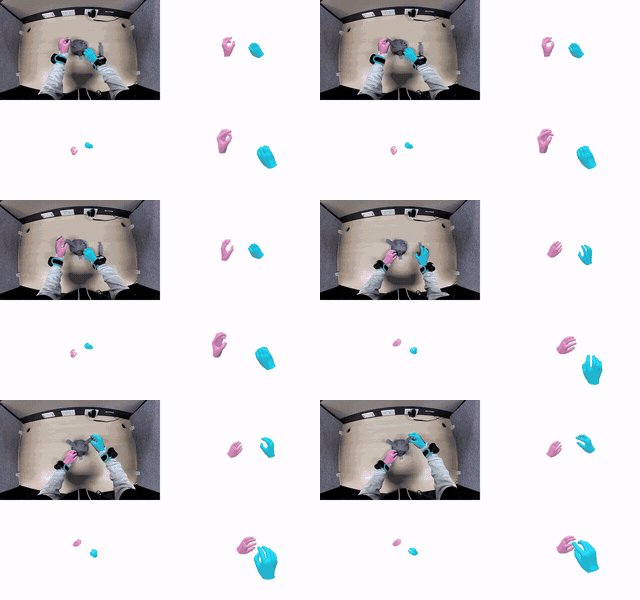
|
Source egocentric video |
Reconstructed 4D hand and camera poses |
Video Capture#
To capture egocentric video with an OAK camera, see the OAK camera plugin documentation.
Setup#
System Requirement#
OS: Ubuntu 24.04
GPU: NVIDIA RTX 6000 Ada, L40, H100, GeForce RTX 3090, GeForce RTX 4090
System RAM: 100GB (for a reference 30s video, more for longer)
System VRAM: 12GB (for a reference 30s video, more for longer)
Free Disk: 100GB
Prerequisites#
Ensure the following are installed and configured before starting:
Docker ≥ 20.10 (BuildKit support required):
docker --version # should print 20.10 or newer
NVIDIA Container Toolkit — required for GPU access inside containers:
Install guide: https://docs.nvidia.com/datacenter/cloud-native/container-toolkit/latest/install-guide.html
Python tooling — required only for downloading videos from S3/Swift URLs:
pip install boto3
Checkout the code#
git clone https://github.com/NVIDIA/IsaacTeleop.git
cd IsaacTeleop/src/postprocessing/egocentric_hand_reconstruction
The ./docker and ./scripts directories referenced in this guide are located under this directory.
Prepare data files#
Place required files in the outputs/ directory.
...
├── docker/
├── scripts/
├── osmo/
└── outputs/
    ├── MANO_RIGHT.pkl
    └── BMC/
        └── *.npy
MANO model (required):
Create an academic account at https://mano.is.tue.mpg.de/ and accept the license.
The download is a ZIP archive — extract it and place
MANO_RIGHT.pklinoutputs/.
BMC data (required):
Follow the README in MengHao666/Hand-BMC-pytorch to generate (until the step
python calculate_bmc.py)Place all
.npyfiles in:outputs/BMC/
Note
The Hand-BMC-pytorch repository is no longer actively maintained, so parts
of its setup may not work out-of-the-box on newer systems. At the time of
writing, the environment.yml pins PyTorch to a specific build
(py3.7_cuda10.0.130_cudnn7.6.2_0) that may no longer be available on
Conda channels or compatible with current hardware. If Conda fails to
resolve the environment, one workaround is to relax the pins in
environment.yml:
# Before
- pytorch==1.2.0=py3.7_cuda10.0.130_cudnn7.6.2_0
- torchvision==0.4.0=py37_cu100

# After
- pytorch=1.2.0
- torchvision=0.4.0
This fix reflects the state of the upstream repo at the time of writing and may need to be adjusted as the ecosystem evolves.
Build Docker images#
./docker/vipe.sh build
./docker/dynhamr.sh build
Note
Building these Docker images pulls third-party source code, libraries, and pre-trained model weights from external repositories. These components are subject to their own respective licenses, which may include restrictions on use, modification, or redistribution. It is the user’s responsibility to review and comply with all applicable third-party licenses before building, using, or distributing these images. Refer to each Dockerfile for the specific sources pulled during the build.
Hand Reconstruction#
Run complete reconstruction (ViPE + Dyn-HaMR) with a single command:
# Using a local video file
./scripts/run_reconstruction.sh path/to/your_video.mp4

# Using a remote video file
./scripts/run_reconstruction.sh s3://path/to/your_video.mp4
The script accepts either a local file path or a remote URL
pointing to a video on cloud storage. Both s3:// URLs (S3-compatible
cloud storage) and swift:// URLs (OpenStack Object Storage) are
supported. When a URL is provided, the video is automatically downloaded
to the outputs/ directory before processing begins.
To use a remote video, set the following environment variables for credentials:
Variable |
Required |
Description |
|---|---|---|
|
Yes |
Your S3 access key ID |
|
Yes |
Your S3 access key |
|
No |
Region (default: |
|
No |
Custom endpoint for S3-compatible storage |
By default, the pipeline reads data files from and writes results to the
outputs/ directory. Set OUTPUTS_DIR to use a different location:
OUTPUTS_DIR=/path/to/outputs ./scripts/run_reconstruction.sh path/to/your_video.mp4
The pipeline will:
Copy or download the video to
outputs/.Run ViPE to estimate camera poses.
Run Dyn-HaMR for hand reconstruction.
Save all results to
outputs/logs/.
Batch Reconstruction with OSMO#
For large-scale batch processing, the pipeline can be submitted as an
OSMO workflow using hand_reconstruction.yaml.
This runs ViPE and Dyn-HaMR as two chained tasks on a GPU pool.
Prerequisites:
A working OSMO cluster deployment (see the OSMO deployment guide)
OSMO CLI installed and authenticated (
osmo login …)Bucket and image registry credentials stored in OSMO
Container images built and pushed to your registry (see Build Docker images)
MANO and BMC assets available at an S3 URL
See osmo/README.md for full setup details including credential registration and container image push steps.
Submit a workflow:
osmo workflow submit osmo/hand_reconstruction.yaml \
    --pool POOL_NAME \
    --set-string \
        experiment_id=EXPERIMENT_ID \
        source_url=s3://INPUT_S3_PATH \
        dest_url=s3://OUTPUT_S3_PATH \
        assets_url=s3://ASSETS_S3_PATH \
        vipe_image=CONTAINER_REGISTRY/ego_vipe:TAG \
        dynhamr_image=CONTAINER_REGISTRY/ego_dynhamr:TAG
Monitor progress:
osmo workflow logs WORKFLOW_ID -n 100
Estimated Runtime#
For a reference 30-second video, expect approximately:
ViPE: ~7 minutes
Dyn-HaMR: ~30 minutes
Actual runtime may vary depending on system hardware and video length.
View results#
# List results
ls outputs/logs/video-custom/<DATE>/<VIDEO_NAME>*/

# View visualization
vlc outputs/logs/video-custom/<DATE>/<VIDEO_NAME>*/*_grid.mp4
Limitations#
The quality of the reconstructed result is directly related to the capture quality of the egocentric video.