

Storage and Access#
NCore V4 components (see Data Formats) can be persisted in two storage formats and accessed from local or remote storage backends. Each group of component is represented as a zarr group, which can be stored as a directory-based zarr stores or as single-file indexed tar archives.
Indexed Tar Archive Format (.itar)#
NCore defines a custom .itar (indexed tar) container format specifically
tailored to dataset and use-case characteristics in robotics and autonomous
vehicle applications. The .itar format packages zarr chunks as sequential
tar members in a single file and appends a compressed index at the end of a
regular tar archive, combining the streaming efficiency of tar with random-access
capability.
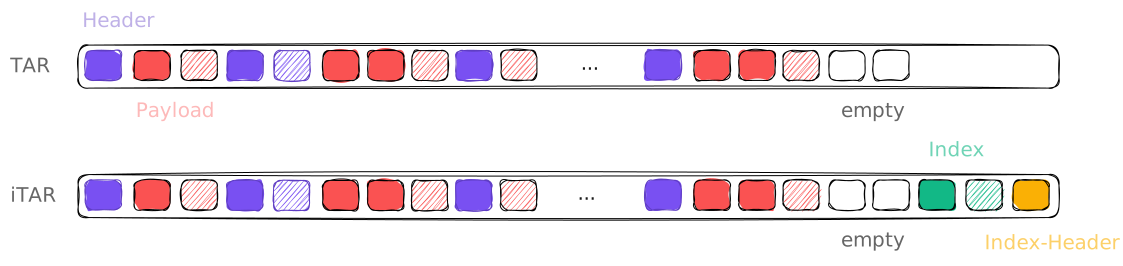
Comparison of regular tar files with it’s 512 byte blocks (as used by, e.g., WebDataset, supporting linear streaming but no random access) with NCore’s indexed tar format, which appends a compressed index enabling O(1) key lookups and direct seeks to any chunk.#
The .itar store can be used as a drop-in replacement for directory stores in
all NCore APIs. Via
UPath, .itar containers can
also be accessed transparently from cloud storage backends (e.g., S3, GCS)
without requiring a local copy.
Tradeoffs#
.itar(container file) – efficient for distribution, cloud storage, and atomic transfers; supports both sequential streaming and random access via the appended indexdirectory store – individual chunk files on disk; simpler for debugging and incremental updates
Both formats are accessed through the same
SequenceComponentGroupsReader and
SequenceComponentGroupsWriter APIs.
Read Performance (local)#
The chart below compares .itar read throughput against four alternative
storage formats on a synthetic dataset of the same 1k JPEG images (2k and 4k
resolutions, ~4.5 GB on local SSD) with associated per-image meta-data (poses,
timestamps, etc.). Throughput is measured with init cost excluded (formats
pre-opened); init cost is reported separately as time-to-first-read.
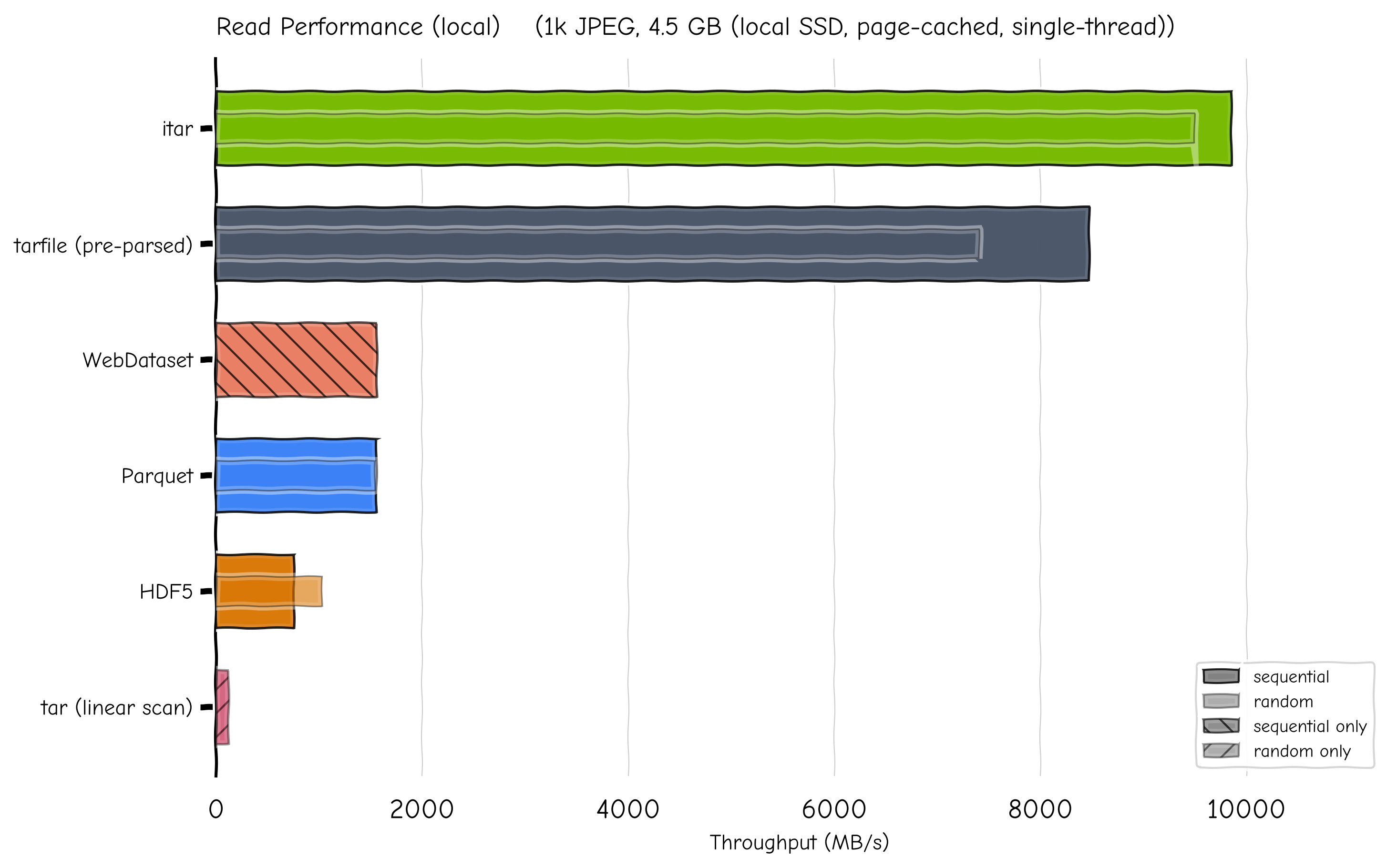
Read throughput across five storage formats. Full bar = sequential; inner bar = random access.#
Format |
Seq (MB/s) |
Rand (MB/s) |
Seq latency |
Rand latency |
Time-to-first-read |
|---|---|---|---|---|---|
|
9847 |
9492 |
0.46 ms |
0.48 ms |
2.1 ms (decompress index) |
|
8470 |
7402 |
0.54 ms |
0.62 ms |
82.6 ms (scan all file headers) |
|
— |
119 |
— |
38.2 ms |
per-access (no index) |
1 557 |
— |
2.91 ms |
— |
3.2 ms (pipeline build) |
|
1552 |
1542 |
2.92 ms |
2.98 ms |
2 929 ms (materialise table) |
|
754 |
1027 |
6.01 ms |
4.48 ms |
1.0 ms (B-tree open) |
Even with tarfile’s headers pre-parsed, .itar is 16% faster sequential and
28% faster random. The gap comes from tarfile’s extractfile() wrapping
data in three Python layers (ExFileObject → _FileInFile →
BufferedReader), while .itar does a single seek + read.
.itar’s time-to-first-read is 2.1 ms (decompressing a ~14 KB CBOR/LZMA
trailer index) vs tarfile’s 82.6 ms (sequential scan of all tar headers).
The tarfile linear-scan scenario (119 MB/s) shows the 80 × penalty of
random access without any index.
Note
All reads are from OS page cache (local SSD). On cold disk or network I/O the differences narrow.
zarr Versions and Formats#
NCore works with both major versions of the zarr-python
library (2.x, or 3.x ≥ 3.1.4 on Python ≥ 3.11, selected automatically), and
can write component stores in zarr format v2 or v3:
zarr-python 2 |
zarr-python 3 |
|
|---|---|---|
read / write zarr format v2 (default) |
✓ |
✓ |
read / write zarr format v3 |
— |
✓ |
zarr format v2 is the default, since all NCore versions and zarr-python versions can read it. Write zarr format v3 only if all consumers of the data use zarr-python 3:
writer = SequenceComponentGroupsWriter(..., zarr_format=3)
or --zarr-format 3 in the data converter CLIs. Readers detect the format
automatically.
With zarr-python 3, arrays of .itar archives written by NCore are read with a faster
direct path (chunks are decompressed directly into the output array, concurrently for
large arrays). Set NCORE_ZARR3_DIRECT_READS=0 to read all arrays via zarr-python
instead, e.g. to rule out the direct path when debugging.
Note
Custom components should access their data via self._group, an
ncore.impl.data.nodes.Group (e.g. create_array, array(path).read(),
create_bytes_array / read_bytes, attrs), which works with both zarr-python
versions and zarr formats. Records of .itar archives are write-once: write each
array once, attributes can be updated until the store is closed.
Loading V4 Data#
V4 sequences are loaded by specifying one or more component store paths:
from ncore.data.v4 import SequenceComponentGroupsReader
from pathlib import Path

# Load sequence from multiple component stores
reader = SequenceComponentGroupsReader([
    Path("ncore4.zarr.itar"),           # default components
    Path("ncore4-calibv2.zarr.itar"),   # alternative calibration
])

# Access specific components
poses_readers = reader.open_component_readers(PosesComponent.Reader)
camera_readers = reader.open_component_readers(CameraSensorComponent.Reader)
Asynchronous Reads#
All component reader methods reading array data have asynchronous variants
(*_async, e.g. get_frame_data_async, get_frame_ray_bundle_data_async,
get_generic_data_async), returning the same data. Awaiting multiple reads
concurrently overlaps their I/O and decompression (e.g., range requests to remote
storage), and the running event loop isn’t blocked (blocking work, such as
decompression, runs on worker threads):
import asyncio

lidar = reader.open_component_readers(LidarSensorComponent.Reader)["lidar"]

async def load_frames(timestamps_us):
    return await asyncio.gather(
        *(lidar.get_frame_ray_bundle_data_async(ts, "direction") for ts in timestamps_us)
    )

directions = asyncio.run(load_frames(lidar.frames_timestamps_us[:, 1].tolist()))
Metadata (attributes, names, timestamps) is held in memory and only provided
synchronously. Custom components can implement asynchronous accessors via
self._group.array(path).read_async().
Note
Each in-flight read holds its decompressed data in memory. When reading many large frames, bound the number of concurrent reads (e.g., to the number of CPU cores, or higher for high-latency remote storage) instead of gathering all of them at once:
async def load_frames(timestamps_us, max_concurrent_reads=16):
    semaphore = asyncio.Semaphore(max_concurrent_reads)

    async def load(ts):
        async with semaphore:
            return await lidar.get_frame_ray_bundle_data_async(ts, "direction")

    return await asyncio.gather(*(load(ts) for ts in timestamps_us))
Note
On remote storage (e.g., s3:// archives), the synchronous and the asynchronous
(*_async) reader APIs fetch data differently:
Synchronous APIs (e.g.
get_frame_data,get_frame_ray_bundle_data) read through a buffered file object, one request at a time: each request fetches a block ofdefault_block_sizebytes, cached perdefault_cache_type(see Cloud and Remote Storage Access). Reads of nearby data are served from cached blocks.Asynchronous APIs (
*_async) fetch each chunk with its own byte-range request, independent ofdefault_block_size/default_cache_type, and the requests of concurrent reads are in flight at once (no per-request latency for each read).
Remote storage is supported by both: the synchronous APIs suit sequential access (few, large requests), the asynchronous APIs random access and high-latency storage (exact, concurrent requests).
Synchronous APIs can fetch like the asynchronous ones with
SequenceComponentGroupsReader(..., itar_remote_range_reads=True): each read then
fetches exact byte ranges, and reads of multiple threads (e.g., a thread pool reading
frames) fetch concurrently, without asyncio.
Only enable it for concurrent reads: a single thread reading records one by one pays
the request latency for each record, and is likely slower than with the buffered file
object (which serves nearby records from its cached blocks).
Cloud and Remote Storage Access#
NCore accesses all data paths through
UPath (universal_pathlib),
a drop-in pathlib.Path replacement built on top of
fsspec. This means component
stores can be read transparently from cloud storage backends – the same
SequenceComponentGroupsReader API works for local
files and remote URLs alike.
Supported URL Schemes#
Any protocol that fsspec supports can be used as a component store path. Common examples:
Protocol |
Example URL |
|---|---|
S3 |
|
GCS |
|
Azure Blob |
|
HTTP(S) |
|
Local |
|
Required Dependencies#
nvidia-ncore ships with universal_pathlib (and its transitive
dependency fsspec), which is sufficient for local paths. To access
remote storage you need to install the corresponding fsspec filesystem
implementation:
Protocol |
Extra package |
Credentials / configuration |
|---|---|---|
S3 |
AWS credentials ( |
|
GCS |
|
|
Azure Blob |
|
|
HTTP(S) |
(built-in) |
n/a |
Install the extra package for the protocol you need, for example:
pip install nvidia-ncore s3fs          # for S3
pip install nvidia-ncore gcsfs         # for GCS
pip install nvidia-ncore adlfs         # for Azure Blob
Loading Remote Component Stores#
Pass remote URLs directly to
SequenceComponentGroupsReader:
from ncore.data.v4 import SequenceComponentGroupsReader
from upath import UPath

reader = SequenceComponentGroupsReader([
    UPath("s3://my-bucket/sequences/seq01/ncore4.zarr.itar"),
    UPath("s3://my-bucket/sequences/seq01/ncore4-labels.zarr.itar"),
])
For S3-compatible endpoints or when a specific AWS profile is needed,
pass additional keyword arguments through UPath:
# Use a named AWS profile
store_path = UPath(
    "s3://my-bucket/sequences/seq01/ncore4.zarr.itar",
    profile="my-aws-profile",
)

# Tune download performance
store_path = UPath(
    "s3://my-bucket/sequences/seq01/ncore4.zarr.itar",
    profile="my-aws-profile",
    default_block_size=5 * 1024 * 1024,   # 5 MB download chunks
    default_cache_type="blockcache",      # fsspec file-descriptor caching strategy
)

# Point to an S3-compatible endpoint (e.g. MinIO)
store_path = UPath(
    "s3://my-bucket/sequences/seq01/ncore4.zarr.itar",
    client_kwargs={"endpoint_url": "https://minio.example.com"},
)

reader = SequenceComponentGroupsReader([store_path])
All keyword arguments accepted by the underlying S3FileSystem (or the respective fsspec filesystem class for other protocols) can be forwarded this way.
Read Performance (S3)#
The chart below compares streaming read throughput from S3 on the same
synthetic dataset. .itar reads individual samples via byte-range
requests using the trailer index; other formats use their native streaming
or fsspec-based file-object capabilities.
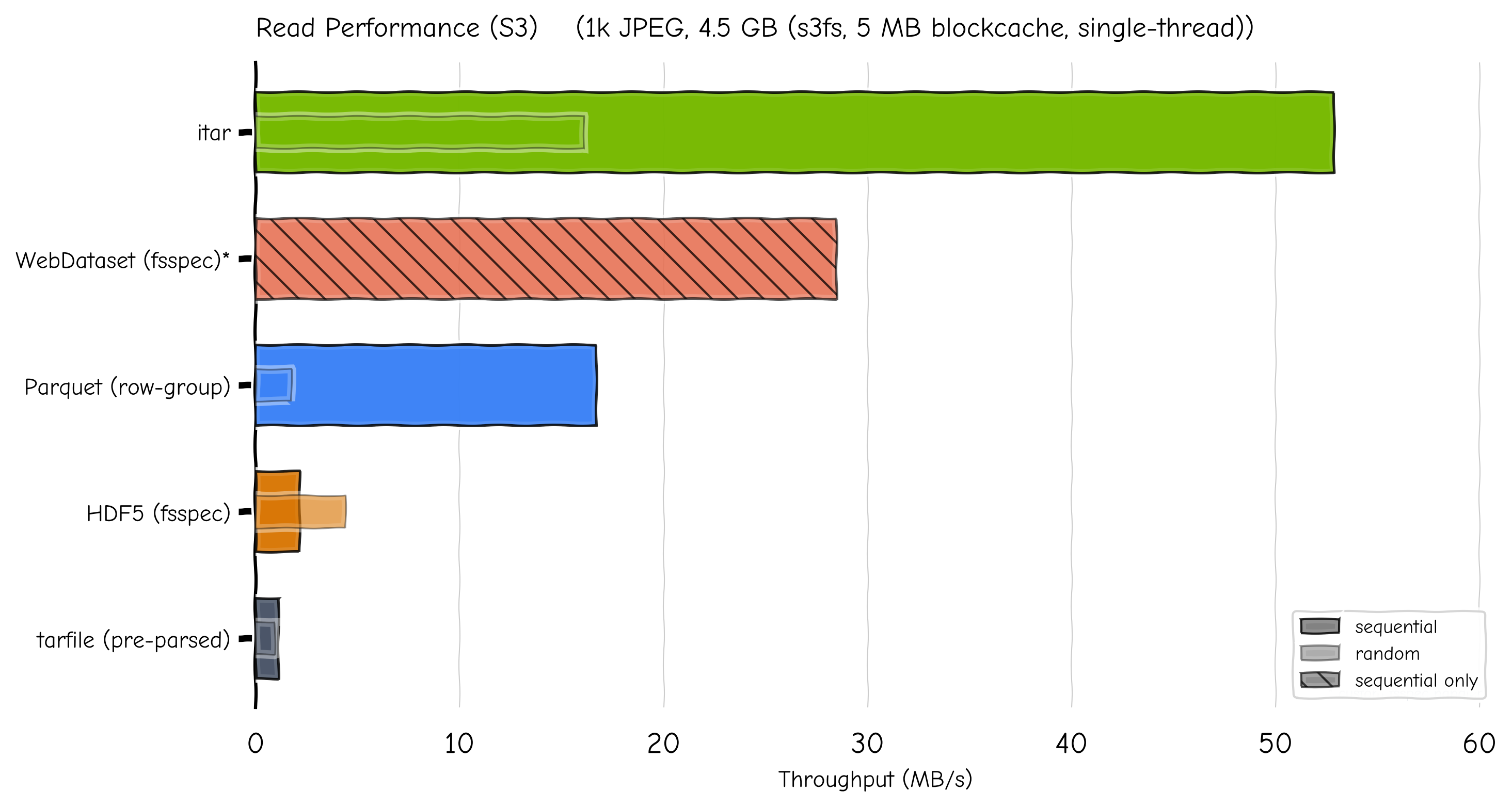
S3 streaming throughput. Full bar = sequential; inner bar = random access.#
Format |
Seq (MB/s) |
Rand (MB/s) |
Seq latency |
Rand latency |
Time-to-first-read |
|---|---|---|---|---|---|
|
53 |
16 |
53 ms |
281 ms |
240 ms (decompress index) |
|
28 |
— |
98 ms |
— |
536 ms |
|
17 |
2 |
167 ms |
2 614 ms |
8.7 s (read footer) |
|
2 |
4 |
1 303 ms |
1 031 ms |
304 ms |
|
1 |
1 |
2 564 ms |
4 906 ms |
119 s (scan all headers) |
.itar’s time-to-first-read over S3 is 240 ms — fast enough for
interactive use. In contrast, tarfile must scan all 2 000 tar headers
over the network before any random access is possible (119 s). Parquet
reads only the footer on open (8.7 s for this dataset) and then fetches
individual row groups via byte-range requests.
1 WebDataset does not natively support s3:// URLs. Results
use a custom fsspec-based handler registered in gopen_schemes.
Note
Measured from cluster nodes to S3-compatible storage (SwiftStack).
s3fs with 5 MB blockcache, single-threaded.
Performance Recommendations#
Use the
.itarformat for cloud-stored data. The indexed tar archive enables random access with a single file, avoiding the large number of small HTTP requests that directory-based zarr stores would incur.Enable consolidated metadata (the default). The
open_consolidatedparameter onSequenceComponentGroupsReaderisTrueby default, which pre-loads all zarr metadata in a single read. This is especially important for remote stores where each metadata lookup would otherwise be a separate round-trip.Keep the node cache enabled (the default). Component readers cache the groups / arrays they open (including their decoded metadata, but not their data), so repeated accesses (e.g., of frames) skip re-opening them. The
node_cache_sizeparameter onSequenceComponentGroupsReaderbounds the number of cached nodes per component reader for very long sequences (Nonecaches all accessed nodes,0disables caching).Tune the block size and cache type for your workload. The
default_block_sizeanddefault_cache_typeparameters onUPathcontrol how much data is fetched per HTTP request and how it is cached in memory. For mixed sequential/random workloads, 5 MB withblockcacheprovides the best balance (~50 MB/s sequential, ~16 MB/s random on.itar). Larger block sizes (16–64 MB) improve sequential throughput at the cost of random access performance. This applies to the synchronous reader APIs only (unlessitar_remote_range_reads=True): the asynchronous*_asyncAPIs fetch exact byte ranges concurrently (see Asynchronous Reads).Consider local caching for repeated access to the same data. fsspec supports transparent caching via the
simplecacheorfilecacheprotocols:# Cache remote files locally on first access store_path = UPath( "simplecache::s3://my-bucket/sequences/seq01/ncore4.zarr.itar", s3={"profile": "my-aws-profile"}, simplecache={"cache_storage": "/tmp/ncore_cache"}, )