

NCore V4 Data Loading#
This tutorial illustrates how to use the NCore data loader APIs and some of the sensor-specific APIs.
Use ncore.data.v4 APIs for V4 data loading#
[23]:
component_group_path = Path("<PATH>/ncore-demo/sequence-ncore4.json") # adapt to local V4 sequence meta file
[8]:
# V4 API provides direct access to component data
from ncore.data.v4 import SequenceComponentGroupsReader, SequenceLoaderV4

# Load low-level component groups
group_reader = SequenceComponentGroupsReader([component_group_path])

# Use sequence loader to load data with convenient APIs
loader = SequenceLoaderV4(group_reader)
Now that the loader initialized the dataset into a virtual sequence, we introspect some of the general properties of the dataset with methods exposed by the loader:
[9]:
# Sequence information
print(f'sequence-id: {loader.sequence_id}')

# List all sensor IDs of different sensor types in loaded data
print(f'lidar sensors: {loader.lidar_ids}')
print(f'camera sensors: {loader.camera_ids}')
sequence-id: c12961c2-4329-11ec-bcb5-00044bcbccac
lidar sensors: ['lidar_gt_top_p128_v4p5']
camera sensors: ['camera_rear_right_70fov', 'camera_rear_left_70fov', 'camera_rear_tele_30fov', 'camera_right_fisheye_200fov', 'camera_rear_fisheye_200fov', 'camera_cross_right_120fov', 'camera_front_wide_120fov', 'camera_cross_left_120fov', 'camera_left_fisheye_200fov', 'camera_front_fisheye_200fov']
Next, we introspect some pose / trajectory properties of the sequence:
[10]:
global_pose = unpack_optional(loader.pose_graph.get_edge("world", "world_global")) # *full* pose / rig trajectory data
rig_poses = unpack_optional(loader.pose_graph.get_edge("rig", "world")) # *full* pose / rig trajectory data

print('ECEF-aligned base pose (SE3):\n', global_pose.T_source_target, '\n')
print('first world poses (SE3):\n', rig_poses.T_source_target[:2], '\n')
print('first world pose timestamps:\n', unpack_optional(rig_poses.timestamps_us)[:2])
ECEF-aligned base pose (SE3):
 [[      -0.7085495276572739        -0.5165307835309174        -0.48078426441685684 -2672408.693024274        ]
 [       0.7030619419398989        -0.45831159857852444       -0.5437410887037756  -4271966.408560775        ]
 [       0.06051000624771203       -0.723288651254294          0.6878895716550725   3897142.112033472        ]
 [       0.                         0.                         0.                         1.                 ]]

first world poses (SE3):
 [[[   0.78011525     0.607144      -0.15098473  1759.4768     ]
  [  -0.6053525      0.79346514     0.062939264 -542.82056    ]
  [   0.15801433     0.042299118    0.9865304    251.81543    ]
  [   0.             0.             0.             1.         ]]

 [[   0.78101844     0.6057621     -0.15186328  1759.9159     ]
  [  -0.6040682      0.794484       0.06242354  -543.16       ]
  [   0.15846677     0.042981856    0.9864283    251.90439    ]
  [   0.             0.             0.             1.         ]]]

first world pose timestamps:
 [1636661913800056 1636661913900022]
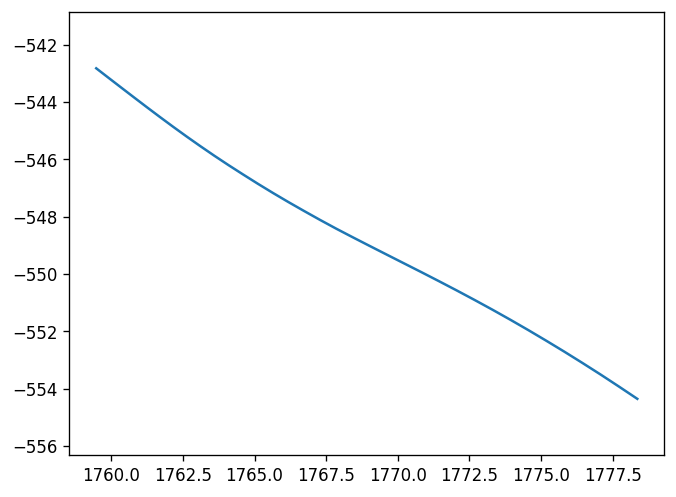
We can also visualize the trajectory by rendering a top-view of the 2d x/y positions:
[11]:
plt.plot(
    # x coordinates in 4x4 pose
    rig_poses.T_source_target[:, 0, 3:],
    # y coordinates in 4x4 poses
    rig_poses.T_source_target[:, 1, 3:])
plt.axis('equal')
plt.show()
Sensor Interaction Example#
Next we look into sensor-specific data. We start by instantiating lidar and camera sensors:
[12]:
lidar_sensor = loader.get_lidar_sensor(loader.lidar_ids[0])
Again, sensor-specific properties can be introspected using methods associated with the sensor instances:
[13]:
from ncore.data import FrameTimepoint

# Sensor's extrinsics
print('lidar extrinsics:\n', lidar_sensor.T_sensor_rig, '\n')

# Available frame ranges
print('lidar frame range:\n', lidar_sensor.get_frame_index_range(), '\n')

# Sensor's or rig world poses at frame-end time
print('lidar world pose at index 0:\n', lidar_sensor.get_frames_T_sensor_target("world", 0), '\n')
print('rig world pose at lidar index 0 at start / end of frame timepoints:\n', lidar_sensor.get_frames_T_source_target("rig", "world", 0, None), '\n')

# Frame start and end times
print('lidar frame 0 start timestamp:\n', lidar_sensor.get_frame_timestamp_us(0, FrameTimepoint.START), '\n')
print('lidar frame 0 end timestamp:\n', lidar_sensor.get_frame_timestamp_us(0, FrameTimepoint.END), '\n')

# All frame timestamps
print('lidar start/end frame timestamps of first frames:\n', lidar_sensor.frames_timestamps_us[:10,:])
lidar extrinsics:
 [[ 0.9999579     -0.00916378     0.00041632314  1.1885       ]
 [ 0.009162849    0.99995565     0.0021855677   0.           ]
 [-0.00043633272 -0.002181661    0.9999975      1.86655      ]
 [ 0.             0.             0.             1.           ]]

lidar frame range:
 range(0, 34)

lidar world pose at index 0:
 [[   0.78660214     0.59890985    -0.15021358  1760.5605     ]
 [  -0.5967907      0.79984784     0.063908435 -543.7613     ]
 [   0.15842341     0.039375555    0.9865858    253.93391    ]
 [   0.             0.             0.             1.         ]]

rig world pose at lidar index 0 at start / end of frame timepoints:
 [[[   0.78011525     0.607144      -0.15098473  1759.4768     ]
  [  -0.6053525      0.79346514     0.062939264 -542.82056    ]
  [   0.15801433     0.042299114    0.9865304    251.81543    ]
  [   0.             0.             0.             1.         ]]

 [[   0.7810182      0.6057625     -0.15186305  1759.9158     ]
  [  -0.6040686      0.7944837      0.062423684 -543.15985    ]
  [   0.15846665     0.042981666    0.9864284    251.90436    ]
  [   0.             0.             0.             1.         ]]]

lidar frame 0 start timestamp:
 1636661913800056

lidar frame 0 end timestamp:
 1636661913899995

lidar start/end frame timestamps of first frames:
 [[1636661913800056 1636661913899995]
 [1636661913899999 1636661913999932]
 [1636661913999936 1636661914099898]
 [1636661914099902 1636661914199864]
 [1636661914199867 1636661914299801]
 [1636661914299805 1636661914399767]
 [1636661914399771 1636661914499760]
 [1636661914499764 1636661914599781]
 [1636661914599785 1636661914699802]
 [1636661914699806 1636661914799851]]
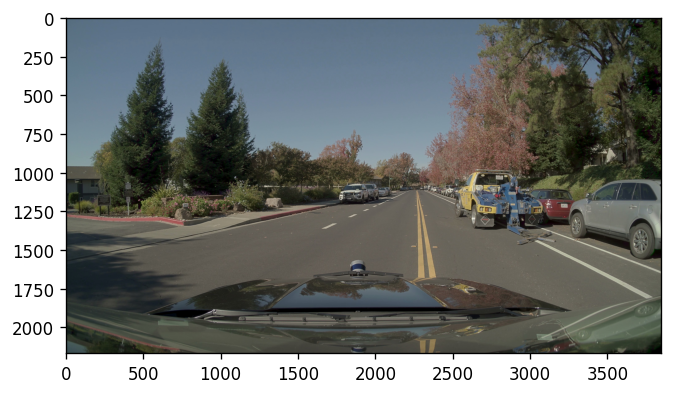
Next we load + render some sensor data (an camera frame in this case):
[14]:
camera_sensors = {camera_id: loader.get_camera_sensor(camera_id) for camera_id in loader.camera_ids}

camera_image = camera_sensors["camera_front_wide_120fov"].get_frame_image_array(20) # loads and decodes image into array -
                                                                                    # there are further camera-specific APIs to only reference the data without decoding it
plot_image(camera_image)
Project lidar point cloud to cameras using rolling-shutter compensation#
We continue to combine the data of multiple sensors in a more complex way by projecting a lidar point cloud into each of the moving camera sensors. For this, we make use of NCORE sensor-specific APIs to perform the projection while compensating camera-specific rolling-shutter effects.
First, we load relevant NCORE sensor APIs related to camera models:
[15]:
from ncore.sensors import CameraModel
Next, we load a lidar point cloud and transform it from sensor-space to world-space:
[16]:
lidar_frame_idx = lidar_sensor.frames_count // 2 + 2   # point cloud frame at center of stream
lidar_frame_timestamp_us = lidar_sensor.get_frame_timestamp_us(lidar_frame_idx) # get timestamp of lidar frame (end-of-frame)

# We loads motion-compensated frame points clouds relative to the lidar sensor's end-of-frame pose and transform to world frame
point_cloud_sensor = lidar_sensor.get_frame_point_cloud(lidar_frame_idx, motion_compensation=True, with_start_points=False)
point_cloud_world = transform_point_cloud(point_cloud_sensor.xyz_m_end, lidar_sensor.get_frames_T_sensor_target("world", lidar_frame_idx))

# Additional per-frame measurements can be obtained via the `get_frame_ray_bundle_*` APIs (ray bundle timestamps / lidar model element indices) and `get_frame_ray_bundle_*` APIs (distances, intensity, etc.)
And finally, we perform the point-to-camera projection using rolling-shutter compensation of the moving sensors:
[21]:
image_frames = []
image_point_projections = []

for camera_sensor in camera_sensors.values():

    # Initialize camera intrinsics - this transparently instantiates the required camera model for the data
    camera_model_params = camera_sensor.model_parameters
    camera_model = CameraModel.from_parameters(camera_model_params, device='cpu')  # we use 'cpu' for increased compatibility / can also run on 'cuda' device

    # Determine closest camera frame relative to mid of lidar-frame
    camera_frame_idx = camera_sensor.get_closest_frame_index(lidar_frame_timestamp_us)

    # Load the camera image and poses for rolling-shutter projection
    image_frames.append(camera_sensor.get_frame_image_array(camera_frame_idx))

    # Use the pose-graph APIs to get world -> sensor poses at the start and end times of the frame
    T_world_sensor_start, T_world_sensor_end = camera_sensor.get_frames_T_source_sensor("world", camera_frame_idx, None)

    # Project point cloud into camera frame using rolling-shutter motion-compensation
    image_point_projections.append(camera_model.world_points_to_image_points_shutter_pose(point_cloud_world,
                                                                                          T_world_sensor_start,
                                                                                          T_world_sensor_end,
                                                                                          return_T_world_sensors=True,
                                                                                          return_valid_indices=True))
The computed projections are visualized as colored point overlayed onto the camera frames [this can be slow for a lot of cameras]:
[22]:
plt.figure(figsize=(30, len(camera_sensors) * 12))

for i, (image_frame, image_point_projection) in enumerate(zip(image_frames, image_point_projections)):
    plt.subplot(len(camera_sensors), 1, i+1)
    plot_points_on_image(point_cloud_world, image_point_projection, image_frame)

plt.show()
