Scheduling#
Overview#
OSMO’s scheduling system maximizes cluster utilization while ensuring fair resource allocation across teams and projects. The scheduler operates on three key principles:
Priority-Based Queuing
Workflows are scheduled based on their priority level (HIGH, NORMAL, LOW), ensuring critical tasks get resources first.
Smart Preemption
Low-priority workflows can be interrupted to make room for higher-priority tasks, with automatic rescheduling.
GPU Borrowing
Unused GPUs from other pools can be borrowed to maximize utilization and reduce wait times.
Priority#
Workflows can be assigned one of three priority levels:
Priority |
Preemptible |
May Borrow GPUs |
When To Use |
|---|---|---|---|
|
No |
No |
For time-critical workflows that need to skip the queue. |
|
No |
No |
For most standard workflows. |
|
Yes |
Yes |
Batch jobs that can handle being interrupted and restarted. These can be scheduled before
|
The scheduler will always try to schedule higher priority workflows before lower priority workflows.
For workflows with the same priority level, workflows are scheduled in the order they are submitted.
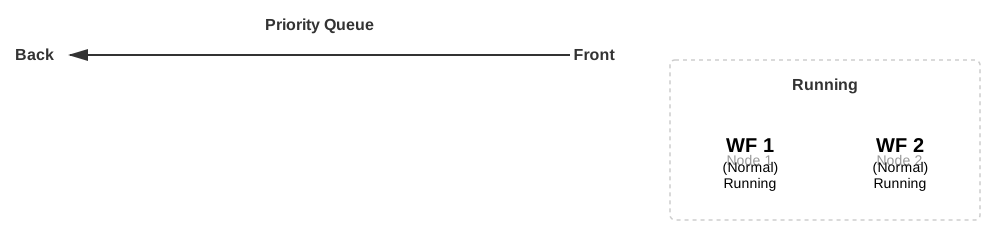
Example: Priority Queueing Order
In this example, we have WF1 (NORMAL priority) and WF2 (NORMAL priority) running.
The rest of the workflows (WF3 through WF6) are queued by (1) priority and then
by (2) submission time.
See also
To learn how to specify priority in your workflow, see submit.
Quotas#
Each pool has a quota of GPUs that can be occupied by NORMAL and HIGH priority workflows.
Once the pool’s GPU quota is reached, workflows submitted with NORMAL or HIGH priority will be queued.
LOW priority workflows can be executed even when the pool has hit its GPU quota via Borrowing.
Important
LOW priority workflows do not count towards the pool’s GPU quota.
See also
To learn more about how to see your pool’s quota, see Pool CLI Reference and Resource CLI Reference.
Preemption#
Preemption within a pool is when a higher priority workflow (NORMAL or HIGH) evicts
a lower priority workflow (LOW) to make room for it to start running.
Preemption will happen if the following conditions are met:
The pool has NOT reached its GPU quota (from
NORMALandHIGHpriority workflows)There are existing
LOWpriority workflows consuming the pool’s GPUsA higher priority workflow (
NORMALorHIGH) is submitted to the pool
This will result in LOW priority workflows running in the pool to be preempted to make room
for the higher priority workflow.
See also
Preemption outside of a pool may occur when borrowed resources are reclaimed by other pools. See Borrowing for more information.
Important
Key Characteristic:
A preempted workflow will fail with the
FAILED_PREEMPTEDstatus.A preempted workflow will be rescheduled automatically by default.
Preemption allows you to submit as many
LOWpriority workflows as you want to keep the cluster busy without needing to worry about blocking other workflows.
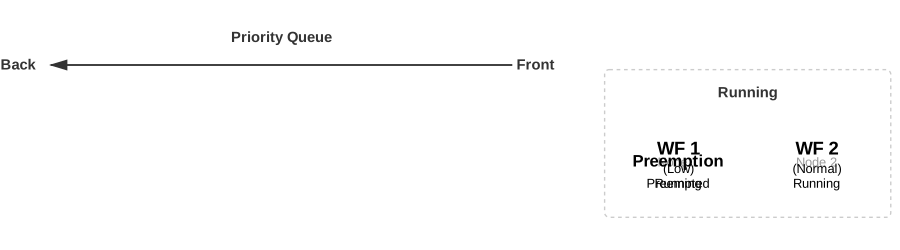
Example: Preemption
In this example, we have:
WF1(LOWpriority) andWF2(NORMALpriority) are running.WF3(LOWpriority) andWF4(LOWpriority) are already enqueued.
When WF5 (NORMAL priority) is submitted, it jumps to the front of the queue. Since WF1
is LOW priority, it will be preempted to make room for WF5 to start running.
WF1 will be re-enqueued, placing it in front of WF3 and WF4 (due to the order of
priority and submit time).
Why should I use LOW priority workflows?
While preemption may seem like a disadvantage at first glance, it is essential tool for maximizing cluster utilization.
By organizing your workflows into different priority levels, you can ensure that critical workflows are always able to run, while less critical workflows can be queued and executed when resources are available.
What happens when a workflow is preempted?
By default, preempted workflows will automatically be rescheduled.
You can manually configure a workflow to automatically reschedule on preemption by using the
exitActions field in the workflow spec.
See also
Learn more about exit actions at Exit Actions.
Borrowing#
Multiple pools can share the same physical GPUs in the compute cluster. Administrators can configure the partitioning of the GPUs between the pools through quotas.
Borrowing allows you to run more workflows even if the total GPUs used have reached the pool’s GPU quota. OSMO will automatically borrow GPUs from other pools that are sharing the same GPUs.
Important
LOW priority workflows are the only priority level that can go beyond the pool quota by
borrowing GPUs from other pools with the risk of being preempted.
If the pool is under its quota limit, the LOW priority workflows will NOT be preempted
by other pools.
When is borrowing possible?
Borrowing is only possible when the pool has reached its quota limit but not its capacity limit.
While the pool’s quota is the number of GPUs that are guaranteed to be available to the pool, the capacity is the total number of GPUs that are available to be used by the pool, including GPUs that are shared with other pools.
As noted above, only LOW priority workflows can borrow GPUs from other pools.
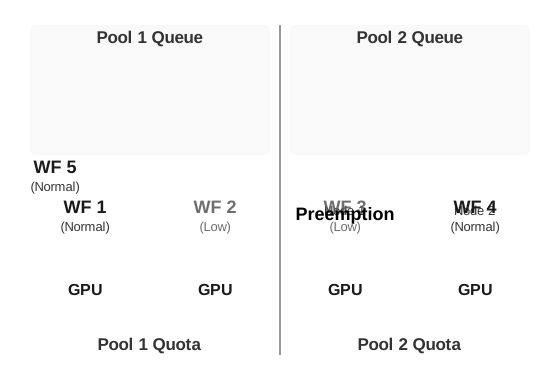
Example: Borrowing and Reclaiming
In this example, pool1 and pool2 share 4 GPUs. Both pools have a quota of 2 GPUs each.
In
pool1-WF1(NORMALpriority) andWF2(LOWpriority) are running.In
pool2-WF4(NORMALpriority) is running.A user submits
WF3(LOWpriority) topool1.
Since pool2 is only using 1 out of its 2 allocated GPUs, pool1 can
borrow the unused GPU from pool2 to run WF3.
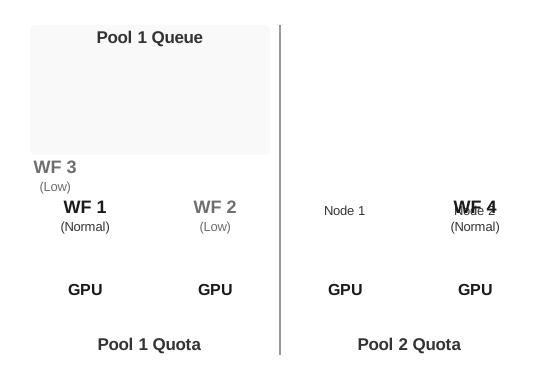
When a user submits WF5 with NORMAL priority to pool2, the scheduler will preempt WF3 to allow WF5 to start, effectively reclaiming the borrowed GPU.