

Serial Workflows#
This tutorial teaches you how to create serial workflows where tasks execute sequentially, with each task depending on the output of previous tasks.
A serial workflow is a sequence of tasks where:
Tasks run one after another
Each task waits for its dependencies to complete
Data flows from one task to the next
Results build on previous stages
Tip
Serial workflows are ideal for:
Data processing pipelines
Multi-stage model training
Sequential transformations
Validation and testing workflows
By the end of this tutorial, you’ll be able to build complex multi-stage workflows with proper task dependencies and data flow.
Understanding Task Dependencies#
In OSMO, you create dependencies by specifying which tasks a task depends on:
tasks:
- name: task1
  # ... task definition

- name: task2
  inputs:
  - task: task1  # task2 depends on task1
Task execution order:
task1runs firsttask2waits fortask1to completetask2runs aftertask1succeeds
Understanding Data Flow#
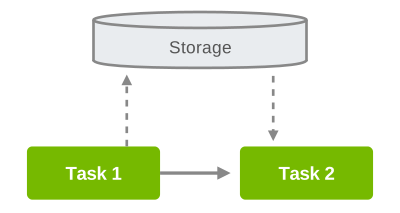
When you declare a task dependency, OSMO automatically handles data transfer between tasks. Below is an example of how data flows between tasks when a task dependency is declared.
tasks:
- name: task1
  command: ["python", "generate.py"]
  # Any data written to {{output}} is automatically saved

- name: task2
  inputs:
  - task: task1  # Declares both dependency AND data flow
  command: ["python", "process.py"]
  # Data from task1 is available at {{input:0}}
OSMO automatically:
Saves the output directory (
{{output}}) fromtask1Waits for
task1to complete successfullyDownloads
task1’s output to{{input:0}}intask2Starts
task2with the data ready
Important
If you would like to export the intermediate data, you can add an outputs: section to the upstream task.
Tip
Think of serial workflows as a pipeline where:
Task dependencies control when tasks run
Data flow controls what data tasks receive
Both are configured together in the
inputs:section
Your First Serial Workflow#
Let’s build a three-stage serial workflow (serial_workflow.yaml):

workflow:
  name: serial-tasks
  tasks:

  ##############################
  # Task 1
  ##############################
  - name: task1
    image: ubuntu:22.04
    command: [sh]
    args: [/tmp/run.sh]
    files:
    - contents: |
        echo "Hello from task1 $(hostname)"
        echo "Data from task 1" > {{output}}/test_read.txt # (1)
      path: /tmp/run.sh

  ##############################
  # Task 2 (depends on Task 1)
  ##############################
  - name: task2
    image: ubuntu:22.04
    command: ['sh']
    args: ['/tmp/run.sh']
    files:
    - contents: |
        echo "Hello from task2 {{output}}"

        echo "Reading from task 1"
        while IFS= read -r line; do
          echo "a line: $line"
        done < {{input:0}}/test_read.txt

        echo "Data from task 2" > {{output}}/test_read.txt
      path: /tmp/run.sh
    resource: default
    inputs:
    - task: task1 # (2)

  #########################################
  # Task 3 (depends on Task 1 and Task 2)
  #########################################
  - name: task3
    image: ubuntu:22.04
    command: ['sh']
    args: ['/tmp/run.sh']
    files:
    - contents: |
        echo "Hello from task3 {{output}}"

        echo "Reading from task 1"
        while IFS= read -r line; do
          echo "a line: $line"
        done < {{input:0}}/test_read.txt

        echo "Reading from task 2"
        while IFS= read -r line; do
          echo "a line: $line"
        done < {{input:1}}/test_read.txt

        echo "Data from task 3" > {{output}}/test_read.txt
      path: /tmp/run.sh
    inputs:
    - task: task1
    - task: task2
No
outputs:section is required for the downstream task to download.The output of task 1 is downloaded by task 2 to
{{input:0}}.
Conditional Execution#
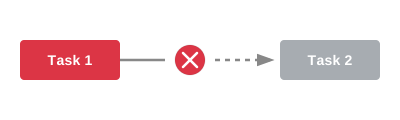
Tasks only run if their dependencies succeed. If a task fails, downstream tasks are canceled:
tasks:

##############################
# This task might fail...
##############################
- name: validate-input
  command: ["bash", "-c", "test -f /data/input.txt || exit 1"]


###################################################
# This task only runs if the previous task succeeds
###################################################
- name: process
  inputs:
  - task: validate-input
  command: ["python", "process.py"]
Next Steps#
You now understand serial workflows! Next, learn how to run tasks in parallel to speed up your workflows: Parallel Workflows.
See also