

Hardware In The Loop (HIL)#
Important
Prerequisites:
This tutorial also assumes you have necessary hardware in your pool to run tasks on different platforms.
This tutorial teaches you how to build a Hardware-In-The-Loop (HIL) workflow through heterogeneous gang scheduling, one of OSMO’s most powerful features.
This feature also enables you to orchestrate workflows across the three-computer architecture for robotics development, inspired by NVIDIA’s approach to physical AI .
By the end, you’ll understand:
What is heterogeneous gang scheduling and how it works in OSMO
How to target multiple hardware platforms in a group
How to use different computers from the three-computer architecture in your workflows
Tip
In addition to HIL, heterogeneous gang scheduling is also useful for:
Cross-platform testing - Test x86 and ARM builds simultaneously
Distributed systems - Deploy services across different hardware types
Hybrid workloads - Combine GPU compute, ARM inference, and x86 orchestration
What is heterogeneous gang scheduling?
In Parallel Workflows and Combination Workflows, you learned about groups where tasks run together. Gang scheduling means OSMO schedules all tasks in a group as a unit - they all start simultaneously.
Gang scheduling - Multiple tasks scheduled together as a unit (all start at the same time) Heterogeneous - Tasks can run on different hardware platforms (x86, ARM, GPU, etc.)
What is the three-computer architecture?
The three-computer architecture for robotics development consists of the following types of computers, each serving a specific role in the development pipeline:
Training Computer - High-performance GPU for model training and evaluation
Simulation Computer - GPU for physics simulation and synthetic data generation
Edge Computer - ARM edge device for real-time robot control and inference
These computers represent different stages in the robotics development pipeline:
Simulation and synthetic data generation - Generate training data and test scenarios
Model training and policy development - Train and refine robot policies
Policy evaluation and deployment - Run policies on edge devices
While these computers serve different purposes in the pipeline, OSMO’s heterogeneous gang scheduling enables you to orchestrate workflows that use one, two, or all three together depending on your needs.
Targeting Multiple Platforms#
Use the platform field in resource specifications to target specific platforms:
resources:
  training-gpu:
    cpu: 8
    gpu: 1
    memory: 32Gi
    platform: ovx-a40 # (1)

  simulation-gpu:
    cpu: 4
    gpu: 1
    memory: 16Gi
    platform: ovx-a40 # (2)

  robot-edge:
    cpu: 2
    memory: 8Gi
    platform: agx-orin-jp6 # (3)
Training computer - High-performance GPU for model training/evaluation
Simulation computer - GPU for physics simulation
Edge computer - ARM edge device for robot control
Tip
Check available platforms in your pool:
$ osmo resource list --pool <pool_name>
Robotics Simulation Example#
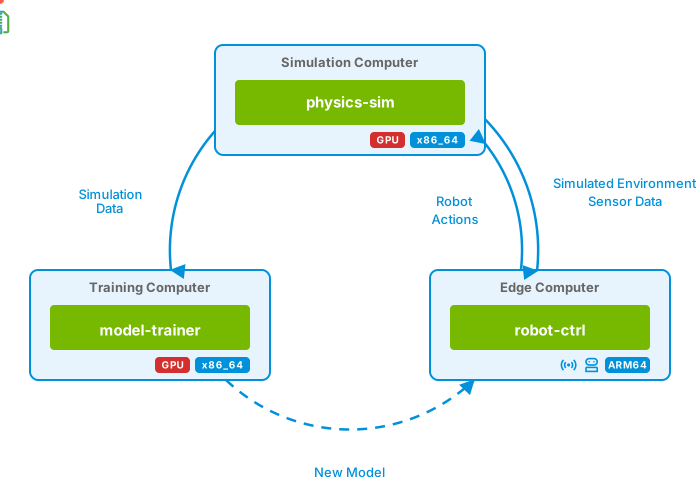
Let’s create a workflow (robot_simulation.yaml) that contains
the following tasks:
physics-simtask that generates physics data (e.g. obstacle distance)robot-ctrltask that makes control decisions based on the obstacle distancemodel-trainertask that evaluates the robot controller’s performance
Important
Please make sure to modify the workflow to use the correct platform and resource for your setup. For more information, please refer to the Resources documentation.
workflow:
  name: robot-simulation
  timeout:
    exec_timeout: 15m
  resources:
    gpu-enabled:
      cpu: 1
      gpu: 1
      storage: 2Gi
      memory: 4Gi
      platform: ovx-a40

    robot-edge:
      cpu: 1
      storage: 2Gi
      memory: 4Gi
      platform: agx-orin-jp6

  groups:
  - name: robot-hil
    tasks:

    #############################################################
    # Training Task - Evaluates performance, and updates policy
    #############################################################
    - name: model-training
      lead: true  # (1)
      image: nvcr.io/nvidia/pytorch:24.01-py3
      resource: gpu-enabled # (2)
      command: [bash]
      args: [/tmp/train.sh]
      files:
      - path: /tmp/train.sh
        contents: |
          # Helpers
          wait() { until curl -sfo /dev/null "$1"; do sleep "${2:-1}"; done; }
          get() { curl -sf "$1"; }
          file() { echo "e${1}_s${2}"; }

          # Peer task webservers
          sim="http://{{host:physics-sim}}:8080"
          ctrl="http://{{host:robot-ctrl}}:9090"

          # Initialize
          mkdir -p /tmp/model && cd /tmp/model
          python3 -m http.server 8000 > /dev/null 2>&1 &
          policy={{initial_policy}} && echo "$policy" > policy.txt && echo "0,0" > step.txt
          until curl -sf http://localhost:8000/policy.txt > /dev/null; do sleep 1; done
          echo "[TRAIN] Starting with threshold: ${policy}m"
          wait $sim/ready && wait $ctrl/ready

          # Main training loop
          for epoch in $(seq 1 {{max_epochs}}); do
            echo "=== Epoch $epoch ==="
            success=0 && jumped_early=0 && jumped_too_late=0 && missed_jump=0

            # Move simulation forward
            for step in $(seq 1 {{steps_per_epoch}}); do
              echo "$epoch,$step" > step.txt
              wait $sim/$(file $epoch $step).csv
              case $(get $sim/$(file $epoch $step).csv | cut -d',' -f3) in
                success) ((success++));;
                jumped_early) ((jumped_early++));;
                jumped_too_late) ((jumped_too_late++));;
                missed_jump) ((missed_jump++));;
              esac
            done

            # Evaluate policy
            accuracy=$((success * 100 / {{steps_per_epoch}}))
            too_high=$jumped_early  # Jumped when shouldn't (policy too high)
            too_low=$((jumped_too_late + missed_jump))  # Didn't jump when should (policy too low)
            echo "[TRAIN] Accuracy: ${accuracy}% | Early: ${jumped_early}, Late: ${jumped_too_late}, Missed: ${missed_jump}"
            [ $accuracy -ge {{target_accuracy}} ] && echo "[TRAIN] Converged on policy: ${policy}m!" && break

            # Adjust policy based on error distribution
            if [ $too_high -gt $too_low ]; then
              adj=$((-4 - RANDOM % 5))  # Decrease threshold
            elif [ $too_low -gt $too_high ]; then
              adj=$((4 + RANDOM % 5))   # Increase threshold
            elif [ $too_high -gt 0 ] || [ $too_low -gt 0 ]; then
              adj=$((-3 + RANDOM % 7))  # Mixed errors
            else
              adj=0  # Perfect epoch
            fi

            policy=$((policy + adj))
            [ $policy -lt {{min_policy}} ] && policy={{min_policy}}
            [ $policy -gt {{max_policy}} ] && policy={{max_policy}}
            echo "[TRAIN] Adjusted by ${adj}m -> New threshold: ${policy}m"
            echo "$policy" > policy.txt
          done

    #############################################################
    # Simulation Task - Generates synthetic environment data
    #############################################################
    - name: physics-sim
      image: nvcr.io/nvidia/pytorch:24.01-py3
      resource: gpu-enabled  # (2)
      command: [bash]
      args: [/tmp/sim.sh]
      files:
      - path: /tmp/sim.sh
        contents: |
          # Helpers
          wait() { until curl -sfo /dev/null "$1"; do sleep "${2:-1}"; done; }
          get() { curl -sf "$1"; }
          file() { echo "e${1}_s${2}"; }

          # Peer task webservers
          train="http://{{host:model-training}}:8000"
          ctrl="http://{{host:robot-ctrl}}:9090"

          # Initialize
          mkdir -p /tmp/sim && cd /tmp/sim
          python3 -m http.server 8080 > /dev/null 2>&1 &
          touch ready && until curl -sf http://localhost:8080/ready > /dev/null; do sleep 1; done
          last="0,0"

          while true; do
            current=$(get $train/step.txt)
            [ -z "$current" -o "$current" = "$last" ] && sleep 1 && continue
            last=$current && IFS=',' read epoch step <<< "$current"

            # Generate obstacle distance (3-10m with high variance)
            base=$(({{obstacle_width}} + RANDOM % ({{max_obstacle_distance}} - {{obstacle_width}} + 1)))
            variance=$((RANDOM % 4 - 1))  # -1 to +2
            obstacle=$((base + variance))
            [ $obstacle -lt {{obstacle_width}} ] && obstacle={{obstacle_width}}
            [ $obstacle -gt {{max_obstacle_distance}} ] && obstacle={{max_obstacle_distance}}
            echo "$obstacle" > $(file $epoch $step)_state.txt

            # Wait for robot decision
            wait $ctrl/$(file $epoch $step)_act.txt 0.5 && action=$(get $ctrl/$(file $epoch $step)_act.txt)

            # Evaluate action (optimal: jump when obstacle at 3-5m)
            min=$(({{jump_distance}} - {{obstacle_width}} + 1))
            max={{jump_distance}}

            if [ "$action" = "JUMP" ]; then
              if [ $obstacle -ge $min ] && [ $obstacle -le $max ]; then
                result="success"
              elif [ $obstacle -gt $max ]; then
                result="jumped_early"
              else
                result="jumped_too_late"
              fi
            else
              if [ $obstacle -ge $min ] && [ $obstacle -le $max ]; then
                result="missed_jump"
              else
                result="success"
              fi
            fi

            echo "[SIM] E${epoch}:S${step} obs=${obstacle}m -> $action ($result)"
            echo "${obstacle},${action},${result}" > $(file $epoch $step).csv
          done


    #############################################################
    # Robot Control Task - Makes control decisions
    #############################################################
    - name: robot-ctrl
      image: arm64v8/python:3.11-slim
      resource: robot-edge  # (3)
      command: [bash]
      args: [/tmp/ctrl.sh]
      files:
      - path: /tmp/ctrl.sh
        contents: |
          # Helpers
          wait() { until curl -sfo /dev/null "$1"; do sleep "${2:-1}"; done; }
          get() { curl -sf "$1"; }
          file() { echo "e${1}_s${2}"; }

          # Peer task webservers
          train="http://{{host:model-training}}:8000"
          sim="http://{{host:physics-sim}}:8080"

          # Initialize
          apt-get update -qq && apt-get install -y -qq curl > /dev/null 2>&1
          mkdir -p /tmp/robot && cd /tmp/robot
          python3 -m http.server 9090 > /dev/null 2>&1 &
          touch test.txt && until curl -sf http://localhost:9090/test.txt > /dev/null; do sleep 1; done
          wait $train/policy.txt && policy=$(get $train/policy.txt) && echo "[CTRL] Policy loaded: ${policy}m"
          touch ready && last="0,0"

          while true; do
            current=$(get $train/step.txt)
            [ -z "$current" -o "$current" = "$last" ] && sleep 1 && continue
            last=$current && IFS=',' read epoch step <<< "$current"

            # Update policy on new epoch
            [ $step -eq 1 ] && policy=$(get $train/policy.txt) && echo "[CTRL] Epoch $epoch: Policy ${policy}m"

            # Make decision based on obstacle distance
            wait $sim/$(file $epoch $step)_state.txt 0.5 && obstacle=$(get $sim/$(file $epoch $step)_state.txt)
            [ $obstacle -le $policy ] && action="JUMP" || action="RUN"
            echo "$action" > $(file $epoch $step)_act.txt && echo "[CTRL] E${epoch}:S${step} obs=${obstacle}m -> $action"
          done

default-values:
  # Policy parameters
  initial_policy: 18         # Starting jump threshold
  min_policy: 1              # Minimum jump threshold
  max_policy: 15             # Maximum jump threshold
  target_accuracy: 90        # Target accuracy (%)

  # Training parameters
  steps_per_epoch: 15        # Steps per epoch
  max_epochs: 12             # Maximum epochs

  # Environment parameters
  jump_distance: 5           # Robot jumps 5m forward
  obstacle_width: 3          # Obstacle is 3m wide (optimal window: 3-5m)
  max_obstacle_distance: 12  # Maximum obstacle distance (12m)
Training Computer - Lead task that collects metrics from both simulation and robot, evaluates performance, and terminates when evaluation is complete.
Simulation Computer - GPU-based physics simulation that generates synthetic environment data.
Edge Computer - ARM edge device running real-time robot control policy.
What Happens:
Gang scheduling: OSMO schedules all three computers together across heterogeneous hardware
Simultaneous start: Training, simulation, and edge computers all start together
Edge Computer loads the initial policy from the training computer and starts the robot control loop
Simulation Computer generates synthetic environment data and receives robot actions from the edge computer
Training Computer evaluates the robot controller’s performance and updates the policy
The process repeats until the training computer converges to a safe policy
Important
This example demonstrates OSMO’s ability to orchestrate all three computers from the three-computer architecture simultaneously to showcase heterogeneous gang scheduling capabilities.
In production environments, you would typically use separate workflows for each stage:
Data generation workflow
Training workflow
Evaluation/deployment workflow
Real-world robotics development would separate these stages into distinct workflows for better scalability, resource utilization, and development iteration cycles.
Next Steps#
Continue Learning:
Advanced Patterns - Workflow templates, checkpointing, error handling, and more
TorchRun: Training Deep Learning Models - Training deep neural networks with OSMO
Isaac Lab: Training Robot Policy with Reinforcement Learning - Reinforcement learning with OSMO
Hardware-in-the-Loop: Deploying Policy on Jetson - Production HIL workflow with Isaac Lab and Jetson
See also
Related Documentation:
Resources - Full resource and platform specification
Groups - Full specification for groups
Scheduling - How OSMO schedules workflows