

Combination Workflows#
This tutorial teaches you how to combine serial and parallel execution patterns by creating groups with dependencies—enabling sophisticated multi-stage workflows.
So far, you have learned:
Serial workflows (Tutorial #5) - Tasks run one after another with dependencies
Parallel workflows (Tutorial #6) - Tasks run simultaneously using groups
Combination workflows merge both patterns by creating groups with dependencies.
By the end, you’ll understand:
How to create workflows with groups that depend on each other
How data flows between groups
How to build complex multi-stage pipelines
Tip
Combination workflows are ideal for:
Data processing pipelines - Preprocess → train/validate in parallel → aggregate
ML workflows - Data prep → train multiple models → compare results
Testing workflows - Build → test on multiple configs → report
ETL pipelines - Extract → transform in parallel → load
Simple Example#
Let’s build a data processing pipeline with multiple stages by downloading the workflow definition
here: combination_workflow_simple.yaml.
workflow:
  name: data-pipeline

  groups:
  ##################################################
  # Group 1: Data Preparation (runs first)
  ##################################################
  - name: prepare-data
    tasks:
    - name: generate-dataset
      lead: true
      image: ubuntu:24.04
      command: ["bash", "-c"]
      args:
      - |
        echo "Generating training dataset..."
        mkdir -p {{output}}/data
        for i in {1..10}; do
          echo "sample_$i,value_$i" >> {{output}}/data/dataset.csv
        done
        echo "✓ Dataset generation complete!"

    - name: validate-data
      image: ubuntu:24.04
      command: ["bash", "-c"]
      args:
      - |
        echo "Validating dataset..."
        sleep 3
        echo "✓ Validation passed!"

  ##################################################
  # Group 2: Training (depends on Group 1)
  ##################################################
  - name: train-models
    tasks:
    - name: train-model-a
      lead: true
      image: ubuntu:24.04
      command: ["bash", "-c"]
      args:
      - |
        echo "Training Model A..."
        cat {{input:0}}/data/dataset.csv
        echo "✓ Model A complete!"
      inputs:
      - task: generate-dataset  # (1)

    - name: train-model-b
      image: ubuntu:24.04
      command: ["bash", "-c"]
      args:
      - |
        echo "Training Model B..."
        wc -l {{input:0}}/data/dataset.csv
        echo "✓ Model B complete!"
      inputs:
      - task: generate-dataset
The
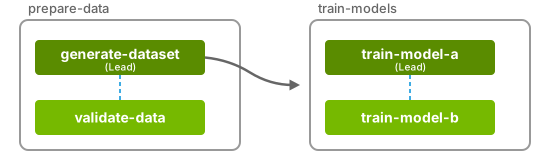
generate-datasettask is an input task for thetrain-model-atask. Therefore, the entire grouptrain-modelswaits forprepare-datato complete.
Execution Flow:
Group
prepare-datastarts →generate-datasetandvalidate-datarun in parallel.Task
generate-datasetcompletes → Grouptrain-modelsdependencies are satisfied.Group
train-modelsstarts →train-model-aandtrain-model-brun in parallel.
Important
Group dependencies are established through task dependencies.
If any task in a group depends on a task from another group, the entire group waits for the other group to complete.
Key Characteristics:
✅ Serial execution between groups
✅ Parallel execution within groups
✅ Data flows from Group 1 to Group 2
✅ All tasks access the same data from the previous group
Complex Example#
Let’s build a more complex data processing pipeline by downloading the workflow definition
here: combination_workflow_complex.yaml.
workflow:
  name: complex-pipeline

  groups:
  ##################################################
  # Group 1: Fetch data
  ##################################################
  - name: fetch
    tasks:
    - name: download
      lead: true
      image: ubuntu:24.04
      command: ["bash", "-c"]
      args:
      - |
        echo 'Downloading data...'
        mkdir -p {{output}}/data
        echo "apple" > {{output}}/data/fruits.txt
        echo "banana" >> {{output}}/data/fruits.txt
        echo "cherry" >> {{output}}/data/fruits.txt
        echo "Data downloaded!"

  ##################################################
  # Group 2: Process (depends on Group 1)
  ##################################################
  - name: process
    tasks:
    - name: transform-a
      lead: true
      image: ubuntu:24.04
      command: ["bash", "-c"]
      args:
      - |
        echo 'Transform A: Converting to uppercase...'
        mkdir -p {{output}}/transformed
        tr '[:lower:]' '[:upper:]' < {{input:0}}/data/fruits.txt > {{output}}/transformed/uppercase.txt

        sleep 120 # (1)
        echo "✓ Transform A complete!"
      inputs:
      - task: download

    - name: transform-b
      image: ubuntu:24.04
      command: ["bash", "-c"]
      args:
      - |
        echo 'Transform B: Adding line numbers...'
        mkdir -p {{output}}/transformed
        cat -n {{input:0}}/data/fruits.txt > {{output}}/transformed/numbered.txt
        echo "✓ Transform B complete!"
      inputs:
      - task: download

  ##################################################
  # Group 3: Aggregate (depends on Group 2)
  ##################################################
  - name: aggregate
    tasks:
    - name: combine
      lead: true
      image: ubuntu:24.04
      command: ["bash", "-c"]
      args:
      - |
        echo 'Combining results from both transforms...'
        mkdir -p {{output}}/final

        echo "=== UPPERCASE VERSION ===" > {{output}}/final/combined.txt
        cat {{input:0}}/transformed/uppercase.txt >> {{output}}/final/combined.txt

        echo "" >> {{output}}/final/combined.txt
        echo "=== NUMBERED VERSION ===" >> {{output}}/final/combined.txt
        cat {{input:1}}/transformed/numbered.txt >> {{output}}/final/combined.txt

        echo "✓ Results combined!"
        cat {{output}}/final/combined.txt
      inputs:  # (2)
      - task: transform-a
      - task: transform-b
The
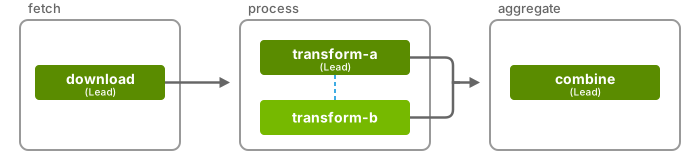
transform-atask is intentionally longer than thetransform-btask to ensure that theleadtask doesn’t prematurely terminate non-lead tasks.Group 3 depends on both tasks from Group 2, so it waits for Group 2 to complete.
Execution:
Group
fetchstarts →downloadtask runsdownloadtask completes → Groupprocessdependencies are satisfied.Group
processstarts →transform-aandtransform-brun in parallel.transform-btask completes → Groupaggregatedependencies not yet satisfied.transform-atask completes → Groupaggregatedependencies are satisfied.Group
aggregatestarts →combinetask runs with outputs from both transforms.
Caution
To ensure that all tasks in a group run to completion, you should make sure that
the lead task does not terminate before non-lead tasks.
This can be done by coordinating task completion through a barrier script
(osmo_barrier.py )
or by ensuring that the lead task duration is longer than the non-lead tasks.
Important
Best Practices:
✅ Always designate one task as
lead: truein each group✅ Use clear group names that reflect their purpose (e.g.,
prepare-data,train-models)✅ Make dependencies explicit through task inputs
✅ Consider which tasks should run in parallel vs. serially
Next Steps#
Continue Learning:
Gang Scheduling - Run tasks across different hardware platforms (x86, ARM, GPU) simultaneously
Advanced Patterns - Workflow templates, checkpointing, error handling, and more
See also
Related Documentation:
Groups - Full specification for groups
Inputs and Outputs - Data flow between tasks