

Parallel Workflows#
This tutorial teaches you how to create parallel workflows where multiple tasks execute simultaneously, dramatically reducing overall execution time.
Parallel workflows allow you to:
Run independent tasks concurrently
Scale processing across many compute nodes
Enable communication between tasks that need to coordinate
Tip
Parallel workflows are ideal for:
Data parallel training
Batch processing large datasets
Independent task execution
Map-reduce patterns
Distributed training with multiple workers
By the end of this tutorial, you’ll be able to build efficient parallel workflows that maximize resource utilization.
Important
OSMO provides two ways to achieve parallelism:
Independent tasks: Tasks that run in parallel without needing to communicate
Groups: Collections of tasks that execute together and can communicate over the network
Use tasks for independent parallel work. Use groups when tasks need to coordinate or communicate (e.g., distributed training, client-server patterns).
Independent Tasks#
Asynchronous Parallelism
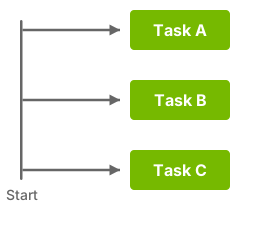
Independent tasks run in parallel asynchronously when they:
Have no dependencies on each other
Are defined at the workflow level under
tasks:Have available compute resources
For example: (parallel_tasks.yaml)
workflow:
  name: parallel-tasks
  tasks:
  - name: task-a
    # Runs in parallel with task-b and task-c
    image: alpine:3.18
    command: ["echo", "Hello from task-a"]

  - name: task-b
    # Runs in parallel with task-a and task-c
    image: alpine:3.18
    command: ["echo", "Hello from task-b"]
  - name: task-c

    # Runs in parallel with task-a and task-b
    image: alpine:3.18
    command: ["echo", "Hello from task-c"]
All three tasks start simultaneously (resource availability permitting). They cannot communicate with each other over the network.
Groups#
Synchronized Parallelism
Important
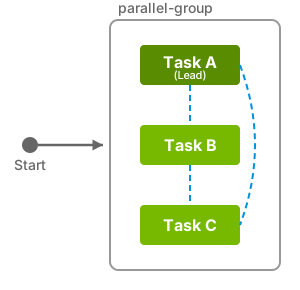
Groups are collections of tasks that execute together as a unit. All tasks in a group start simultaneously and can communicate over the network.
Key characteristics of groups:
All tasks in a group start together (synchronized execution)
Tasks can communicate with each other using
{{host:task-name}}(see more at Task Communication)One task must be designated as the lead task
Groups run serially based on dependencies between them
Tasks may run on the same node or different nodes
For example: (group_tasks.yaml)
workflow:
  name: grouped-workflow
  groups:
  - name: parallel-processing
    tasks:
    - name: processor-1
      lead: true  # One task must be the leader
      image: ubuntu:24.04
      command: ["bash", "-c"]
      args:
      - |
        echo "Processor 1: Starting..."
        for i in {1..5}; do
          echo "Processor 1: Processing item $i"
          sleep 5
        done
        echo "Processor 1: Complete"

    - name: processor-2
      image: ubuntu:24.04
      command: ["bash", "-c"]
      args:
      - |
        echo "Processor 2: Starting..."
        for i in {6..10}; do
          echo "Processor 2: Processing item $i"
          sleep 1
        done
        echo "Processor 2: Complete"

    - name: processor-3
      image: ubuntu:24.04
      command: ["bash", "-c"]
      args:
      - |
        echo "Processor 3: Starting..."
        for i in {11..15}; do
          echo "Processor 3: Processing item $i"
          sleep 2
        done
        echo "Processor 3: Complete"
Caution
The workflow level groups and tasks fields are mutually exclusive.
You cannot use both in the same workflow.
Task Communication#
Tasks within a workflow group can communicate over the network using the token {{host:task-name}}.
The token is replaced with the IP address of the task when the task is running.
Example: (group_tasks_communication.yaml)
workflow:
  name: grouped-workflow-communication
  groups:
  - name: parallel-processing
    tasks:
    - name: server
      lead: true
      image: alpine:3.18
      command: ["sh", "-c"]
      args:
      - |
        echo "Server: Starting..."
        echo "hello" > /tmp/hello.txt
        nc -w 50 -l -p 24831 < /tmp/hello.txt
        sleep 10
        echo "Server: Complete"

    - name: client
      image: alpine:3.18
      command: ["sh", "-c"]
      args:
      - |
        echo "Client: Starting..."
        echo "Calling server at {{host:server}}..."
        nc -w 30 {{host:server}} 24831 > /tmp/hello.txt
        echo "Received from server: $(cat /tmp/hello.txt)"
        echo "Client: Complete"
Next Steps#
You now understand parallel workflows! Continue to Advanced Patterns to learn about complex workflow patterns and optimizations.