xRep puts an image on another image’s pixel grid, using the WCS (world coordinate system, the mapping from pixel to sky position) in both headers. It resamples the image, its variance and its bad-pixel mask together. Align a pair before you subtract it (Chapter 6), or put several exposures on one shared grid as a stack.
You need:
cuPhoton with the CPU profile (Chapter 1). The gpu profile adds the CuPy backend.
Two-dimensional FITS images with a celestial WCS in their headers. This page writes a sample pair.
NoteSample data
This page runs on a small synthetic pair. The printed values only demonstrate the API.
The folded block writes sample/reference.fits and sample/target.fits. The reference has smaller pixels, on a grid rotated by 3 degrees from the target’s.
Create the sample pair (NumPy and Astropy only)
# Writes sample/reference.fits and sample/target.fits: two synthetic star fields# of the same sky on different pixel grids, with different blur and sky level.# The target also holds one new source and one star three times brighter.# Noise is independent Gaussian noise with variance expected_image / gain;# this teaching sample has no read noise, saturation, or detector artifacts.from pathlib import Pathimport numpy as npfrom astropy.io import fitsfrom astropy.wcs import WCSrng = np.random.default_rng(7)def make_wcs(shape, scale_arcsec, rotation_deg, crpix_shift): w = WCS(naxis=2) w.wcs.ctype = ["RA---TAN", "DEC--TAN"] w.wcs.crval = [150.0, 2.0] w.wcs.crpix = [shape[1] /2+ crpix_shift[0], shape[0] /2+ crpix_shift[1]] c, s = np.cos(np.radians(rotation_deg)), np.sin(np.radians(rotation_deg)) w.wcs.cd = scale_arcsec /3600* np.array([[-c, s], [s, c]])return wdef render(shape, wcs, ra, dec, flux, sigma, sky, gain): x, y = wcs.world_to_pixel_values(ra, dec) yy, xx = np.mgrid[: shape[0], : shape[1]] image = np.full(shape, sky, dtype=float)for xi, yi, fi inzip(x, y, flux): image += fi / (2* np.pi * sigma**2) * np.exp(-((xx - xi) **2+ (yy - yi) **2) / (2* sigma**2))return rng.normal(image, np.sqrt(image / gain)).astype(np.float32)ra =150.0+ rng.uniform(-0.016, 0.016, 150)dec =2.0+ rng.uniform(-0.016, 0.016, 150)flux =10** rng.uniform(2.5, 4.5, 150)target_flux = np.r_[3* flux[0], flux[1:], 4000.0] # star 0 brightens; one new sourcetarget_ra, target_dec = np.r_[ra, 150.004], np.r_[dec, 2.003]Path("sample").mkdir(exist_ok=True)for name, shape, wcs, sky_coords, fl, sigma, sky, gain in [ ("reference", (300, 300), make_wcs((300, 300), 0.26, 0.0, (0, 0)), (ra, dec), flux, 1.2, 100.0, 8.0), ("target", (256, 256), make_wcs((256, 256), 0.27, 3.0, (4.3, -2.7)), (target_ra, target_dec), target_flux, 1.8, 120.0, 2.0),]: header = wcs.to_header() header["GAIN"] = (gain, "electrons per data number (DN)") header["PSFSIG"] = (sigma, "Gaussian PSF sigma [px]") fits.writeto(f"sample/{name}.fits", render(shape, wcs, *sky_coords, fl, sigma, sky, gain), header, overwrite=True)
Real images come with a bad-pixel mask, an integer array in which each bit marks one kind of fault. The sample pair has none. This block adds a hot column and a hot pixel to the reference and flags them with mask values 2 and 4 (bit positions 1 and 2). It then builds the variance plane, one noise variance per pixel (Chapter 2).
mask = np.zeros(reference.shape, dtype=np.int32)reference[:, 120] +=500.0# a hot column at x = 120 (NumPy indexes [y, x])mask[:, 120] |=2reference[200, 60] +=5e4# a hot pixel at (y, x) = (200, 60)mask[200, 60] |=4reference_variance = np.clip(reference, 0, None) / reference_read.infos[0].header["GAIN"]
Mask value 1 (bit position 0) stays free for output pixels that the reference does not cover.
5.3 Map target pixels to reference pixels
For each output pixel, xRep finds where that pixel falls in the source image and interpolates the source there. make_wcs_pair_transform builds that mapping from two WCS, target pixel to sky to reference pixel. It maps an (N, 2) array of zero-based (x, y) pixel positions:
from cuphoton.xrep import make_wcs_pair_transformmapping = make_wcs_pair_transform(target_wcs, reference_wcs)print(mapping(np.array([[80.0, 167.0]]))) # (x, y) on the target grid
[[ 93.4792349 190.49344068]]
Target pixel (x, y) = (80, 167) falls at the printed position on the reference grid. The mapping uses (x, y) order, while NumPy arrays index (y, x).
5.4 Describe the output grid
A ReprojectionSpec holds the mapping, the output region and the resampling options (refer to “Options”). BBox gives the region as its origin, width and height on the output grid. This one covers the whole target grid:
from cuphoton.xrep import BBox, ReprojectionSpecheight, width = target.shapespec = ReprojectionSpec(mapping=mapping, output_bbox=BBox(0, 0, width, height)) # (x, y) origin, then the sizeprint(spec.interpolation, spec.mapping_grid_step, spec.area_scaling, spec.invalid_mask_value)
lanczos3 100 True 1
The defaults resample with a Lanczos-3 kernel (a windowed sinc that reads 6 by 6 source pixels), evaluate the WCS mapping every 100 output pixels and interpolate it in between, and scale values for the change in pixel area.
5.5 Reproject the image, variance and mask
reproject_masked_array resamples the three planes with one mapping:
All three planes now have the target’s shape. Masked source values still contribute to the image; the mask propagates their flags so that later steps can reject affected pixels. The image uses the kernel weights, and the variance uses their squares. The metadata records that the variance is diagonal. Neighboring output pixels share source pixels, which correlates their noise. xRep does not return that correlation.
5.6 Read the aligned mask
Each pixel of aligned.mask holds the bitwise OR of the mask bits of every source pixel that feeds it with a nonzero weight. A flagged source pixel therefore marks every output pixel that its value reached. Output pixels outside the reference get invalid_mask_value (1) in the mask and NaN in the image and the variance.
for bit, name in [(1, "outside the reference"), (2, "hot column"), (4, "hot pixel")]:print(f"bit {bit} ({name}): reference {np.count_nonzero(mask & bit)}, "f"aligned {np.count_nonzero(aligned.mask & bit)} pixels")
bit 1 (outside the reference): reference 0, aligned 0 pixels
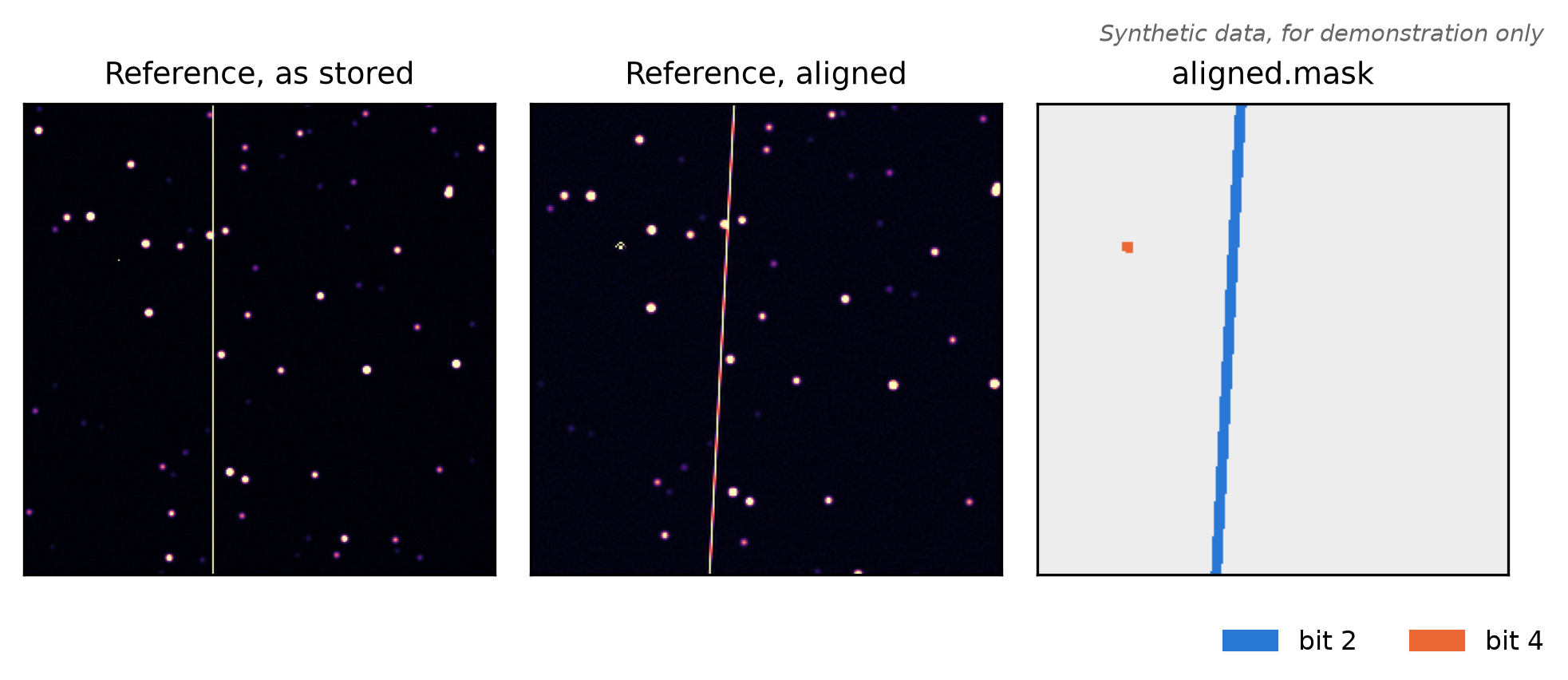
bit 2 (hot column): reference 300, aligned 1479 pixels
bit 4 (hot pixel): reference 1, aligned 34 pixels
The hot column becomes a band a few pixels wide, and the hot pixel a block, because the kernel spreads their values over that area (Figure 5.1). The reference covers the whole target grid. No pixel has bit 1. Treat every pixel with a nonzero mask as unusable, for example with good = aligned.mask == 0. To keep these pixels out of a subtraction, set them to NaN before the fit (Section 6.8).
Plotting code
import matplotlib.pyplot as pltfrom matplotlib.colors import to_rgbfrom matplotlib.patches import Patchlo, hi = np.percentile(reference, [1, 99.5])colors = {2: "#2A78D6", 4: "#EB6834"} # blue for bit 2, orange for bit 4mask_rgb = np.full(aligned.mask.shape + (3,), 0.93)for bit, color in colors.items(): mask_rgb[(aligned.mask & bit) >0] = to_rgb(color)fig, axes = plt.subplots(1, 3, figsize=(6.5, 2.6))axes[0].imshow(reference, origin="lower", cmap="magma", vmin=lo, vmax=hi)axes[1].imshow(aligned.image, origin="lower", cmap="magma", vmin=lo, vmax=hi)axes[2].imshow(mask_rgb, origin="lower")for ax, title inzip(axes, ["Reference, as stored", "Reference, aligned", "aligned.mask"]): ax.set_title(title, fontsize=9) ax.set_xticks([]); ax.set_yticks([])fig.legend([Patch(color=color) for color in colors.values()], ["bit 2", "bit 4"], loc="lower right", ncol=2, fontsize=8, frameon=False)fig.text(1, 1, "Synthetic data, for demonstration only", ha="right", va="bottom", fontsize=7, style="italic", color="0.4", transform=fig.transFigure)fig.tight_layout(rect=(0, 0.06, 1, 1))plt.show()
Figure 5.1: The reference before and after xRep. Left: the reference as stored, with its hot column. Middle: the reference on the target grid, where the column is tilted by the 3 degree rotation. Right: the aligned mask, blue for the hot column (bit 2) and orange for the hot pixel (bit 4), which is too small to see in the image panels. Synthetic data, for demonstration only.
5.7 Reuse the mapping for more images
reproject_masked_array evaluates the mapping once per call. prepare_reprojection does it once for many calls, and returns the source position, area ratio and a valid flag of every output pixel. Pass it as prepared to reproject other images with the reference’s shape and WCS, such as a model of the reference. This block aligns a flat sky of 100 DN (data numbers, the detector’s unit) per reference pixel:
from cuphoton.xrep import prepare_reprojectionprepared = prepare_reprojection(spec, source_shape=reference.shape)print(prepared.output_shape, f"area ratio {np.median(prepared.relative_area):.4f}")sky = np.full(reference.shape, 100.0)sky_aligned = reproject_masked_array(sky, sky /8.0, np.zeros(reference.shape, dtype=np.int32), spec, backend="cpu", prepared=prepared)print(f"flat sky on the target grid: {np.median(sky_aligned.image):.2f} DN per pixel")
(256, 256) area ratio 1.0784
flat sky on the target grid: 107.84 DN per pixel
A target pixel covers the printed area ratio of reference pixels. It therefore collects that much more light. With area_scaling=True, xRep multiplies the image by the ratio and the variance by its square. Set area_scaling=False for surface-brightness units, where a constant field should retain its value after resampling. A prepared mapping belongs to one spec and one source shape.
5.8 Stack several images on one grid
An xRep stack resamples several images onto one grid and returns one array with shape (images, height, width). It does not combine them. build_stack_spec_from_fits reads the files and builds one spec per image, and reproject_stack resamples them:
from cuphoton.xrep import build_stack_spec_from_fits, reproject_stackimages, stack_spec = build_stack_spec_from_fits(["sample/target.fits", "sample/reference.fits"])stack = reproject_stack(images, stack_spec, backend="cpu")print(stack_spec.output_bbox, stack_spec.grid.pixel_scale_arcsec, "arcsec per pixel")print(stack.images.shape, "invalid pixels per image:", stack.masks.sum(axis=(1, 2)))
BBox(min_x=-140, min_y=-147, width=290, height=290) 0.27 arcsec per pixel
(2, 290, 290) invalid pixels per image: [19083  1156]
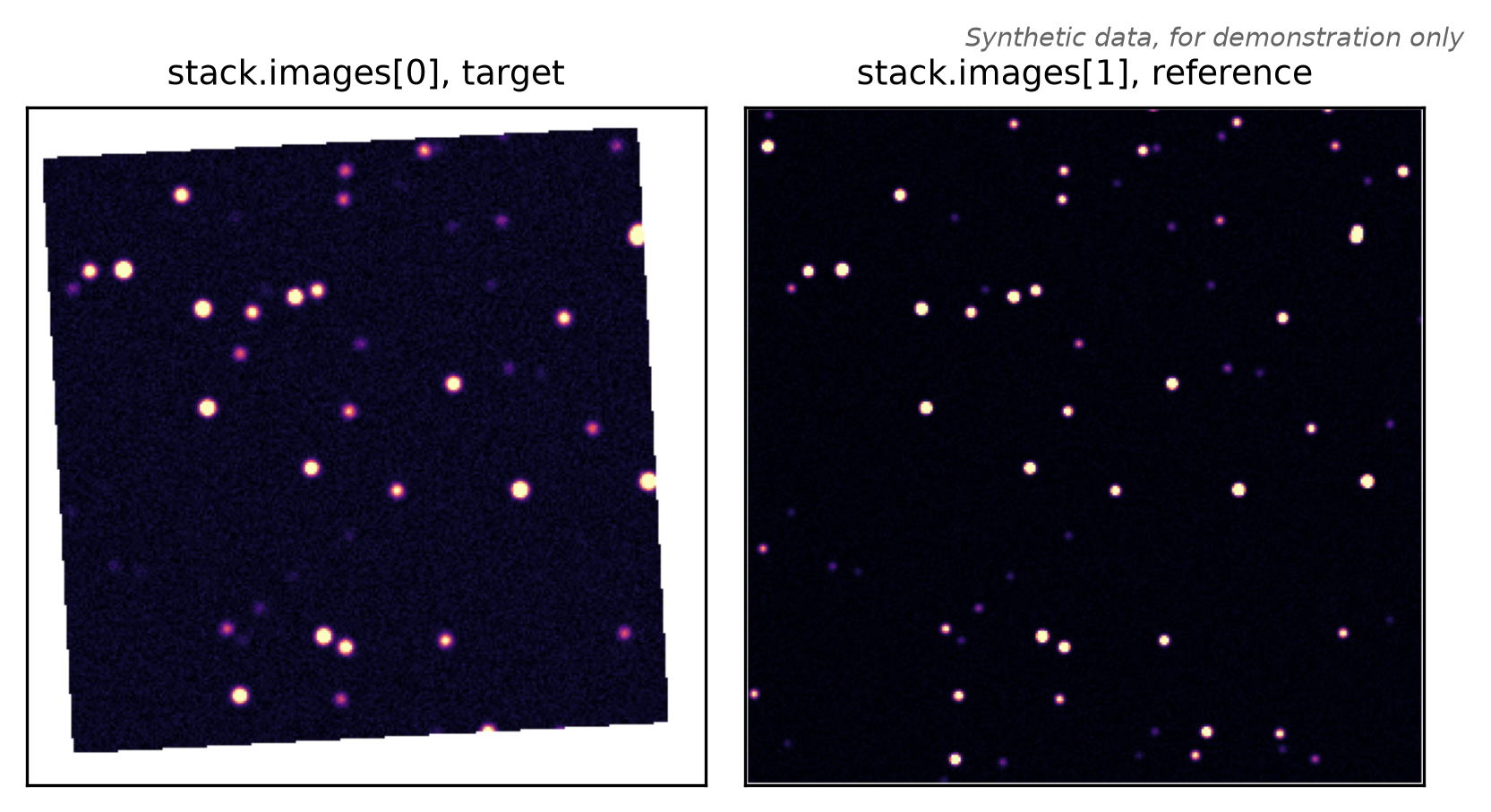
Without a grid, the stack uses a north-up grid with the first image’s pixel scale and grid pixel (0, 0) at the first image’s center. The box covers every footprint. Its origin can therefore be negative. Each image is NaN, and flagged in stack.masks, where it has no data (Figure 5.2). For the target’s grid instead, pass grid=Grid.from_wcs(target_wcs) and output_bbox=BBox(0, 0, width, height).
reproject_stack returns no variance. Without source masks, its masks mark the geometric footprint; with source masks, it propagates flags only from the 2 by 2 bilinear neighborhood, even for Lanczos interpolation. For variance and full-kernel masks, call reproject_masked_array with each member’s spec:
member = reproject_masked_array(reference, reference_variance, mask, stack_spec.members[1], backend="cpu")print(member.image.shape, np.count_nonzero(member.mask &1), "pixels outside the reference")
Figure 5.2: The two images of the stack on the shared north-up grid, on one color scale. White marks pixels where an image has no data. Left: the target, rotated by 3 degrees from the grid. Right: the reference, whose larger footprint covers most of the grid. Synthetic data, for demonstration only.
5.9 Options
ReprojectionSpec takes these fields:
Option
Default
Effect
mapping
required
callable from output (x, y) pixels to source (x, y) pixels
output_bbox
required
BBox(min_x, min_y, width, height) on the output grid
source_origin
(0, 0)
(x, y) offset subtracted from source positions when the source array is a cutout
interpolation
"lanczos3"
"lanczos3" or "bilinear" (2 by 2 pixels, no ringing at sharp edges)
mapping_grid_step
100
output pixels between exact WCS evaluations; 1 evaluates every pixel
area_scaling
True
multiply by the source area each output pixel covers
fill_value
nan
image value outside the source footprint
invalid_mask_value
1
mask value outside the source footprint
lanczos_a
3
Lanczos kernel radius
two_a_footprint
True
use 2 * lanczos_a taps per axis; False uses 2 * lanczos_a + 1
reproject_masked_array also takes backend, prepared and variance_fill_value (NaN). Without backend, it takes the first available of cupy, CUDA torch and cpu (NumPy). The variance must be nonnegative, with NaN or positive infinity for no data. The mask must have an integer or boolean dtype.
5.10 On a GPU
With the gpu profile, pass backend="cupy", or backend="native" for the precompiled kernels of the native extension (Chapter 1). reproject_masked_array still takes and returns NumPy arrays:
To keep the result on the GPU, use reproject_array_device with CuPy inputs. It runs on the cupy backend, the default, or on native. Its mask covers the bilinear neighborhood. It does not check the variance for negative values, because that check needs a copy to the host.
prepare_reprojection evaluates the WCS with Astropy on the CPU and expands the mapping to every pixel on the GPU. build_stack_spec_from_fits takes fits_reader="xdr" and device=True to decode its inputs on the GPU (Chapter 4).
5.11 Command line
cuphoton xrep reproject-image resamples one FITS image, and optionally a FITS --mask, onto a north-up grid. The grid takes the image’s center and pixel scale unless you pass --grid-crval-ra, --grid-crval-dec and --pixel-scale-arcsec together. To align one image to another image’s grid, run reproject-stack with one input and --target-wcs:
The command writes a new run directory under runs/align, with summary.json and the arrays in artifacts/. --write-fits adds a FITS copy with the target’s WCS. From Python, run the command and print part of its summary:
The commands do not resample variance. reproject-image propagates an input mask only over the bilinear neighborhood, even for Lanczos interpolation; reproject-stack takes no input mask and marks only the geometric footprint. Use reproject_masked_array when you need either. For a target WCS with SIP distortion (polynomial corrections to the projection), pass --mapping-grid-step 1. Otherwise reproject-stack warns that the coarse mapping grid interpolates the distortion.
5.12 Troubleshooting
The aligned image has more NaN pixels than the source
xRep does not skip NaN source pixels. Each NaN turns every output pixel that reads it into NaN. Before you resample, replace NaN pixels, for example with the local sky level, and flag them.
Edge pixels come back NaN and flagged, even where the source covers the grid
xRep keeps an output pixel only when its source position lies inside the source image. WCS round-off can place edge pixels just outside, for example when you map an image onto its own grid. Treat them as missing.
RuntimeError: Requested backend is unavailable: cupy
Install the gpu profile, or pass backend="cpu".
ERROR: run directory already exists
Each run needs a new directory. Pass a new --name, or leave it out for a timestamped name. Two runs started in the same second get the same name.