Core’s shared reader, cuphoton.core.fits_io, reads the images in a FITS file (the standard file format for astronomical images) into NumPy arrays, or into CuPy arrays on a GPU. Each call returns the pixels, their headers and a receipt that names the reader that ran. Astropy decodes on the CPU, and xDataReader (xDR) decodes supported files on the GPU. xPois, xRep, xFit and xScan read FITS files through this reader. Its rules therefore also apply to their commands.
You need:
cuPhoton with the CPU profile (Chapter 1) for Astropy reads.
For GPU reads, the gpu profile and xDR’s native extension (refer to “On a GPU” below).
FITS files with two-dimensional images. This page writes its own.
NoteSample data
This page runs on a small synthetic pair. The printed values only demonstrate the API.
The folded block writes sample/reference.fits and sample/target.fits.
Create the sample pair (NumPy and Astropy only)
# Writes sample/reference.fits and sample/target.fits: two synthetic star fields# of the same sky on different pixel grids, with different blur and sky level.# The target also holds one new source and one star three times brighter.# Noise is independent Gaussian noise with variance expected_image / gain;# this teaching sample has no read noise, saturation, or detector artifacts.from pathlib import Pathimport numpy as npfrom astropy.io import fitsfrom astropy.wcs import WCSrng = np.random.default_rng(7)def make_wcs(shape, scale_arcsec, rotation_deg, crpix_shift): w = WCS(naxis=2) w.wcs.ctype = ["RA---TAN", "DEC--TAN"] w.wcs.crval = [150.0, 2.0] w.wcs.crpix = [shape[1] /2+ crpix_shift[0], shape[0] /2+ crpix_shift[1]] c, s = np.cos(np.radians(rotation_deg)), np.sin(np.radians(rotation_deg)) w.wcs.cd = scale_arcsec /3600* np.array([[-c, s], [s, c]])return wdef render(shape, wcs, ra, dec, flux, sigma, sky, gain): x, y = wcs.world_to_pixel_values(ra, dec) yy, xx = np.mgrid[: shape[0], : shape[1]] image = np.full(shape, sky, dtype=float)for xi, yi, fi inzip(x, y, flux): image += fi / (2* np.pi * sigma**2) * np.exp(-((xx - xi) **2+ (yy - yi) **2) / (2* sigma**2))return rng.normal(image, np.sqrt(image / gain)).astype(np.float32)ra =150.0+ rng.uniform(-0.016, 0.016, 150)dec =2.0+ rng.uniform(-0.016, 0.016, 150)flux =10** rng.uniform(2.5, 4.5, 150)target_flux = np.r_[3* flux[0], flux[1:], 4000.0] # star 0 brightens; one new sourcetarget_ra, target_dec = np.r_[ra, 150.004], np.r_[dec, 2.003]Path("sample").mkdir(exist_ok=True)for name, shape, wcs, sky_coords, fl, sigma, sky, gain in [ ("reference", (300, 300), make_wcs((300, 300), 0.26, 0.0, (0, 0)), (ra, dec), flux, 1.2, 100.0, 8.0), ("target", (256, 256), make_wcs((256, 256), 0.27, 3.0, (4.3, -2.7)), (target_ra, target_dec), target_flux, 1.8, 120.0, 2.0),]: header = wcs.to_header() header["GAIN"] = (gain, "electrons per data number (DN)") header["PSFSIG"] = (sigma, "Gaussian PSF sigma [px]") fits.writeto(f"sample/{name}.fits", render(shape, wcs, *sky_coords, fl, sigma, sky, gain), header, overwrite=True)
4.1 List the images in a file
A FITS file holds one or more HDUs (header/data units), each a text header followed by binary data. inspect_fits_images lists the two-dimensional image HDUs from their headers, without decoding pixels.
from cuphoton.core.fits_io import inspect_fits_imagesfor info in inspect_fits_images("sample/target.fits"):print(info.hdu, info.shape, info.dtype, info.compression, info.xdr_unsupported_reason)
0 (256, 256) float32 None None
The sample file holds one uncompressed image, in HDU 0. xdr_unsupported_reason is None when the image format passes the reader’s xDR checks, and otherwise gives the reason. This inspection does not check whether the GPU and xDR dependencies are available. Tables and data cubes do not appear in the list.
4.2 Read an image
Pass the file and a list of HDU indices. The result holds one array and one FitsImageInfo per index, in the order you list them.
The arrays use native byte order, and integer masks keep their type and bits. Each header is an Astropy Header. astropy.wcs.WCS(header) gives the image’s WCS (world coordinate system, the mapping from pixel to sky position).
4.3 Check the receipt
result.metadata() returns the receipt of the read:
for key, value in result.metadata().items():print(f"{key:17}{value}")
astropy | xDR GPU dependencies or a CUDA device are unavailable
Cannot use xDR: xDR GPU dependencies or a CUDA device are unavailable
Without a GPU, auto falls back to Astropy and xdr raises. On a GPU host with xDR built, the same auto call reports xdr. Use auto in code that must run on both, and xdr when a silent CPU fallback hides a problem. cuPhoton never retries a failed read with the other reader.
4.5 Read a section
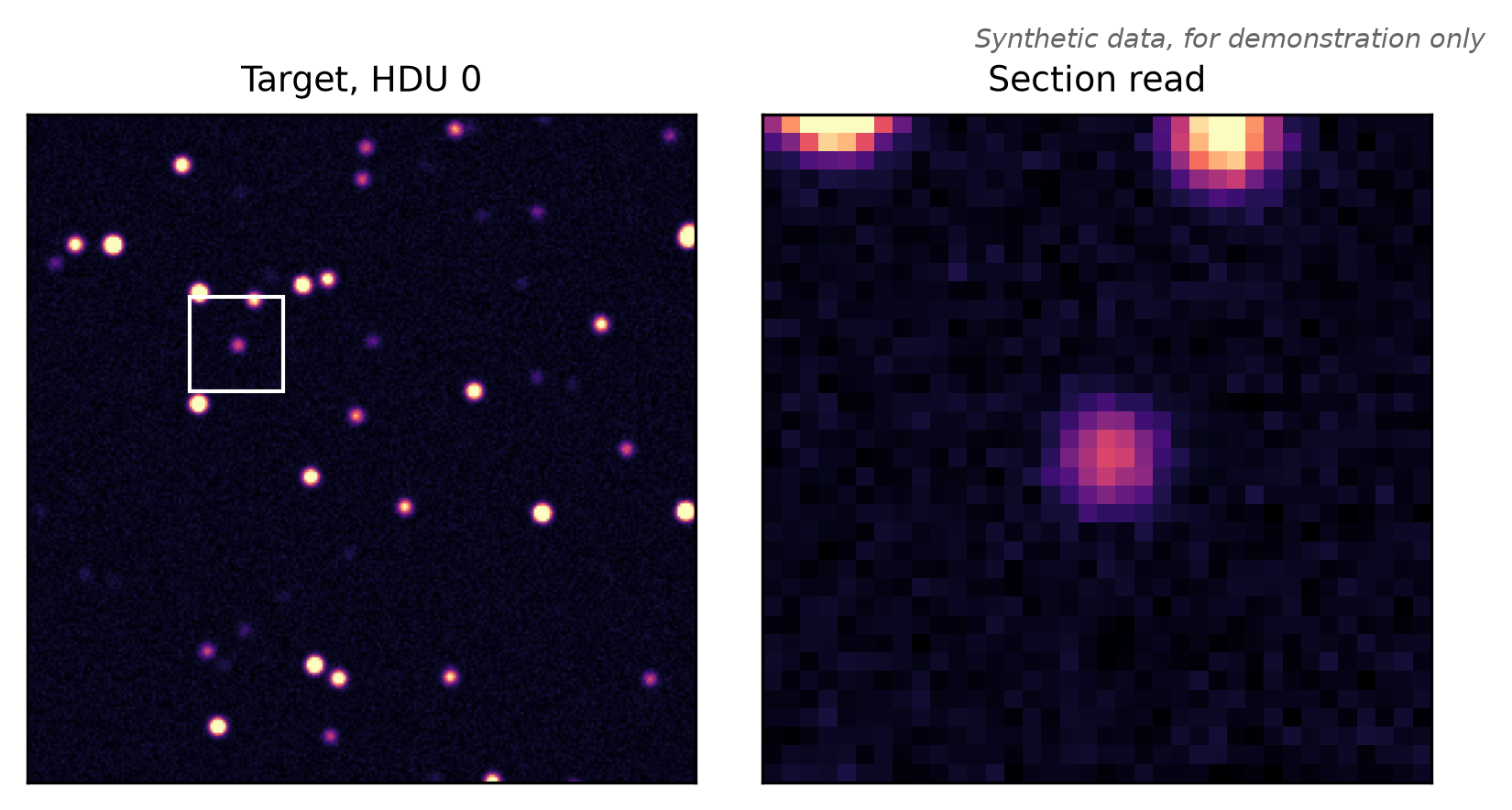
section reads a rectangle of the image. Pass a (y, x) pair of unit-step slices that lie inside every listed image. This block reads a 36 by 36 pixel cutout around the target’s new source, near pixel (y, x) = (167, 80):
The returned infos[0].header still describes the full image; section reads do not shift its WCS. Use WCS(cutout.infos[0].header).slice(box) for cutout-relative sky coordinates, or add the section origin to the cutout pixel coordinates before using the original WCS.
A section of an uncompressed image always uses Astropy. A small cutout then does not cost a full-image GPU read. reader="xdr" rejects it. xDR reads sections of tile-compressed images. Figure 4.1 shows the cutout.
Figure 4.1: Left: the whole target image, with the section box in white. Right: the 36 by 36 pixel array that the section read returns, with the new source at its center. Both panels share one color scale. Synthetic data, for demonstration only.
4.6 Write files xDR can decode
xDR decodes supported uncompressed images and lossless images tile-compressed with GZIP_1 or GZIP_2; scaling, nulls and quantization have the restrictions listed below. Tile compression cuts an image into rectangles (tiles) and compresses each one on its own. The GPU can then decode all tiles at once. This block writes the target twice into one file with Astropy, as lossless GZIP_2 in HDU 1 and with Astropy’s defaults in HDU 2.
from astropy.io import fitsfits.HDUList([ fits.PrimaryHDU(), fits.CompImageHDU(image, header, compression_type="GZIP_2", quantize_level=0), fits.CompImageHDU(image, header), # Astropy's default compression]).writeto("sample/target-compressed.fits", overwrite=True)for info in inspect_fits_images("sample/target-compressed.fits"):print(info.hdu, info.compression, info.xdr_unsupported_reason)
For floating-point images, Astropy’s default is RICE_1 after quantization, which rounds every pixel to a step set by the tile’s noise. Read both HDUs and compare them with the original:
import numpy as npboth = read_fits_images("sample/target-compressed.fits", [1, 2], reader="auto")print(both.metadata()["reader"], "|", both.metadata()["fallback_reason"])lossless, quantized = both.arraysprint("GZIP_2 copy equals the original:", np.array_equal(lossless, image))print("RICE_1 copy, largest change:", np.abs(quantized - image).max())
astropy | compression RICE_1 requires Astropy
GZIP_2 copy equals the original: True
RICE_1 copy, largest change: 0.31546783
One call uses one reader for all its HDUs. HDU 2 needs Astropy. The whole read therefore falls back. Read HDUs in separate calls to let xDR take the ones it supports.
To write images that xDR decodes:
Leave the image uncompressed, or tile-compress it with GZIP_1 or GZIP_2. xDR does not decode RICE_1, HCOMPRESS_1 or PLIO_1.
Write floating-point images with quantize_level=0. Astropy quantizes floats by default, and xDR rejects every quantized image.
Store integer masks in a signed type, such as int16 or int32. FITS stores uint16 with an offset (BZERO), and xDR rejects scaling (BSCALE, BZERO) and null values (BLANK).
Do not gzip the whole file (.fits.gz). xDR rejects externally compressed files.
Astropy’s default tile is one image row. For tile sizes, refer to the xDR tile-size notes.
4.7 Options
read_fits_images takes these arguments after the path:
Option
Default
Effect
hdus
required
HDU indices to read, in the order of the returned arrays
a (y, x) pair of unit-step slices, applied to every listed HDU
stream
None
the CuPy stream for device reads; None uses the current stream
xdr_options
None
xDR decode choices (next section), checked and recorded even when Astropy decodes
4.8 On a GPU
xDR needs the GPU environment from Chapter 1 and a native extension that you build from the checkout. The build needs a C++17 compiler, the CUDA and cuFile headers and a thread-safe CFITSIO, as the xDR install notes describe. From that prepared environment, build the extension and check that it loads:
bash src/cuphoton/xdr/src/build.shuv run --no-sync python -c"from cuphoton.xdr.nvcomp_batch import cpp_helper_available; print(cpp_helper_available())"
Pass device=True to keep the pixels on the GPU. The arrays are ready when the call returns. xdr_options chooses how xDR decodes:
With reader="astropy", device=True decodes on the CPU and copies the arrays to the GPU. It still needs CuPy and a CUDA device. The three xdr_options keys are also command-line flags:
Key
Flag
Values
What auto does
postprocess
--xdr-postprocess
auto, fused, separate, native
restores the pixels with one fused kernel
gzip_decoder
--xdr-gzip-decoder
auto, gzip, deflate
uses native Gzip when available, otherwise raw DEFLATE
decompression_backend
--xdr-decompression-backend
auto, cuda, hardware
lets nvCOMP pick its decompression engine, with CUDA as the fallback
postprocess="native" restores compressed tiles with the precompiled kernels of cuPhoton’s native extension (Chapter 1). Every key defaults to auto. The keys choose how xDR decodes, not whether it runs, and none changes a pixel value. The call checks them on any machine and records them in the receipt:
Use decompression_backend="hardware" with reader="xdr" to require native Gzip hardware decoding for compressed HDUs. It fails when the hardware engine, buffers or tile sizes are incompatible. Uncompressed HDUs need no decompression. See hardware eligibility for supported devices and allocation requirements.
The receipt records the requested choices, not the engine that ran. To load the same HDUs from many files of one shape, batch_to_device returns one CuPy array per HDU, shaped (file, y, x):
from cuphoton.xdr import batch_to_device(images,) = batch_to_device(["exposure-1.fits", "exposure-2.fits"], hdu_indices=[1])
cuphoton xdr benchmark-fits times each stage of a GPU read. The xDR reference covers the batch readers and the benchmark.
4.9 Command line
The FITS commands of xFit, xPois, xRep and xScan take --fits-reader, with the same three values, and the three --xdr-* flags. Most default to auto. The xScan pipeline commands keep their manifest’s reader unless you pass the flag. For example:
cuphoton xrep reproject-image --input sample/target-compressed.fits --hdu 1 \--backend cpu --fits-reader auto --output-dir runs/read-fits
The command prints its run summary as JSON and saves it as summary.json in a new directory under runs/read-fits. The summary lists one receipt per read under fits_reads. From Python, run the command and print the receipts:
CPU runs of xFit, xPois and xRep turn auto into astropy before they read. The receipt therefore shows requested_reader as astropy. Chapter 5 covers the rest of the command.
4.10 Troubleshooting
Cannot use xDR: xDR GPU dependencies or a CUDA device are unavailable
reader="xdr" found no CUDA device, GPU packages or native extension. Set them up as in “On a GPU”, or use reader="auto".
Cannot use xDR: compression RICE_1 requires Astropy, or quantized FITS images require Astropy
The file uses a format xDR does not decode. Use reader="auto", or rewrite the file as in “Write files xDR can decode”.
Cannot use xDR: uncompressed FITS sections require Astropy
Read cutouts of uncompressed images with reader="auto" or reader="astropy".
FITS HDU 0 is not a 2D image
The HDU holds no image, a table or a cube. Run inspect_fits_images to find the image HDUs.
No module named 'cupy'
device=True needs CuPy, even when Astropy decodes. Install the gpu profile.
An explicit decoder or backend choice fails on a GPU host
The native extension may predate the requested choice. Rebuild it, as the troubleshooting guide describes. A hardware request also requires a supported device, compatible buffers and tile sizes.