Subtracting two images of the same scene shows what changed. xPois fits a convolution kernel that blurs the reference until it matches the target, plus a smooth background, then subtracts. It also predicts the noise of every difference pixel and finds the candidates. Use it once the two images share one pixel grid.
You need: cuPhoton installed with the CPU profile (Chapter 1), and two images on one pixel grid with a variance plane for each. This page makes a sample pair and aligns it.
NoteSample data
This page runs on a small synthetic pair. The printed values only demonstrate the API.
Create the sample pair (NumPy and Astropy only)
# Writes sample/reference.fits and sample/target.fits: two synthetic star fields# of the same sky on different pixel grids, with different blur and sky level.# The target also holds one new source and one star three times brighter.# Noise is independent Gaussian noise with variance expected_image / gain;# this teaching sample has no read noise, saturation, or detector artifacts.from pathlib import Pathimport numpy as npfrom astropy.io import fitsfrom astropy.wcs import WCSrng = np.random.default_rng(7)def make_wcs(shape, scale_arcsec, rotation_deg, crpix_shift): w = WCS(naxis=2) w.wcs.ctype = ["RA---TAN", "DEC--TAN"] w.wcs.crval = [150.0, 2.0] w.wcs.crpix = [shape[1] /2+ crpix_shift[0], shape[0] /2+ crpix_shift[1]] c, s = np.cos(np.radians(rotation_deg)), np.sin(np.radians(rotation_deg)) w.wcs.cd = scale_arcsec /3600* np.array([[-c, s], [s, c]])return wdef render(shape, wcs, ra, dec, flux, sigma, sky, gain): x, y = wcs.world_to_pixel_values(ra, dec) yy, xx = np.mgrid[: shape[0], : shape[1]] image = np.full(shape, sky, dtype=float)for xi, yi, fi inzip(x, y, flux): image += fi / (2* np.pi * sigma**2) * np.exp(-((xx - xi) **2+ (yy - yi) **2) / (2* sigma**2))return rng.normal(image, np.sqrt(image / gain)).astype(np.float32)ra =150.0+ rng.uniform(-0.016, 0.016, 150)dec =2.0+ rng.uniform(-0.016, 0.016, 150)flux =10** rng.uniform(2.5, 4.5, 150)target_flux = np.r_[3* flux[0], flux[1:], 4000.0] # star 0 brightens; one new sourcetarget_ra, target_dec = np.r_[ra, 150.004], np.r_[dec, 2.003]Path("sample").mkdir(exist_ok=True)for name, shape, wcs, sky_coords, fl, sigma, sky, gain in [ ("reference", (300, 300), make_wcs((300, 300), 0.26, 0.0, (0, 0)), (ra, dec), flux, 1.2, 100.0, 8.0), ("target", (256, 256), make_wcs((256, 256), 0.27, 3.0, (4.3, -2.7)), (target_ra, target_dec), target_flux, 1.8, 120.0, 2.0),]: header = wcs.to_header() header["GAIN"] = (gain, "electrons per data number (DN)") header["PSFSIG"] = (sigma, "Gaussian PSF sigma [px]") fits.writeto(f"sample/{name}.fits", render(shape, wcs, *sky_coords, fl, sigma, sky, gain), header, overwrite=True)
6.1 Put the pair on one grid
xPois needs a reference and a target on one grid. The block repeats the alignment of Chapter 2, which Chapter 5 explains.
import numpy as npfrom astropy.wcs import WCSfrom cuphoton.core.fits_io import read_fits_imagesfrom cuphoton.xrep import BBox, ReprojectionSpec, make_wcs_pair_transform, reproject_masked_arraytarget_read = read_fits_images("sample/target.fits", [0])reference_read = read_fits_images("sample/reference.fits", [0])target, reference = (r.arrays[0].astype(np.float64) for r in (target_read, reference_read))target_header, reference_header = target_read.infos[0].header, reference_read.infos[0].headertarget_variance = np.clip(target, 0, None) / target_header["GAIN"]reference_variance = np.clip(reference, 0, None) / reference_header["GAIN"]mapping = make_wcs_pair_transform(WCS(target_header), WCS(reference_header)) # maps (x, y) positions# BBox takes the (x, y) origin, then the width and the heightspec = ReprojectionSpec(mapping=mapping, output_bbox=BBox(0, 0, target.shape[1], target.shape[0]))aligned = reproject_masked_array(reference, reference_variance, np.zeros(reference.shape, dtype=bool), spec, backend="cpu")print(target.shape, aligned.image.shape)
(256, 256) (256, 256)
aligned.image and aligned.variance are the reference and its variance on the target grid.
6.2 Choose the kernel basis
The kernel must turn the reference PSF (point spread function: the blur pattern of a point of light) into the target PSF. When the target is blurrier than the reference and both PSFs are Gaussian, the matching kernel is a Gaussian of width \(\sqrt{\sigma_T^2 - \sigma_R^2}\) with both widths in target pixels. xPois builds the kernel from basis functions. Each GaussianBasisComponent(sigma, degree) is a Gaussian of width sigma pixels times every polynomial up to total degree degree. The example places a narrow, a matching and a wide Gaussian around the needed width. For real images, inspect the residuals and adjust the basis; resampling and non-Gaussian PSFs change the matching problem. If the target is sharper, swap the subtraction roles or choose a sharper reference instead of taking the square root of a negative width difference.
from astropy.wcs.utils import proj_plane_pixel_scalesfrom cuphoton.xpois import GaussianBasisComponent# Reference PSF width in target pixels, then the width the kernel must addscale = proj_plane_pixel_scales(WCS(reference_header))[0] / proj_plane_pixel_scales(WCS(target_header))[0]kernel_sigma = np.sqrt(target_header["PSFSIG"] **2- (scale * reference_header["PSFSIG"]) **2)widths = np.round(kernel_sigma * np.array([0.5, 1.0, 2.0]), 1)basis = [GaussianBasisComponent(sigma, degree) for sigma, degree inzip(widths, (4, 2, 2))]print(f"kernel sigma {kernel_sigma:.2f} px, basis widths {widths}")
kernel sigma 1.38 px, basis widths [0.7 1.4 2.8]
The kernel shape must be odd in both axes. Make it reach about three widths of the widest Gaussian on each side of the center, so that the Gaussian is not cut off. Here that is 19 × 19.
6.3 Fit the kernel and subtract
solve_constant_kernel fits one kernel for the whole image by least squares, with each pixel weighted by one over its target variance.
from cuphoton.xpois import solve_constant_kernelfit = solve_constant_kernel(aligned.image, target, basis, kernel_shape=(19, 19), variance=target_variance, background_degree=1, backend="cpu")difference = fit.residual # target minus the matched referenceprint(f"backend {fit.backend}, {len(fit.basis_terms)} basis terms, kernel sum {fit.kernel.sum():.4f}")print(f"chi2/dof {fit.chi2 / fit.dof:.3f} over {fit.fit_pixel_count} pixels")print(int(np.isnan(difference).sum()), "NaN pixels")
backend cpu, 27 basis terms, kernel sum 1.0129
chi2/dof 1.289 over 56644 pixels
8892 NaN pixels
The kernel sum is the flux ratio from the reference to the target. The NaN pixels form an edge band half a kernel wide, where the kernel reaches past the image. The difference is also NaN where the kernel footprint holds a non-finite reference pixel, or where the target or its variance is not finite. The result holds these fields:
Field
Holds
kernel
the fitted kernel, of shape kernel_shape
matched
the reference convolved with the kernel, plus the background
residual
the difference image, target - matched
background
the fitted background image
fit_mask
the pixels that entered the fit
kernel_coefficients, background_coefficients
the fitted coefficients
basis_kernels, basis_terms
each basis image and its width and polynomial powers
chi2, dof, fit_pixel_count
the weighted residual sum, the degrees of freedom and the number of fitted pixels
backend
the backend that ran the fit
6.4 Predict the noise of the difference
The difference holds noise from both images. standardize_constant_kernel_residual predicts the variance of every difference pixel. It adds the target variance and the reference variance convolved with the squared kernel. Then it divides the difference by the square root of that sum.
from cuphoton.xpois import standardize_constant_kernel_residualnoise = standardize_constant_kernel_residual(difference, kernel=fit.kernel, target_variance=target_variance, reference_variance=aligned.variance)z = noise.standardized_residualinside = noise.valid_maskspread =1.4826* np.median(np.abs(z[inside] - np.median(z[inside])))print(f"{int(inside.sum())} valid pixels, robust spread of z {spread:.3f}")
56644 valid pixels, robust spread of z 1.001
A spread near one is expected when the fixed-kernel, independent-input noise model is adequate. The result holds four arrays:
marginal_residual_variance: the predicted variance of each difference pixel.
propagated_reference_variance: the reference part of that variance alone.
standardized_residual: the difference over the square root of the predicted variance.
valid_mask: the pixels with a complete, finite reference-variance footprint, a positive target variance and a finite difference. If you pass your own valid_mask, the result keeps only pixels inside it.
The three floating-point arrays are NaN outside valid_mask. The prediction assumes independent reference pixels, independent target pixels and independence between the two images. It treats the kernel as fixed, omitting the uncertainty in the fitted kernel and background. The result records covariance_represented=False and fit_parameter_uncertainty_represented=False. In this example, the reference was resampled: its pixels are already correlated, so the diagonal prediction is approximate even for the variance of an individual difference pixel. Standardization also does not remove correlations between difference pixels. The xPois reference and Chapter 10 explain how to account for correlation and other terms in measurements such as a flux.
6.5 Find the candidates
identify_residual_hotspots divides an image by robust_sigma and marks every pixel whose absolute value reaches threshold_sigma. It groups marked pixels that touch horizontally or vertically into regions, and sorts the regions by peak significance, then by size. Using robust_sigma=1.0 thresholds the supplied z values directly; it does not calibrate their statistical significance.
from cuphoton.xpois import identify_residual_hotspotsregions = identify_residual_hotspots(z, robust_sigma=1.0, threshold_sigma=5.0, max_regions=None)for region in regions: # peak_yx is (y, x)print(region["peak_yx"], f"{region['peak_residual']:+.1f} sigma,", region["pixel_count"], "pixels,","box", region["bbox_y0y1x0x1"])
The two regions are the brightened star and the new source. Each record also holds centroid_yx, peak_abs_sigma and mean_residual. Positions are (y, x) and the box is half-open, (y0, y1, x0, x1). The test uses the absolute value. A fading source therefore also forms a region, and touching positive and negative lobes join into one. residual_hotspot_table returns the same rows as columns.
On the plain difference, pass a noise estimate as robust_sigma. One number then stands for the noise everywhere, although bright stars are noisier.
6.6 Keep changed pixels out of the fit
A source that changed is not a blur difference, and inside the fit it pulls the kernel. Mask each region with a margin, then fit again. fit_mask is a boolean image of the pixels to fit. The solver also drops the edge band and invalid pixels.
kernel sum 1.0129 -> 0.9999
chi2/dof 1.289 -> 1.021
The difference still covers the masked pixels. The reported chi2 continues to use target-only variance; the later noise calculation does not change the solver weights or its chi2. To fit only a few bright, isolated stars instead, build the mask with build_compact_source_stamp_mask.
6.7 Look at the result
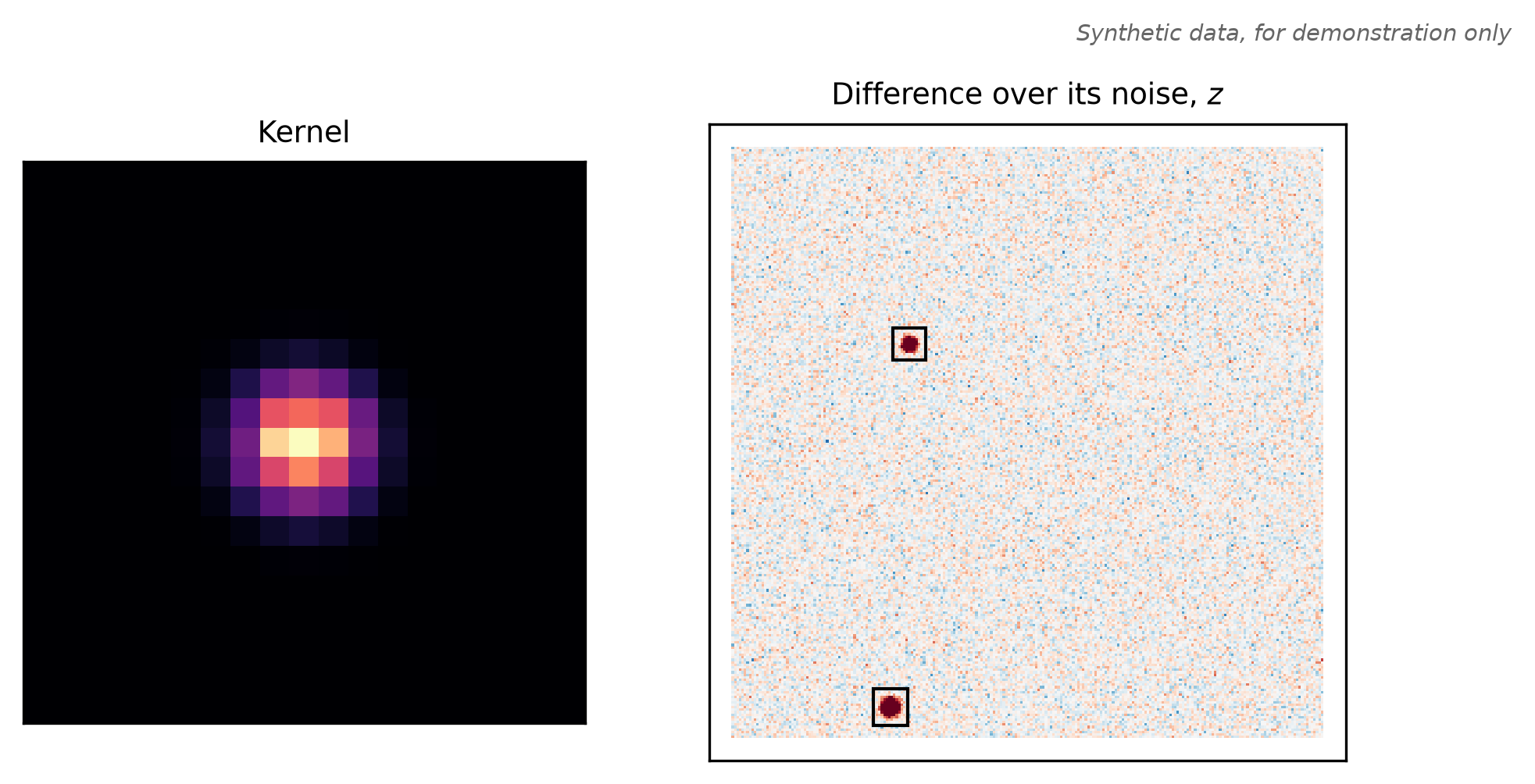
Figure 6.1 shows the fitted kernel and the standardized difference.
Plotting code
import matplotlib.pyplot as pltfrom matplotlib.patches import Rectanglefig, axes = plt.subplots(1, 2, figsize=(6.5, 3.2), width_ratios=[1, 1.6])axes[0].imshow(refit.kernel, origin="lower", cmap="magma")axes[0].set_title("Kernel", fontsize=9)axes[1].imshow(z, origin="lower", cmap="RdBu_r", vmin=-6, vmax=6)for region in regions: y0, y1, x0, x1 = region["bbox_y0y1x0x1"] axes[1].add_patch(Rectangle((x0 -3.5, y0 -3.5), x1 - x0 +6, y1 - y0 +6, fill=False, lw=1, ec="black"))axes[1].set_title("Difference over its noise, $z$", fontsize=9)for ax in axes: ax.set_xticks([]); ax.set_yticks([])fig.text(1, 1, "Synthetic data, for demonstration only", ha="right", va="bottom", fontsize=7, style="italic", color="0.4", transform=fig.transFigure)fig.tight_layout()plt.show()
Figure 6.1: The subtraction of the sample pair after the refit. Left: the fitted 19 × 19 kernel. Right: the standardized difference \(z\) on a red-blue scale from -6 to 6, with each candidate region boxed. Red is brighter in the target. The white frame is the edge band the kernel cannot reach. Synthetic data, for demonstration only.
6.8 Keep bad pixels out of the subtraction
A bad-pixel mask flags pixels whose values are wrong, such as a hot column. Set those pixels to NaN in the image and its variance. solve_constant_kernel then leaves out each non-finite target pixel, and every pixel whose kernel footprint holds a non-finite reference pixel. This block flags a hot column in the reference and a hot pixel in the target. It aligns the reference with its mask, which puts both masks on the target grid (Chapter 5).
flagged_reference, reference_mask = reference.copy(), np.zeros(reference.shape, dtype=np.int32)flagged_reference[:, 120] +=500.0# a hot column at x = 120 (NumPy indexes [y, x])reference_mask[:, 120] |=2flagged_target, target_mask = target.copy(), np.zeros(target.shape, dtype=np.int32)flagged_target[60, 200] +=5e4# a hot pixel at (y, x) = (60, 200)target_mask[60, 200] |=4flagged = reproject_masked_array(flagged_reference, reference_variance, reference_mask, spec, backend="cpu")reference_bad, target_bad = flagged.mask !=0, target_mask !=0print(int(reference_bad.sum()), "flagged reference pixels,", int(target_bad.sum()), "flagged target pixel")
Fit the pair twice with the fit_mask of the refit. The first fit leaves the flagged values in. The second sets them to NaN.
def fit_and_search(reference_image, reference_var, target_image, target_var): result = solve_constant_kernel(reference_image, target_image, basis, kernel_shape=(19, 19), variance=target_var, fit_mask=fit_mask, background_degree=1, backend="cpu") scaled = standardize_constant_kernel_residual(result.residual, kernel=result.kernel, target_variance=target_var, reference_variance=reference_var)return result, identify_residual_hotspots(scaled.standardized_residual, robust_sigma=1.0, max_regions=None)ignored_fit, ignored = fit_and_search(flagged.image, flagged.variance, flagged_target, target_variance)masked_fit, kept = fit_and_search(np.where(reference_bad, np.nan, flagged.image), np.where(reference_bad, np.nan, flagged.variance), np.where(target_bad, np.nan, flagged_target), np.where(target_bad, np.nan, target_variance))print(f"flags ignored: kernel sum {ignored_fit.kernel.sum():.4f}, {len(ignored)} candidates")print(f"flags as NaN: kernel sum {masked_fit.kernel.sum():.4f}, {len(kept)} candidates at (y, x)", [region["peak_yx"] for region in kept])
flags ignored: kernel sum 0.6129, 40 candidates
flags as NaN:  kernel sum 1.0005, 2 candidates at (y, x) [[21, 72], [167, 80]]
With NaN, the candidates are again the brightened star and the new source. With the flags left in, the bad values pull the kernel, and stars across the image become candidates.
The cost is the kernel size. A flagged target pixel removes only itself, because the target is not convolved. A flagged reference pixel removes every difference pixel within half a kernel of it:
Use fit_mask instead for a pixel whose value is right but must not steer the kernel, such as a changed source. It leaves the fit and keeps its difference.
6.9 Choose a solver
xPois has five kernel solvers:
Solver
Kernel model
Backends
Use when
solve_constant_kernel
one two-dimensional kernel for the whole image
auto, cpu, cupy, cutile, native
the blur difference is the same across the image
solve_constant_kernel_device
the same, with results kept on the GPU
cupy, native
the next step also runs on the GPU
solve_separable_kernel
one kernel that is the outer product of two one-dimensional profiles
NumPy only, no backend argument
the kernel is close to separable, such as a round Gaussian
solve_spatial_als
a separable kernel whose profiles change smoothly across the image
auto, cpu, cupy
the blur difference changes across the image
solve_spatial_gaussian_polynomial_kernel
a two-dimensional kernel whose shape, sum and background change smoothly across the image (experimental)
auto, cpu, cupy, native
the blur difference changes across the image and the kernel is not close to separable
solve_spatial_als takes its settings in a SpatialALSConfig. ALS stands for alternating least squares. The solver fits the vertical and horizontal profiles in turn.
from cuphoton.xpois import SpatialALSConfig, solve_spatial_alsconfig = SpatialALSConfig(spatial_degree=1, background_degree=1, flux_conserve=True)als = solve_spatial_als(aligned.image, target, basis, kernel_shape=(19, 19), variance=target_variance, fit_mask=fit_mask, config=config, backend="cpu")print(f"converged {als.converged} after {als.iterations} sweeps")print(f"kernel sum at the image center {als.kernel_at(127.5, 127.5).sum():.4f}") # kernel_at(y, x)
converged True after 7 sweeps
kernel sum at the image center 1.0000
spatial_degree is the total degree of the polynomials that describe how the profiles change across the image. kernel_at(y, x) returns the kernel at one pixel position. A fit that runs out of sweeps returns converged=False without an error. Check it.
The spatial Gaussian-polynomial model is experimental. Import it from its submodule. It fits all basis terms in one linear solve, with separate polynomial fields for the kernel shape, the kernel sum and the background:
from cuphoton.xpois.spatial_gaussian_polynomial import (SpatialGaussianPolynomialKernelConfig, solve_spatial_gaussian_polynomial_kernel)config = SpatialGaussianPolynomialKernelConfig(shape_degree=2, photometric_degree=0, background_degree=1)spatial = solve_spatial_gaussian_polynomial_kernel(aligned.image, target, basis, kernel_shape=(19, 19), variance=target_variance, fit_mask=fit_mask, config=config, backend="cpu")print(f"backend {spatial.backend}, objective/dof {spatial.fit_objective / spatial.dof:.3f}")print(f"kernel sum at the image center {spatial.kernel_at_local(127.5, 127.5).sum():.4f}") # (y, x)
backend cpu, objective/dof 1.021
kernel sum at the image center 1.0001
The first basis term sets the kernel sum, and the other terms change only the shape. The model therefore takes no flux_conserve. fit_objective takes the place of chi2. It is the residual sum weighted by one over variance. An ill-conditioned fit raises an error instead of being regularized. Pass source_variance to also predict the noise of the difference, as marginal_standardized_residual.
6.10 Options
The options of solve_constant_kernel:
Option
Default
Effect
kernel_shape
(15, 15)
odd kernel size in pixels. It also sets the edge band.
variance
None
target variance. The fit weights each pixel by its inverse. None weights every pixel equally.
fit_mask
None
the pixels to fit. None fits every valid pixel outside the edge band.
background_degree
0
total degree of the background polynomial. 0 is a constant, 1 a plane.
flux_conserve
False
rewrites the basis into one unit-sum term and zero-sum terms. kernel_coefficients[0] is then the kernel sum.
flux_reference_index
0
the basis term that carries the flux scale under flux_conserve
backend
"auto"
auto tries cupy, then cpu. cutile and native run only when you name them.
The options of identify_residual_hotspots:
Option
Default
Effect
robust_sigma
required
the noise unit the image is divided by
threshold_sigma
5.0
the absolute value, in noise units, that marks a pixel
max_regions
8
the number of regions kept, strongest first. None keeps all.
The fields of SpatialGaussianPolynomialKernelConfig, and their flags under --solver spatial-gaussian-polynomial:
Option
Flag
Default
Effect
shape_degree
--spatial-degree
2
total degree of the polynomials that change the kernel shape across the image
photometric_degree
--photometric-degree
0
total degree of the kernel sum across the image. 0 is one flux ratio.
background_degree
--background-degree
0
total degree of the background polynomial
condition_limit
--condition-limit
1e12
the largest condition number the solve accepts before it raises an error
6.11 On a GPU
With the gpu profile, pass backend="cupy". solve_constant_kernel still returns NumPy arrays, while solve_constant_kernel_device keeps them on the GPU. The noise prediction and the hotspot search run in CuPy on CuPy inputs, and the search returns host records. backend="cutile" is experimental and needs the cutile extra.
backend="native" runs the constant-kernel and spatial Gaussian-polynomial fits with precompiled kernels. It needs the native extension (Chapter 1). A native constant-kernel fit needs a kernel wider than one pixel in each axis and a background degree of at most 31. Use cupy otherwise.
cuphoton xpois subtract runs the same fit on FITS or NPY files that share one grid. Save the aligned reference, the target variance and the fit mask first:
The first command writes the arrays as NPY files under runs/sample/artifacts/ and prints its receipt, summary.json. The second prints residual statistics of the saved run:
robust_sigma is 1.4826 times the median absolute deviation of the residual inside the fit region, a noise estimate that is less sensitive to outliers than a standard deviation. The receipt matches the Python refit:
To keep bad pixels out (Section 6.8), pass --reference-mask, --target-mask and a --mask-policy. Both masks are FITS or NPY files on the shared grid. Save the flagged pair with the aligned reference mask:
The fit pixel count and the kernel sum match masked_fit. --mask-policy takes these values:
Value
Effect
none
the default. The command reads no mask, and a mask flag is an error.
strict
sets every pixel with a nonzero mask value to NaN
masklite
sets the pixels of the mask planes BAD, SAT, INTRP, CR, EDGE, SUSPECT, NO_DATA, CROSSTALK and UNMASKEDNAN to NaN. It reads the bit of each plane from the MP_ cards of a FITS mask header.
survey presets
the masklite rule under a survey’s name. An unknown value prints every accepted name.
The target variance becomes NaN wherever the target mask flags a pixel. On FITS input, a mask defaults to the HDU named MASK in the image file. --reference-mask-hdu and --target-mask-hdu select an HDU by index.
In place of --fit-mask, --auto-stamp-mask fits a few compact stars. --solver spatial-als and --solver spatial-gaussian-polynomial select the spatial models. The second takes the flags in the Options table. fit-batch does not run it. cuphoton xpois help subtract lists every flag.
6.13 Troubleshooting
ValueError: reference and target must share the same shape
The variance holds zeros or negative values. Set those pixels to np.nan to leave them out of the fit.
ValueError: fit normal equations are ill-conditioned for the requested basis
Two basis components are the same or nearly so, or the fit pixels hold too little structure to tell the basis terms apart, such as blank sky. Drop a component, lower a degree, or fit pixels that include stars.
ValueError: fit region is underdetermined for the requested basis
The fit mask selects fewer pixels than the fit has coefficients. Select more pixels.
converged is False after solve_spatial_als
Raise max_iterations in SpatialALSConfig (--als-iterations on the command line), or set flux_conserve=True. SpatialALSConfig defaults to flux_conserve=False.
flux_conserve behaves differently in solve_separable_kernel
There it divides the kernel by its sum, which forces the sum to one. In the other solvers it rewrites the basis and the sum stays a fitted value.
ERROR: mask FITS is ambiguous; specify a mask HDU explicitly
The image file has no HDU named MASK. Pass the mask file, or the HDU index with --reference-mask-hdu or --target-mask-hdu.
ERROR: [Errno 17] File exists
The run directory exists already. Pass a new --name, or remove the old run.
A GPU fit reports backendcpu
auto falls back to the CPU when no GPU backend is usable. Check fit.backend, or pass backend="cupy" to raise an error instead.
6.14 Next steps
Measure the candidates, including dipoles: Chapter 7.
Turn the predicted noise into error bars you can trust: Chapter 10.
The xPois reference covers kernel-fit covariance, correlated noise, the spatial Gaussian-polynomial model in full, batch runs on many GPUs and the review commands.