xLens records what your code measured during a run and shows it in a dashboard. Your code computes each value and applies its own rules. xLens stores the results as samples, one per subject, such as an image, a candidate or a time window. It keeps every revision, and it serves the run as a web page or exports it as one HTML file. Use it to watch a long, unattended run or to review one after it ends. Monitoring and export need no GPU and no outside service.
You need: cuPhoton with any profile (Chapter 1), and the values your code measures. Questions to a language model about a run are optional and need an extra. Refer to the xLens reference.
NoteSample data
This page runs on synthetic measurements. The printed values only demonstrate the API.
15.1 Save some results to monitor
A pipeline often writes one small result file per image. The block below writes ten such files with two synthetic measurements each. The first is the image’s noise in DN (data numbers, the detector’s count unit). The second is its zero-point ratio. This ratio is the image’s flux scale relative to a reference image, computed from their zero points (the calibration that converts counts to brightness). Image 6 has a bright sky, image 3 has no zero point, and one file is corrupt.
import jsonimport shutilfrom pathlib import Pathimport numpy as npshutil.rmtree("runs/monitor", ignore_errors=True) # a new monitor needs an empty directoryresults = Path("runs/monitor/results")results.mkdir(parents=True)rng = np.random.default_rng(4)start = np.sort(rng.uniform(0, 8, 10)) # hours since the start of the nightnoise = rng.normal(12.0, 0.3, 10)noise[6] =19.0# a bright skyratio = rng.normal(1.0, 0.01, 10)for i inrange(10): result = {"image": f"image-{i:02d}", "start_h": start[i], "exposure_h": 0.1,"noise_dn": noise[i], "zero_point_ratio": Noneif i ==3else ratio[i]} (results /f"image-{i:02d}.json").write_text(json.dumps(result))(results /"image-10.json").write_text('{"image": "image-10", "noi') # a truncated fileprint(sorted(path.name for path in results.iterdir())[-3:])
Write an analyzer, a function that takes one input and returns a Sample. The sample holds the subject’s measurements, the findings of your rules, and references to its files. sequence sets the display order. The observation times use your own unit and origin.
from cuphoton.core.artifacts import file_sha256from cuphoton.xlens import Artifact, Finding, Measurement, Sampledef analyze(path): result = json.loads(path.read_text()) findings = []if result["noise_dn"] >15: findings.append(Finding("high_noise", "Noise is above 15 DN.", category="data_quality"))if result["zero_point_ratio"] isNone: findings.append(Finding("no_zero_point", "Calibration gave no zero point.", category="processing", severity="error"))return Sample(id=result["image"], sequence=int(result["image"][-2:]), observed_start=result["start_h"], observed_end=result["start_h"] + result["exposure_h"], time_unit="h", measurements={"noise": Measurement(result["noise_dn"], "DN"),"zero_point_ratio": Measurement(result["zero_point_ratio"])}, findings=tuple(findings), artifacts=(Artifact("result", f"results/{path.name}", file_sha256(path), "application/json"),), )print(analyze(results /"image-03.json").measurements["zero_point_ratio"])
A Measurement holds one scalar with its unit and status. A None value gets the status missing, and NaN becomes invalid. A Finding is the result of one rule. Its category (scientific, data_quality or processing) is separate from its severity (info, warning or error). An Artifact names a file by relative path and SHA-256. xLens never opens it. Keep arrays and images in such files.
15.3 Replay the results into a monitor
A Monitor owns one state directory and rewrites state.json there after every change. replay passes each input to the analyzer in order and publishes the returned samples. When the analyzer raises, xLens records the error and goes on with the next input.
from cuphoton.xlens import Monitormonitor = Monitor("runs/monitor/state", run_id="night-1")monitor.replay(sorted(results.glob("*.json")), analyze)state = monitor.snapshot()print(len(monitor.samples), "samples, collector", state["collector"])print("errors:", [(error["source_id"], error["error_type"]) for error in state["errors"]])print("flagged:", {sample.id: [f.code for f in sample.findings] for sample in monitor.samples if sample.findings})
The corrupt file became an ingestion error, not a sample. The error record keeps the exception class and a source ID, here the input’s position input-10, but not the message. To ingest one input at a time, for example as files arrive, call monitor.ingest(item, analyze, source_id=...) with a source ID you choose.
15.4 Look at the measurements
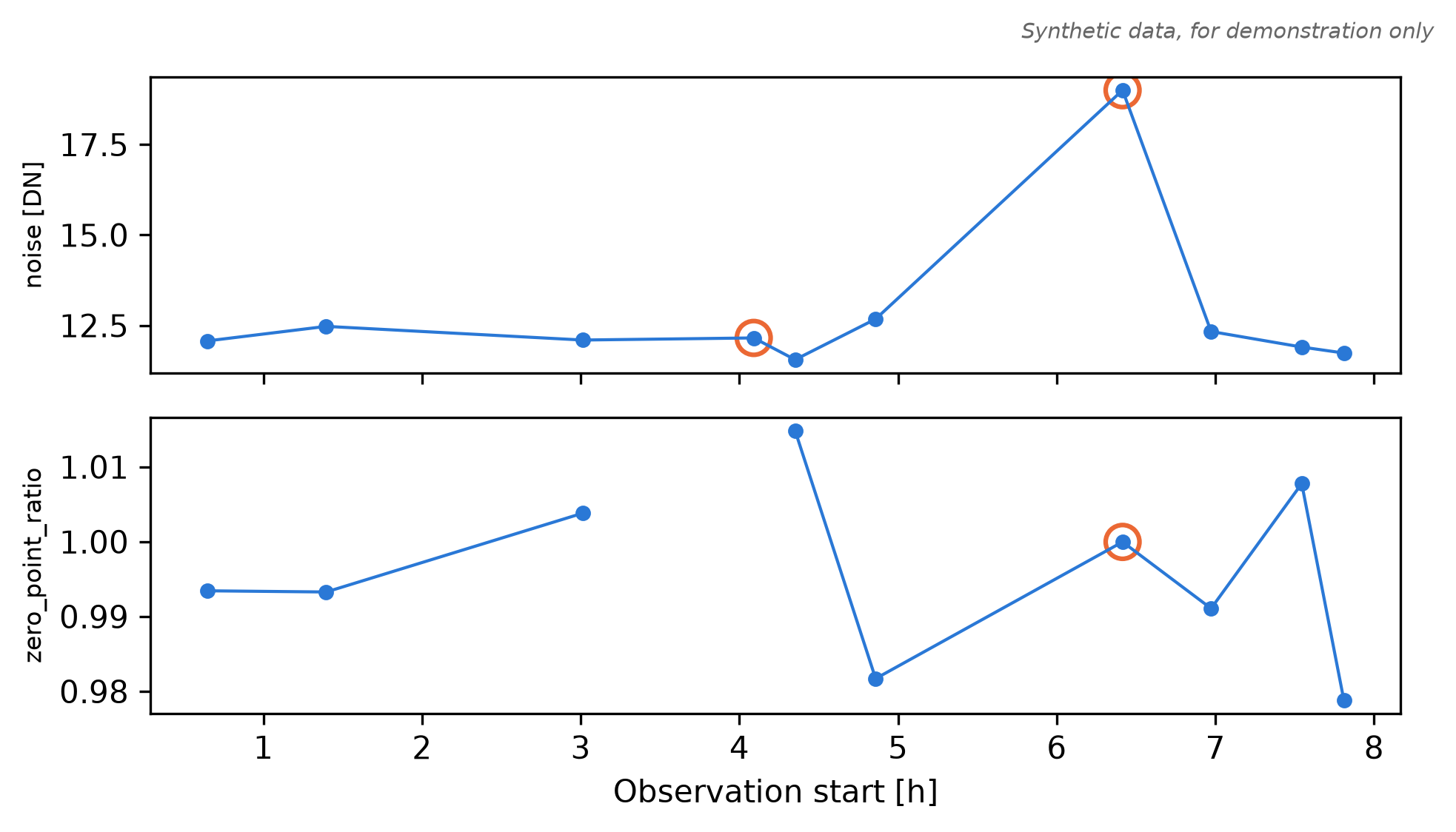
Figure 15.1 plots the samples the way the dashboard’s measurement history does.
Plotting code
import matplotlib.pyplot as pltsamples = monitor.sampleshours = np.array([sample.observed_start for sample in samples])flagged = np.array([bool(sample.findings) for sample in samples])fig, axes = plt.subplots(2, 1, figsize=(6.5, 3.6), sharex=True)for ax, name inzip(axes, ["noise", "zero_point_ratio"]): values = np.array([np.nan if s.measurements[name].value isNoneelse s.measurements[name].value for s in samples]) ax.plot(hours, values, "o-", color="#2A78D6", ms=4, lw=1) ax.scatter(hours[flagged], values[flagged], s=120, facecolors="none", edgecolors="#EB6834", linewidths=1.5) unit = samples[0].measurements[name].unit ax.set_ylabel(name + (f" [{unit}]"if unit else""), fontsize=8)axes[-1].set_xlabel("Observation start [h]")fig.text(1, 1, "Synthetic data, for demonstration only", ha="right", va="bottom", fontsize=7, style="italic", color="0.4", transform=fig.transFigure)fig.tight_layout()plt.show()
Figure 15.1: The two measurements of the ten recorded samples against their observation start. Orange rings mark samples with findings: the high noise of image 6, and image 3, whose missing zero-point ratio leaves a gap in the lower panel. Synthetic data, for demonstration only.
15.5 Revise a sample
When you reprocess an image, publish the new evidence under the same id with a higher revision. xLens keeps the old revision in the history. Publishing the same evidence again changes nothing and returns False. Changed evidence with the same revision raises an error.
from dataclasses import replaceold =next(sample for sample in monitor.samples if sample.id=="image-03")new = replace(old, revision=2, findings=(), measurements={**old.measurements, "zero_point_ratio": Measurement(0.998)})print(monitor.publish(new), monitor.publish(new))try: monitor.publish(replace(new, findings=old.findings)) # changed, same revisionexceptValueErroras error:print("ValueError:", error)print(len(monitor.samples), "samples,", len(monitor.snapshot()["history"]), "revisions")
Recompute any totals you keep from monitor.samples, which always holds the current revisions.
15.6 Open a saved run
The state directory is the saved run. Monitor.load opens it again. With recover=False, loading reads without writing, for example while the run’s own process still writes. Default recovery marks unfinished collection as interrupted. Use it only when you own the writer role: loading does not acquire an exclusive lock. Keep one writer per state directory.
Dashboard.export writes the run into one HTML file that opens in a browser without a server. The file is a fixed snapshot, and its content security policy blocks network requests.
The server rereads the saved state on every request and stops with Ctrl+C. It answers only the address it listens on, which includes localhost for the default loopback address, and the names you add with --allowed-host. Besides the page, it serves JSON for scripts:
Route
Returns
/
the dashboard
/api/state
the whole saved state
/api/dashboard?sample_id=ID
the display data, with one sample’s domain view
/health
the collector status and a storage-error flag
make_server builds the same server in Python. The block below starts it on a free port, reads /health, and stops it:
import threadingimport urllib.requestfrom cuphoton.xlens.dashboard import make_serverwith make_server(Dashboard(viewer), host="127.0.0.1", port=0) as server: # port 0 picks a free port thread = threading.Thread(target=server.serve_forever, daemon=True) thread.start()try:with urllib.request.urlopen(f"http://127.0.0.1:{server.server_port}/health") as response:print(response.read().decode())finally: server.shutdown() thread.join()
{"collector": "complete", "storage_error": false}
In a pipeline that writes results as it runs, let a MonitorSession poll for new inputs in the process that owns the monitor, and serve the dashboard from there. This poller processes each filename once. Have the producer write a temporary file and rename it to .json only when complete, then leave that file unchanged. Handle reprocessing separately by publishing a higher sample revision.
from cuphoton.xlens import MonitorSession, serveseen =set()def poll(): # called every poll_interval secondsfor path insorted(results.glob("*.json")):if path.name notin seen: seen.add(path.name) monitor.ingest(path, analyze, source_id=path.name)serve(Dashboard(monitor, title="Night 1 images"), session=MonitorSession(monitor, poll=poll, poll_interval=10.0))
15.8 What the dashboard shows
The page has these parts:
Run status: the run ID, the sample count, the collector status (idle, running, complete, stopped, failed or interrupted) and the number of revisions.
Samples: the list in sequence order, with a text filter and a finding-category filter.
Measurement history: up to six measurements at a time, against sample sequence or observation time, on a linear or log scale. Samples with findings are outlined. Missing and invalid values leave gaps.
Selected sample: its findings, a table of measurements with value, unit, status and coverage, your domain view, and its configuration, provenance and artifacts.
Investigate this run: questions to a language model. They need a live session with an inference configuration.
Ingestion diagnostics: the errors that ingest and replay recorded.
The page shows the last 256 samples in sequence order. state.json keeps them all.
15.9 Options
Option
Default
Effect
Sample(revision=...)
1
version of the evidence. Raise it to publish changed evidence under the same id
Sample(time_unit=...)
"s"
unit of observed_start and observed_end
Sample(metadata=...)
{}
JSON for configuration or provenance, at most 16 KiB
Measurement(status=...)
"valid"
valid, missing, invalid or unavailable. Missing and unavailable values must be None
Measurement(coverage=...)
None
fraction in [0, 1] that your code defines. xLens does not rescale the value
Measurement(note=...)
""
free text
Finding(category=...)
"scientific"
scientific, data_quality or processing
Finding(severity=...)
"warning"
info, warning or error
Dashboard(title=...)
"cuPhoton xLens"
page title
Dashboard(render_sample=...)
None
your callable that returns HTML for one sample, shown in the sample panel (at most 2 MiB). Escape any outside text
serve(host=..., port=...)
"127.0.0.1", 8765
listen address and port
MonitorSession(poll_interval=...)
1.0
seconds between calls to poll, from 0.05 to 3600
A sample is at most 64 KiB with at most 128 measurements. A run holds at most 10,000 samples, 50,000 revisions and 1,000 reports, and keeps the latest 100 ingestion errors. Start another run when you reach a limit.
15.10 Command line
cuphoton xlens quickstart --output-dir xlens-demo # an invented run and its report.htmlcuphoton xlens export --state runs/monitor/state --output-file runs/monitor/report-cli.htmlcuphoton xlens serve --state runs/monitor/state --port 8765# Backend for a reverse proxy on this machinecuphoton xlens serve --state runs/monitor/state --host 127.0.0.1 --port 8765 --allowed-host monitor.example
serve takes exactly one of --state and --site. --site serves an installed application’s own collection of monitors. --prefix mounts the page under a URL path.
The server does not configure TLS or authenticate dashboard viewers. When sharing a dashboard, use a proxy that provides both. Bind the backend to 127.0.0.1 for a proxy on the same machine, as shown above. If the proxy runs elsewhere, bind a private interface and restrict access to the backend port to that proxy. Set --allowed-host to the HTTP Host value the proxy forwards, including its port when present; this header check does not authenticate the viewer.
15.11 Troubleshooting
Message or symptom
Fix
FileExistsError: state exists; use Monitor.load or a new directory
A new Monitor needs an empty directory. Open the run with Monitor.load, or choose a new directory.
ValueError: changed evidence requires an increasing revision
Publish the changed sample with a higher revision.
ValueError: sample exceeds 64 KiB; use referenced artifacts
Move arrays and long text into files, and reference them with Artifact.
The browser shows 421 Unrecognized monitor host
Add the name you browse with: --allowed-host name[:port].
supply exactly one of --state or --site
Pass one of the two to cuphoton xlens serve.
An input is missing from the samples
Look at the ingestion diagnostics. The analyzer raised, or the sample broke a limit.
15.12 Next steps
Produce the values to monitor with the end-to-end pipeline: Chapter 9.
To ask a language model about saved evidence, install the xlens-inference extra and use cuphoton xlens ask. Refer to the xLens reference, which also covers application sites and domain views.