The cuPhoton checkout ships an end-to-end pipeline in examples/transient-chain/. It takes a target image and its reference from FITS files to a catalog of candidates, each with a position, a flux, their error bars and, with a classifier checkpoint, a real-or-bogus score. Each GPU worker keeps the main image calculations on the device. Astropy reads begin on the host, and WCS work, optional host star finding, diagnostics and final catalog columns can cross the host/device boundary. Use it to run the whole pipeline on your own images instead of calling each module as in Chapter 2. The chain needs an NVIDIA GPU. Its configuration, input checks and file loaders run on a CPU, and this page runs them on the sample pair.
The worker runs these steps for each target image:
Step
Stages in summary.json
Module
What it does
Read
read
Core, xDR
reads the target and reference planes with the reader set in io.reader
Align
template, refine
xRep
reprojects the reference onto the target grid, then corrects the mapping with matched stars
Subtract
mask, xpois
xPois
masks bad pixels, fits the blur-matching kernel and subtracts
Detect
detect, stamps
the example
finds residual hotspots and cuts target, kernel-matched reference (including fitted background), and difference stamps around each
Measure
xfit, uncertainty
xFit
fits a dipole to each candidate, sets quality flags and measures a PSF flux
Error bars
uq
xPois, xRep
adds the noise terms that the fit leaves out
Classify
xscan
xScan
scores the cutouts, only when you pass a checkpoint
You need:
A cuPhoton source checkout with any profile (Chapter 1). Run the blocks from its root, or set CUPHOTON_REPO to its path.
For the chain: a Linux host with an NVIDIA GPU and the gpu and catalog extras, plus dragon or mpi for those executors.
A target and a reference image as FITS files with WCS headers (world coordinate system: the mapping from pixel to sky position). Most of the error budget also needs a variance plane for each.
This page runs on a small synthetic pair. The printed values only demonstrate the API.
9.1 Make a sample pair
The block below writes sample/reference.fits and sample/target.fits, the pair of Chapter 2.
Create the sample pair (NumPy and Astropy only)
# Writes sample/reference.fits and sample/target.fits: two synthetic star fields# of the same sky on different pixel grids, with different blur and sky level.# The target also holds one new source and one star three times brighter.# Noise is independent Gaussian noise with variance expected_image / gain;# this teaching sample has no read noise, saturation, or detector artifacts.from pathlib import Pathimport numpy as npfrom astropy.io import fitsfrom astropy.wcs import WCSrng = np.random.default_rng(7)def make_wcs(shape, scale_arcsec, rotation_deg, crpix_shift): w = WCS(naxis=2) w.wcs.ctype = ["RA---TAN", "DEC--TAN"] w.wcs.crval = [150.0, 2.0] w.wcs.crpix = [shape[1] /2+ crpix_shift[0], shape[0] /2+ crpix_shift[1]] c, s = np.cos(np.radians(rotation_deg)), np.sin(np.radians(rotation_deg)) w.wcs.cd = scale_arcsec /3600* np.array([[-c, s], [s, c]])return wdef render(shape, wcs, ra, dec, flux, sigma, sky, gain): x, y = wcs.world_to_pixel_values(ra, dec) yy, xx = np.mgrid[: shape[0], : shape[1]] image = np.full(shape, sky, dtype=float)for xi, yi, fi inzip(x, y, flux): image += fi / (2* np.pi * sigma**2) * np.exp(-((xx - xi) **2+ (yy - yi) **2) / (2* sigma**2))return rng.normal(image, np.sqrt(image / gain)).astype(np.float32)ra =150.0+ rng.uniform(-0.016, 0.016, 150)dec =2.0+ rng.uniform(-0.016, 0.016, 150)flux =10** rng.uniform(2.5, 4.5, 150)target_flux = np.r_[3* flux[0], flux[1:], 4000.0] # star 0 brightens; one new sourcetarget_ra, target_dec = np.r_[ra, 150.004], np.r_[dec, 2.003]Path("sample").mkdir(exist_ok=True)for name, shape, wcs, sky_coords, fl, sigma, sky, gain in [ ("reference", (300, 300), make_wcs((300, 300), 0.26, 0.0, (0, 0)), (ra, dec), flux, 1.2, 100.0, 8.0), ("target", (256, 256), make_wcs((256, 256), 0.27, 3.0, (4.3, -2.7)), (target_ra, target_dec), target_flux, 1.8, 120.0, 2.0),]: header = wcs.to_header() header["GAIN"] = (gain, "electrons per data number (DN)") header["PSFSIG"] = (sigma, "Gaussian PSF sigma [px]") fits.writeto(f"sample/{name}.fits", render(shape, wcs, *sky_coords, fl, sigma, sky, gain), header, overwrite=True)
The correlation term of the chain’s error budget requires a locally translation-only mapping. When that term is active, a rotated or rescaled grid gives undefined error bars (Section 9.11.1). Write a second target that keeps the reference’s pixel scale and orientation, with the same two changes:
wcs = make_wcs((256, 256), 0.26, 0.0, (4.3, 6.3)) # the reference's scale, no rotation, shifted by a few pixelsheader = wcs.to_header()header["GAIN"], header["PSFSIG"] =2.0, 1.8image = render((256, 256), wcs, target_ra, target_dec, target_flux, 1.8, 120.0, 2.0)fits.writeto("sample/chain-target.fits", image, header, overwrite=True)
9.2 Install the example
The example is a separate package inside the checkout. Start with the GPU environment from Chapter 1, which includes the catalog dependencies, then install the example from the checkout root. For a distributed executor, include --extra dragon or --extra mpi in that environment’s sync command. A later uv sync removes the example, so install it again after each sync.
uv pip install -e examples/transient-chain
On a CPU machine you can skip the install. The block below imports the example from the checkout, as launch.py does.
import osimport sysfrom pathlib import PathREPO = Path(os.environ.get("CUPHOTON_REPO", "."))EXAMPLE = REPO /"examples"/"transient-chain"sys.path.insert(0, str(EXAMPLE)) # not needed after you install the exampleprint(sorted(p.name for p in EXAMPLE.iterdir() if p.suffix in (".py", ".yaml")))
launch.py starts a run, and the two YAML files hold every step’s parameters.
9.3 Read the shipped configurations
load_config reads a configuration file as launch.py does. It fills in defaults, rejects unknown keys and checks each value. Load both files and compare the settings you are most likely to change:
import pandas as pdfrom transient_chain.config import load_configconfigs = {name: load_config(EXAMPLE / name) for name in ("config.yaml", "config-generic.yaml")}keys = ["io.reader", "align.star_finder", "subtract.kernel_height", "subtract.basis_sigmas","detect.threshold_sigma", "stamps.stamp_size", "xfit.psf_sigma_px", "uq.enabled"]rows = {key: [cfg[block][name] for cfg in configs.values()] for key in keys for block, name in [key.split(".")]}print(pd.DataFrame.from_dict(rows, orient="index", columns=list(configs)).to_string())shipped, generic = configs.values()print("blocks that differ:", [block for block in shipped if shipped[block] != generic[block]])
config.yaml is set up for one survey’s public data release. config-generic.yaml reads any FITS pair that its survey block describes. After loading, that block is the only difference. Start from config-generic.yaml for your own images.
9.4 Describe your files to the survey adapter
The survey block picks an adapter, the code that turns one entry of the selections file into image planes. The generic adapter reads each plane from a file and an HDU (header/data unit; here, an image inside a FITS file) that you name. The template is the reference image. Print the layout that config-generic.yaml ships:
A key that you leave out takes the adapter’s default, not the shipped value. Replacing the whole params block, as the next steps do, therefore drops the shipped identity, extra_keys and variance_kind. The defaults are the following.
Table 9.1: Defaults of the generic adapter, from transient_chain/surveys/generic.py.
variance (the shipped target block uses inverse_variance)
template.on_target_grid, template.pieces
false, correlated
identity
exposure_id, ccd_id and band read from the entry keys of the same names
extra_keys
none
mask_policy
strict: any nonzero mask value marks a bad pixel
Key
Meaning
path_key, mask_path_key, variance_path_key
the key of a selections entry that holds the file path
image_hdu, mask_hdu, variance_hdu
an HDU index, an EXTNAME, or null for the first 2D image. An HDU without a path key reads the image’s own file. A plane with both null is absent
variance_kind
variance, inverse_variance (a weight map) or none
on_target_grid
false reprojects the reference through its WCS. true takes a reference already on the target grid
pieces
how the variances of overlapping reference pieces combine: correlated or independent
identity
the entry keys that fill the catalog’s exposure_id, ccd_id and band
mask_policy
the mask bits that mark a bad pixel: none, strict (any nonzero bit), a survey preset, {planes: [...]} or {bits: N}
9.5 Give each image a variance plane
The sample pair has no variance planes. Approximate its Gaussian noise variance from the positive, sky-inclusive image and gain (electrons per data number), as in Chapter 2. Real data need their calibrated noise model, including sky and read noise:
import numpy as npfrom astropy.io import fitsfor name in ("chain-target", "reference"): image, header = fits.getdata(f"sample/{name}.fits", header=True) fits.writeto(f"sample/{name}_variance.fits", np.clip(image, 0, None) / header["GAIN"], overwrite=True)
9.6 Write a configuration for your files
Copy config-generic.yaml and replace its survey parameters. Each sample image sits in its primary HDU, with one variance file and no mask. Keys that you leave out take the adapter’s defaults.
import yamlconfig = yaml.safe_load((EXAMPLE /"config-generic.yaml").read_text())config["survey"]["params"] = {"target": {"path_key": "image", "variance_path_key": "image_variance"},"template": {"path_key": "template", "variance_path_key": "template_variance"},"mask_policy": "none",}config["align"]["xcorr_window_px"] =128# keep the alignment check's central window inside the 256 px targetconfig["stamps"]["stamp_size"] =31# the default 51 drops candidates within 25 px of the edge of this small imagePath("sample/chain.yaml").write_text(yaml.safe_dump(config, sort_keys=False))
1402
9.7 Write the selections file
The selections file lists one entry per target image. Each entry holds the identity keys (exposure_id, ccd_id and band by default) and the path keys that you named. Each process reads a relative path from the directory it starts in. Write absolute paths.
prepare_workload runs the input checks that launch.py runs before it starts a worker. It loads the configuration, builds the adapter, and checks each entry for missing keys and files. The third argument is the checkpoint directory.
from transient_chain.workload import prepare_workloadspec = prepare_workload(Path("sample/selections.json"), Path("sample/chain.yaml"), None)print(spec.manifest_payload["survey"], spec.manifest_payload["reader"], spec.manifest_payload["items"])
generic auto ['S1-v1']
Each item is named <ccd_id>-v<exposure_id>. --only S1/1 runs that item alone, and --only S1 every exposure of detector S1.
9.9 Look at what the adapter reads
Run the adapter’s loaders with a host reader. load_target returns the target planes. template returns a provider whose build reprojects the reference onto the target grid with xRep, as the worker does on the GPU.
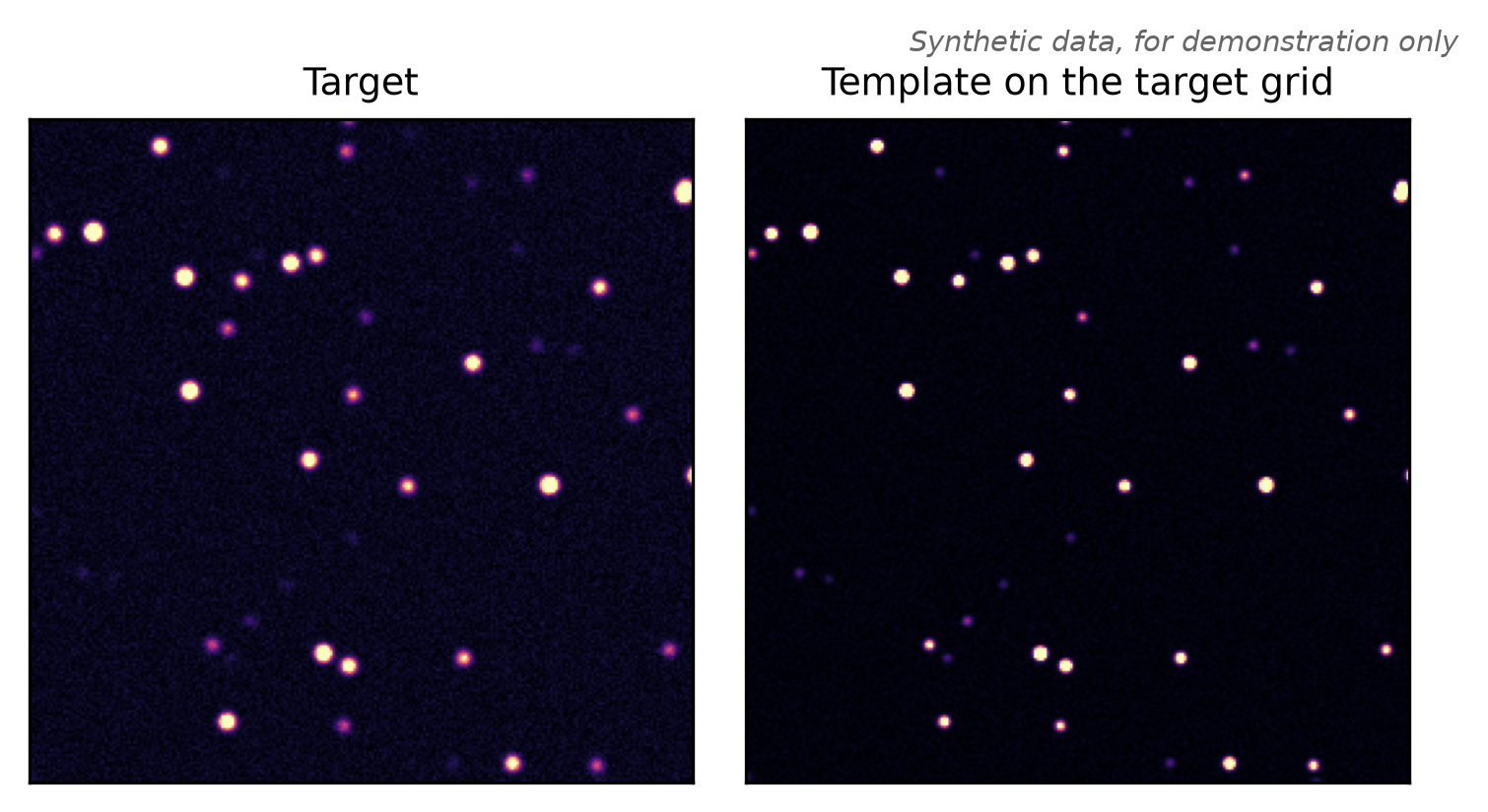
Check that the template has the target’s shape and that both variance planes are there. Without a reference variance plane, the chain leaves out the corr error term; the remaining errors then omit that contribution. Figure 9.1 shows the two planes.
Plotting code
import matplotlib.pyplot as pltfig, axes = plt.subplots(1, 2, figsize=(5, 2.6))for ax, image, title in [(axes[0], target.image, "Target"), (axes[1], template, "Template on the target grid")]: lo, hi = np.percentile(image, [1, 99.5]) ax.imshow(image, origin="lower", cmap="magma", vmin=lo, vmax=hi) ax.set_title(title, fontsize=9) ax.set_xticks([]); ax.set_yticks([])fig.text(1, 1, "Synthetic data, for demonstration only", ha="right", va="bottom", fontsize=7, style="italic", color="0.4", transform=fig.transFigure)fig.tight_layout()plt.show()
Figure 9.1: What the generic adapter hands the chain for the sample pair, read on the CPU. Left: the target. Right: the reference after the template provider reprojected it onto the target grid. Each panel has its own color scale. Apart from the two changes, the same stars sit at the same pixels in both panels. Synthetic data, for demonstration only.
9.10 Run the chain on a GPU
On the GPU host, run the blocks above, then start the chain from the root of the checkout. The local executor runs the items in turn, in this process, on one GPU. This command needs a GPU and is not run here.
python examples/transient-chain/launch.py --executor local \--config sample/chain.yaml --selections sample/selections.json --output-dir out
Without --checkpoint-dir, the chain skips the classify step. To score the cutouts, pass the directory that holds an xScan checkpoint.pt. To change one value for one run, add --set block.key=value, such as --set io.reader=astropy.
For many images on several GPUs, pick another executor (Chapter 14):
Executor
Start it with
Workers
local
python launch.py
this process, one GPU
dragon
the dragon launcher
one persistent worker per GPU, placed by DragonHPC
The local run writes out/items/<item>/catalog.parquet and summary.json for each item, and out/catalog.parquet with the rows of all items. Dragon and MPI write the same files under <output-dir>/<name>/. Every item writes the same columns with the same types, also when it finds no candidates. Print the column count, the flux columns and the error terms:
from cuphoton.xfit import GaussianDipoleModelfrom transient_chain import catalogcolumns = catalog.schema(GaussianDipoleModel((51, 51)).parameter_names) # the worker's dipole modelprint(len(columns), "columns")print([name for name in columns if name.startswith("psf_flux")])for term, meaning in catalog.BUDGET_TERMS.items():print(f"{term:7}{meaning}")
93 columns
['psf_flux', 'psf_flux_err_fit', 'psf_flux_err', 'psf_flux_err_corr', 'psf_flux_err_kfit', 'psf_flux_err_kmatch', 'psf_flux_err_mis']
corr    correlated reference noise through the resampling and the kernel
kfit    the kernel fit's own uncertainty
kmatch  kernel mismatch times the reference flux (psf_flux only; 0 for positions)
mis     residual misalignment (0 for psf_flux)
The columns you are most likely to use:
Column
Meaning
candidate_id
cu-<exposure_id>-<ccd_id>-<index>
x, y
rounded hotspot centroid on the target grid, in zero-based pixels
ra, dec
sky position in degrees, from the target header WCS at (x, y), rather than the fitted source position
sign
sign of the hotspot’s peak residual: +1 for a positive excursion, -1 for a negative excursion
source_x, source_y
position of the measured source in pixels, relative to (x, y)
psf_flux
difference flux at the source, in target image units; normally forced PSF (point spread function) photometry. It requires a variance plane and an independent PSF width. Without that width, an accepted one-lobe fit supplies its fitted flux; other rows are NaN
fit_model
"dipole", or "single" for a candidate refit with one lobe
quality_flags
bits of cuphoton.xfit.DipoleQualityFlag, 0 when none is set
probability, decision
classifier output, NaN and false without a checkpoint
9.11.1 Error bars
The budget covers center_x, center_y, positive_x, positive_y and, when forced photometry runs, psf_flux. For each computed quantity q, use <q>_err: the quadrature sum of <q>_err_fit and the available terms above. It is NaN where fewer than half the pixels in a required window are usable, the correlation factor is undefined, or the total uncertainty is non-finite. A center needs both lobe windows to pass.
With the budget enabled, uq_valid means that every computed budget quantity has a defined error. It does not certify that every term was available, that the source model is appropriate, or that unavailable PSF photometry has a valid error. If a one-lobe fitted flux stands in for missing forced photometry, it keeps its fit-only error. Inspect summary.json for excluded terms and quality_flags for fit problems.
source_x_err and source_y_err normally copy the positive_* bars. For a fading candidate identified by the lobe-support flags whose one-lobe refit was not accepted, source_* instead selects the dipole’s negative lobe and its position errors are NaN: the budget was computed for the positive lobe.
When corr is active, its factor is undefined where the grid mapping between the two images is not locally a shift, for example a reference that is rotated or has a different pixel scale. The affected computed quantities get NaN error bars and uq_valid is false. summary.json counts them under uq.undefined_factor, and those on a rotated grid under uq.rotated_grid. The example’s README explains why. This page’s sample target shares the reference’s pixel scale and orientation for that reason.
After a GPU run, inspect the rows and read how the item’s bars were built. This block needs a finished run and is not run here.
table = pd.read_parquet("out/catalog.parquet")columns = ["x", "y", "fit_model", "quality_flags", "psf_flux", "psf_flux_err", "source_x_err", "uq_valid"]print(table[columns].to_string())summary = json.loads(Path("out/items/S1-v1/summary.json").read_text())print(summary["candidates"], summary["psf_sigma_source"], summary["uq_terms"])if summary["uq"] isnotNone: # null when there are no candidatesprint(summary["uq"]["excluded"]) # each term left out, with the reason
A candidate can have a finite flux error and still have uq_valid=False because a position error is undefined. Check quality_flags and fit_model before quoting a position. The one-lobe refit is attempted only when exactly one lobe is unsupported, and its result replaces the dipole position only when the refit covariance is valid. Rows with both lobes unsupported keep their dipole values and need further inspection.
psf_sigma_source reports where the PSF width came from. If uq.excluded reports mis: no misalignment model, inspect diagnostics.align.refine.misalignment.reason for the cause. These GPU result fields are described from the implementation; this page’s executable examples validate the CPU setup and input loading.
summary.json also records the reader each file took (diagnostics.read.receipts), the time per stage (timings_sec) and the bytes copied to the host (transfers).
9.12 Turn the error budget on or off
The uq block controls the error budget, which is on by default. The second argument of load_config takes the same overrides as --set. Compare the shipped block with the one that uq.enabled=false gives:
every <q>_err equals <q>_err_fit, the term columns are 0, uq_valid is true, no candidate is refit with one lobe, and summary.json lists only fit under uq_terms
kernel_fit
leaves out the kfit term
measure_correlation
skips the per-image measurement of the correlation factor
single_source_refit
keeps the dipole fit for candidates with one supported lobe
sky_astrometry_arcsec, sky_astrometry_source
set together, copy an outside sky-position error into sky_err_arcsec, never added to the pixel error bars
With uq.enabled=false, uq_valid is always true; inspect the fit validity flags and finite error values before using those fit-only errors.
A term also needs its inputs. corr needs both variance planes, and kmatch and mis need stars that the align step matched. Uncertainty quantification explains each term.
9.13 Options
Common launch.py flags are listed below. Run python examples/transient-chain/launch.py --help for the complete list, including worker and rank timeouts.
Option
Default
Effect
--executor
required
local, dragon or mpi
--selections, --output-dir
required
the selections file and the output folder
--config
config.yaml next to launch.py
the configuration file
--set BLOCK.KEY=VALUE
none
overrides one configuration value, repeatable
--checkpoint-dir
none
folder with an xScan checkpoint.pt. Without it the chain does not classify
--only CCD[/EXPOSURE]
every entry
runs only the matching items, repeatable
--name
a timestamped id
run id, dragon and mpi only
--max-workers
one per visible GPU
dragon only
--warmup-rounds, --measure-rounds
none
benchmark rounds under rounds/, dragon and mpi only
Check these configuration keys for new data.
Option
Default
Effect
io.reader
auto
auto decodes on the GPU with xDR when the file allows it, else with Astropy. xdr insists on the GPU decoder. astropy decodes on the host
align.star_finder
gpu
daofind finds stars with Photutils on host copies
xfit.psf_sigma_px
null
PSF width in pixels. Null measures it from the stars that the align step matched
stamps.stamp_size
51 in both files
odd cutout size, equal to the checkpoint’s image_size. Candidates closer than half of it to the image edge are dropped
align.xcorr_window_px
512
side of the central window of the alignment check. It must fit inside the target
The example’s README lists every configuration key and column, the shipped survey adapter’s parameters, and how to add an adapter for another survey. Uncertainty quantification explains how to check the error bars. Distributed execution and Dragon cover the executors.