

Feature: ID:004 - Simulate Multi-Body Physics - Base#
Property |
Value |
|---|---|
Internal ID |
|
Description#
Features needed to support Simulate Multi-Body physics. This feature enables simulation of physically accurate motion and collisions for props and dynamic assets that have multibody bodies that need to be joined or simulated together. The enables real world “joints” to describe how two bodies work together. It is suitable for testing, validation, or reference applications where basic physical interactions are required.
Dependency Graph#
        flowchart LR
    FET003N["FET003_BASE_NEUTRAL\n0.1.0"]
    FET004N["FET004_BASE_NEUTRAL\n0.1.0"]
    FET003P["FET003_BASE_PHYSX\n0.1.0"]
    FET004P["FET004_BASE_PHYSX\n0.1.0"]
    FET004RN["FET004_ROBOT_PHYSX\n0.1.0"]
    FET022N["FET022_DRIVEN_JOINTS_NEUTRAL\n0.1.0"]
    FET022P["FET022_DRIVEN_JOINTS_PHYSX\n0.1.0"]

    FET004N --> FET003N
    FET004P --> FET003P
    FET004P --> FET004N
    FET022N --> FET004N
    FET022P --> FET004RN

    classDef current fill:#90EE90,stroke:#333
    classDef other fill:#fff,stroke:#333
    class FET004N,FET004P,FET004RN current
    class FET003N,FET003P,FET022N,FET022P other
Use Cases#
Products that consume this feature:
IsaacSim
MEGA
Lightwheel SOW1
Neutral Format#
Version 0.1.0#
Details
Used in Profiles#
This version is used in the following profiles:
Prop Robotics Neutral Profile (v0.1.0) - Used for multi-body dynamics with joint and articulation support
Requirements#
Property |
Value |
|---|---|
Dependency |
Capability: Physics-Bodies/Physics-Joints
Requirements
-
JT.001 | Version 0.1.0
-
JT.ART.002 | Version 0.1.0
Articulation-Not-On-Kinematic-Body
JT.ART.003 | Version 0.1.0
Articulation-Not-On-Static-Body
JT.ART.004 | Version 0.1.0
-
JT.002 | Version 0.1.0
Joint-No-Multiple-Body-Targets
JT.003 | Version 0.1.0
-
Capability: Physics_Bodies/Physics_Rigid_Bodies
Requirements:
-
RB.MB.001 | Version 0.1.0
-
Pipelines Supported for this Feature#
Source file type:
.blend
Via Blender SimReady Add-ons
.mjcf
Via Blender SimReady Add-ons + MJCF2USD Tool
.step
Via Blender SimReady Add-ons + CAD Converter
MultiBody | Rigidbody Samples (Neutral)#
Test Process#
None.
NVIDIA Physx Format#
Version 0.1.0#
Details
Property |
Value |
|---|---|
Internal ID |
|
Proprietary Techs |
|
Used in Profiles#
This version is used in the following profiles:
Prop Robotics Physx Profile (v0.1.0) - Used for advanced multi-body dynamics with PhysX joint and articulation system
Requirements#
Property |
Value |
|---|---|
Dependency |
|
Dependency |
ID:004 - Simulate Multi-Body Physics - Base - Neutral Format - v0.1.0 |
No additional requirements.
Pipelines Supported for this Feature#
Source file type:
.usd
Via CIP.
Convert from Neutral Format - Version 0.1.0.
MultiBody | Rigidbody Samples (Physx)#
MultiBody | Robot Rigidbody Samples (Physx)#
Test Process#
Obtain Isaac Sim
Find directory where Isaac Sim was installed
Launch isaacsim.bat
In Isaac Sim, open this usd: test stage
Can be manually located here:
nv_core/testing_tools/testing_data/runtime_physics_tests.usda
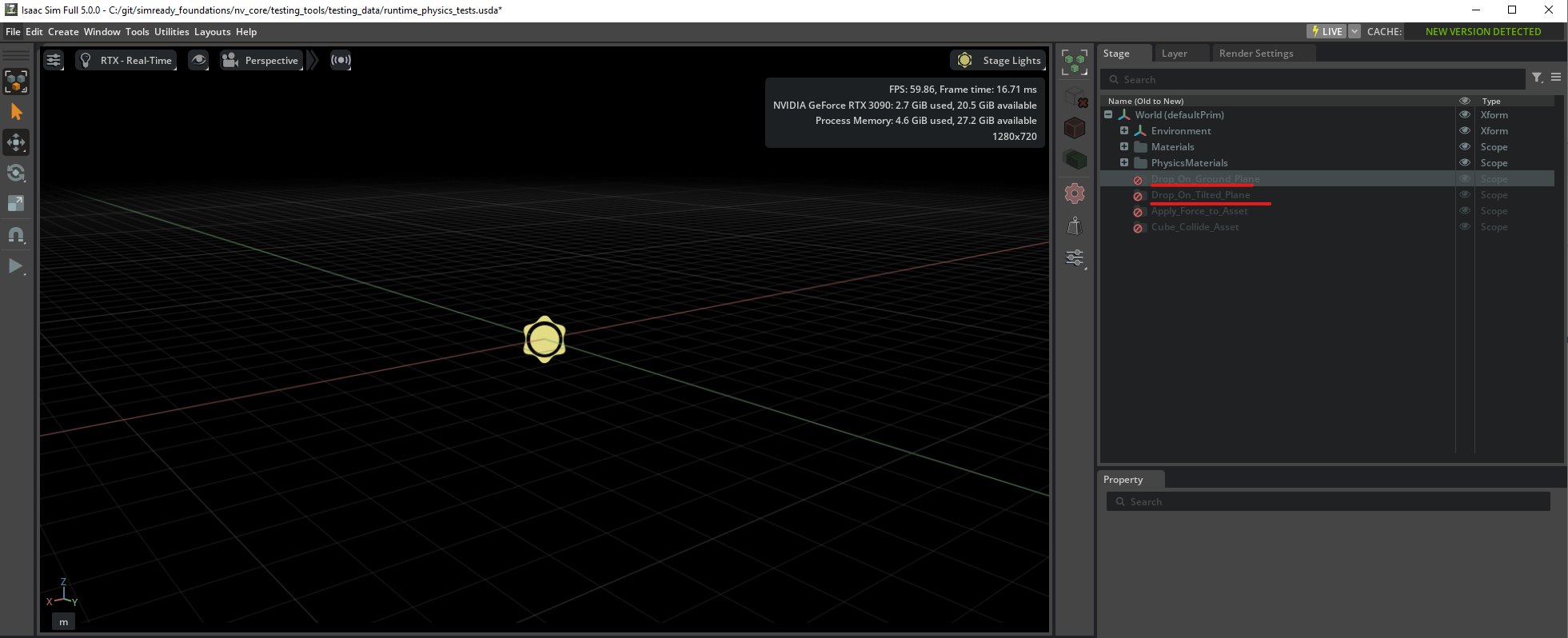
Activate correct prim (right click + activate)
select on of these prims:
/World/Drop_On_Ground_Plane/World/Drop_On_Tilted_Plane
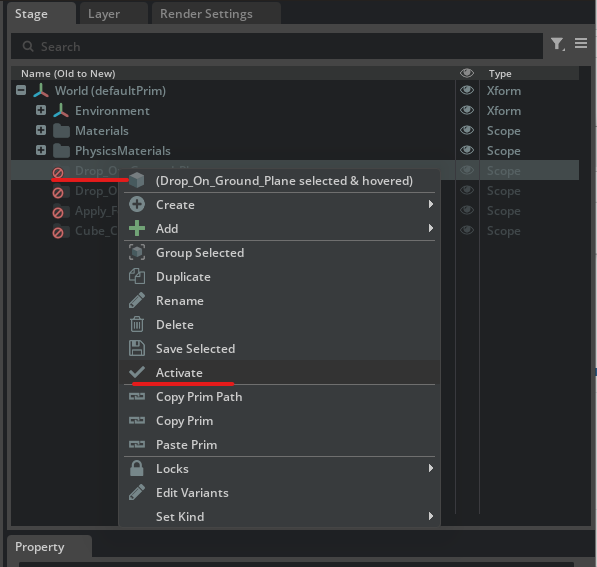
Right-click on selected prim for context menu and click “Activate”
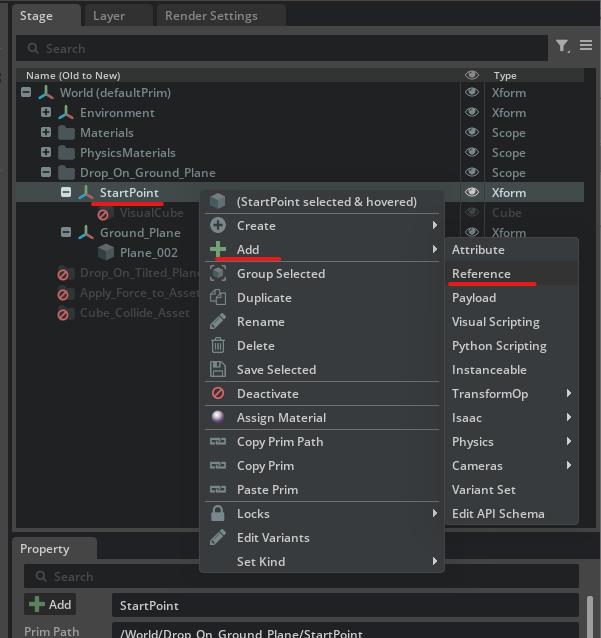
Drill down into activated hierarchy, there should be a prim called “StartPoint”
or the direct prim path is:
/World/Drop_On_Ground_Plane/StartPoint
Select that prim
Right-click, add reference to (path/to/asset/in_question.usd)
Hit play button in UI.
Press play to start sim
Warnings will occur based on collider schema, this is expected
Expected result:
item should fall down and stop and settle after 5 seconds.
Joints should move as expected
Jointed assets should not disconnect
Item should be splayed out in some form
Video Examples:
Robot PhysX Format (FET004_ROBOT_PHYSX)#
This variant is used in Robot-Body profiles (e.g. Robot-Body-Physx, Robot-Body-Runnable, Robot-Body-Isaac) for multi-body robot physics with PhysX. It uses the same multi-body and joint requirements as the base PhysX format, but with a different set of collision requirements.
RB.COL.001 exclusion#
RB.COL.001 (“Colliding Gprims must apply the Collision API”) is not enforced for FET004_ROBOT_PHYSX.
Reason: RB.COL.001 is too strict for Omniverse/Isaac Sim robot assets. In practice, nesting for CollisionAPI is allowed (e.g. collision shapes under non-Gprim hierarchy or applied in ways that RB.COL.001 would reject).
Effect: The Robot PhysX feature does not include RB.COL.001 in its requirement set. It does include RB.COL.002, RB.COL.003, and RB.COL.004 (mesh collision API, collider mesh, uniform scale), plus the other rigid-body and joint requirements listed in the feature JSON.
When authoring or validating robot USDs for Robot-Body profiles, do not require RB.COL.001 compliance; the validator configuration for this feature omits it by design.